Hey thanks a lot, lt me try it out. from Library manager I can see the recent version is 4.0.4. Should I use that one?
No you need to install the zip from my website. V4.0.4 does not have the SerialComs class and its support
All good from Mega side, but I'm not receiving data on the Wemos.
14:25:50.835 ->  9 8 7 6 5 4 3 2 1
14:25:55.362 -> Jelka Bisa MPPT Project V, I and P measurements
14:25:55.362 ->  SerialComs -  started
14:25:55.362 -> ESP8266 Setup finished.
14:25:58.346 -> Prompt other side to connect
14:26:01.361 -> Prompt other side to connect
14:26:04.364 -> Prompt other side to connect
14:26:07.368 -> Prompt other side to connect
14:26:10.378 -> Prompt other side to connect
14:26:13.356 -> Prompt other side to connect
14:26:16.378 -> Prompt other side to connect
14:26:19.359 -> Prompt other side to connect
14:26:22.367 -> Prompt other side to connect
14:26:25.372 -> Prompt other side to connect
14:26:28.369 -> Prompt other side to connect
14:26:31.364 -> Prompt other side to connect
14:26:34.370 -> Prompt other side to connect
14:26:37.381 -> Prompt other side to connect
14:26:40.386 -> Prompt other side to connect
14:26:43.376 -> Prompt other side to connect
my connection is like suggested,

The red and black wires are connected through a resistor as I had to reduce voltage to 3.3V
If you are using resistors you need voltage divider for on the Mega TX to the ESP RX pin
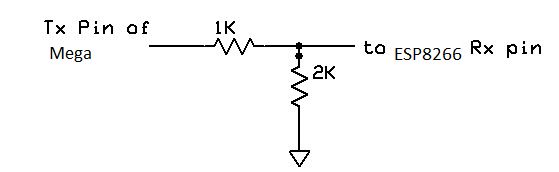
Try getting these two pass through sketches working first.
Open two (2) instances of the IDE and set one to program the ESP8266 and the other to program the Mega2560. The upload these codes and open the IDE monitors so you can see both at the same time. You should be able to enter text on either and have is appear on both.
ESP8266 code
//ESP8266toMegaPassThrough Code
//https://forum.arduino.cc/t/arduino-mega-to-esp8266-communication-via-tx-rx/857016/2

#include "SoftwareSerial.h"
const int RX_pin = 15; // for ESP8266 use 15  D10 on wemos-d1-esp8266
const int TX_pin = 13; // for ESP8266 use 13  D7  on wemos-d1-esp8266
SoftwareSerial toESP(RX_pin, TX_pin);
//#define toESP Serial2

void setup() {
  Serial.begin(115200);
  for (int i = 10; i > 0; i--) {
    Serial.print(' '); Serial.print(i);
    delay(500);
  }
  Serial.println();

  toESP.begin(9600, SWSERIAL_8N1, -1, -1, false, 256); // use previous rxPin, txPin and set 256 RX buffer
  Serial.println(F("ESP8266toMegaPassThrough Setup finished."));
  Serial.println(F("Set IDE monitor to Newline or Both NL & CR"));
}

void loop() {
   if (Serial.available()) {      // If anything comes in Serial (USB),
    char c = Serial.read();
    Serial.write(c); // echo
    toESP.write(c);   // read it and send it out toESP
  }

  if (toESP.available()) {     // If anything comes in toESP
    Serial.write(toESP.read());   // read it and send it out Serial (USB)
  }
}
Mega2560 code
// MegaToESP8266PassThrough
//https://forum.arduino.cc/t/arduino-mega-to-esp8266-communication-via-tx-rx/857016/2

// download SafeString V4.1.0+ library from the
// https://www.forward.com.au/pfod/ArduinoProgramming/SafeString/index.html

// Mega2560 Transmitter code
// use Mega HardwareSerial Serial1
#define toESP Serial1

void setup() {
  Serial.begin(115200);
  for (int i = 10; i > 0; i--) {
    Serial.print(' '); Serial.print(i);
    delay(500);
  }
  Serial.println();

  toESP.begin(9600);   // Initialize the "link" serial port
  Serial.println(F("MegaToESP8266 Setup finished."));
  Serial.println(F("Set IDE monitor to Newline or Both NL & CR"));
}

void loop() {
   if (Serial.available()) {      // If anything comes in Serial (USB),
    char c = Serial.read();
    Serial.write(c); // echo
    toESP.write(c);   // read it and send it out toESP
  }

  if (toESP.available()) {     // If anything comes in toESP
    Serial.write(toESP.read());   // read it and send it out Serial (USB)
  }
}
this works fine. How can I edit my original code to this.
ok then comment out all the delays() in the two previous sketches
In these?
//ESP8266 Code
//https://forum.arduino.cc/t/arduino-mega-to-esp8266-communication-via-tx-rx/857016/2

//Receiver code
// download SafeString V4.1.0+ library from the
// https://www.forward.com.au/pfod/ArduinoProgramming/SafeString/index.html
//
#include "SerialComs.h"
#include <ArduinoJson.h>
#include "SoftwareSerial.h"
const int RX_pin = 15; // for ESP8266 use 15  D10 on wemos-d1-esp8266
const int TX_pin = 13; // for ESP8266 use 13  D7  on wemos-d1-esp8266
SoftwareSerial toESP(RX_pin, TX_pin);
//#define toESP Serial2

// sendLineLength, receiveLineLength
SerialComs coms(10, 250); // send 10 (nothing sent), receive 250 chars
// receiveLineLength must match other sides sendLineLength
// sendLineLength must match other sides receiveLineLength

StaticJsonDocument<1000> doc;

void setup() {
  Serial.begin(115200);
  for (int i = 10; i > 0; i--) {
    Serial.print(' '); Serial.print(i);
    delay(500);
  }
  Serial.println();  Serial.println("Jelka Bisa MPPT Project V, I and P measurements");
  SafeString::setOutput(Serial); // enable error messages and debugging

  toESP.begin(9600, SWSERIAL_8N1, -1, -1, false, 256); // use previous rxPin, txPin and set 256 RX buffer
  coms.setAsController(); // need to do this on one side
  // Always choose the SoftwareSerial Side as the controller

  if (!coms.connect(toESP)) {
    while (1) {
      Serial.println(F("Out of memory"));
      delay(3000);
    }
  }
  Serial.println(F("ESP8266 Setup finished."));
}

void loop() {
  coms.sendAndReceive(); // must do this every loop

  if (!coms.textReceived.isEmpty()) { // got some data
    float Vin;    float Iin;    float Pin;    float Vout;    float Iout;    float Pout;

    DeserializationError error = deserializeJson(doc, coms.textReceived.c_str());
    if (error) {
      Serial.print(F(("deserializeJson() failed with code - "))); Serial.println(error.c_str());
    } else {
      //Fetching values
      Vin = doc["Vin"];
      Iin = doc["Iin"];
      Pin = doc["Pin"];
      Vout = doc["Vout"];
      Iout = doc["Iout"];
      Pout = doc["Pout"];

      Serial.print("Deserialized to -> PV module : Supply V = ");  Serial.print(Vin, 3);
      Serial.print("V Supply I = "); Serial.print(Iin, 3);
      Serial.print("A P = ");  Serial.print(Pin, 3); Serial.print("W");
      Serial.print(" Battery charging : Output V="); Serial.print(Vout, 3);
      Serial.print("V Ouput I = "); Serial.print(Iout, 3);
      Serial.print("A P = "); Serial.print(Pout, 3); Serial.println("W");
    }
  }
  delay(3000);// web stuff delay
}
yes comment out all the delay( ) statements, 2 in the EsP code and 3 on the Mega code
and the Serial.prints on the Mega side
//  Serial.print("PV module : Supply V = ");  Serial.print(Vin, 3);
//  Serial.print("V Supply I = ");  Serial.print(Iin, 3);
//  Serial.print("A P = ");  Serial.print(Pin, 3);  Serial.print("W");
//  Serial.println();
Then I get on the Mega side
01:04:09.162 -> Received Data ''
01:04:09.162 -> Send Data '{"Vin":1.002933,"Iin":-12.45674,"Pin":-12.49327,"Vout":0.215054,"Iout":-22.84946,"Pout":-4.913863}'
01:04:09.264 -> Received Data ''
01:04:09.298 -> Send Data '{"Vin":2.033724,"Iin":-11.69058,"Pin":-23.77541,"Vout":0.317693,"Iout":-22.01857,"Pout":-6.995148}'
01:04:09.400 -> Received Data ''
yes I'm getting the same
17:13:15.681 ->  10 10 9 8 7 6 5 4 3 2 1
17:13:20.671 ->  SerialComs -  started
17:13:20.671 -> Mega Setup finished.
17:13:24.668 ->  Made Connection.
17:13:24.668 -> Received Data ''
17:13:24.701 -> Send Data '{"Vin":14.68182,"Iin":-0.198145,"Pin":-2.909131,"Vout":1.847507,"Iout":-0.904202,"Pout":-1.670521}'
17:13:26.748 -> Received Data ''
17:13:26.748 -> Send Data '{"Vin":14.6261,"Iin":-0.4095,"Pin":-5.989388,"Vout":1.84262,"Iout":-0.904202,"Pout":-1.666101}'
17:13:28.800 -> Received Data ''
17:13:28.800 -> Send Data '{"Vin":14.57038,"Iin":-0.171726,"Pin":-2.50211,"Vout":1.84262,"Iout":-0.904202,"Pout":-1.666101}'
17:13:30.847 -> Received Data ''
how about on the ESP side? Because I'm sending from Mega to ESP
What does the ESP8266 IDE monitor show?
17:16:27.384 ->  9 8 7 6 5 4 3 2 1
17:16:31.890 -> Jelka Bisa MPPT Project V, I and P measurements
17:16:31.890 ->  SerialComs -  started
17:16:31.890 -> ESP8266 Setup finished.
17:16:32.129 -> Prompt other side to connect
17:16:32.368 -> Prompt other side to connect
17:16:32.642 -> Prompt other side to connect
17:16:32.883 -> Prompt other side to connec
Seems the receive is not working. Are you sure you could send data to the ESP in the Pass through sketches? Can you post the ESP output for that test?
this is ouput when I upload on mega
17:24:53.944 ->  10 10 9 8 7 6 5 4 3 2 1
17:24:58.940 -> MegaToESP8266 Setup finished.
17:24:58.940 -> Set IDE monitor to Newline or Both NL & CR
17:24:59.147 ->
17:24:59.385 ->
17:24:59.625 ->
17:24:59.899 ->
then I get this when I upload on ESP
17:26:37.514 ->  7 6 5 4 3 2 1
17:26:41.033 -> ESP8266toMegaPassThrough Setup finished.
17:26:41.033 -> Set IDE monitor to Newline or Both NL & CR
So no data on the ESP side when you enter text on the mega side
try using pin 12 for ESP RX instead of 15
Try D6 for RX i.e.
const int RX_pin = 12; // for ESP8266 use 12  D6 on wemos-d1-esp8266
const int TX_pin = 13; // for ESP8266 use 13  D7  on wemos-d1-esp8266
SoftwareSerial toESP(RX_pin, TX_pin);
I need to do a little soldering here to test this

ok ESP receive not working at all, try the pin change above
