Hello, I am new to Arduino. I am working on a project with four vibration coins, turning on randomly one at a time for 100ms, in loop. I got the sketch done, but I don't know how to wire the coins to the Arduino Nano Every. I found videos online that say that I need a "driver" (a resistor and a transistor for each coin), and others that make no mention of those: "Connecting a vibration motor to an Arduino is a straightforward process, requiring minimal components. By connecting the motor to a digital pin on the Arduino you can control the intensity and duration of the vibrations.". Obviously, I like the simplicity of the 2nd solution, but I'm not sure that will work.
Drink from the firehose:
Post a link to the exact vibration coin you are using. You will need some additional circuitry no matter the current they draw, which is the first consideration for attaching anything directly.
a7
Micro Vibration Motor Rated Voltage: DC 3V;Rated Current: 85mA, Rated Speed: 12000 RPM,Voltage range: DC1.5-3.7V
Vibration Motor Rated Voltage: DC 3V;Rated Current: 85mA, Rated Speed: 12000 RPM,Voltage range: DC1.5-3.7V
Definitely won't work. The output voltage of the digital pins is 5v and they can only supply 20 ma of current.
The 3.3v pin of the Nano Every can only supply 50 ma, so it can not work as a power supply for the motors.
You are going to require a 3v power supply and logic level n channel mosfets like a 2n7000 for your circuit.
See this hookup diagram here
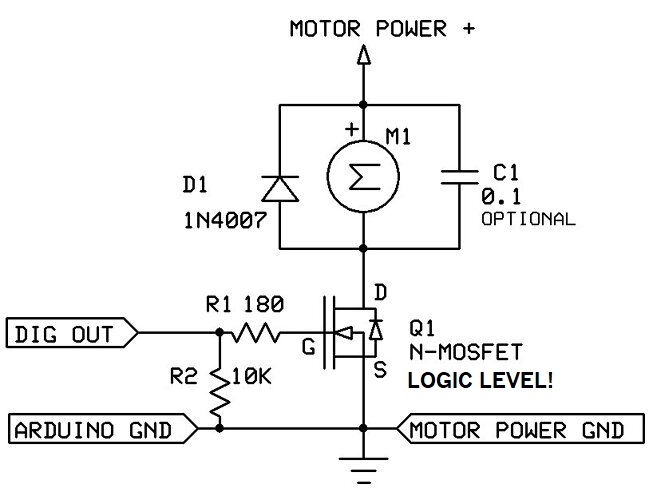

Thanks for the quick reply. I only need to power one motor at a time. Does each motor need its own hookup? Also, newbie here, not contesting your advice, however, I did power the Arduino Nano Every via USB, and I connected one motor to GND and a digital out [that I've set to HIGH in my sketch], as indicated in the link below, and it did work... I did not expect that, do you know why it worked?
DC motors will run at a range of voltages and the speed will vary. With 5v, you are overdriving your motor, but with the motor in your sketch being on and off for one second, it's probably not going to burn up. It see's 2.5v on average and it's like you are driving it with a low frequency pwm,
I only need to power one motor at a time. Does each motor need its own hookup?
If you want to turn on a specific motor out of the 4, it will need its own control line, but the motor driving power can be shared.
The perpetual mix-up: the Nano and the Nano Every.
Indeed, the Nano can supply max 50 mA from the FT232R.
The Nano Every on the other hand, has a dedicated voltage regulator that can supply up to 550 mA, though Arduino recommends not more than 200 mA.
In this case I don't see a problem using the 3.3V output of the Nano Every.
It will take 4 MOSFETs (or a driver IC).
@Wawa : how to connect the 4 vibration coins to the ULN2003?
The white connector has one power pin and four output pins.
Connect the motor between the power pin and one of the output pins.
Female to male Dupond wires and a breadboard might help.
Leo..