I'm testing my new arduino uno r4 wifi and i decided to try BLE.
I'm trying to change the value of 3 variables inside the arduino from my smartphone.
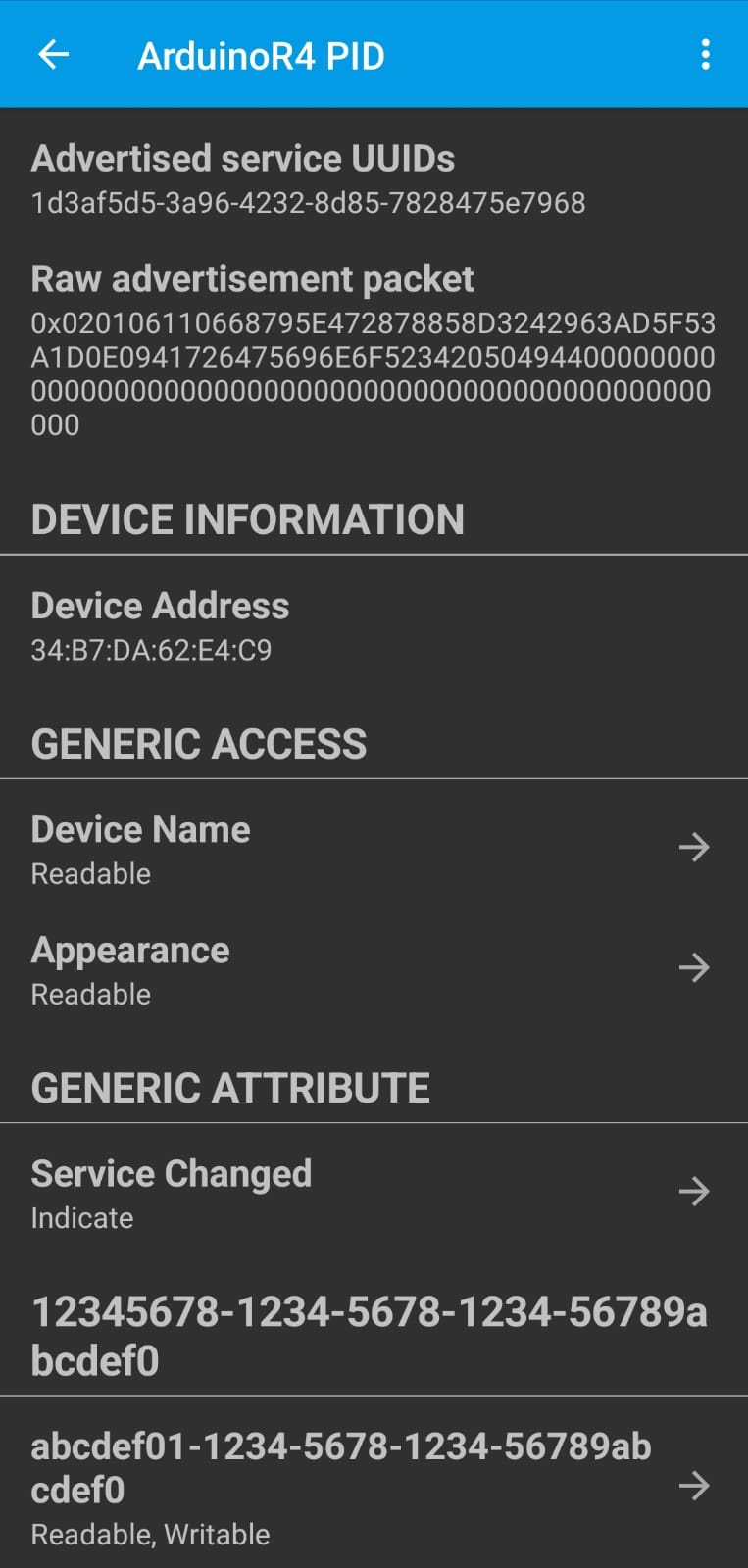
I'm trying assigning one characteristic to each variable, but when trying with one characteristic it works and the characteristic shows on the smartphone but when I increase the characteristic number the new characteristics does't show on the connected smartphone.
Here is the code, as you can see is going to be used for a line follower robot:
#include <ArduinoBLE.h>

BLEService mainService("12345678-1234-5678-1234-56789abcdef0");
BLEIntCharacteristic kpCharacteristic("abcdef01-1234-5678-1234-56789abcdef0", BLERead | BLEWrite);
BLEIntCharacteristic kdCharacteristic("abcdef02-1234-5678-1234-56789abcdef0", BLERead | BLEWrite);
BLEIntCharacteristic kiCharacteristic("abcdef03-1234-5678-1234-56789abcdef0", BLERead | BLEWrite);

void setup() {
  Serial.begin(9600);
  while (!Serial);

  delay(5000);

  if (!BLE.begin()) {
    Serial.println("error initializing BLE!");
    while (1);
  }

  BLE.setLocalName("ArduinoR4");
  BLE.addService(mainService);
  mainService.addCharacteristic(kpCharacteristic);
  mainService.addCharacteristic(kdCharacteristic);
  mainService.addCharacteristic(kiCharacteristic);
  BLE.setAdvertisedService(mainService);

  kpCharacteristic.writeValue(0);
  kdCharacteristic.writeValue(0);
  kiCharacteristic.writeValue(0);

  BLE.setAdvertisingInterval(100);

  BLE.advertise();
  Serial.println("Ready for BLE connection");

}

void loop() {
  BLEDevice central = BLE.central();

  if (central) {
    Serial.print("Connected to: ");
    Serial.println(central.address());

    while (central.connected()) {
      if (kpCharacteristic.written()) {
        int val = kpCharacteristic.value();
        Serial.print("Kp set to: ");
        Serial.println(val);
        }

      if (kdCharacteristic.written()) {
        int val = kdCharacteristic.value();
        Serial.print("KD set to: ");
        Serial.println(val);
        }
      if (kiCharacteristic.written()) {
        int val = kiCharacteristic.value();
        Serial.print("KI set to: ");
        Serial.println(val);
        }

      }
    if (central.disconnect()){
      Serial.print("Disconnected from: ");
      Serial.println(central.address());
      }
    }
  }
I have tried both lightblue and nrf connect, but on lighblue I connect, I can see the service, but associated with that service there is only one characteristic.
I also tried making a simple app with mit app inventor, but when I try to write to a characteristic that is not the first one the app crashes and in the error it says it can't find the characteristic.
And even with the modified code, as @J-M-L suggested, there is no change.
I, on the other hand, cannot scroll past the first characteristic.
Just as if the other two do not exist.
I hope it's not a problem with the arduino that it's stuck on tests done previously.
EDIT:
I tried again by changing all the uuids with an online generator, reloaded the new code on the arduino, but on lightblue I kept seeing the old uuids, both for the service and for the one characteristic I can see.
I have seen this behaviour with LightBlue, and I don't recall what I did to reset LightBlue. Maybe turn off the BLE Arduino, make certain that its not showing in Light Blue, reconnect the Arduino, reopen the sketch and then rescan?
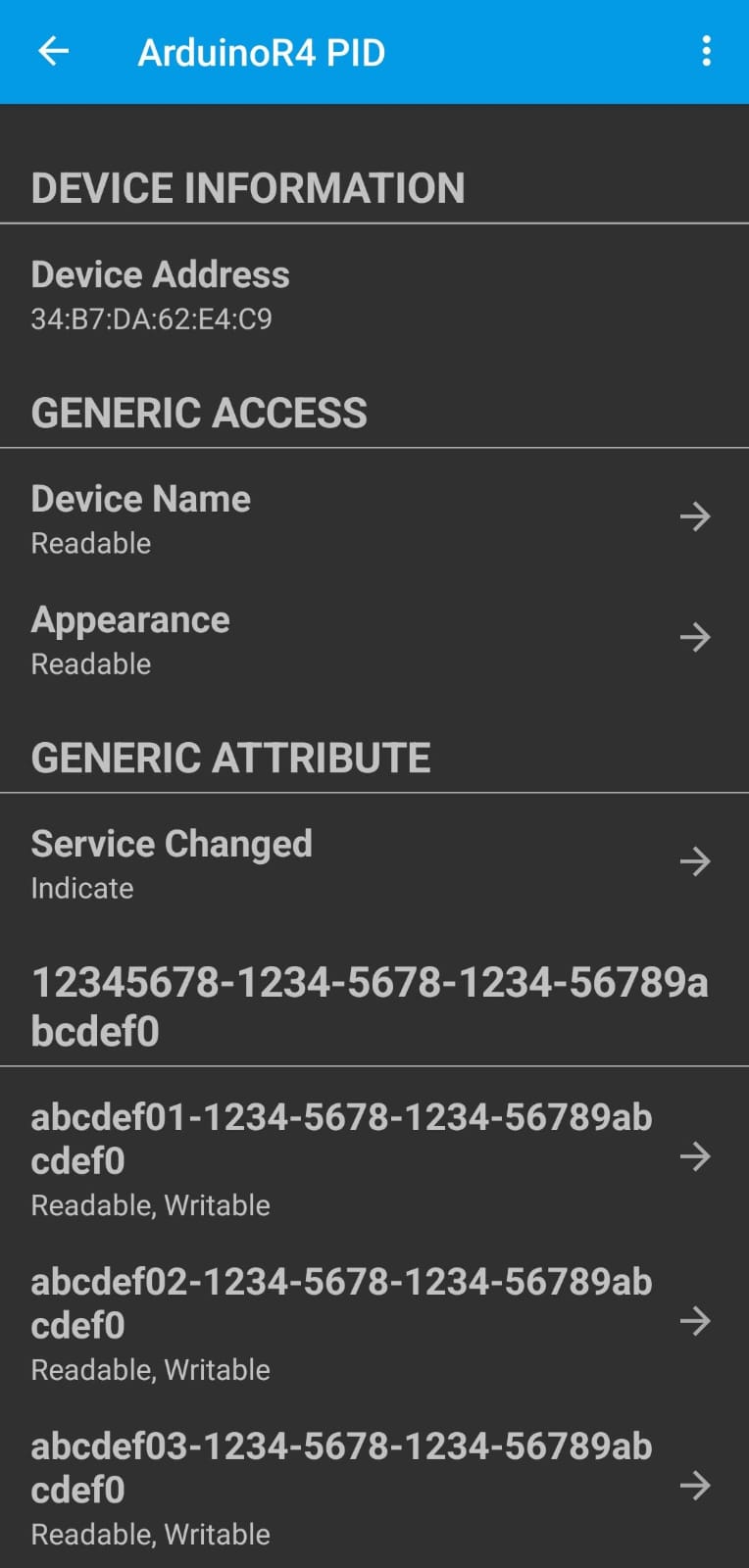
What do you see with nrfConnect? When you tap on the service, I see three characteristics open up.
I tried uninstalling lightblue after removing all data from it and then reinstalling it thus starting over, reloaded the code in the arduino, but nothing changed.
I have just tried with the attached sketch on my R4-wifi and it works without problems with my Android / nrfconnect. I have used ArduinoBLE 1.3.7 (latest at this moment). sketch_aug18a-r4.ino (1.9 KB)
I don't know how, but now it works.
So can say thanks.
Edit:
now on every time i connect i delete lightblue's data and then upload the sketch.
So, i think, my arduino got bugged somehow and somehow the problem solved itself changing sketch
Now i'll tell thanks to everyone who writed in this chat trying to help me, so thank you .


 .
.