Hello,
The following are calibration sketch and example sketch for arduino based weighing scale:
HX711.h
#ifndef HX711_h
#define HX711_h

#if ARDUINO >= 100
#include "Arduino.h"
#else
#include "WProgram.h"
#endif

class HX711
{
	private:
		byte PD_SCK;	// Power Down and Serial Clock Input Pin
		byte DOUT;		// Serial Data Output Pin
		byte GAIN;		// amplification factor
		long OFFSET;	// used for tare weight
		float SCALE;	// used to return weight in grams, kg, ounces, whatever

	public:
		// define clock and data pin, channel, and gain factor
		// channel selection is made by passing the appropriate gain: 128 or 64 for channel A, 32 for channel B
		// gain: 128 or 64 for channel A; channel B works with 32 gain factor only
		HX711(byte dout, byte pd_sck, byte gain = 128);

		virtual ~HX711();

		// check if HX711 is ready
		// from the datasheet: When output data is not ready for retrieval, digital output pin DOUT is high. Serial clock
		// input PD_SCK should be low. When DOUT goes to low, it indicates data is ready for retrieval.
		bool is_ready();

		// set the gain factor; takes effect only after a call to read()
		// channel A can be set for a 128 or 64 gain; channel B has a fixed 32 gain
		// depending on the parameter, the channel is also set to either A or B
		void set_gain(byte gain = 128);

		// waits for the chip to be ready and returns a reading
		long read();

		// returns an average reading; times = how many times to read
		long read_average(byte times = 10);

		// returns (read_average() - OFFSET), that is the current value without the tare weight; times = how many readings to do
		double get_value(byte times = 1);

		// returns get_value() divided by SCALE, that is the raw value divided by a value obtained via calibration
		// times = how many readings to do
		float get_units(byte times = 1);

		// set the OFFSET value for tare weight; times = how many times to read the tare value
		void tare(byte times = 10);

		// set the SCALE value; this value is used to convert the raw data to "human readable" data (measure units)
		void set_scale(float scale = 1.f);

		// get the current SCALE
		float get_scale();

		// set OFFSET, the value that's subtracted from the actual reading (tare weight)
		void set_offset(long offset = 0);

		// get the current OFFSET
		long get_offset();

		// puts the chip into power down mode
		void power_down();

		// wakes up the chip after power down mode
		void power_up();
};

#endif /* HX711_h */
HX711.cpp
#include <Arduino.h>
#include <HX711.h>

HX711::HX711(byte dout, byte pd_sck, byte gain) {
	PD_SCK 	= pd_sck;
	DOUT 	= dout;

	pinMode(PD_SCK, OUTPUT);
	pinMode(DOUT, INPUT);

	set_gain(gain);
}

HX711::~HX711() {

}

bool HX711::is_ready() {
	return digitalRead(DOUT) == LOW;
}

void HX711::set_gain(byte gain) {
	switch (gain) {
		case 128:		// channel A, gain factor 128
			GAIN = 1;
			break;
		case 64:		// channel A, gain factor 64
			GAIN = 3;
			break;
		case 32:		// channel B, gain factor 32
			GAIN = 2;
			break;
	}

	digitalWrite(PD_SCK, LOW);
	read();
}

long HX711::read() {
	// wait for the chip to become ready
	while (!is_ready());

    unsigned long value = 0;
    byte data[3] = { 0 };
    byte filler = 0x00;

	// pulse the clock pin 24 times to read the data
    data[2] = shiftIn(DOUT, PD_SCK, MSBFIRST);
    data[1] = shiftIn(DOUT, PD_SCK, MSBFIRST);
    data[0] = shiftIn(DOUT, PD_SCK, MSBFIRST);

	// set the channel and the gain factor for the next reading using the clock pin
	for (unsigned int i = 0; i < GAIN; i++) {
		digitalWrite(PD_SCK, HIGH);
		digitalWrite(PD_SCK, LOW);
	}

    // Datasheet indicates the value is returned as a two's complement value
    // Flip all the bits
    data[2] = ~data[2];
    data[1] = ~data[1];
    data[0] = ~data[0];

    // Replicate the most significant bit to pad out a 32-bit signed integer
    if ( data[2] & 0x80 ) {
        filler = 0xFF;
    } else if ((0x7F == data[2]) && (0xFF == data[1]) && (0xFF == data[0])) {
        filler = 0xFF;
    } else {
        filler = 0x00;
    }

    // Construct a 32-bit signed integer
    value = ( static_cast<unsigned long>(filler) << 24
            | static_cast<unsigned long>(data[2]) << 16
            | static_cast<unsigned long>(data[1]) << 8
            | static_cast<unsigned long>(data[0]) );

    // ... and add 1
    return static_cast<long>(++value);
}

long HX711::read_average(byte times) {
	long sum = 0;
	for (byte i = 0; i < times; i++) {
		sum += read();
	}
	return sum / times;
}

double HX711::get_value(byte times) {
	return read_average(times) - OFFSET;
}

float HX711::get_units(byte times) {
	return get_value(times) / SCALE;
}

void HX711::tare(byte times) {
	double sum = read_average(times);
	set_offset(sum);
}

void HX711::set_scale(float scale) {
	SCALE = scale;
}

float HX711::get_scale() {
	return SCALE;
}

void HX711::set_offset(long offset) {
	OFFSET = offset;
}

long HX711::get_offset() {
	return OFFSET;
}

void HX711::power_down() {
	digitalWrite(PD_SCK, LOW);
	digitalWrite(PD_SCK, HIGH);
}

void HX711::power_up() {
	digitalWrite(PD_SCK, LOW);
}
[/code]
Calibration sketch:
/*
 Setup your scale and start the sketch WITHOUT a weight on the scale
 Once readings are displayed place the weight on the scale
 Press +/- or a/z to adjust the calibration_factor until the output readings match the known weight
 Arduino pin 5 -> HX711 CLK
 Arduino pin 6 -> HX711 DOUT
 Arduino pin 5V -> HX711 VCC
 Arduino pin GND -> HX711 GND
*/

#include "HX711.h"

HX711 scale(6, 5);

float calibration_factor = -400; // this calibration factor is adjusted according to my load cell
float units;
float ounces;

void setup() {
  Serial.begin(9600);
  Serial.println("HX711 calibration sketch");
  Serial.println("Remove all weight from scale");
  Serial.println("After readings begin, place known weight on scale");
  Serial.println("Press + or a to increase calibration factor");
  Serial.println("Press - or z to decrease calibration factor");

  scale.set_scale();
  scale.tare();  //Reset the scale to 0

  long zero_factor = scale.read_average(); //Get a baseline reading
  Serial.print("Zero factor: "); //This can be used to remove the need to tare the scale. Useful in permanent scale projects.
  Serial.println(zero_factor);
}

void loop() {

  scale.set_scale(calibration_factor); //Adjust to this calibration factor

  Serial.print("Reading: ");
  units = scale.get_units(), 10;
  if (units < 0)
  {
    units = 0.00;
  }
  ounces = units * 0.035274;
  Serial.print(units);
  Serial.print(" grams");
  Serial.print(" calibration_factor: ");
  Serial.print(calibration_factor);
  Serial.println();

  if(Serial.available())
  {
    char temp = Serial.read();
    if(temp == '+' || temp == 'a')
      calibration_factor += 1;
    else if(temp == '-' || temp == 'z')
      calibration_factor -= 1;
  }
  delay(2000);
}
Example sketch:
#include "HX711.h"

HX711 scale(6, 5); //HX711 scale(6, 5);

float calibration_factor = -58;
float units;
float ounces;

void setup()
{
  Serial.begin(9600);
  Serial.println("HX711 weighing");
  scale.set_scale(calibration_factor);
  scale.tare();
  Serial.println("Readings:");
}

void loop()
{
  Serial.print("Reading:");
  units = scale.get_units(10);
  if (units < 0)
  {
    units = 0.00;
  }
  ounces = units * 0.035274;
  Serial.print(units);
  Serial.println(" grams");
 // delay(10);
}
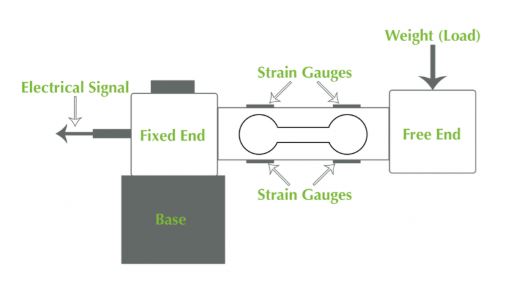
I have been using these library files and sketches, but the readings are not accurate. I used calibration sketch to find out calibration factor. Even though there is no weight on load cell it's indicating non zero value but it's somewhat close to zero and whenever I place the 200 gram load on cell, its indicating 195.67 or 196.67 or something close to 200 but not accurate enough. Moreover, it's indicating different readings at different positions of weight on load cell.
It's a humble request to all of you to help me in this regard considering to get accurate readings.
Thank you.