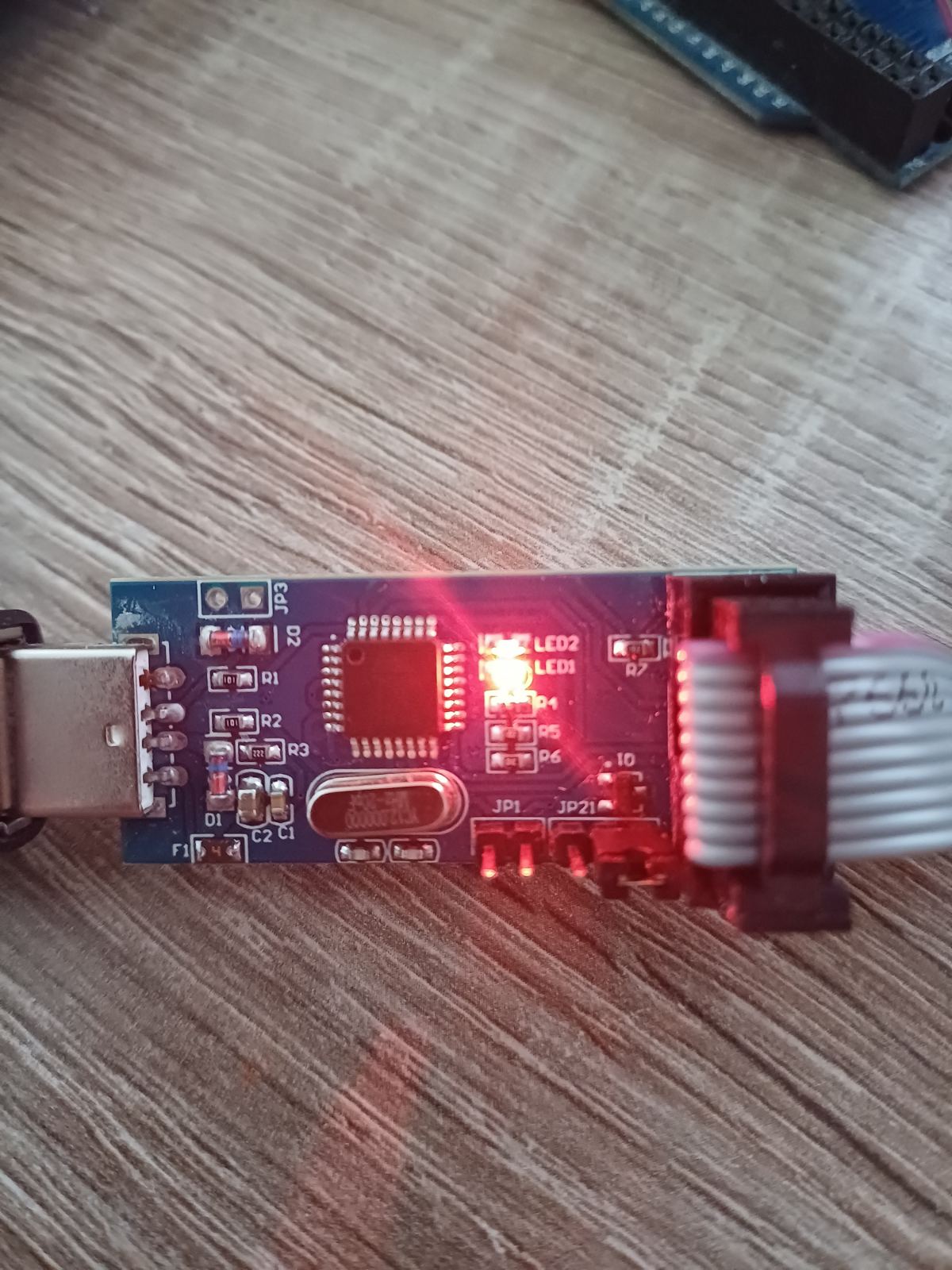
ATMega2560 not accessible by USBasp

Ok, I was playing around trying to extract the flash from my arduino mega2560 with a USBasp.
I was using the eXtreme Burner - AVR to extract it and it was reading the flash, but somehow the mega2560 stopped working completely.

I could not connect to it anymore with the USBasp with avrdude.

The error I get is always the same:

avrdude.exe -vvvv -c usbasp -p atmega2560 -b 19200 -t -F

avrdude: Version 7.3
         Copyright the AVRDUDE authors;
         see https://github.com/avrdudes/avrdude/blob/main/AUTHORS

         System wide configuration file is D:\ARDUINO\avrdude-v7.3-windows-x64\avrdude.conf

         Using port            : usb
         Using programmer      : usbasp
         Setting baud rate     : 19200
avrdude: usbasp_open("usb")
avrdude: seen device from vendor >www.fischl.de<
avrdude: seen product >USBasp<
         AVR Part              : ATmega2560
         Programming modes     : ISP, HVPP, JTAG, SPM

         Memory         Size  Pg size
         ----------------------------
         eeprom         4096        8
         flash        262144      256
         efuse             1        1
         hfuse             1        1
         lfuse             1        1
         lock              1        1
         signature         3        1
         calibration       1        1
         io              480        1
         sram           8192        1

         Variants          Package  F max   T range        V range
         ----------------------------------------------------------------
         ATmega2560        TQFP100  16 MHz  [N/A,    N/A]  [4.5 V, 5.5 V]
         ATmega2560-16AU   TQFP100  16 MHz  [-40 C, 85 C]  [4.5 V, 5.5 V]
         ATmega2560-16AUR  TQFP100  16 MHz  [N/A,    N/A]  [4.5 V, 5.5 V]
         ATmega2560-16CU   CBGA100  16 MHz  [-40 C, 85 C]  [4.5 V, 5.5 V]
         ATmega2560V-8AU   TQFP100  8 MHz   [-40 C, 85 C]  [1.8 V, 5.5 V]
         ATmega2560V-8AUR  TQFP100  8 MHz   [-40 C, 85 C]  [1.8 V, 5.5 V]
         ATmega2560V-8CU   CBGA100  8 MHz   [-40 C, 85 C]  [1.8 V, 5.5 V]

         Programmer Type       : usbasp
         Description           : USBasp ISP and TPI programmer
avrdude: usbasp_initialize()
avrdude: usbasp_transmit("USBASP_FUNC_GETCAPABILITIES", 0x00, 0x00, 0x00, 0x00)
         <= [01] [00] [00] [00]
avrdude: usbasp_spi_set_sck_period(0)
avrdude: auto set sck period (because given equals null)
avrdude: usbasp_transmit("USBASP_FUNC_SETISPSCK", 0x00, 0x00, 0x00, 0x00)
         <= [00]
avrdude: usbasp_transmit("USBASP_FUNC_CONNECT", 0x00, 0x00, 0x00, 0x00)
avrdude: usbasp_program_enable()
avrdude: usbasp_transmit("USBASP_FUNC_ENABLEPROG", 0x00, 0x00, 0x00, 0x00)
         <= [01]
avrdude usbasp_spi_program_enable() [usbasp.c:784] error: program enable: target does not answer (0x01)
avrdude main() [main.c:1527] error: initialization failed, rc=-1
        - double check the connections and try again
        - use -B to set lower the bit clock frequency, e.g. -B 125kHz
avrdude: AVR device initialized and ready to accept instructions
avrdude: device signature = 0x000000 (retrying)
avrdude: device signature = 0x000000
avrdude main() [main.c:1636] error: Yikes!  Invalid device signature.
avrdude main() [main.c:1652] warning: expected signature for ATmega2560 is 1E 98 01

The config command from avrdude:

avrdude> config
avrdude: usbasp_spi_cmd(0x50, 0x00, 0x00, 0x00) ...
avrdude: usbasp_transmit("USBASP_FUNC_TRANSMIT", 0x50, 0x00, 0x00, 0x00)
         <= [00] [00] [00] [00]
avrdude: usbasp_spi_cmd() => 0x00, 0x00, 0x00, 0x00
config sut_cksel=extclk_6ck_0ms # 0
config ckout=gpio_pe7 # 0
config ckdiv8=by_8 # 0
avrdude: usbasp_spi_cmd(0x58, 0x08, 0x00, 0x00) ...
avrdude: usbasp_transmit("USBASP_FUNC_TRANSMIT", 0x58, 0x08, 0x00, 0x00)
         <= [00] [00] [00] [00]
avrdude: usbasp_spi_cmd() => 0x00, 0x00, 0x00, 0x00
config bootrst=boot_section # 0
config bootsz=bs_4096w # 0
config eesave=ee_preserved # 0
config wdton=wdt_always_on # 0
config spien=isp_enabled # 0
config jtagen=jtag_enabled # 0
config ocden=ocd_enabled # 0
avrdude: usbasp_spi_cmd(0x50, 0x08, 0x00, 0x00) ...
avrdude: usbasp_transmit("USBASP_FUNC_TRANSMIT", 0x50, 0x08, 0x00, 0x00)
         <= [00] [00] [00] [00]
avrdude: usbasp_spi_cmd() => 0x00, 0x00, 0x00, 0x00
config bodlevel=0 # reserved
avrdude: usbasp_spi_cmd(0x58, 0x00, 0x00, 0x00) ...
avrdude: usbasp_transmit("USBASP_FUNC_TRANSMIT", 0x58, 0x00, 0x00, 0x00)
         <= [00] [00] [00] [00]
avrdude: usbasp_spi_cmd() => 0x00, 0x00, 0x00, 0x00
config lb=prog_ver_disabled # 0
config blb0=lpm_spm_disabled_in_app # 0
config blb1=lpm_spm_disabled_in_boot # 0

And it happened now even with my UNO m328p when I tried to extract the FW. It now also can't read out the signature of the device and the same issue is happening.

Any ideas. Fuses?

Can you explain the command what are you trying to do?
Why -F and -t, if you are trying to extract the flash?
The eXtreme Burner is just some nice GUI for avrdude. Try to read avrdude help.

General rule for all beginners: Do not use -F option with avrdude!

Sorry for the misunderstanding.

I'm not trying to read the flash here, I'm trying to bring it back to life.

I cannot connect to the atmega2560 anymore. Can't do anything with in anymore.

EDIT> So wanted just some tricks and tips how this could happen and is there any way to make it working again.

The information, what you did at the moment it stops working, would help.

Try this:

avrdude -patmega2560 -cusbasp -v

Why is USB striked out?

avrdude -patmega2560 -cusbasp -v

avrdude: Version 7.3
         Copyright the AVRDUDE authors;
         see https://github.com/avrdudes/avrdude/blob/main/AUTHORS

         System wide configuration file is D:\ARDUINO\avrdude-v7.3-windows-x64\avrdude.conf

         Using port            : usb
         Using programmer      : usbasp
         AVR Part              : ATmega2560
         Programming modes     : ISP, HVPP, JTAG, SPM
         Programmer Type       : usbasp
         Description           : USBasp ISP and TPI programmer
avrdude: auto set sck period (because given equals null)
avrdude usbasp_spi_program_enable() error: program enable: target does not answer (0x01)
avrdude main() error: initialization failed, rc=-1
        - double check the connections and try again
        - use -B to set lower the bit clock frequency, e.g. -B 125kHz
        - use -F to override this check

avrdude done.  Thank you.

I own many mega2560, so I just marked it that this one does not work.

Does your USBasp have jumper for slow SCK? I do not know this exact type you have.
Check the schematics here USBasp - USB programmer for Atmel AVR controllers - fischl.de an try the same command with this jumper. It is probably not installed so maybe you should solder it first.

Another possibility, and the evidence is likely lost, is that you inadvertently programmed the SPIEN fuse to disable the SPI programming. If that's the case, then I think you need a high voltage programmer in order to reset SPIEN back.

You mean the jumper 3?

Hmm, I have a T48 programmer... could that work?

Probably JP3 but I cannot say for sure from the photo. Check the schematics I've sent. There are 3 jumpers: 5V/3V3, slow SCK and self programming. Check which one according the traces to the ATmega8 or 88.

Yeah, this is non a high voltage programming device. Apparently the device needs 12V to "reset" fuse issues.

Found this device. Hope it works.

https://www.aliexpress.com/item/1005005773780073.html?spm=a2g0o.order_list.order_list_main.5.2b9d1802FxDpe8

Thank you for your support.

Apparently that jumper is deprecated and is controller by the chip on the USBasp.

There is only the jumper for voltage and self programming.

I've not had a need to do any HV recovery of fuses. Apparently it's all about applying a 12V pulse to the RESET pin, but beyond that, I have no additional information/experience.

What does it supposed to mean? Just solder the jumper there. I think, you somehow managed to set default clock which is driven by the internal oscillator. These USBasp programmers are not able to deal with MCU on slow clock like raw factory ATmegas have. For this reason there is JP1 on fischl schematics. In your case it seems to be JP3.

BTW, all USBasp programmers are copies of fischl's one with exactly same FW. There exsits the FW version which have automatic slow SCK fuctionality, but I doubt you have it if you did not upload it yourself.

soldered the jumper J3. It is the same result.

Too bad. There is probably only chance with parallel or JTAG programming.

Re-install the Boot Loader Program to bring your freaked Arduino MEGA back to working condition.

And how would you do this if you don't have access even through ISP?

Have you tried to re-install the Boot Loader using another working MEGA or UNO as ISP Programmer? If yes, that means the SPIEN/RSTDISABL fuse bits are freaked which can only be recovered by High Voltage Programming which seems to be an impractical task in your case as the ATmega2650 MCU chip is soldered on the non-functioning Board.

I'm quite familiar with Avrdude.

You can slow down the ISP clock by using the -B flag. So -B 32 will slow the bit clock down to 1/32 MHz, or about 31 kHz. This is useful if the hardware doesn't have a SCK slowdown jumper.

Check the on-board resonator. If you connect an oscilloscope (if you have access to one) to one of the pins on it, do you see a 16 MHz clock signal? If yes, that means that the chip has a stable clock input. If not, it can either mean that the fuse settings have disabled the external clock driver, or the chip is defective.

If the ISP interface has been disabled, the only way to recover it is by either using the JTAG interface (usually disabled on Arduinos) or parallel programming (HVPP). This applies a 12V pulse on the reset pin, but the MEGA has a protection diode on the reset pin to accidentally enter HVPP mode when using the bootloader. So the diode needs to be removed to recover it using HVPP. But it's probably more likely that the chip is just dead. And with the right tools for the job, it isn't impossible to replace the chip.