Recently, I purchased a brand new Arduino UNO board. At first I was able to write a small programme into it. After I removed the Atmega328 and insert an another atmega328 to write another programme. Now the problem is The Arduino UNO is not responding anything and the error message comes as : “avrdude: stk500_recv(): programmer is not responding”.
At first, I thought the problem is with ATMEGA328P, but later I was able to programme it via another Arduino as ISP programmer.
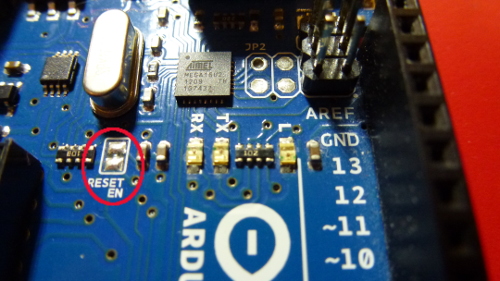
A strange thing I see. The On-board L led which is connected to D13 of Atmega328 is continuously running evenif I remove the ATMEGA328 chip from the UNO board.
But the Arduino IDE is showing PORT as COM7 (Arduino UNO). Also the Device Manger shows “Arduino UNO-COM7.
I have attached all the screenshot and picture of Arduino UNO Board.
Please anyone help.
I have tried all the method which are showing in the Google as well as from youtube. But couldnot get anything result.
Yes the chip have a bootloader. So that at first, I was able to programme the ATMEGA328. What you thought, I also reprogramme the bootloader with another Arduino nano. But the Problem remain same.
The sequence of events is important. You mentioned being able to program the MCU using another Arduino as ISP, and you mentioned burning the bootloader using another Arduino as ISP. I don’t know in what order you did those things. When you upload a sketch using programmer, the bootloader is deleted. Make sure you burn the bootloader before attempting to upload a program via USB.
It may be a good idea to put the known good MCU that you previously removed back into the Uno to check that the Uno works.
I tried to put the original MCU which was at 1st programmed with UNO board. But the problem remain same. However, I can reprogramme any other atmega328 via Arduino as ISP from another Arduino UNO. but this uno not responding.. Did i Bricked the ATMEGA16u2 which is the serial communication ic of Arduino uno?? IF this then, how the Device Manager shows “Comm-07-Arduino UNO”??
Have you ever tried to plug in an MCU into the board, then burn the bootloader using Arduino as ISP, and then try to upload a program such as blink using the USB cable and regular upload method?
If after attempting that, when you press and release the reset button does the pin 13 LED blink several times rapidly, indicating the bootloader is there and listening?
Test the auto reset circuit by holding the reset button during compiling and release it at the beginning of upload. You may need to try a couple times to get the timing right because the bootloader only waits a very short period before giving up. Pressing and releasing reset works to upload there could be a problem with the auto reset circuit. Did you know auto reset can be disabled by cutting a small trace, perhaps yours is cut.
If you need to you can enable verbose output during bootloader to see the avrdude command lines that set the fuses and upload the bootloader, and copy those lines into a text editor to alter them to have the fuses for the ATmega16U2, and the hex file for the ATmega16u2, and execute those new doctored lines to upload to the ATmega16U2 while you have an Arduino as ISP connected to the 2x3 male header above the ATmega16U2. The firmware hex file is in the Arduino installation. It varies where depending on the computer, installation directory, and Arduino IDE version. On my computer it is in the /Applications/Arduino.app/Contents/Java/hardware/arduino/avr/firmwares/atmegaxxu2 directory. The file is Arduino-COMBINED-dfu-usbserial-atmega16u2-Uno-Rev3.hex and the fuse settings are -U lfuse:w:0xFF:m -U hfuse:w:0xD9:m -U efuse:w:0xF4:m -U lock:w:0x0F:m
Are u talking about burning bootloader with another Arduino Uno with ICSP? Can I burn bootloader with another Arduino UNO which is having ATMEGA328 SMD with ch340 driver ic?
Would you please elaborate the things.. I cant understand how to fuse for Atmega16U2. and where is the hex file for this.. please tell me how to do the things. Thanks in Advance
Since this topic has been moved into its own thread it makes it more clear some discussion of ATmega16U2 may be premature. Let’s talk about ATmega328P. You mentioned some things above about it, but did not mention the sequence of events. You mention “later I was able to programme it via another Arduino as ISP programmer.” Does this mean you put a sketch on it using “another Arduino as ISP programmer?” If so, then the ATmega328P does not have a bootloader on it at all, because when you upload a sketch using programmer, it wipes out the bootloader. Do you see what I mean about sequence of steps is important?
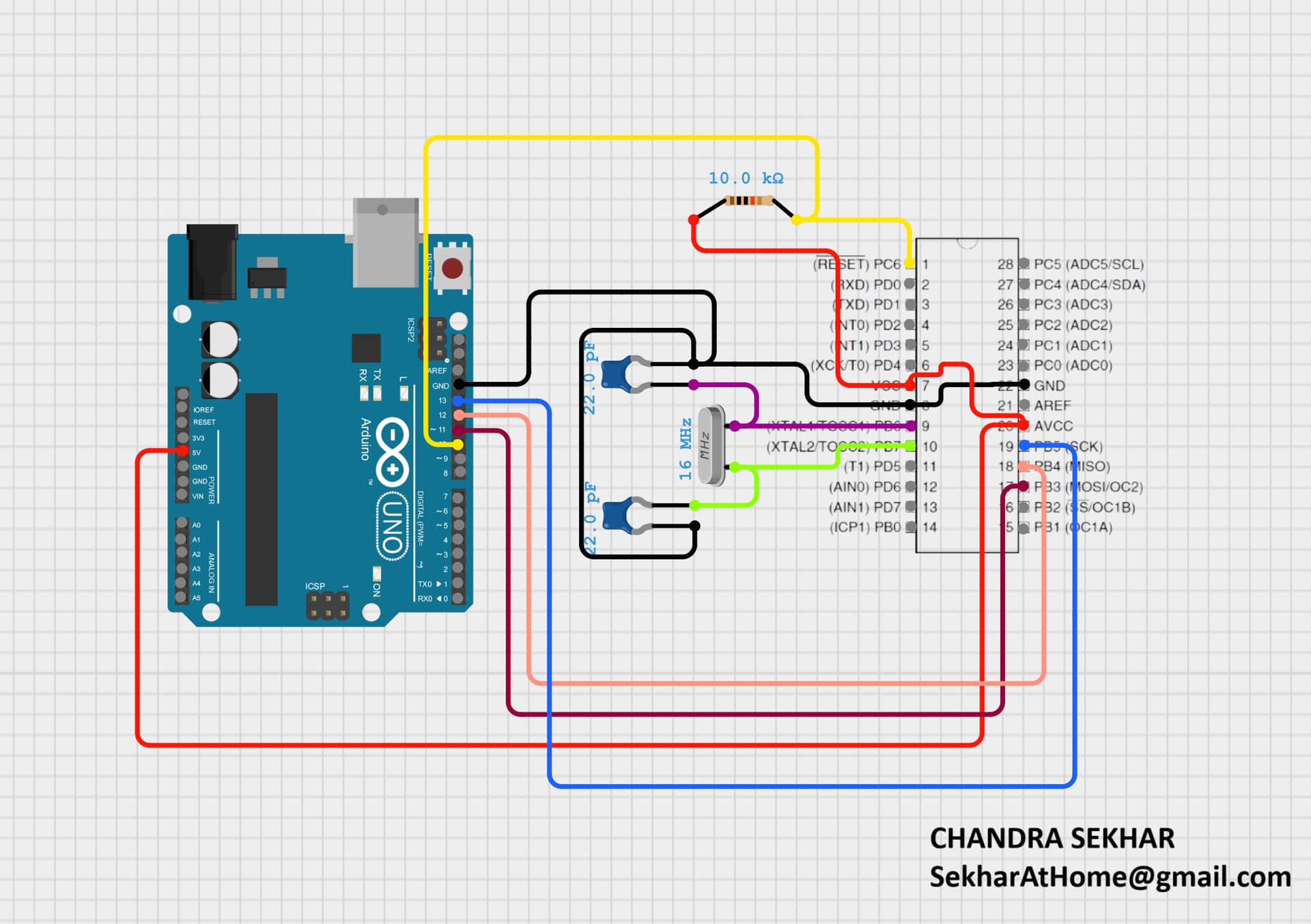
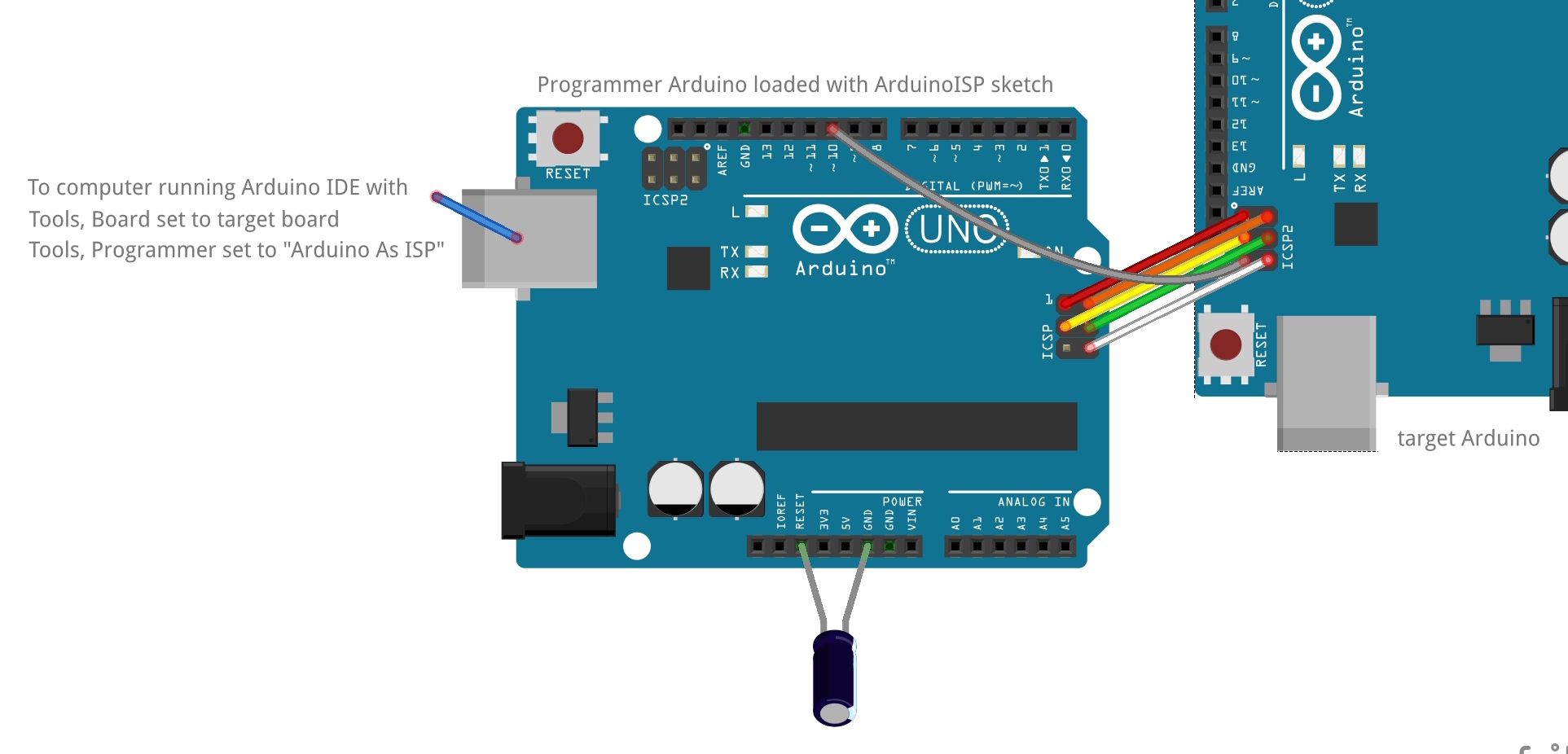
Thanks All friends. I have successfully solved the problem with OPTIBOOTLOADER {(Bill Westfield ("WestfW")}. Just upload the programme into the Programmer Board. connect the Atmega328p as ICSP as mentioned in the image. After then the system automatically bootload the correct bootloader. Now the uC runs smoothly in the Arduino Uno Board. Also thanks to ElectronNoobs ( 16MHz bootloader for Atmega8 arduino IDE ) for his tutorials. Although I know how to burn bootloader but I found this method is too easy and instant. Thanks All.