Beginner Problem

Hi folks,

I actually have a fairly simple task, but even after several hours of trial and error, I haven't been able to solve it.

Basically, it's just a matter of splitting a given string, which is always 8 bytes long, character by character and calculating the ASCII code for each character.

It's easy in VB.
Here's what the code looks like:

Private Sub Form_Load()

Dim Text As String
Dim i As Integer
Dim Char As String
Dim ascii As Integer

Text = "ABCDEFGH"

Debug.Print "Character => ASCII"
For i = 1 To 8
    Char = Mid$(Text, i, 1)
    ascii = Asc(Char)
    Debug.Print Char & " => " & ascii
Next i

End Sub

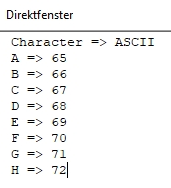
And this would be the result as it should look:

Could someone please tell me how I can implement this on the Arduino and especially what kind of variables I should define.

Thanks in advance.
b.r. Electronixs

Consider

String text {"ABCDEFGH"};

void setup() 
{
  Serial.begin (115200);
  Serial.println("ASCII => Character");
  for (auto c:text) Serial.print((byte) c), Serial.print(" => "), Serial.println(c);
}

void loop() {} 

An alternative that uses C style strings rather than Strings

char myText[] = "Hello World";

void setup()
{
    Serial.begin(115200);
    byte length = strlen(myText);
    for (int c = 0; c < length; c++)
    {
        Serial.println(myText[c]);
    }
}

void loop()
{
}

Ok thanks.
And when I want to store the results (single character and the ascii code) in two variables
for further usage, which kind of var I should define ?
byte, int, char ???

b.r. Electronixs

Why do you need to store them ?

The characters will already be stored in an array and you can derive or test the ASCII values on the fly when needed

Please explain what you are actually doing with the characters and ASCII values ?

UKHeliBob

I have to drive a very special Display where the ascii table is strange.
The uppercase letters are ASCII-conform, but the lower case letters and nearly all special characters have different ASCII Codes so I have to make a cross-reference-table.

b.r. Electronixs

It is because you do not understand text chars.
A char variable is a signed 8 bit variable.
ASCII code is a number-symbol relation.
Print the char as a number shows the ASCII value.
Print the char as text shows the ASCII symbol.

'A' == 65
They are the same.
'B' = 66
'B' - 'A' == 1, 66 - 65 == 1
The letter IS the number shown differently.

Use C char-array strings on Arduino and save yourself blackbox String confusion just trying to get at your data.

String and string are different things.

I know that of course, exactly for this I need that information..
It's not about printing via
Serial.println

The display gets data via CAN-Bus
Assumed the text "Pressure", which is stored in a standard text-variable, should be displayed.
Fot this I must dissassable the String to it's single characters,
(P, r, e, s, s, u, r, e)
then convert every Character in its ASCII-Code
(80, 114, 101, 115, 115, 117, 114, 101)
run every ASCII-Code thru the cross-reference-table and get
(80, 114, 05, 115, 115, 117, 114, 05)
This codes I must send via CAN-Bus to the display to get the correct text displayed.

If you have better idea to do this without the ascii code conversation, let's hear

b.r. Electronixs

What sort of mad device is the display and how many exceptions to the normal character to ASCII relationship are there ?

What is displayed if you send ASCII 101 for 'e' instead of 5 ? More to the point, what happens if you send 'e' ?

Sounds like a simple lookup table (array) of bytes would suffice where you use the incoming ASCII character code as the index into the array and the byte at that location is the value to send to the display.

To answer the actual question, you could use any of those. But I think that one of the points made above is that it is not necessary to store any intermediate variables. Instead of:

newCode = weirdConversion(oldCode);

you can use something like

newText[c] = weirdConversion(oldText[c]);
1 Like

Hello electronixs

Post the a.m. table.

I cant send directly "e" because only hexvalues can be sent .
With 101 (0x65h) a "hyroglyph" is displaed.
There are many exceptions, at least 30, the most on special characters.

No "table" at the moment.
For testing I do it with select case structure.


void CharConvert()
{
    switch (Character)
      {
        case 0 ... 23:
          ASCII_Value = 22;
          break;
        case 24 ... 94:
          ASCII_Value = Character;
          break;
        case 95:
          ASCII_Value = 102; // _
          break;
        case 96:
          ASCII_Value = 22;
          break;
        case 97 ... 112:
          ASCII_Value = Character -96; //a-p
          break;
        case 113 ... 125:
          ASCII_Value = Character; //q-z
          break;
        case 126 ... 131:
          ASCII_Value = 22;
          break;
        case 132:
          ASCII_Value = 95; // Ä
          break;
        case 143 ... 149:
          ASCII_Value = 22;
          break;
        case 150:
          ASCII_Value = 96;
          break;
        case 151 ... 155:
          ASCII_Value = 22;
          break;        
        case 156:
          ASCII_Value = 97;
          break;
        case 157 ... 255:
          ASCII_Value = 22;
          break;
      }
}

look this over

output

 H  72 0x48
 e 101 0x65
 l 108 0x6c
 l 108 0x6c
 o 111 0x6f
    32 0x20
 W  87 0x57
 o 111 0x6f
 r 114 0x72
 l 108 0x6c
 d 100 0x64

 h 104 0x68
 o 111 0x6f
 w 119 0x77
    32 0x20
 n 110 0x6e
 o 111 0x6f
 w 119 0x77
    32 0x20
 b  98 0x62
 r 114 0x72
 o 111 0x6f
 w 119 0x77
 n 110 0x6e
    32 0x20
 c  99 0x63
 o 111 0x6f
 w 119 0x77
 !  33 0x21

char s [90];

// -----------------------------------------------------------------------------
void
disp (
    const char *t )
{
    do {
        sprintf (s, " %c %3d 0x%02x", *t, *t, *t);
        Serial.println (s);
    } while (*++t);
    Serial.println ();
}

// -----------------------------------------------------------------------------
void
loop (void)
{
    if (Serial.available ()) {
        char buf [90];
        int  n = Serial.readBytesUntil ('\n', buf, sizeof(buf)-1);
        buf [n] = '\0';
        disp (buf);
    }
}

// -----------------------------------------------------------------------------
void
setup (void)
{
    Serial.begin (9600);
    disp ("Hello World");
}

you coudl just translate lower to upper case

output

 H  72 0x48 -- H  72 0x48
 e 101 0x65 -- E  69 0x45
 l 108 0x6c -- L  76 0x4c
 l 108 0x6c -- L  76 0x4c
 o 111 0x6f -- O  79 0x4f
    32 0x20 -- 
 W  87 0x57 -- W  87 0x57
 o 111 0x6f -- O  79 0x4f
 r 114 0x72 -- R  82 0x52
 l 108 0x6c -- L  76 0x4c
 d 100 0x64 -- D  68 0x44
char s [90];

// -----------------------------------------------------------------------------
void
disp (
    const char *t )
{
    do {
        sprintf (s, " %c %3d 0x%02x", *t, *t, *t);
        Serial.print   (s);

        char c = *t & 0x5F;
        sprintf (s, " -- %c %3d 0x%02x", c, c, c);
        Serial.println (s);
    } while (*++t);
    Serial.println ();
}

// -----------------------------------------------------------------------------
void
loop (void)
{
    if (Serial.available ()) {
        char buf [90];
        int  n = Serial.readBytesUntil ('\n', buf, sizeof(buf)-1);
        buf [n] = '\0';
        disp (buf);
    }
}

// -----------------------------------------------------------------------------
void
setup (void)
{
    Serial.begin (9600);
    disp ("Hello World");
}

Ok but this doesnt help when I want to use this lower case characters and they have non ASCII-conform codes, or ?

It looks like you have to send the characters from decimal 0 to decimal 255 to the display to analyze the conversion correctly.

And hopefully this table will be static in the display and won't be changed on the fly to annoy hackers.

1 Like

it provided a simple work around to avoid using lower case characters.

if you're required to display lower-case characters can you provide the mapping for them on your display? what is the model # for the display?

Exact this I've done.
The result ist the data in the Select Case Strukture :wink:

1 Like