Billy Bass Hack trouble

Hi everyone :slight_smile: thanks for reading me.
A while ago now, I gave a try at a billy bass hack (the Donald Bell one, for those who know it ).
My first intention was to make it work using a mp3 player module instead of the bluetooth + amplifiers ones from Bell's project.
I was planning to use a previous project's code in order to time schedule the start of the mp3 file (a simple voice test).

Here's my code :

#include <SoftwareSerial.h>
#include "RedMP3.h"

#define MP3_RX 13
#define MP3_TX 11

MP3 mp3(MP3_RX, MP3_TX);


int8_t index  = 0x01;//the first song in the TF card
int8_t volume = 0x1e;//0~0x1e (30 adjustable level)

#include <MX1508.h>

MX1508 bodyMotor(6, 9); // Sets up an MX1508 controlled motor on PWM pins 6 and 9
MX1508 mouthMotor(5, 3); // Sets up an MX1508 controlled motor on PWM pins 5 and 3

int soundPin = A0; // Sound input

int silence = 18 ; // Threshold for "silence". Anything below this level is ignored.
int bodySpeed = 0; // body motor speed initialized to 0
int soundVolume = 0; // variable to hold the analog audio value
int fishState = 0; // variable to indicate the state Billy is in

bool talking = false; //indicates whether the fish should be talking or not

//these variables are for storing the current time, scheduling times for actions to end, and when the action took place
long currentTime;
long mouthActionTime;
long bodyActionTime;
long lastActionTime;

unsigned long startMillis;
unsigned long currentMillis;

struct Evenement
{
  uint32_t temps;
  float mp3;
};
int mouvement = 0;
Evenement evenements[] = {
 
//temps   mp3
  {0000,   0},
  {5000,   1},
  {6000,   0},
  {24000, 2},
  {25000, 0}
};


void setup() {
  bodyMotor.setSpeed(0); 
  mouthMotor.setSpeed(0);

//input mode for sound pin
  pinMode(soundPin, INPUT);

  Serial.begin(9600);  //start Serial in case we need to print debugging info
  startMillis = millis();

}

void loop() {
 
  if ((millis() - startMillis >= evenements[mouvement].temps) && (mouvement < 5))
  {
    {
      if (evenements[mouvement].mp3 == 1 ) 
        {
        delay(500);  
        mp3.playWithVolume(index,volume);
        }

      if (evenements[mouvement].mp3 == 2 ) 
        {
      
        mp3.stopPlay();
        }

      if (evenements[mouvement].temps == 25000)
      {
        mouvement = 0; // On  repart au début des mouvements
        startMillis=millis();  // Remet le chornomètre à 0
      }
      
      mouvement++; // on a traité ce mouvement, on passe au suivant
     
    }
  }
  currentTime = millis(); //updates the time each time the loop is run
  updateSoundInput(); //updates the volume level detected
  SMBillyBass(); //this is the switch/case statement to control the state of the fish
}

void SMBillyBass() {
  switch (fishState) {
    case 0: //START & WAITING
      if (soundVolume > silence) { //if we detect audio input above the threshold
        if (currentTime > mouthActionTime) { //and if we haven't yet scheduled a mouth movement
          talking = true; //  set talking to true and schedule the mouth movement action
          mouthActionTime = currentTime + 100;
          fishState = 1; // jump to a talking state
        }
      } else if (currentTime > mouthActionTime + 100) { //if we're beyond the scheduled talking time, halt the motors
        bodyMotor.halt();
        mouthMotor.halt();
      }
      if (currentTime - lastActionTime > 1500) { //if Billy hasn't done anything in a while, we need to show he's bored
        lastActionTime = currentTime + floor(random(30, 60)) * 1000L; //you can adjust the numbers here to change how often he flaps
        fishState = 2; //jump to a flapping state!
      }
      break;

    case 1: //TALKING
      if (currentTime < mouthActionTime) { //if we have a scheduled mouthActionTime in the future....
        if (talking) { // and if we think we should be talking
          openMouth(); // then open the mouth and articulate the body
          lastActionTime = currentTime;
          articulateBody(true);
        }
      }
      else { // otherwise, close the mouth, don't articulate the body, and set talking to false
        closeMouth();
        articulateBody(false);
        talking = false;
        fishState = 0; //jump back to waiting state
      }
      break;

    case 2: //GOTTA FLAP!
      //Serial.println("I'm bored. Gotta flap.");
      flap();
      fishState = 0;
      break;
  }
}

int updateSoundInput() {
  soundVolume = analogRead(soundPin);
}

void openMouth() {
  mouthMotor.halt(); //stop the mouth motor
  mouthMotor.setSpeed(220); //set the mouth motor speed
  mouthMotor.forward(); //open the mouth
}

void closeMouth() {
  mouthMotor.halt(); //stop the mouth motor
  mouthMotor.setSpeed(180); //set the mouth motor speed
  mouthMotor.backward(); // close the mouth
}

void articulateBody(bool talking) { //function for articulating the body
  if (talking) { //if Billy is talking
    if (currentTime > bodyActionTime) { // and if we don't have a scheduled body movement
      int r = floor(random(0, 8)); // create a random number between 0 and 7)
      if (r < 1) {
        bodySpeed = 0; // don't move the body
        bodyActionTime = currentTime + floor(random(500, 1000)); //schedule body action for .5 to 1 seconds from current time
        bodyMotor.forward(); //move the body motor to raise the head

      } else if (r < 3) {
        bodySpeed = 150; //move the body slowly
        bodyActionTime = currentTime + floor(random(500, 1000)); //schedule body action for .5 to 1 seconds from current time
        bodyMotor.forward(); //move the body motor to raise the head

      } else if (r == 4) {
        bodySpeed = 200;  // move the body medium speed
        bodyActionTime = currentTime + floor(random(500, 1000)); //schedule body action for .5 to 1 seconds from current time
        bodyMotor.forward(); //move the body motor to raise the head

      } else if ( r == 5 ) {
        bodySpeed = 0; //set body motor speed to 0
        bodyMotor.halt(); //stop the body motor (to keep from violent sudden direction changes)
        bodyMotor.setSpeed(255); //set the body motor to full speed
        bodyMotor.backward(); //move the body motor to raise the tail
        bodyActionTime = currentTime + floor(random(900, 1200)); //schedule body action for .9 to 1.2 seconds from current time
      }
      else {
        bodySpeed = 255; // move the body full speed
        bodyMotor.forward(); //move the body motor to raise the head
        bodyActionTime = currentTime + floor(random(1500, 3000)); //schedule action time for 1.5 to 3.0 seconds from current time
      }
    }

    bodyMotor.setSpeed(bodySpeed); //set the body motor speed
  } else {
    if (currentTime > bodyActionTime) { //if we're beyond the scheduled body action time
      bodyMotor.halt(); //stop the body motor
      bodyActionTime = currentTime + floor(random(20, 50)); //set the next scheduled body action to current time plus .02 to .05 seconds
    }
  }
}


void flap() {
  bodyMotor.setSpeed(180); //set the body motor to full speed
  bodyMotor.backward(); //move the body motor to raise the tail
  delay(500); //wait a bit, for dramatic effect
  bodyMotor.halt(); //halt the motor
}

My wiring so far looks like this :
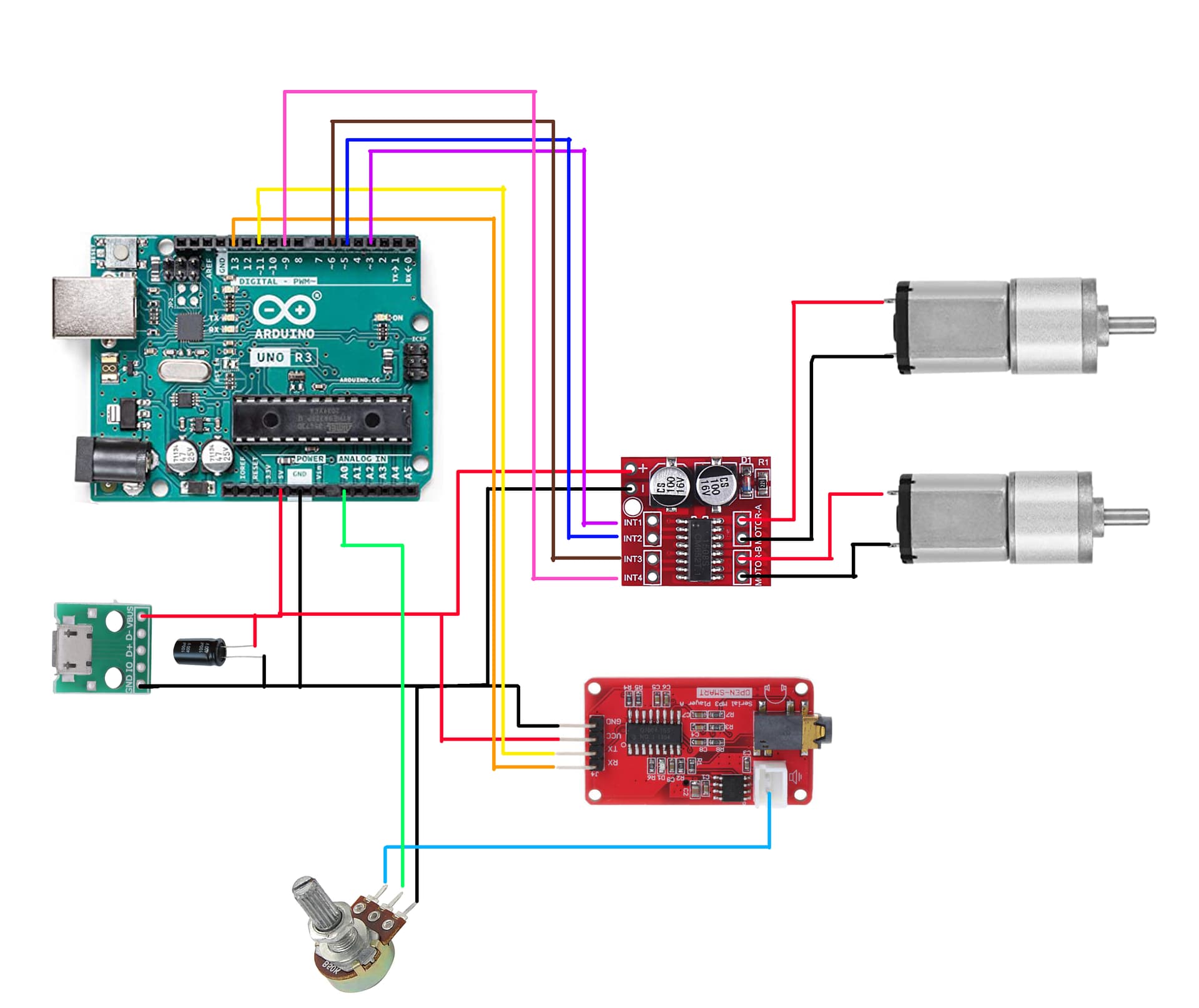
I'm using an 1000 uF capacitor with the usb breakout.
the potentiometer is logarithmic 5K.

So far i feel i'm getting close but that's not quite a success.
The mp3 file plays but the fish moves really randomly and not in sinc with the voices.

For anyone could help me, that would be a relief.
thanks

You didn't say, if that is a normal expectation for the project that everyone who builds it achieves, or whether it is an enhancement that you would like to implement.

Right now, the sound sync is really simple, it only detects a volume threshold and then executes timed motor sequences.

To sync with voice, you need to define and be able to detect voice. Many sound samples contain more than just voice, so it is not a simple matter to isolate it from the additional signals.

To get help here, you have to "float" some specific ideas and goals in that direction.

Your pot is wired up incorrectly for what you want to do.
From the wiper you need a capacitor in series to the A0 input. Then you also need a pull up and a pull down resistor of 100K wired to A0 as well. When there is no audio input reading A0 will give you a bias reading, somewhere around 512. Make a note of it.

This will bias the signal to around mid point. Then when you read the analogue input you need to take the absolute value (the abs function) of your actual reading minus this bias reading, in order to get a number that increases with increasing volume.

Thanks for your replies :slight_smile:

@anon57585045
Yes the project usually is made to sync billy bass's movements with voices ( or sounds but voices works better) to make it appear as if the fish is talking. Some people connect then this to their alexa for exemple.

The mp3 file i'm using is a recording of my voice with no other sounds, so basically a few words with pauses in between.

I'm not that familliar with the "float" formula, i'm checking right now. Do you mean that i should replace some of my expression in the code with float or does that mean I have to rework a code around the "float" expression ?

@Grumpy_Mike
If i understand, you mean that between the wiper (middle pin of the pot in my case) and A0, I should put in series : a capacitor, a resistor 100k, a switch, a switch and a 100k resistor ? in this order ?
what value of capacitor shoul i use ?

I didn't know about pull up pull down resistor. I'm checking right now but i'm not sure to understand the goal.

Oops I didn't mean that as a technical term, I meant it like "floating some ideas", i.e. "presenting ideas for thoughts and consideration"... sorry.

Do a forum and/or Google search on Arduino audio input. It's out there because it's been done 10,000 times.

The main function of an input circuit like that, is to convert the AC signal which has negative voltages that the ADC can not measure, into an AC signal that is always positive so the ADC can read it.

Technically, that will not be your hardest problem. In fact you can get peak readings without any DC offset. Your real problem (especially as you don't seem to know much about audio...) will be to develop code to interpret the input readings.

By the way, it would behoove you to curry some favour here by following the forum guidelines and posting a real, actual, schematic and not a Fritzing artwork.

:slight_smile: yeah this artwork though... i'm gonna get my hands on those schematic apps, hoping there is all the module that i use in my circuit. thanks !

I understand what you said about peak readings...
But i don't undersdtand how come the project from instructable works if only uses the connection from the pot and the ADC.

Thing is that most Instructables contain errors, so it would be more of a surprise if it actually did work.

So, as you advised me, i did some research and i understand a little bit more about audio input into arduino circuit.
I understand better what @Grumpy_Mike said about the pull up pull down resistor and the capacitor in order to DC Offset the signal.
i've also read somewhere that i should use an amplifier (a non inverting amplifier) in order to get a 5v signal. Do you confirm that ?
I guess it might be a bit difficult for me to work on this code but i'm confident i'll end up with something good

There is an alternative to using a preamplifier like you mentioned. If you select the 1.1V ADC reference, the input range is then 0-1.1V which give it more input gain. You only need to bias it to 1.1V/2 = 0.55V.

But whether you actually need it, depends on the amplitude of "Billy"'s output amplifier and the interface circuit components.

Just to be sure that i'm clear with this project, i only kept from the original billy bass objet the motors and the fish. I cut them out from the board they were attached so i won't be using the speaker or else. I was planning at the end to connect the mp3 module either to a small blutooth and minijack speakers or some computer speakers.
Does it change anything about this alternative you spoke off ?

No.

The point is that you don't know how much signal you have at the input of A0. The best way would be to measure it with an oscilloscope, then you know for sure.

The second best is to just try it and print out the values to the serial plotter. Gather 500 readings in an array, and then print out the values to the serial plotter. Don't try to print out each value as you read it as the print will delay the time between samples.

Then look at the results you get with your pot set for full volume. Then you can see the maximum spread of numbers you get. Only if these are very small do you need to consider an amplifier or using a lower Vref value.

I once did something similar with a "translator" I made. But this was only with LEDs. The mouth of the robot showed a pattern of a larger different type depending on the amplitude I measured from the sound.

The output of the MP3 module is probably very close to the 5V input range of the ADC. This is not a studio parametric measurement, it's a talking novelty. So close is good enough. But it's relatively painless to test it, so you should.

Okay so here's what i did.
i added some lines to my previous code :

int potentiometer;
int static_variable = 5;

void setup() {
  Serial.begin(9600);
}

void loop() {
  potentiometer = analogRead(A0);

  Serial.print("Variable_1:");
  Serial.print(potentiometer);
  Serial.print(",");
  Serial.print("Variable_2:");
  Serial.println(static_variable);
}

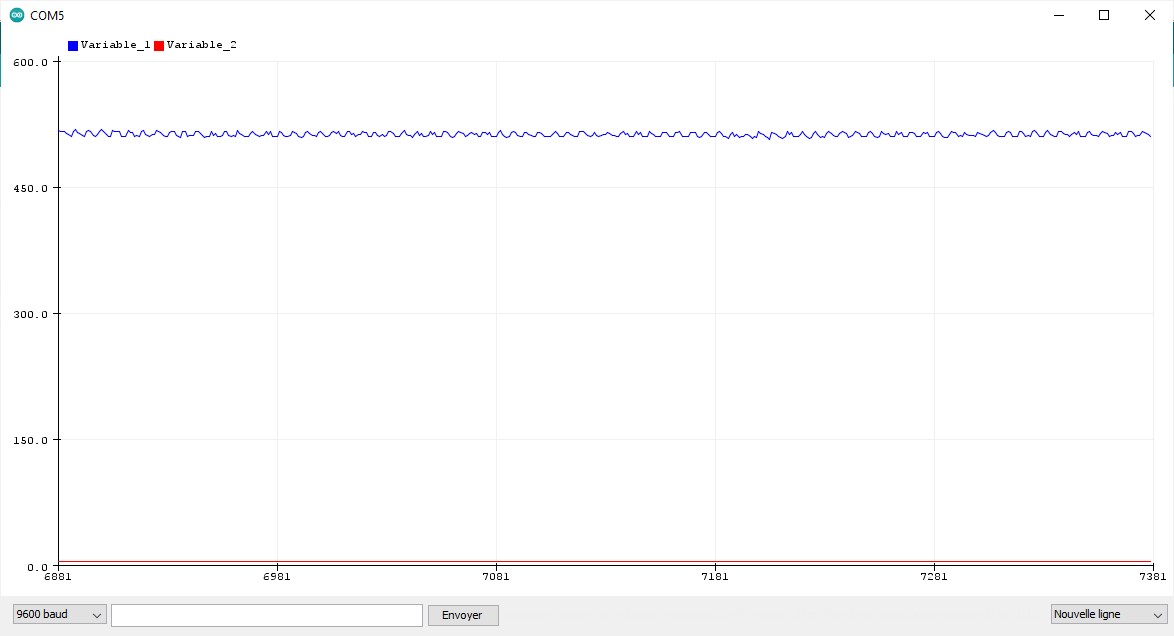
And so i got these reading for, respectively, pot first position, mid position and full position

pot haut

I'm not sure if i did this right.

So correct me if i'm wrong but in the first picture, pot at lowest position, my values are in between 0 and 2.3. But the goal here is to be close 0 to 5, right ?

or a am reading it wrong because the plotter don't show values bellow 0, hence if i just dc offset the thing, i'll be close to 0 to 5 ?

So why did you ignore this? And the thing about subtracting the normal, no audio bias input.
What you did makes a total mockery of what I told you.

Are you serious about wanting help?
If you don't understand something you are told here then say specially what it is you don't understand, ignoring advice wastes not only your time but mine as well.

Still waiting for a schematic, hand drawn is fine.

Sorry , i'm really looking for help. This is not me wanting to waste anyone's time or willing to mock, this is juste me trying hard to grasp everything you tell me, not in my mother tongue and not fully understanding the electronic and programing "language". i'm just learning little by little.

Here i don't know how to do that for example. Genuinely

We all started somewhere. There is no need to ponder or explain the reasons for being inexperienced. However, the methods for communicating in this subject are time honoured and time tested. It is futile to avoid learning how to use them.

Please post a hand drawn schematic. If you don't know how, you can find tutorials online.

Ok so here is the hand drawn schematic.

int samples [500] ; // the place to put your samples

void setup() {
  Serial.begin(9600);
}

void loop() {
for(int i = 0; i < 500; i++) {
    samples [i] = analogRead(0);
   }
for(int i = 0; i < 500; i++) {
     Serial.println(samples[i]);
   }
  delay(1000); // pause to let you see the graph you just plotted
}

If the number you get without any sound from the input is not close to 512 then you have not done the wiring like I told you to.

This is why we want a diagram showing the new way you have wired your circuit, to check you have understood how to wire it up, which given your attempt at the code you were asked to do we doubt.

Edit that is absolutely nothing like you were told to wire it up!