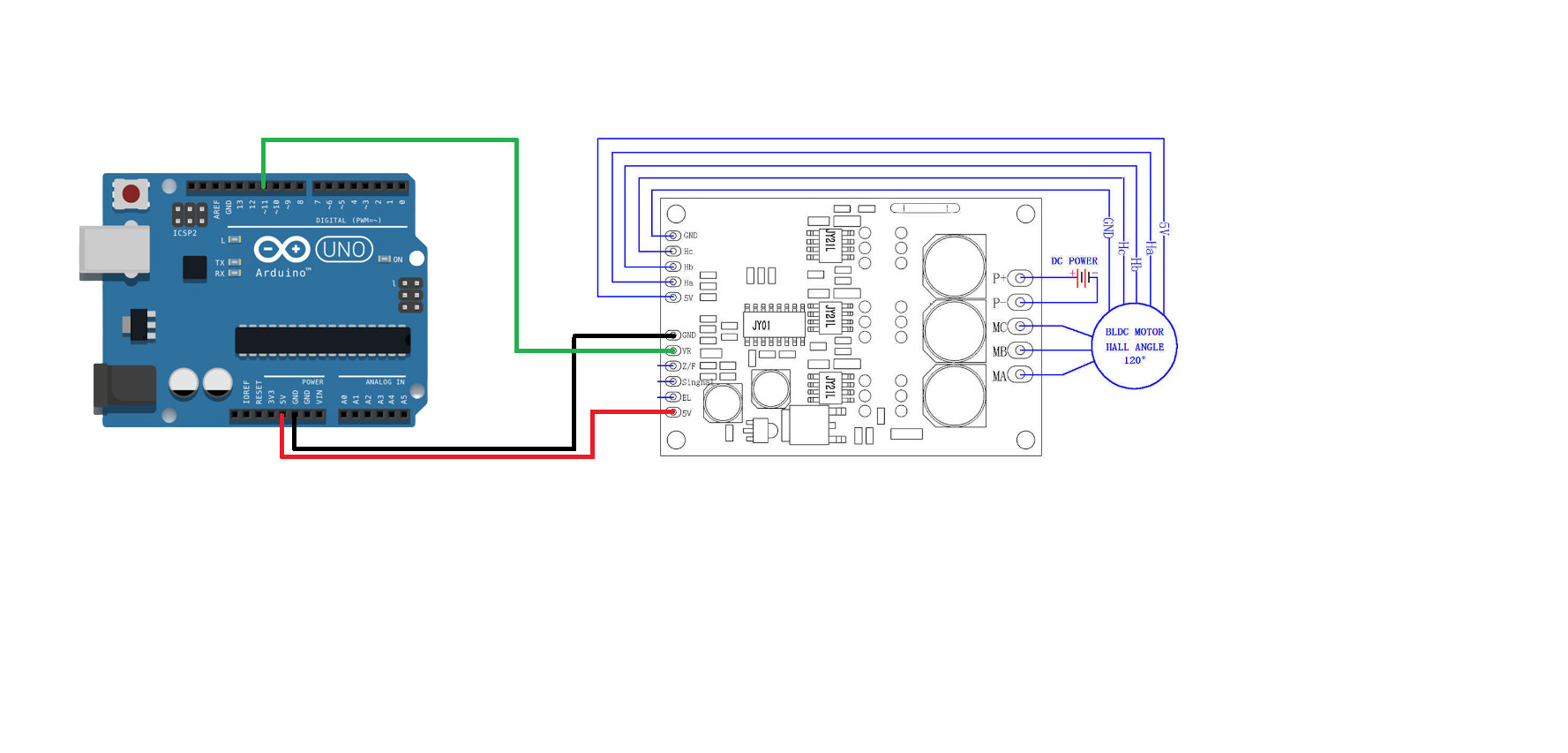
Hello, I'm trying to make a program to control the speed and duration of bldc according to the json command that I entered, the first time I used the json command the motor could run according to command but after the process was finished and I tried using the command again the second time the motor wouldn't. is there an error or someting wrong in my code? thanks
#include <ArduinoJson.h>
//{"start": true}
//{"start": false}
//{"set_rpm": 200}
//{"set_duration": 5000}
int VR = 11;

unsigned long startTime = 0;
unsigned long duration = 0;
int targetRPM = 0;
bool motorStarted = false;
bool processFinished = false;
bool manualStop = false;

void setup() {
  pinMode(VR, OUTPUT);

  Serial.begin(115200);

  Serial.println("Enter RPM and Duration before start:");
}

void loop() {
  if (Serial.available()) {
    String input = Serial.readStringUntil('\n');
    DynamicJsonDocument doc(128);
    deserializeJson(doc, input);
    if (doc.containsKey("start")) {
      bool start = doc["start"];
      if (start) {
        startMotor();
      } else {
        stopMotor();
      }
    }
    if (doc.containsKey("set_rpm")) {
      targetRPM = doc["set_rpm"];
      Serial.print("RPM : ");
      Serial.println(targetRPM);
    }
    if (doc.containsKey("set_duration")) {
      duration = doc["set_duration"];
      Serial.print("Durasi : ");
      Serial.print(duration / 1000);
      Serial.println(" detik");
    }
  }

  if (motorStarted && !manualStop && (millis() - startTime >= duration)) {
    stopMotor();
  }

  if (motorStarted && !manualStop) {
    Serial.print("Durasi: ");
    Serial.print((millis() - startTime) / 1000);
    Serial.println(" detik");
  }

  if (processFinished) {
    Serial.println("Finish");
    motorStarted = false;
    processFinished = false;
    manualStop = false;
    Serial.println("Enter JSON Command to start motor:");
  }
}

void startMotor() {
  if (motorStarted) {
    Serial.println("Motor is already running");
    return;
  }

  if (targetRPM <= 0 || duration <= 0) {
    Serial.println("Before start be sure the rpm and duration is already set");
    return;
  }

  int speed = map(targetRPM, 0, 5000, 50, 250);
  analogWrite(VR, speed);
  startTime = millis();
  motorStarted = true;
  manualStop = false;

  Serial.println("BLDC Start");
}

void stopMotor() {
  digitalWrite(VR, LOW);
  processFinished = true;
  manualStop = true;
}
don't understand how showing some prints of the duration answers my question
i see the following
Enter RPM and Duration before start:
startMotor:
 BLDC Start
stopMotor:
 Finish
Enter JSON Command to start motor:
startMotor:
 BLDC Start
stopMotor:
 Finish
Enter JSON Command to start motor:
with this code
//{"start": true}
//{"start": false}
//{"set_rpm": 200}
//{"set_duration": 5000}
int VR = 11;

unsigned long startTime = 0;
unsigned long duration = 1000;
int  targetRPM = 500;
bool motorStarted = false;
bool processFinished = false;
bool manualStop = false;

void setup() {
    pinMode(VR, OUTPUT);

    Serial.begin(115200);

    Serial.println("Enter RPM and Duration before start:");
}


void loop() {
    if (Serial.available()) {
#if 1
        char buf [80];
        Serial.readBytesUntil('\n', buf, sizeof(buf));
        if (strstr (buf, "start"))
            startMotor();
        else if (strstr (buf, "stop"))
            stopMotor();
        else if (strstr (buf, "duration")) {
            sscanf (buf, "%*s %lu", & duration);
        }

#else
        String input = Serial.readStringUntil('\n');
        DynamicJsonDocument doc(128);
        deserializeJson(doc, input);
        if (doc.containsKey("start")) {
            bool start = doc["start"];
            if (start) {
                startMotor();
            } else {
                stopMotor();
            }
        }
        if (doc.containsKey("set_rpm")) {
            targetRPM = doc["set_rpm"];
            Serial.print("RPM : ");
            Serial.println(targetRPM);
        }
        if (doc.containsKey("set_duration")) {
            duration = doc["set_duration"];
            Serial.print("Durasi : ");
            Serial.print(duration / 1000);
            Serial.println(" detik");
        }
#endif
    }

    if (motorStarted && !manualStop && (millis() - startTime >= duration)) {
        stopMotor();
    }

#if 0
    if (motorStarted && !manualStop) {
        Serial.print("Durasi: ");
        Serial.print((millis() - startTime) / 1000);
        Serial.println(" detik");
    }
#endif

    if (processFinished) {
        Serial.println(" Finish");
        motorStarted    = false;
        processFinished = false;
        manualStop      = false;
        Serial.println("Enter JSON Command to start motor:");
    }
}

// -----------------------------------------------------------------------------
void startMotor() {
    Serial.println ("startMotor:");

    if (motorStarted) {
        Serial.println(" Motor is already running");
        return;
    }

    if (targetRPM <= 0 || duration <= 0) {
        Serial.println(" Before start be sure the rpm and duration is already set");
        return;
    }

    int speed = map(targetRPM, 0, 5000, 50, 250);
    analogWrite(VR, speed);
    startTime = millis();
    motorStarted = true;
    manualStop   = false;

    Serial.println(" BLDC Start");
}

// -----------------------------------------------------------------------------
void stopMotor() {
    Serial.println ("stopMotor:");
    digitalWrite(VR, LOW);
    processFinished = true;
    manualStop = true;
}
sorry, i mean i want the motor to start running again when the first process is already done. But every time i enter the json again after the first process is done the motor wont run until i reupload the code.