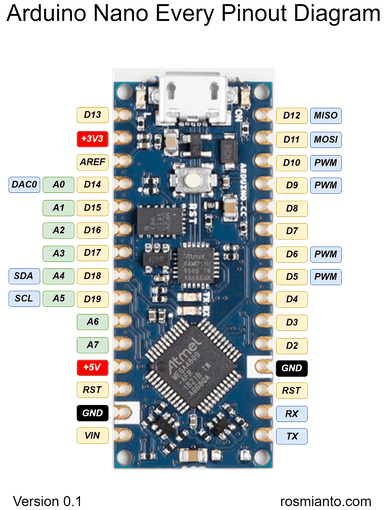
Hey Guys,
So I'm trying to get 2 Arduino Nano Every's to communicate via BlueSmirf Silver Bluetooth (RN-42) units. Using the serial monitor on the master unit (display unit), the communication seems to get hung up on the BTInit() and no connection is established. Any help is greatly appreciated.
Display Code - master and receiver:
Display Code:
#include <Wire.h>
#include <Adafruit_GFX.h>
#include <Adafruit_SSD1306.h>
#include <SD.h>

#define OLED_ADDRESS 0x3C
Adafruit_SSD1306 display(OLED_ADDRESS);

int msgToken = 0;

int incomingByte = 0;
int angle = 0;
char gBtMsg[256];
char gBTAdr[13];
char gBtCmd[256];

int gBtKnownMACTotal = 2;
char* gBtKnownMAC[2];  //This is set to hold only two MAC adresses

//File gLogFile;
void SdInitLog(void) {
  SD.begin(10);
}

void SdLog(char* i_pBtCmd) {
  if (strlen(i_pBtCmd) > 0) {
    File gLogFile = SD.open("btlog.txt", FILE_WRITE);
    if (gLogFile) {
      gLogFile.println(i_pBtCmd);
      gLogFile.close();
    }
  }
}

void BtReceive(void) {
  bool keepReading = true;
  int index = 0;

  gBtMsg[0] = '\0';

  while (keepReading) {
    keepReading = false;

    if (Serial.available() > 0) {
      // read the incoming byte:
      incomingByte = Serial.read();
      if (incomingByte != 13) {
        gBtMsg[index++] = incomingByte;
        keepReading = true;
      }
    }
  }

  gBtMsg[index] = '\0';
}

void BtSend(char* i_pBtCmd, bool i_ln = true) {

  if (i_ln) {
    Serial.println(i_pBtCmd);
  } else {
    Serial.print(i_pBtCmd);
  }

  delay(100);
  BtReceive();
}
void BtInit(void) {

  bool btConnect = false;


  gBtKnownMAC[0] = "0006664346C1";  // Change this to one of your MAC addresses
  gBtKnownMAC[1] = "00066643475A";  // and this one too

  SdInitLog();
  SdLog("#### start ####");

  Serial.begin(115200);
  BtSend("$$$", false);
  delay(1000);


  SdLog(">>>> Set To Master <<<<");

  BtSend("SM,1");
  delay(1000);
  BtSend("I,5");
  BtSend("---");

  while (!btConnect) {
    delay(100);
    BtReceive();
    int msgLen = strlen(gBtMsg);
    if (msgLen > 0) {

      if (msgLen >= 12) {
        char* doneMsg = &gBtMsg[msgLen - 12];

        gBtMsg[12] = '\0';
        bool foundKnownMAC = false;

        for (int i = 0; i < gBtKnownMACTotal && !foundKnownMAC; i++) {
          if (!strcmp(gBtMsg, gBtKnownMAC[i])) {
            foundKnownMAC = true;
          }
        }

        if (!strcmp(doneMsg, "Inquiry Done")) {

          SdLog(doneMsg);

          if (foundKnownMAC) {
            gBtCmd[0] = 'C';
            gBtCmd[1] = ',';

            for (int i = 0; i < 12; i++) {
              gBtCmd[i + 2] = gBtMsg[i];
            }

            gBtCmd[15] = '\0';

            BtSend("$$$", false);
            BtSend(gBtCmd);
            BtSend("---");

            delay(2000);


            while (!btConnect) {
              delay(1000);
              BtSend("$$$", false);
              BtSend("GK");

              int numVal = 0;

              if (strlen(gBtMsg) > 0) {
                numVal = atoi(gBtMsg);
              }

              if (numVal == 1) {
                btConnect = true;
                SdLog("Is connected !!!!!!");
              }
              BtSend("---");
            }
          }
        }
      }
    }
  }


  msgToken = 1;


  SdLog("#### end ####");
}

void setup() {
  BtInit();

  delay(500);

  display.begin(SSD1306_SWITCHCAPVCC, OLED_ADDRESS);
  display.clearDisplay();
  display.setTextSize(2);
  display.setTextColor(SSD1306_WHITE);
  display.setCursor(32, 0);
  display.display();
}

void receiveMsg() {
  int angle;
  if (Serial.available() > 0) {
    // read the incoming byte:
    incomingByte = Serial.read();
    if (incomingByte == 'R') {
      delay(50);
    } else {
      angle = incomingByte;
    }
  }

  delay(100);
}

void sendMsg() {

  delay(50);
  Serial.print("R");

  delay(50);
  Serial.print("R");

  delay(50);

  Serial.print("R");
}

void loop() {

  display.clearDisplay();
  display.setCursor(32, 0);
  display.print("Angle: ");
  display.print(angle);
  display.display();

  Serial.println(angle);
  delay(100);
}
Transmitter Code - slave and sensor read:
#include <SD.h>

int msgToken = 0;

int incomingByte = 0;
char gBtMsg[256];
char gBTAdr[13];
char gBtCmd[256];

int gBtKnownMACTotal = 2;
char* gBtKnownMAC[2];  //This is set to hold only two MAC adresses

//File gLogFile;

int pinA = 3;  // Connected to CLK on KY-040
int pinB = 4;  // Connected to DT on KY-040
int encoderPosCount = 0;
int pinALast;
int aVal;
boolean bCW;
float conv_ang = 0.1;
float angle;

void SdInitLog(void) {
  SD.begin(10);
}

void SdLog(char* i_pBtCmd) {
  if (strlen(i_pBtCmd) > 0) {
    File gLogFile = SD.open("btlog.txt", FILE_WRITE);
    if (gLogFile) {
      gLogFile.println(i_pBtCmd);
      gLogFile.close();
    }
  }
}

void BtReceive(void) {
  bool keepReading = true;
  int index = 0;

  gBtMsg[0] = '\0';

  while (keepReading) {
    keepReading = false;

    if (Serial.available() > 0) {
      // read the incoming byte:
      incomingByte = Serial.read();
      if (incomingByte != 13) {
        gBtMsg[index++] = incomingByte;
        keepReading = true;
      }
    }
  }

  gBtMsg[index] = '\0';
}

void BtSend(char* i_pBtCmd, bool i_ln = true) {

  if (i_ln) {
    Serial.println(i_pBtCmd);
  } else {
    Serial.print(i_pBtCmd);
  }

  delay(100);
  BtReceive();
}


void BtInit(void) {

  bool btConnect = false;


  gBtKnownMAC[0] = "0006664346C1";  // Change this to one of your MAC addresses
  gBtKnownMAC[1] = "00066643475A";  // and this one too

  SdInitLog();
  SdLog("#### start ####");

  Serial.begin(115200);
  BtSend("$$$", false);


    SdLog(">>>> Set To Slave <<<<");
    BtSend("SM,0");
    BtSend("---");

    while (!btConnect) {
      delay(1000);

      BtSend("$$$", false);
      BtSend("GK");

      int numVal = 0;

      if (strlen(gBtMsg) > 0) {
        numVal = atoi(gBtMsg);
      }

      if (numVal == 1) {
        btConnect = true;
        SdLog("Is connected !!!!!!");
      }

      BtSend("---");
    }


  SdLog("#### end ####");
}

void setup() {
  pinMode(pinA, INPUT);
  pinMode(pinB, INPUT);
  /* Read Pin A Whatever state it's in will reflect the last position */
  pinALast = digitalRead(pinA);

  delay(500);

  BtInit();
}

void receiveMsg() {
  for (int i = 0; i < 10; i++) {
    if (Serial.available() > 0) {
      // read the incoming byte:
      incomingByte = Serial.read();
      if (incomingByte == 'R') {

        delay(50);
      }
    }

    delay(100);
  }
}

void sendMsg() {

  delay(50);
  Serial.print("R");

  delay(50);
  Serial.print("R");

  delay(50);

  Serial.print("R");
}

void loop() {
  aVal = digitalRead(pinA);
  if (aVal != pinALast) {
    // Means the knob is rotating
    // if the knob is rotating, we need to determine direction
    // We do that by reading pin B.
    if (digitalRead(pinB) != aVal) {
      // Means pin A Changed first - We're Rotating Clockwise.
      encoderPosCount++;
      bCW = true;
    } else {
      // Otherwise B changed first and we're moving CCW
      bCW = false;
      encoderPosCount--;
    }
    angle = encoderPosCount * conv_ang;

    Serial.print("Angle transmitted: ");
    Serial.println(angle);
    BtSendAngle(angle);
  }
  pinALast = aVal;
  //delay(50);
}

void BtSendAngle(float angle)
{
  char angleStr[10];
  dtostrf(angle, 4, 2, angleStr);
  strcat(angleStr, "\n");
  BtSend(angleStr, false);
}