Dear Arduino Forum,
I need your help regarding my current development project. The project looks like this:
I have an Arduino Uno hooked up to a HC-05 Bluetooth breakout board on PINs 2 and 3 by using software serial. I also have an app built with MIT App Inventor that I want to use to control the Arduino from my smartphone. Later the Uno will also open and close four Relais and handle three LEDs plus a stepper motor driver but right now that is not important.
My problem lies in the communication between app and Arduino or in how to handle the serial data.
Before somebody asks: Yes, I know the HC-05 only wants 3.3V ... I put a voltage divider in the circuit to make sure of it and testet the breakout board several times with a simpler app on baud rate 9600, it works perfectly.
I think it would be best to just hop in, so here is my code:
//TESTCODE for ARDUINO UNO


// add serial communiction port
#include <SoftwareSerial.h>
SoftwareSerial SecSerial(2,3);          // RX | TX extra ports


const int tx = 15;                      // amount of Array values
long txArray[tx] = {0,0,0,0,0,0,0,0,0,0,0,0,0,0,0};   // at the start array shall contain only zeros


// test code only uses the DPIN13 LED and skipps the relais and stepper motor driver module
const int LED13 = 13;
int i;                                  // for-loop integer
bool DataWaiting = false;               // Array beschrieben aber noch nicht ausgewertet


void setup()
{
    SecSerial.begin(9600);              // start Bluetooth Serial on D2 & D3 with rate 9600
    Serial.begin(9600);                 // start Standard Serial on D0 & D1 with rate 9600


    pinMode(LED13, OUTPUT);             // OUTPUT for DPIN 13 possible

    SecSerial.setTimeout(50);           // ends reading time for the second serial
    // tested just "Serial." and I tested the code with this line at all but no effect

    Serial.println("started");          // info that setup complete
}


void loop()
{
    DataTransfer();


    if (DataWaiting == true)            // if there is data to iterate then:
    {
        for (i = 0; i < tx; i++)        // start for loop to iterate the array data
        {
             if (i % 2 == 0)            // for 0,2,4,6,8,10,12,14 of the Arrays (ZEROINDEX)
             {
                 ExampleFunctionA(i);   // start ExampleFunctionA
             }

             else if (i % 2 == 0)       // for 1,3,5,7,9,11,13 of the Arrays (ZEROINDEX)
             {
                 ExampleFunctionB(i);   // start ExampleFunctionB
             }


             else if (i == 15)          // for loop complete: [i is now 15]
             {
                 long txArray[tx] = {0,0,0,0,0,0,0,0,0,0,0,0,0,0,0};     //Array zurücksetzen

                 DataWaiting = false;               // there is no more data to iterate
                 digitalWrite(LED13,LOW);           // LED13 OFF because no more data to iterate
                 delay(10000);                      // Cooldown, all processes finished nothing more to do
             }
        }
    }
}


void DataTransfer()
{
    if (Serial.available())
    {
        txArray[0]  = Serial.parseInt();  // take first Integer and save on Array
        txArray[1]  = Serial.parseInt();  // take following Integer and save on Array
        txArray[2]  = Serial.parseInt();  // take following Integer and save on Array
        txArray[3]  = Serial.parseInt();  // take following Integer and save on Array
        txArray[4]  = Serial.parseInt();  // take following Integer and save on Array
        txArray[5]  = Serial.parseInt();  // take following Integer and save on Array
        txArray[6]  = Serial.parseInt();  // take following Integer and save on Array
        txArray[7]  = Serial.parseInt();  // take following Integer and save on Array
        txArray[8]  = Serial.parseInt();  // take following Integer and save on Array
        txArray[9]  = Serial.parseInt();  // take following Integer and save on Array
        txArray[10] = Serial.parseInt();  // take following Integer and save on Array
        txArray[11] = Serial.parseInt();  // take following Integer and save on Array
        txArray[12] = Serial.parseInt();  // take following Integer and save on Array
        txArray[13] = Serial.parseInt();  // take following Integer and save on Array
        txArray[14] = Serial.parseInt();  // take following Integer and save on Array

     // App sends "\n" now as info that it's end of transmission

        if (SecSerial.read() == '\n')     // if last Byte \n stop reading and send 'd' for done to App
        {
            Serial.flush();               // clear all other commands piled in the buffer
            SecSerial.flush();            // clear all other commands piled in the secondary buffer
            // don't know which one so I chose both

            Serial.print('d');            // send completion of the command
            // does that have to be "SecSerial." ??


            DataWaiting = true;           // there is data to use
            digitalWrite(LED13,HIGH);     // LED 13 ON, because there's data now
        }
    }
}


void ExampleFunctionA(int tAx)
{
    int t_App = txArray[tAx];             // needed time from array
    int t_milli = t_App * 1000;           // time in milliseconds

    Serial.println("Start Example A");    // info that process begins
    Serial.println(tAx);                  // info that process begins


    delay(t_milli);                       // block till time is up
    // in complete code a relais opens and the motor turns for time t_milli


    Serial.println("Example A finished");   // info that process ended
    Serial.println(tAx);                    // info that process ended


    t_App = 0;                            // set back time variables to be sure nothing bad happens
    t_milli = 0;                          // set back time variables to be sure nothing bad happens

    delay(2000);                          // short Time-Out for the Arduino to get some digital snacks
}


void ExampleFunctionB(int tAx)
{
    int t_App = txArray[tAx];             // needed time from array
    int t_milli = t_App * 1000;           // time in milliseconds


    Serial.println("Start Example B");    // info that process begins
    Serial.println(tAx);                  // info that process begins


    delay(t_milli);                       // block till time is up
    // in complete code a relais opens and the motor turns for time t_milli


    Serial.println("Example B finished");   // info that process ended
    Serial.println(tAx);                    // info that process ended


    t_App = 0;                            // set back time variables to be sure nothing bad happens
    t_milli = 0;                          // set back time variables to be sure nothing bad happens

    delay(2000);                          // short Time-Out for the Arduino to get even more digital snacks
}
When I run this code, open the serial monitor and send data from the app, nothing is happening in the serial monitor. The LED on PIN 13 doesn't light up either. Something with the communication does ot work or the data is not handled properly. The program seems to never reach the second if-loop in the DataTransfer function.
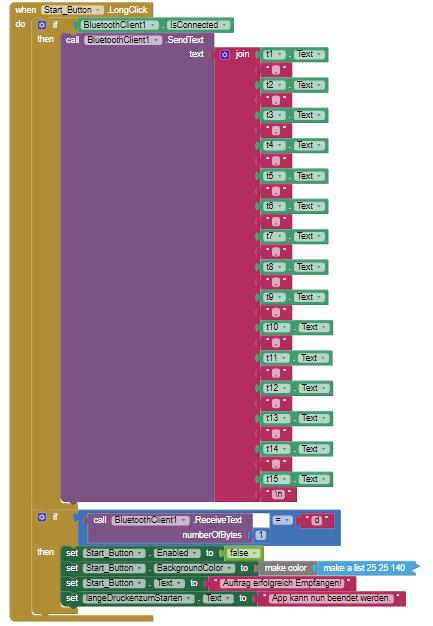
To fully understand he problem, you of course need to know what my app is doing. I have attached two pictures from App Inventor that show how the values are calculated and how they are send. They are at the end of my post. 
I have to admit I'm not completely understanding the topic serial communication, but I have seen a similar solution on instructables with sliders and the robot arm:
It is currently quite late in Germany. But I hope that I have explained my problem in a recognizable way and have not made any obvious mistakes.
I thank you for your time and hope that you can help me.
Have a pleasant evening/day!