Button taking too long to register

Hi, I'm having a problem with my Arduino mega, when i press any button it takes too long to register (1 second) but i need it to register instantly.
I need it to register fast because it will be inside a pinball machine and the ball won't touch it for long.

The code:

#include <Servo.h>

#define SWC1 2
#define SWC2 4
#define SWC3 6
#define SWC4 8
#define SWC5 9
#define LED1 3
#define LED2 5
#define LED3 7
#define SERVO1 10

Servo servo1;

void setup() {
  servo1.attach(SERVO1);
  pinMode(SWC1, INPUT);
  pinMode(SWC2, INPUT);
  pinMode(SWC3, INPUT);
  pinMode(SWC4, INPUT);
  pinMode(SWC5, INPUT);
  pinMode(LED1, OUTPUT);
  pinMode(LED2, OUTPUT);
  pinMode(LED3, OUTPUT);
  resetBersaglio();
  
}
bool statoLed1 = false;
bool statoLed2 = false;
bool statoLed3 = false;

void loop() {

   if(digitalRead(SWC1) == LOW) {
    statoLed1 = true;
    }
  if(digitalRead(SWC2) == LOW) {
    statoLed2 = true;
    }
  if(digitalRead(SWC3) == LOW) {
    statoLed3 = true;
    }
  if(statoLed1 == true) {
    digitalWrite (LED1, HIGH);
    }
  if(statoLed2 == true) {
    digitalWrite (LED2, HIGH);
    }
  if(statoLed3 == true) {
    digitalWrite (LED3, HIGH);
    }

  if(statoLed1 == true && statoLed2 == true && statoLed3 == true) { 
    delay (500);
    for (int i = 1; i <=3; i++) {
      digitalWrite (LED1, LOW);
      digitalWrite (LED2, LOW);
      digitalWrite (LED3, LOW);
      delay (250);
      digitalWrite (LED1, HIGH);
      digitalWrite (LED2, HIGH);
      digitalWrite (LED3, HIGH);
      delay (250);
    }

       
    digitalWrite (LED1, LOW);
    digitalWrite (LED2, LOW);
    digitalWrite (LED3, LOW);
    statoLed1 = false ;
    statoLed2 = false ;
    statoLed3 = false ;
  }

  if(digitalRead(SWC4) == HIGH && digitalRead(SWC5) == HIGH ) {
    resetBersaglio();
    servo1.write(0);
        
    }
   
}


void resetBersaglio() {
  servo1.write(65);
  delay(500);
  servo1.write(0);
  }

Does any of you know how to make the button register any faster?

What do you expect with all the delays?

You need to get rid of those and/or check for button press more often.

For extra information and examples look at

2 Likes

Hello tommy445

Welcome to the worldbest Arduino forum ever.

I´v made a small code review.

It seems to be a robot generated code.

In general - Arrays and structs are your friends.
Don't duplicate code in your sketch. Write code once - use it multiple times.
You should not use magic numbers or magic names. The I/O pins love to have a functional name.

Do you have experience with programming in C++?

The task can easily be realised with an object.
A structured array contains all information, such as pin addresses for the I/O devices, as well as the information for the timing.
A single service takes care of this information and initiates the intended action.
The structured array makes the sketch scalable until all I/O pins are used up without having to adapt the code for the service.
It is cool stuff, isn´t it?

Have a nice day and enjoy coding in C++.

How are buttons connected to input pins? How are input pins pulled up or down?

2 Likes

We need a schematic

Hi again, thanks to the people that answered.
J-M-L, the delays aren't the problem because they are executed only after all the button are pressed.
paulpaulson, the code is probably bad but not robot generated, thanks for the coding advice but using arrays didn't fix my problem.
JCA34F, The buttons are some yl-99, they just have an output that goes low when i press the button.
johnerrington, i understand that schematics are needed to help in some cases but in my case it wound't help since it's just 3 buttons and 3 leds conects directly to arduino pins.
I think the solution is something like interrupts.

These?

So, switch with integrated resistor for pullup/down. No debounce capacitance.

How are you activating them simultaneously, that you have determined you have too long a delay?

do you think the ball is waiting until the action is done before going to touch something else.. ?
if you are simulating it, when are you seeing the lag? when nothing is happening?
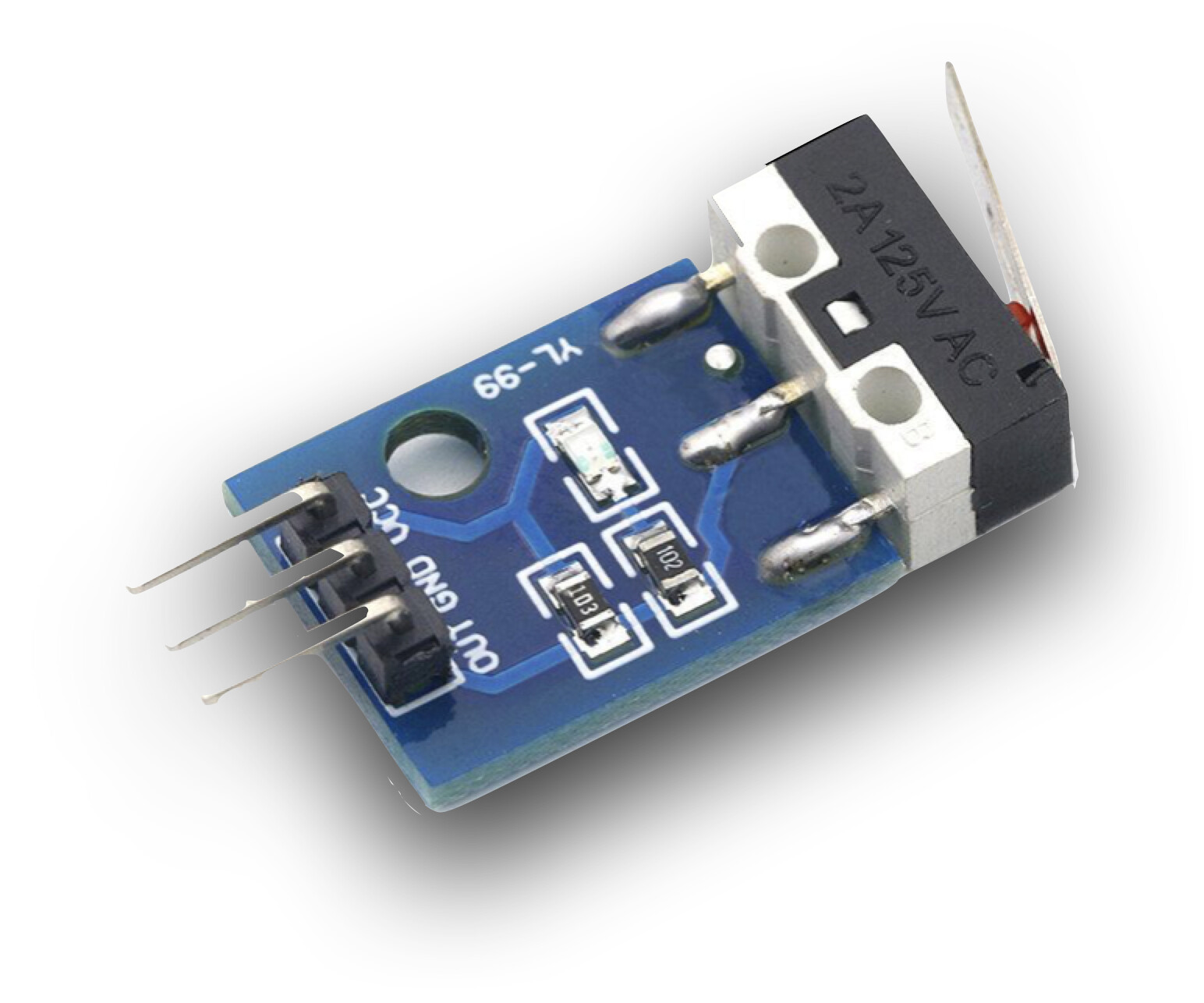
do you have external pullup resistors?

Yes They Are. Read what J-M-L provided

What holds them high when not pressed? Are there pull-up resistors in your circuit?

Your problems are obvious. Listen to these guys, do as they say and they will help you through it.

All of us do. Get rid of the delays, wire the button to ground and use pullup resistors, or declare the button pin INPUT_PULLUP.

Use millis() to replace delay for timed actions. See https://www.baldengineer.com/blink-without-delay-explained.html

try this code and open the serial monitor at 115200 bauds

#define SWC1 2
#define SWC2 4
#define SWC3 6
#define SWC4 8
#define SWC5 9

struct {
  const char * name;
  const byte pin;
  int oldState;
} buttons[] = {
  {"SWC1", SWC1, 255},
  {"SWC2", SWC2, 255},
  {"SWC3", SWC3, 255},
  {"SWC4", SWC4, 255},
  {"SWC5", SWC5, 255},
};

void setup() {
  Serial.begin(115200);
  for (auto& b : buttons) pinMode(b.pin, INPUT);
}

void loop() {
  for (auto& b : buttons) {
    int newState = digitalRead(b.pin);
    if (newState != b.oldState) {
      Serial.print(b.name);
      Serial.print(F(" is now "));
      Serial.println(newState == HIGH ? F("HIGH") : F("LOW"));
      b.oldState = newState;
    }
  }
}

what do you see when you press the buttons?

does it register fast?
do you see bouncing? (multiple triggers for one press)

you have not confirmed if your button looks like this

This topic was automatically closed 180 days after the last reply. New replies are no longer allowed.