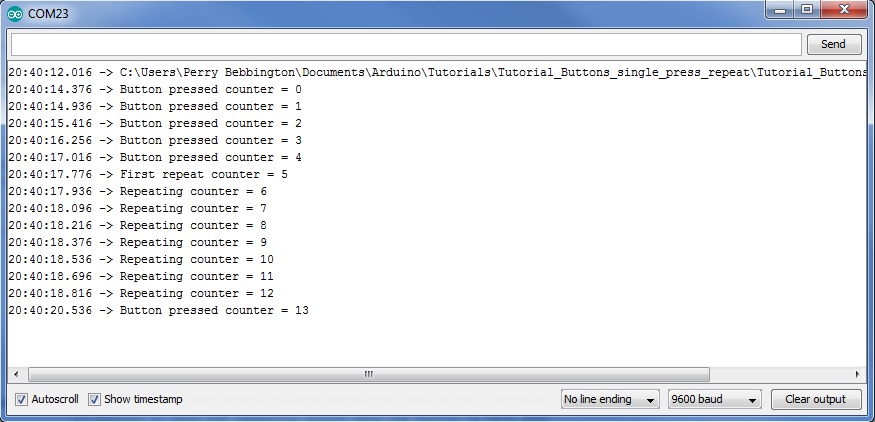
Output on press then repeat while button is held
This code sends "Button has been pressed" to the serial monitor when the button becomes pressed then repeats while the button is held. To make it obvious what is happening I have included a counter that increments if the button is held down. You can vary the time before the repeating starts and you can vary the interval between each repeat. This version includes a state machine in the Buttons function.
/* Simple debounce for a single push to make button wired between ground (0V) and buttonPin */
/* This version sends "Button has been pressed" to the serial monitor when the button becomes pressed */
/* then repeats as long as the button is held down. Includes a counter to make it clear what is happening */
/* The function Buttons in this tutorial is constructed as a state machine */

const uint8_t BUTTONPIN = 2;          // Input for button. On many Arduinos pins 0 and 1 are used for serial making pin 2 the first free pin.

void setup() {
  Serial.begin(9600);                 // Start the serial monitor to see the results.
  char fileName[] = {__FILE__};
  Serial.println(fileName);           // Prints the name of the file the location this sketch is in.
  pinMode(BUTTONPIN, INPUT_PULLUP);   // Make the button pin an input with the internal pull up resistor enabled.
}

void loop() {
  Buttons();                          // Calls the function to read the button.
  // Your other code goes here, make sure it is non blocking (no delays, no loops that don't exit quickly)
}

/* This is the function that reads the state of the button, debounces it and prints to the serial monitor when it detects a press and then repeats after a delay */
void Buttons() {
  #define buttonPressed LOW                                     // When the button is pressed the input will be low, this is to remove the confusion this migth cause.
  uint32_t currentMillis = millis();                            // Millis times uses to for debouncing and timing repeats
  static uint32_t lastMillis;                                   // Start of timeouts
  const uint32_t BOUNCETIMEOUT = 20;                            // Debounce time in milliseconds
  const uint32_t REPEATDELAY = 750;                             // Delay before button repeats
  const uint32_t REPEATINTERVAL = 150;                          // Interval between each repeat
  bool currentButtonState = digitalRead(BUTTONPIN);             // Reads the current state of the button and saves the result in a bool
  static uint8_t state = 0;                                     // Holds the current state of the button as per states
  enum states {notPressed, debouncing, firstRepeat, repeating}; // Differnt states the button can be in
  static uint8_t counter = 0;                                   // Counter to show the repeating output when the button is held down

  if(currentButtonState == buttonPressed) {
    switch (state) {
      case notPressed:
        lastMillis = currentMillis;
        state = debouncing;
        break;
      case debouncing:
        if (currentMillis - BOUNCETIMEOUT >= lastMillis) {
          lastMillis = currentMillis;
          state = firstRepeat;
          Serial.print("Button pressed counter = ");            // First detection of button pressed after bounceTimeout time has expired, put your own code here
          Serial.println(counter);
          ++counter;
        }
        break;
      case firstRepeat:
        if (currentMillis - REPEATDELAY >= lastMillis) {
          lastMillis = currentMillis;
          state = repeating;
          Serial.print("First repeat counter = ");            // First repeat, put your own code here
          Serial.println(counter);
          ++counter;
        }
        break;
      case repeating:
        if (currentMillis - REPEATINTERVAL >= lastMillis) {
          lastMillis = currentMillis;
          Serial.print("Repeating counter = ");               // Second and subsequent repeats, put your own code here
          Serial.println(counter);
          ++counter;
        }
        break;
    }
  } else {
    state = notPressed;
  }
}
This is what you can expect on the serial monitor