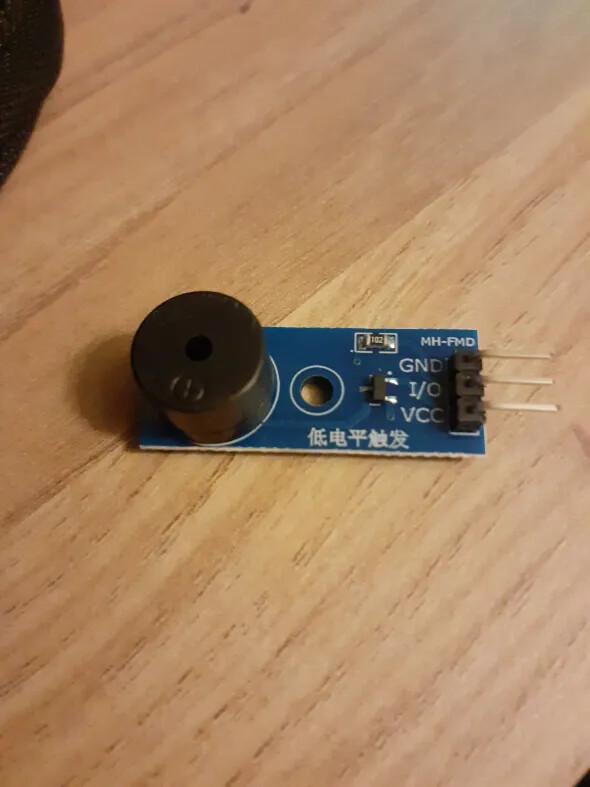
I am trying to use the ezBuzzer library to play a melody using a buzzer module, but instead there’s just a very very faint whirring noise. I have triple checked that VCC connects to 5V (I have also tried 3V), that GND connects to ground and that IO connects to D8. At one point it worked fine but I no longer have access to the code I used to see what’s different.
Here’s the relevant code:
#include <ezBuzzer.h>

ezBuzzer buzzer(8);
int knife[] = {
  NOTE_GS1, NOTE_GS1, NOTE_GS1, NOTE_GS1, NOTE_GS1, 0, NOTE_GS1, NOTE_GS1, NOTE_GS1, NOTE_GS1, NOTE_GS1, NOTE_GS1, NOTE_GS1, NOTE_A1, NOTE_AS1, NOTE_B1
};
int knifeLength[] = {
  24, 24, 24, 24, 24, 24, 24, 24, 24, 24, 24, 24, 24, 24, 24, 20
};
int noteLength;

void setup() {
  noteLength = sizeof(knifeLength) / sizeof(int);
}

void loop() {
  if (buzzer.getState() == BUZZER_IDLE) {
    Serial.print("how alarming");
    Serial.print(buzzer.getState());
    buzzer.playMelody(knife, knifeLength, noteLength);
  }
}
The full script is much longer, but it’s possible that the issue is somewhere there so I have made it collapsible
Full script
// Controller for Buttons, Buzzer and I2C

#include <Wire.h>
#include <ezBuzzer.h>

// Buttons
#define Button1 2
#define Button2 4
#define Button3 6

int button1State = 0;
int button2State = 0;
int button3State = 0;

bool button1Trigger = false;
bool button2Trigger = false;
bool button3Trigger = false;

#define Button4 0
#define Button5 2
#define Button6 6

int button4State = 0;
int button5State = 0;
int button6State = 0;

bool button4Trigger = false;
bool button5Trigger = false;
bool button6Trigger = false;

// Buzzer sounds
ezBuzzer buzzer(8);
int knife[] = {
  NOTE_GS1, NOTE_GS1, NOTE_GS1, NOTE_GS1, NOTE_GS1, 0, NOTE_GS1, NOTE_GS1, NOTE_GS1, NOTE_GS1, NOTE_GS1, NOTE_GS1, NOTE_GS1, NOTE_A1, NOTE_AS1, NOTE_B1
};
int knifeLength[] = {
  24, 24, 24, 24, 24, 24, 24, 24, 24, 24, 24, 24, 24, 24, 24, 20
};
int noteLength;

void setup() {
  // Set up buttons
  pinMode(Button1, INPUT);
  pinMode(Button2, INPUT);
  pinMode(Button3, INPUT);
  pinMode(Button4, INPUT);
  pinMode(Button5, INPUT);
  pinMode(Button6, INPUT);

// Does this
  noteLength = sizeof(knifeLength) / sizeof(int);
// Start I2C
  Wire.begin();
  Serial.begin(9600);
}

void loop() {
  // Read buttons
  button1State = digitalRead(Button1);
  button2State = digitalRead(Button2);
  button3State = digitalRead(Button3);
  button4State = analogRead(Button4);
  button5State = analogRead(Button5);
  button6State = analogRead(Button6);

  // Serial.print(button1Trigger, "\n");
  // button 1 data sender
  if (button1State == 1 and not button1Trigger) {
    Wire.beginTransmission(9);
    Wire.write(10);
    Wire.endTransmission();
    button1Trigger = true;
  } else if (button1State == 0 and button1Trigger) {
    Wire.beginTransmission(9);
    Wire.write(1);
    Wire.endTransmission();
    button1Trigger = false;
  }
  // button 2 data sender
  if (button2State == 1 and not button2Trigger) {
    Wire.beginTransmission(9);
    Wire.write(20);
    Wire.endTransmission();
    button2Trigger = true;
  } else if (button2State == 0 and button2Trigger) {
    Wire.beginTransmission(9);
    Wire.write(2);
    Wire.endTransmission();
    button2Trigger = false;
  }
  // button 3 data sender
  if (button3State == 1 and not button3Trigger) {
    Wire.beginTransmission(11);
    Wire.write(30);
    Wire.endTransmission();
    button3Trigger = true;
  } else if (button3State == 0 and button3Trigger) {
    Wire.beginTransmission(11);
    Wire.write(3);
    Wire.endTransmission();
    button3Trigger = false;
  }
  // button 4 data sender
  if (button4State >= 30 and not button4Trigger) {
    Wire.beginTransmission(11);
    Wire.write(40);
    Wire.endTransmission();
    button4Trigger = true;
  } else if (button1State <= 30 and button4Trigger) {
    Wire.beginTransmission(11);
    Wire.write(4);
    Wire.endTransmission();
    button4Trigger = false;
  }

  // if (button5State >= 30 and button6State <= 30 and buzzer.getState() == BUZZER_IDLE) {
  if (buzzer.getState() == BUZZER_IDLE) {
    Serial.print("how alarming");
    Serial.print(buzzer.getState());
    buzzer.playMelody(knife, knifeLength, noteLength);
  }
}
I am using an Arduino Nano if that helps.