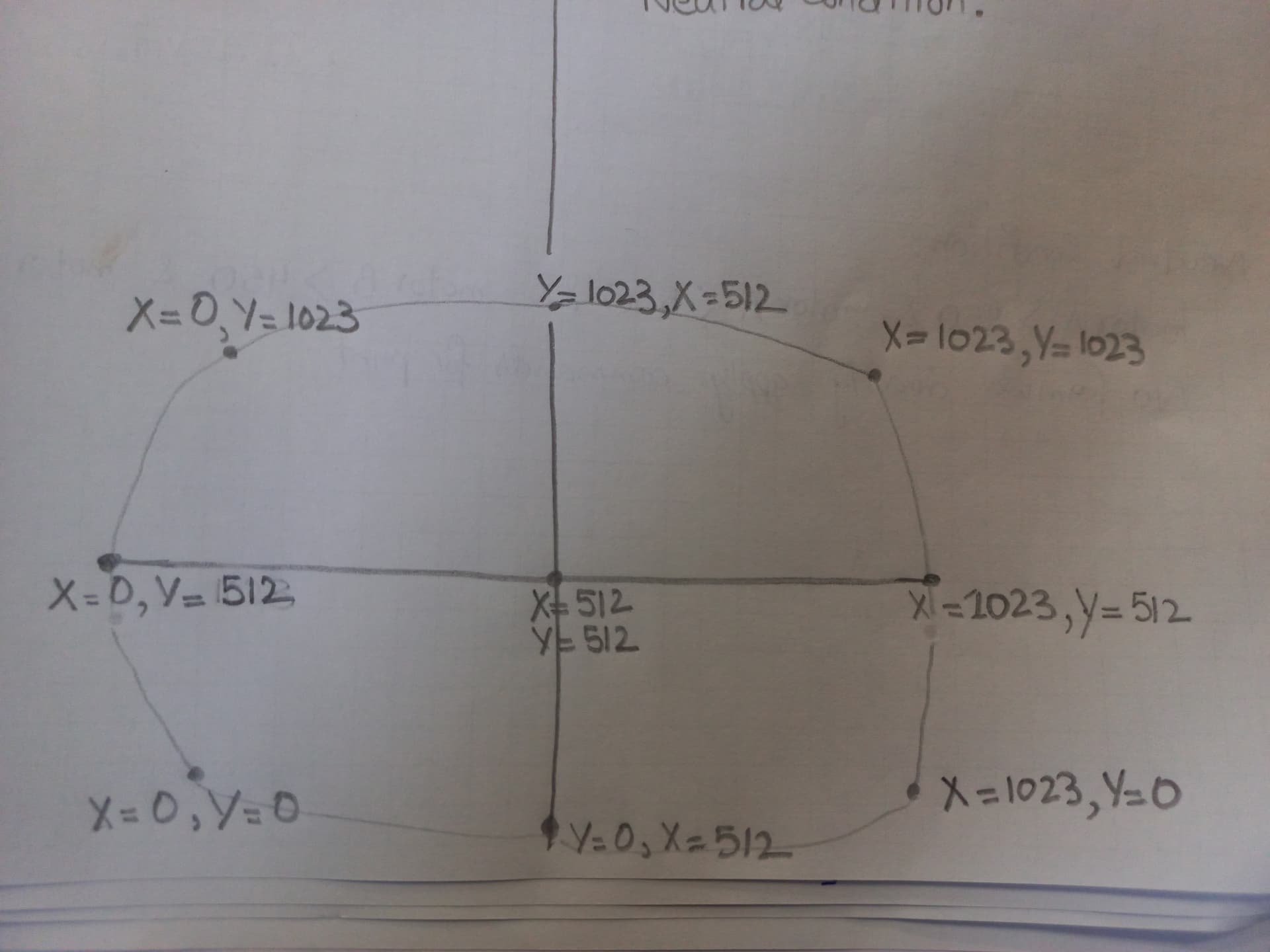
You inverted the conventional names for the axes. Not a problem for the compiler, but people trying to help you might get confused.
Do pure left and pure right directions work?
You inverted the conventional names for the axes. Not a problem for the compiler, but people trying to help you might get confused.
Do pure left and pure right directions work?
Yes for pure left (motor A speed is zero and motor B speed is high) other than pure left this one gradually increases means motor A speed start to increase from zero to high when i move my joystick towards middle upwards directions; Conditions (MOTOR B Speed > MOTOR A SPEED) and this one should also apply for pure right directions same as for left but Conditions (MOTOR A Speed > MOTOR B SPEED)..
Please see this graph as well
The 2 topics have been merged
Please take the time to rotate it 90° counterclockwise first.
My example sketch only calculates speed values for the left and right motors so, yes, you do have to make changes to add code to control your particular motor drivers.
Typically you would use the Servo library for your ESC's. Something like this:
#include <Servo.h>

const byte XPotPin = A0;  // Left-Right control
const byte YPotPin = A1;  // Forward-backward throttle
const byte LeftServoPin = 2;
const byte RightServoPin = 3;

Servo LeftServo, RightServo;

const int SERVO_LIMIT_LOW = 1000;  // Used with servo.writeMilliseconds()
const int SERVO_LIMIT_HIGH = 2000;  // Used with servo.writeMilliseconds()
const int SERVO_IDLE = (SERVO_LIMIT_LOW + SERVO_LIMIT_HIGH) / 2;
const int DEAD_ZONE = 10;
const int YAW_SENSITIVITY = 100;

void setup()
{
  // Set pin modes on motor pins
  LeftServo.writeMicroseconds(SERVO_IDLE);
  LeftServo.attach(LeftServoPin);

  RightServo.writeMicroseconds(SERVO_IDLE);
  RightServo.attach(RightServoPin);
}

void loop()
{
  int speedInput = analogRead(YPotPin); // Forward/Reverse
  int yawInput = analogRead(XPotPin); // Left/Right turn

  // Map 'speedInput' to the range SERVO_LIMIT_LOW (backward), SERVO_LIMIT_HIGH (forward)
  speedInput = map(speedInput, 0, 1023, SERVO_LIMIT_LOW, SERVO_LIMIT_HIGH);

  // Map 'yawInput' to the range -YAW_SENSITIVITY (full left) to +YAW_SENSITIVITY (full right)
  yawInput = map(yawInput, 0, 1023, -YAW_SENSITIVITY, YAW_SENSITIVITY);

  // Put in dead zones
  if (speedInput > SERVO_IDLE-DEAD_ZONE && speedInput < SERVO_IDLE+DEAD_ZONE)
    speedInput = SERVO_IDLE;
  if (yawInput > -DEAD_ZONE && yawInput < DEAD_ZONE)
    yawInput = 0;

  int leftSpeed = speedInput + yawInput;
  int rightSpeed = speedInput - yawInput;

  // neither motor can go faster than maximum speed
  leftSpeed = constrain(leftSpeed, -SERVO_LIMIT_LOW, SERVO_LIMIT_HIGH);
  rightSpeed = constrain(rightSpeed, -SERVO_LIMIT_LOW, SERVO_LIMIT_HIGH);

  LeftServo.writeMicroseconds(leftSpeed);
  RightServo.writeMicroseconds(rightSpeed);
}did you understand my code ?
Thank you soo much Sir, Your code is working perfectly. I want to understand your code how its works ... What do you mean by DEADZONE which is equal to 10 and Yaw Sensitivity?
I'm getting a good results by using this arduino module joystick 
but when I used this joystick model number (CHC-104B-M4), I'm not getting an accurate results like the one as above.

Is it possible to obtain reverse left and reverse right, forward left and forward right with this code ?
That is to ignore joystick inputs near the center so the car stops when the stick is released, even if it doesn't always spring back to the exact center reading.
This controls how much faster one wheel goes than the other. Use lower numbers if the car turns too quickly. Use higher numbers if the car doesn't turn quickly enough.
What analogRead() values are the X and Y producing?
It should be. I saw in the user manual for your EZRUN MAX 8 BLDC motor controllers that your controllers won't switch to reverse until the car has come to a stop. You may have to add code for that... Keep track of which direction your motor is going and stop the car if either motor needs to switch from forward to reverse.
This topic was automatically closed 180 days after the last reply. New replies are no longer allowed.