I am trying to upload a sketch (that uploads from the same PC and works on a Nano) to a Noano Every but get the message:
avrdude: ser_open(): can't open device "\.\COM4": The system cannot find the file specified.
I installed the CH341 driver, unchecked the FIFO buffers in Advanced settings and followed earlier advice such as uploading without arduino connected the repeating it with connected board.
The port is listed under Ports in device Manager as CH341 port but the listing disapears after the error occurs.
What am I missing?
I’m assuming that the PC and associated hardware are functioning correctly, as you’re able to program a Nano. Based on the limited information provided, I’ll make an educated guess (SWAG). It’s possible that you’re selecting the wrong board in the Arduino IDE. Keep in mind that the Nano and Nano Every use different processors.
To resolve this, go to Tools in the Arduino IDE and ensure you’ve selected the correct board and processor. For more guidance, refer to this helpful article: Select the right processor for Arduino Nano.
Have you selected the Nano Every in the boards selection under Arduino megaAVR Boards.
Tools>Board>Arduino megaAVR Boards>Arduino Nano Every
I should have mentioned this in the first post: I hope I'm using the correct definition (Arduino Nano Every and register emulation "None (ATMEGA4809)). That's what is selected but the behavior suggests otherwise.
Does COM4 disappear from the IDE when you disconnect the board?
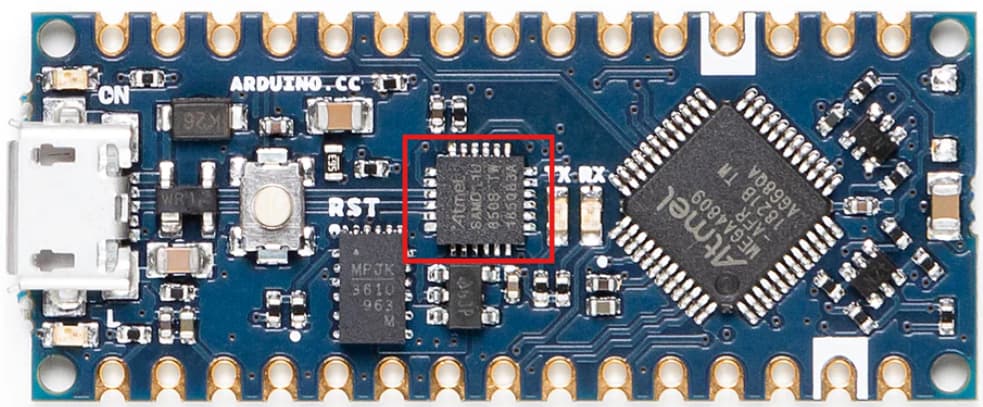
Are you certain you have a Nano Every? The USB to Serial chip / programmer is not a CH341, but a SAMD11D14 processor.
I am certain that I'm working with an original Arduino Nano Every. I don't know how to specifically address the SAMD11D14 interface.
You shouldn't have to. When you installed the megaAVR core you should have been prompted to install the drivers (dpinst...). But if your board is recognised as a CH341 it's a sign that something is seriously wrong. Either you forced that driver for the board in Windows device manager or your board is not a Nano Every.
I don't have the board but the SAMD is the chip "circled" in red
You can find the driver in C:\Users\yourUsername\AppData\Local\Arduino15\packages\arduino\hardware\megaavr\1.8.8\drivers. Right click the inf file and install.
I confirmed that I actually have genuine Arduini Nano Every(s). I uninstalled IDE 2.33 and upgraded to the latest version (2.3.4).
When I plug-in the Nano, the Ports (COM & LPT) listing appears in the device manager as USB-serial CH340 (COM4). I can work with the Nano as expected. When I unplug the Nano, the Ports listing goes away.
When I plug in the Nano Every, the Ports (COM & LPT) listing does NOT appear in the device manager and no ports are shown in the IDE. I did install the megaavr\1.8.8\driver as suggested it made no difference.
Do you see anything different if you use 1.8.19 instead of 2.3.3?
Is the Nano Every running the blink program? I have bought many genuine Nano Every's and they were all running blink out of the box.
Maybe I missed that in earlier posts; sorry if so. I suggest that you try different cables; you might be using a charge-only cable instead of a data/sync cable.
I tried that already, both cables work fine with other data reliant equipment.
First: Please report on the Blink operation and the 1.8.19 ide performance requested a few posts previous.
If you are convinced that the cable for the Nano Every (which typically has a different connector than the cable for the Nano) is indeed a data cable, then there is either an issue with the windows usb drivers on the computer or the SamD11 usb interface chip on the Nano Every.
Check on the windows usb situation first, as fixing issues with the SAMD11 chip is complex and not always successful.
The usb driver which talks to the usb code of the SAMD11 is C:\WINDOWS\system32\DRIVER\usbser.sys
Do you find this file on your computer?
I found a solution!!!
I verified that the initial cables are data cables but for some reason they didn't work.
What worked: A USB-C cable with a USB- micro adapter. It opened a new port, COM 6. I don't know yet where things went wrong but I'm good now. Thanks for all the pointers.
Very strange indeed. If you can figure out the "some reason" it would be helpful to others. Perhaps you could sacrifice one of the non working cables to figure out the root cause.
I can not imagine why a standard data cable with a usb A end plugging into the computer and a micro usb B end plugging into the Nano Every did not work.
Many of these "my computer won't recognize my Nano Every" turn out to be cable issues.
Hello,
I was under the impression that my problems were solved but after several (many?) uploads things again don't work. The verbose output after successful compilation during uploading is shown here:
avrdude: Version 6.3-20190619
         Copyright (c) 2000-2005 Brian Dean, http://www.bdmicro.com/
         Copyright (c) 2007-2014 Joerg Wunsch

         System wide configuration file is "C:\Users\xxx\AppData\Local\Arduino15\packages\arduino\tools\avrdude\6.3.0-arduino17/etc/avrdude.conf"

         Using Port                    : COM3
         Using Programmer              : jtag2updi
         Overriding Baud Rate          : 115200
JTAG ICE mkII sign-on message:
Communications protocol version: 1
M_MCU:
  boot-loader FW version:        1
  firmware version:              1.07
  hardware version:              1
S_MCU:
  boot-loader FW version:        1
  firmware version:              6.07
  hardware version:              1
Serial number:                   00:00:00:00:00:00
Device ID:                       JTAGICE mkII
         AVR Part                      : ATmega4809
         Chip Erase delay              : 0 us
         PAGEL                         : P00
         BS2                           : P00
         RESET disposition             : dedicated
         RETRY pulse                   : SCK
         serial program mode           : yes
         parallel program mode         : yes
         Timeout                       : 0
         StabDelay                     : 0
         CmdexeDelay                   : 0
         SyncLoops                     : 0
         ByteDelay                     : 0
         PollIndex                     : 0
         PollValue                     : 0x00
         Memory Detail                 :

                                  Block Poll               Page                       Polled
           Memory Type Mode Delay Size  Indx Paged  Size   Size #Pages MinW  MaxW   ReadBack
           ----------- ---- ----- ----- ---- ------ ------ ---- ------ ----- ----- ---------
           signature      0     0     0    0 no          3    0      0     0     0 0x00 0x00
           prodsig        0     0     0    0 no         61   61      0     0     0 0x00 0x00
           fuses          0     0     0    0 no          9    0      0     0     0 0x00 0x00
           fuse0          0     0     0    0 no          1    0      0     0     0 0x00 0x00
           fuse1          0     0     0    0 no          1    0      0     0     0 0x00 0x00
           fuse2          0     0     0    0 no          1    0      0     0     0 0x00 0x00
           fuse4          0     0     0    0 no          1    0      0     0     0 0x00 0x00
           fuse5          0     0     0    0 no          1    0      0     0     0 0x00 0x00
           fuse6          0     0     0    0 no          1    0      0     0     0 0x00 0x00
           fuse7          0     0     0    0 no          1    0      0     0     0 0x00 0x00
           fuse8          0     0     0    0 no          1    0      0     0     0 0x00 0x00
           lock           0     0     0    0 no          1    0      0     0     0 0x00 0x00
           data           0     0     0    0 no          0    0      0     0     0 0x00 0x00
           usersig        0     0     0    0 no         64   64      0     0     0 0x00 0x00
           flash          0     0     0    0 no      49152  128      0     0     0 0x00 0x00
           eeprom         0     0     0    0 no        256   64      0     0     0 0x00 0x00

         Programmer Type : JTAGMKII_PDI
         Description     : JTAGv2 to UPDI bridge
         M_MCU hardware version: 1
         M_MCU firmware version: 1.07
         S_MCU hardware version: 1
         S_MCU firmware version: 6.07
         Serial number:          00:00:00:00:00:00
         Vtarget         : 5.0 V

avrdude: jtagmkII_initialize(): Cannot locate "flash" and "boot" memories in description
avrdude: AVR device initialized and ready to accept instructions

Reading | ################################################## | 100% 0.27s

avrdude: Device signature = 0x1e9651 (probably m4809)
avrdude: erasing chip
avrdude: reading input file "C:\Users\xxx\AppData\Local\arduino\sketches\ED1CE200C20A76CCFF31A8FBA94D65E8/OV5642_CAM_2SD_Accel_LED_RTC_202412011217.ino.hex"
avrdude: writing flash (30240 bytes):

Writing | ###################################avrdude: jtagmkII_paged_write(): timeout/error communicating with programmer (status -1)
Any idea what could be wrong?
Hi @Gravity123.
I'm not sure I understood correctly what you mean by this. Please provide a detailed description of what you mean by this in a reply on this forum thread, including:
- What did you do?
- What were the results you expected from doing that thing?
- What were the results you observed that did not match your expectations?
Make sure to include the full and exact text of any error or warning messages you might have encountered.
My vote is for a defective usb cable. There's been something funky with your cable from the beginning, and the solution you found has not been needed by any other Nano Every user with problems on this forum.
What worked: A USB-C cable with a USB- micro adapter.
I took your advice to heart and purchased a new cable. So for some time I was able to upload reliably with two cable options.
Meanwhile I found out that the connection between Nano Every and cable is the problem. When slightly bending the cable -Nano connection, the communication worked again. This observation suggests that the connection within the Nano USB port is the culprit. The troublking part is that of the 6 NanosE two were unreliable from the beginning. I think I know now how to approach it.