I have been following the tutorial at https://racheldebarros.com/arduino-projects/trigger-sound-effects-with-arduino-pir-motion-sensor/ but I haven't been able to get it to work. I've rebuilt it again and again and inputted the code again and again but it still doesn't work. Any help would be appreciated.

/*This Arduino sketch plays a random track from a DFRobot PlayerMini
mp3 player module when motion is detected by a PIR sensor.
For the wiring diagram, step-by-step video, code explanation and more
motion-activated soundUse code tags to format code for the forum effects projects with Arduino, visit:
*/
#include <SoftwareSerial.h>
#include <DFRobotDFPlayerMini.h> // download this library from Arduino IDE "Manage Libraries"
int pirPin = 12; // Arduino pin the PIR sensor is connected to
int rxPin = 3; // Arduino pin the TX pin of mp3 player is connected to
int txPin = 2; // Arduino pin the RX pin of mp3 player is connected to
int motionStatus = 0; // variable to store the PIR's current reading (high or low)
int pirState = 0; // variable to store the PIR's state change
SoftwareSerial fxSerial (rxPin, txPin); // Software Serial object
DFRobotDFPlayerMini fxPlayer;
void setup() {
pinMode(pirPin, INPUT); // set Arduino pin that PIR is connected to as an INPUT
pinMode(rxPin, INPUT): // set Arduino pin that mp3 player TX is connected to as an INPUT
pinMode(txPin, OUTPUT); // set Arduino pin that mp3 player RX is connected to as an OUTPUT
Serial.begin(9600); // initialize Serial Monitor (for looking at PIR readings)
fxSerial.begin(9600); // initialize Serial communication for mp3 player
fxPlayer.begin(fxSerial); // tells mp3 player to use fxSerial for communication
fxPlayer.volume(30); // mp3 player volume (pick a value 10-30)
delay(30000); // allow 30-60 secs for PIR sensor to calibrate before proceeding with sketch
}
void loop() {
motionStatus = digitalRead(pirPin); // read the PIR pin's current output (is it HIGH or LOW?)
// if PIR pin output is HIGH:
if (motionStatus == HIGH) {
if (pirState == LOW) {
  Serial.println("Motion Detected"); // print result to the serial monitor
  pirState = HIGH; // update the previous PIR state to HIGH

  fxPlayer.play(random(1,6)); // play a random track from 1 to 5 from micro SD card
  delay(5000); // length in microseconds of longest track
}
}
// or else if PIR pin output is LOW:
else {
if (pirState == HIGH) {
  Serial.println ("Motion Ended"); //print result to the serial monitor
  pirState = LOW; // update the previous PIR state to LOW
}
}
}
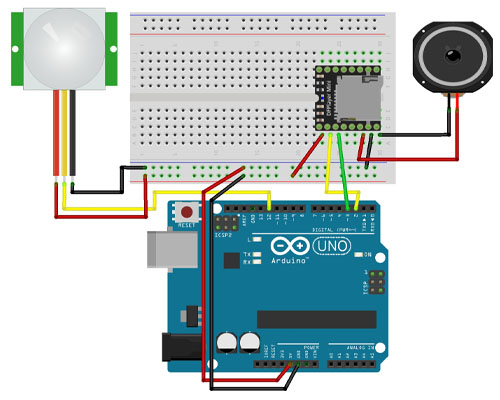
You have the Player's +V and GND reversed in your diagram.
The motion-IR gizmo is backward too.
If the breadboard is to be followed, the Uno +V/GND are backwards, causing everything else wired to the rails to be backwards.
What would be the correct placement and how could have I noticed it was reversed?
The red wires should go to 5V, the black wires should go to GND.
I can't correct fritzing - and that's why I abhor fritzing.
That does not indicate "fixed"... that indicates "changed." "Fix" would have sound. The problem could be putting 5VDC on the GND pin of all your devices. Verify each device on its own. The Arduino, the PIR and the DFPlayerMini can all operate stand-alone.
First of all - your connections on the photo looks chaotic and very unstable. Using a wires with same color for different lines is not a good idea.
And next - do you see at least "Motion Detected" message in Serial Monitor? If not - it is too early to expect the sound, your motion sensor is not react.
I get a motion detected message, but never get a motion ended message.
Did you copy and paste that code? And did it compile? It doesn't as it stands because you've typed a colon instead of a semi-colon here:
pinMode(rxPin, INPUT): // set Arduino pin that mp3 player TX is connected to as an INPUT
It compiles OK with that corrected, so do that first and come back if the sketch does not work as Rachel described. (It does here.)
I had fixed that mistake and it was able to run the code, I just haven't reached the intended result yet.
Is it possible for someone to try their hand at the tutorial and see what I'm doing wrong?
Show your latest 'fixed' sketch and its schematic plus details of how its behaviour differs from the intended.
Rachel's sketch works here.
I am certain everyone who offered help has tried the sketch. Why do you doubt them? Follow their advice, without telling them that you will be doing what you want, not what you are told.
You probably have been as clumsy with your wiring as you have with your sketch and drawing. The sketch will only work if your wiring is correct, SO... You MUST verify the wiring is placed correctly. Remove everything from your breadboard. Get a wiring diagram that is legible and correct. Follow it.
The PIR you are using does not need an Arduino. It can be connected to power and ground, and the data pin will be low when not active and high when active. PIR Sensor with Arduino: Wiring & Code for Interactive Props
The DFPlayMini you are using does not need an Arduino. It can be connected to power, ground, a speaker, and you can select (audio) file with the shorting of the ground pin to IO_1 or IO_2. DFPlayer Mini Mp3 Player - DFRobot Wiki
The Arduino you are using does not need a PIR or DFPlayerMini to work. Use a sketch that senses a slide switch or shorting jumper going HIGH (to simulate the PIR detecting motion) and the slide switch going LOW (to simulated PIR no movement).
int pirPin = 12; // Arduino pin the PIR sensor is connected to
int rxPin = 3; // Arduino pin the TX pin of mp3 player is connected to
int txPin = 2; // Arduino pin the RX pin of mp3 player is connected to

int motionStatus = 0; // variable to store the PIR's current reading (high or low)
int pirState = 0; // variable to store the PIR's state change

void setup() {
  pinMode(pirPin, INPUT); // set Arduino pin that PIR is connected to as an INPUT
  pinMode(rxPin, INPUT); // set Arduino pin that mp3 player TX is connected to as an INPUT
  pinMode(txPin, OUTPUT); // set Arduino pin that mp3 player RX is connected to as an OUTPUT
  Serial.begin(9600); // initialize Serial Monitor (for looking at PIR readings)
}

void loop() {
  motionStatus = digitalRead(pirPin); // read the PIR pin's current output (is it HIGH or LOW?)
  delay(100); // need to debounce the PIR pin (switch/button)
  if (motionStatus == HIGH) {
    if (pirState == LOW) {
      Serial.println("Motion Detected"); // print result to the serial monitor
      pirState = HIGH; // update the previous PIR state to HIGH
      digitalWrite(txPin, HIGH);
    }
  }  else {
    if (pirState == HIGH) {
      Serial.println ("Motion Ended"); //print result to the serial monitor
      pirState = LOW; // update the previous PIR state to LOW
      digitalWrite(txPin, LOW);
    }
  }
}
{
  "version": 1,
  "author": "Anonymous maker",
  "editor": "wokwi",
  "parts": [
    { "type": "wokwi-arduino-nano", "id": "nano", "top": 4.8, "left": -0.5, "attrs": {} },
    {
      "type": "wokwi-led",
      "id": "led1",
      "top": -39.6,
      "left": 141,
      "rotate": 90,
      "attrs": { "color": "green" }
    },
    {
      "type": "wokwi-led",
      "id": "led2",
      "top": -58.8,
      "left": 141,
      "rotate": 90,
      "attrs": { "color": "red" }
    },
    { "type": "wokwi-slide-switch", "id": "sw1", "top": -62.8, "left": 3.1, "attrs": {} }
  ],
  "connections": [
    [ "nano:GND.2", "led1:C", "black", [ "v0" ] ],
    [ "nano:GND.2", "led2:C", "black", [ "v0" ] ],
    [ "nano:2", "led1:A", "green", [ "v0" ] ],
    [ "nano:3", "led2:A", "green", [ "v0" ] ],
    [ "nano:12", "sw1:2", "green", [ "v0" ] ],
    [ "nano:GND.2", "sw1:1", "black", [ "v-28.8", "h-115.2" ] ],
    [ "nano:5V.2", "sw1:3", "red", [ "h-124.8", "v-48", "h-0.2" ] ]
  ],
  "dependencies": {}
}
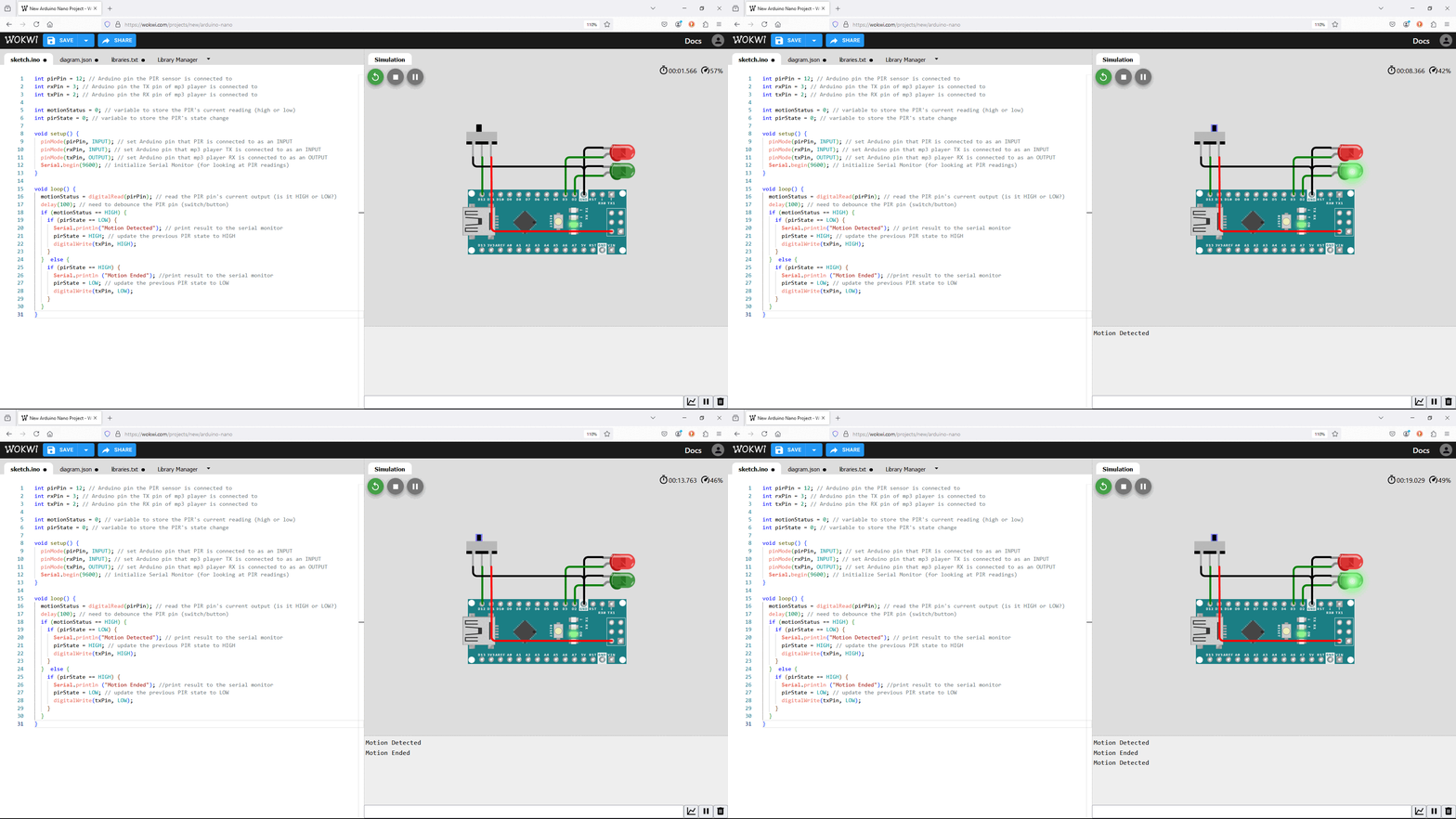
I used your sketch (after replacing the colon with a semicolon) and wired things up accordingly. Unlike your setup, I reduced the 5V signal going to the DFplayer to its 3.3V allowable range with a 1.2K/2.2K voltage divider.
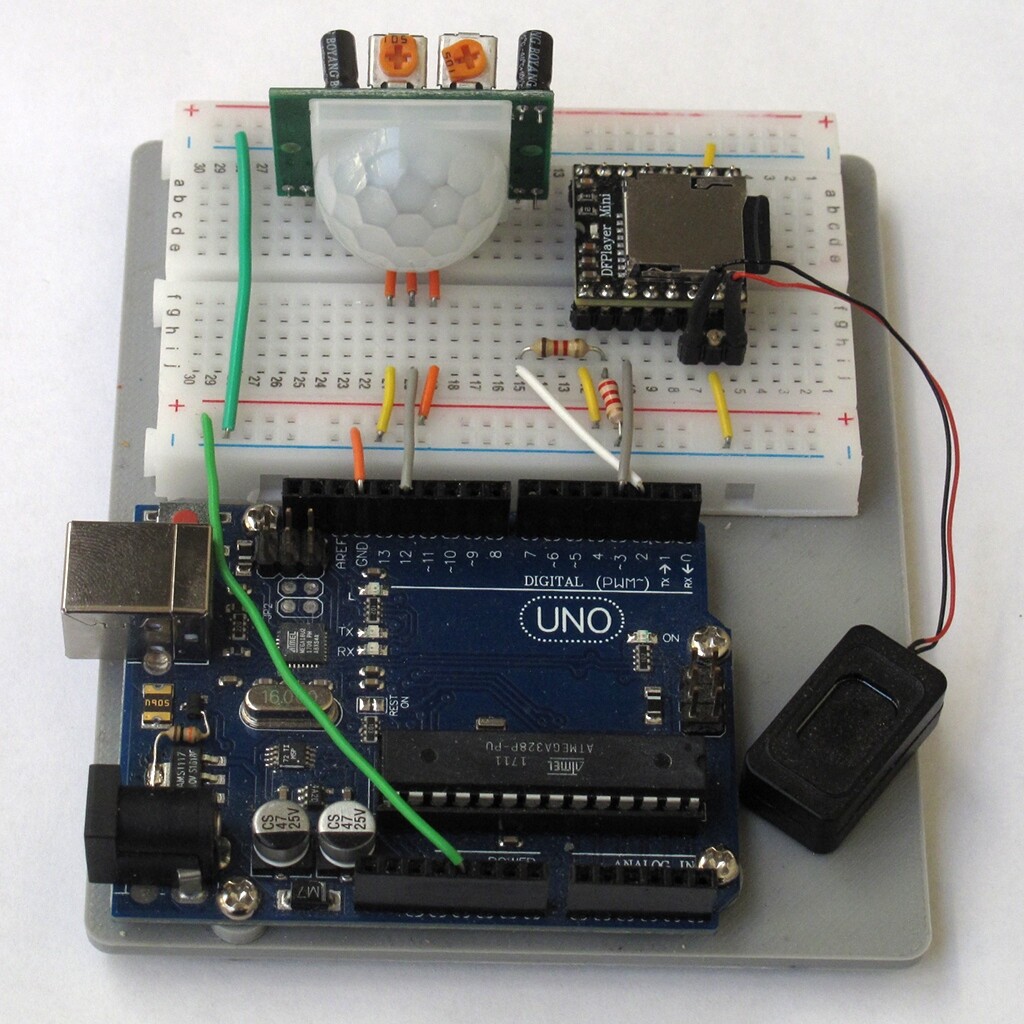
Works like a charm. Move and a random track plays and "Motion Detected" is printed. Stop moving and after a while "Motion Ended" is printed. Rinse and repeat.
Assuming your wiring is now correct, I wouldn't be the least bit surprised if you've damaged either the PIR sensor or the DFplayer when you reversed the power going to them.
It finally is able to play sound! It also plays my randomly selected songs! I think that it had to do with the formatting of the SD card I put into the DFPlayer, which I had to figure out by using the website. Thank you all for your great help!
Okay, I've gotten it to play the random sounds, but now it won't continue to play them. It only plays it once and then I have to transfer the sketch again.
Post the sketch are you using.