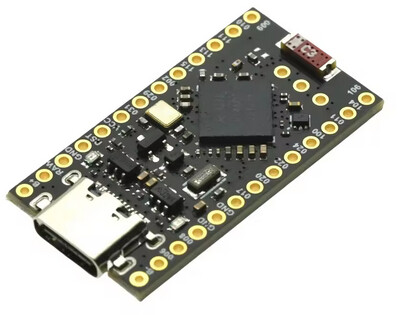
Can't install nRF52840 Nice!Nano board

I have tried installing this on a recently upgraded Arduino IDE 2.3.6 Win10 PC and on another Win 10 PC with a fresh Arduino IDE 2.3.6 installation, but can’t get either to work.

I added these URLs to the Additional Boards Manager:

https://adafruit.github.io/arduino-board-index/package_adafruit_index.json

  • this added the Adafruit NRF52 boards okay

and

https://raw.githubusercontent.com/pdcook/nRFMicro-Arduino-Core/main/package_nRFMicro_index.json

  • this should add the Nice!Nano board by PDCook, but it doesn’t. I have tried clearing the cache and reloading the IDE dozens of times

Can anyone suggest how I get this board showing in the board list?

Thanks in advance, Neil

Hi @emodeler. Try this:

  1. Select Tools > Board > Boards Manager... from the Arduino IDE menus to open the "Boards Manager" view in the left side panel.
  2. Find the "nRFMicro-like Boards" entry in the list of boards platforms.
  3. Click the "INSTALL" button at the bottom of the entry.
  4. Wait for the installation process to finish, as indicated by a notification at the bottom right corner of the Arduino IDE window:

    Successfully installed platform ...

  5. Select Tools > Board > nRFMicro-like Boards > nice!nano v2 from the Arduino IDE menus.

You will now have Arduino IDE configured to compile and upload sketches to the "nice!nano" board.

Thank you very much for your clear reply. If I search for nRFMicro-like Boards or just nRFMicro the Boards Manager search doesn’t find anything.

If I simplify the search just to nRF it shows the Arduino and Adafruit nRF52 boards only. I have installed these already,

Any suggestions, please?

Neil

Try this:

  1. Select File > Preferences... (or Arduino IDE > Settings... for macOS users) from the Arduino IDE menus.
    The "Preferences" dialog will open.
  2. Click the button to the right of the "Additional Boards Manager URLs" field in the "Preferences" dialog.
    The "Additional Boards Manager URLs dialog will open.
  3. Verify that the "Enter additional URLs, one for each row" field in the "Additional Boards Manager URLs dialog contains the line:
    https://raw.githubusercontent.com/pdcook/nRFMicro-Arduino-Core/main/package_nRFMicro_index.json
    
  4. If the field does not contain that line, add it, making sure to place it on its own line in the field.
  5. Verify that the URL is exactly as shown above, without any typos or extra characters.
  6. Click the "OK" button in the "Additional Boards Manager URLs dialog.
    The "Additional Boards Manager URLs" dialog will close.
  7. Click the "OK" button in the "Preferences dialog.
    The "Preferences" dialog will close.

If you changed the "Additional Boards Manager URLs" configuration, you will now see a notification at the bottom right corner of the Arduino IDE window that shows the progress of downloading the package index files. Wait for that notification to disappear.

After that, check in Boards Manager again to see if there is now an "nRFMicro-like Boards" entry. If so, you can proceed to install that platform as usual.

The PDCook URL had already been added. See the first message in this thread. I had checked it by pasting it into the browser and confirming the JSON file was found.

Anyway I deleted it and pasted it in from your message, as below

https://raw.githubusercontent.com/pdcook/nRFMicro-Arduino-Core/main/package_nRFMicro_index.json

Unfortunately there is no change, the PDCook boards, including the Nice!Nano, are still not available, even after restarting the IDE.

Any suggestions, please?

Neil

Find the file C:\Users\yourUsername.arduinoIDE\arduino-cli.yaml and open it with a text editor.

The content should start with the additional URLs

board_manager:
    additional_urls:
    ...
    ...
    - https://raw.githubusercontent.com/pdcook/nRFMicro-Arduino-Core/main/package_nRFMicro_index.json
    ...
    ...

If it's not there, you can add it manually in that file; make a backup first. Close the IDE first if you do that and start it afterwards.

I've taken the steps provided in post #4 and I do see the platform in boards manager; I just did wait till all json files were fetched again.

Thank you for your help. I edited the .yaml file. It had duplicated references to the PDcook distribution. I deleted them both an pasted in the (identical) URL you posted.

But on restarting the IDE Boards Manager still doesn’t show the PDCook boards

What might help is to delete the directory:
C:\Users\yourUsername\AppData\Roaming\arduino-ide.

It's safe to do so; I done it plenty of times; the directory will be recreated. I'm not sure what it exactly contains but part of it is settings/configuration.

I deleted the Arduino-IDE folder.

It did not help.

Neil

Isn't this just the ongoing issue

1 Like

@maxgerhardt is right. The problem didn't occur on my machine because I happen to already have the package index dependency in place. I'll provide instructions you can follow to work around the two distinct problems:

Fix for "Platform Entry Not Shown in Boards Manager"

The reason why the "nRFMicro-like Boards" entry did not appear in your Boards Manager is because this platform depends on tools that are provided by a separate package index file, which you don't have on your computer. That makes it impossible for the platform to be installed, and so it is not listed in the Arduino IDE 2.x Boards Manager.

The solution is to add the URL of the package index dependency to your "Additional Boards Manager URLs" preference:

  1. Select File > Preferences... from the Arduino IDE menus.
    The "Preferences" dialog will open.
  2. Click the button to the right of the "Additional Boards Manager URLs" field in the "Preferences" dialog.
    The "Additional Boards Manager URLs dialog will open.
  3. Add the following URL to the "Enter additional URLs, one for each row" field in the "Additional Boards Manager URLs dialog:
    https://files.seeedstudio.com/arduino/package_seeeduino_boards_index.json
    
  4. Click the "OK" button in the "Additional Boards Manager URLs dialog.
    The "Additional Boards Manager URLs" dialog will close.
  5. Click the "OK" button in the "Preferences dialog.
    The "Preferences" dialog will close.
  6. You will now see a notification at the bottom right corner of the Arduino IDE window that shows the progress of downloading the package index files. Wait for that notification to disappear.

You should now see the "nRFMicro-like Boards" entry in Boards Manager. Install the platform as usual.

Fix for "Unable to Select Board"

After installing the "nRFMicro-like Boards" platform, you will encounter yet another problem, which is caused by a different bug in the platform. This bug makes it so the boards of the platform can not be selected in Arduino IDE.

The bug causes the platform to be installed in a folder that has an name with a space in it. Arduino IDE 2.x does not support platforms with spaces in the folder name (it does have support for working with such paths in the filesystem, but the folder name also defines a machine identifier for the platform, and it is the space in the identifier that is not supported).

The workaround for the bug is to rename the platform installation folder. I'll provide instructions you can follow to do that:

  1. Select File > Quit from the Arduino IDE menus.
    All Arduino IDE windows will close.
  2. Start Windows "File Explorer".
  3. Navigate to the following path on your hard drive:
    C:\Users\<username>\AppData\Local\Arduino15\packages
    
    (where <username> is your Windows username)
    • :red_exclamation_mark: The AppData folder is hidden in File Explorer by default. You can make it visible by opening the "View" menu, then checking the box next to "☐ Hidden items".
  4. Rename the nRFMicro-like Boards folder to nRFMicro-like_Boards
  5. Start Arduino IDE.
  6. Select Tools > Board > nRFMicro-like Boards > nice!nano v2 from the Arduino IDE menus.

After that give it another try. Unfortunately I still ran into a compilation error even after all that, but maybe it is a matter of user error (I don't have any experience with this platform and didn't spend much time looking into it).

1 Like

Thank you ptillisch and maxgerhardt, I can now select the board and compile programs for it. But I cannot upload them. I get this error message:

"C:\Users\Neil\AppData\Local\Arduino15\packages\Seeeduino\tools\arm-none-eabi-gcc\9-2019q4/bin/arm-none-eabi-size" -A "C:\Users\Neil\AppData\Local\arduino\sketches\5E139DFD43A996E7093EF6024942AD3E/sketch_oct6a.ino.elf"
Sketch uses 20156 bytes (2%) of program storage space. Maximum is 811008 bytes.
Global variables use 3096 bytes (1%) of dynamic memory, leaving 234472 bytes for local variables. Maximum is 237568 bytes.
Performing 1200-bps touch reset on serial port COM7
Waiting for upload port...
No upload port found, using COM7 as fallback
"C:\Users\Neil\AppData\Local\Arduino15\packages\nRFMicro\hardware\nrf52\1.0.2/tools/adafruit-nrfutil/win32/adafruit-nrfutil.exe" --verbose dfu serial -pkg "C:\Users\Neil\AppData\Local\arduino\sketches\5E139DFD43A996E7093EF6024942AD3E/sketch_oct6a.ino.zip" -p COM7 -b 115200 --singlebank
Upgrading target on COM7 with DFU package C:\Users\Neil\AppData\Local\arduino\sketches\5E139DFD43A996E7093EF6024942AD3E\sketch_oct6a.ino.zip. Flow control is disabled, Single bank, Touch disabled
Opened serial port COM7
Starting DFU upgrade of type 4, SoftDevice size: 0, bootloader size: 0, application size: 20164
Sending DFU start packet
Sending DFU init packet
Sending firmware file

Failed to upgrade target. Error is: WriteFile failed (PermissionError(13, 'The device does not recognize the command.', None, 22))
Traceback (most recent call last):
File "main.py", line 296, in serial
File "dfu\dfu.py", line 235, in dfu_send_images
File "dfu\dfu.py", line 206, in _dfu_send_image
File "dfu\dfu_transport_serial.py", line 213, in send_firmware
File "dfu\dfu_transport_serial.py", line 241, in send_packet
File "serial\serialwin32.py", line 317, in write
serial.serialutil.SerialException: WriteFile failed (PermissionError(13, 'The device does not recognize the command.', None, 22))

Possible causes:

  • Selected Bootloader version does not match the one on Bluefruit device.
    Please upgrade the Bootloader or select correct version in Tools->Bootloader.
  • Baud rate must be 115200, Flow control must be off.
  • Target is not in DFU mode. Ground DFU pin and RESET and release both to enter DFU mode.

The board is visible as a D: drive and contains a file called INFO_UF2.TXT with this contents:

UF2 Bootloader 0.6.0 lib/nrfx (v2.0.0) lib/tinyusb (0.10.1-41-gdf0cda2d) lib/uf2 (remotes/origin/configupdate-9-gadbb8c7)
Model: nice!nano
Board-ID: nRF52840-nicenano
SoftDevice: S140 version 6.1.1
Date: Jun 19 2021

Help please!

Thanks in advance, Neil

This is progress at least!

Purely a wild guess, but I wonder if this error might be caused by some antivirus/security software on your computer blocking the adafruit-nrfutil.exe upload tool from accessing the drive created by the board?

Such software might automatically perform a scan on the drive that appears when the upload process puts the board into the USB mass storage mode used for the sketch upload, and block any access to the drive until that scan is completed. That is problematic for an upload because the upload tool won't know that it needs to wait for the scan to finish, and will instead simply error out. If this is the problem, the solution would be to configure your security software so that it does not automatically perform the scan on the new drive.

HI

first thing tested successfully : SuperMIni nRF52840 treated as a Feather nRF52840 with Adafuit’s nRF52 code
(only 9 usable GPIO , common to the 2 boards : IDE’s declared target and real target :roll_eyes: )

OK : compilation , flash and execute.

second thing done : installation of PDcook’s nRF52 core with the 2 fixes from #11 (thanks @ptillisch )
Compilation OK for the selected boards Nice!Nnao ou SuperMini nRF52840
Flashing not ok with the following error (bootloader version problem as said in ‘possible causes’ )?

Opened serial port /dev/ttyACM0
Starting DFU upgrade of type 4, SoftDevice size: 0, bootloader size: 0, application size: 21148
Sending DFU start packet
Sending DFU init packet
Sending firmware file

Failed to upgrade target. Error is: write failed: [Errno 5] Input/output error
Traceback (most recent call last):
File "/home/al1/.local/share/pipx/venvs/adafruit-nrfutil/lib/python3.13/site-packages/serial/serialposix.py", line 621, in write
n = os.write(self.fd, d)
OSError: [Errno 5] Input/output error

During handling of the above exception, another exception occurred:

Traceback (most recent call last):
File "/home/al1/.local/share/pipx/venvs/adafruit-nrfutil/lib/python3.13/site-packages/nordicsemi/main.py", line 296, in serial
dfu.dfu_send_images()
~~~~~~~~~~~~~~~~~~~^^
File "/home/al1/.local/share/pipx/venvs/adafruit-nrfutil/lib/python3.13/site-packages/nordicsemi/dfu/dfu.py", line 235, in dfu_send_images
self._dfu_send_image(HexType.APPLICATION, self.manifest.application)
~~~~~~~~~~~~~~~~~~~~^^^^^^^^^^^^^^^^^^^^^^^^^^^^^^^^^^^^^^^^^^^^^^^^
File "/home/al1/.local/share/pipx/venvs/adafruit-nrfutil/lib/python3.13/site-packages/nordicsemi/dfu/dfu.py", line 206, in _dfu_send_image
self.dfu_transport.send_firmware(firmware)
~~~~~~~~~~~~~~~~~~~~~~~~~~~~~~~~^^^^^^^^^^
File "/home/al1/.local/share/pipx/venvs/adafruit-nrfutil/lib/python3.13/site-packages/nordicsemi/dfu/dfu_transport_serial.py", line 213, in send_firmware
self.send_packet(pkt)
~~~~~~~~~~~~~~~~^^^^^
File "/home/al1/.local/share/pipx/venvs/adafruit-nrfutil/lib/python3.13/site-packages/nordicsemi/dfu/dfu_transport_serial.py", line 241, in send_packet
self.serial_port.write(bytearray(pkt.data))
~~~~~~~~~~~~~~~~~~~~~~^^^^^^^^^^^^^^^^^^^^^
File "/home/al1/.local/share/pipx/venvs/adafruit-nrfutil/lib/python3.13/site-packages/serial/serialposix.py", line 655, in write
raise SerialException('write failed: {}'.format(e))
serial.serialutil.SerialException: write failed: [Errno 5] Input/output error

Possible causes:

Selected Bootloader version does not match the one on Bluefruit device.
Please upgrade the Bootloader or select correct version in Tools->Bootloader.

Baud rate must be 115200, Flow control must be off.


Here is the content of INFO_UF2.TXT in my SuperMiniRF52840 board , (Nice!Nano compatible) :

UF2 Bootloader 0.6.0 lib/nrfx (v2.0.0) lib/tinyusb (0.10.1-41-gdf0cda2d) lib/uf2 (remotes/origin/configupdate-9-gadbb8c7)
Model: nice!nano
Board-ID: nRF52840-nicenano
SoftDevice: S140 version 6.1.1
Date: Jun 19 2021

I give up with previous attempts with nRF52 PDCooks’core in IDE2….
after foundind working variant files and board.txt file to add Nice!Nano board (and compatibles) to the maintained Adafruit nRF52 core. (1.70 at this date)

tested yet in IDE 2.3.6 : OK for UART, I2C, BUILTIN_LED….

Files here in a fork :

1 Like