Any chance of getting a photo of the front of that DFMini player?

I have another Arduino Mega Board ? but in the Website it states that it is 3.3-5V Module
Here is the Website : MP3 Mini Player for Arduino or Microcontrollers - RAM Electronics
If it say it's looping, I guess it is
No the Arduino Uno is just fine- its that DFMini Mp3 player where the problem lies- we have to get power to it. Do you happen to have another DFMini module or do you have anyway to put a separate power supply to just the DF Mini? If you happen to have a multimeter can you check the voltage is going to the DFMini player you have from the Arduino Uno?
Okay , hopefully , i will be able to measure the voltage . I have read somewhere that the Mp3 initial is the blue light off , and when we press play /pause button , the light is turned on . Dont know whether this is true or not . But if true , how can i modify the code for it to play ?
Although in some youtube videos , the Df player just starts when connected

The music begins when the program begins, there is no play button. I have a Red LED, but this DF Mini Mp3 is a knockoff from AliExpress.
(There is an oopsie in the video- the RX/TX lines are one pin off. I was too far forward (pins were actually on 11 and 12). The resistor belongs on Pin #10.)
Hi ,
Thank you for your reply , I have switched the RX and TX pins on the Arduino , and the Blue Light Finally starts blinking , but still it is not Solid Blue Light. And there is no sound
Where do you think is the problem ?
There is only one time that i had run the code ,and it actually gives solid blue , but after that after i recompile the code and re upload , it just blinks !!!
Also , The TX Led on the Arduino Board is on for about 20 seconds and then is off .Hope this info helps
Ok- This is good! We know we have a working DFMini. So I want you to do 2 steps first to troubleshoot.
- Disconnect the speaker from the DF Mini and run the program without the speakers attached to the Mini. Does anything change with the LED?
I want you to run that first to see if speakers are drawing too much power. I don't think they are, because:
- A blinking LED means the SD Card cannot find the file in the SD Card. So go into File Explorer and check that file. Here's an issue I encounter. You only need to name the file 0001, not 0001.mp3 because often the computer will add ANOTHER .mp3 extenstion- making your file name:
0001.mp3.mp3
and the SD Card can't find it due to that. So deep dive into that card and make sure that the file name is correct. Also be sure that the sound file is not super short- a file of less than 2-3 seconds will cause problems. You may want to make 0001 a full song to make sure it plays properly.
Hope that helps!
Okay , good News . I have changed the Code a little bit from a Video on Youtube and now the Blue Light is a Solid One !!! . But There is Still no Sound .
I will attach a photo of the files on the SD Card .And will attach the code .
I have also run a couple of Commands to identify the State of my Player

Here is the Code
#include <SoftwareSerial.h>
#include <DFPlayerMini_Fast.h>

SoftwareSerial mySerial(10, 11); // RX, TX
DFPlayerMini_Fast myMP3;
# define Start_Byte 0x7E
# define Version_Byte 0xFF
# define Command_Length 0x06
# define End_Byte 0xEF
# define Acknowledge 0x00 //Returns info with command 0x41 [0x01: info, 0x00: no info]
void setup()
{
  Serial.begin(9600);
  mySerial.begin(9600);

  myMP3.begin(mySerial);

  Serial.println("Setting volume to max");
  myMP3.volume(20);
  delay(20);


  Serial.println("Playing track 1 for 5 sec");
 // myMP3.resume();
  //myMP3.playNext();
  playFirst();
   Serial.println("Is it Playing");
  Serial.println(myMP3.isPlaying());    ->1
Serial.print("----------------");
 Serial.println( myMP3.currentVolume()); ->20
Serial.println(myMP3.currentEQ()); ->0
Serial.println(myMP3.currentMode()); ->0
Serial.println(myMP3.currentVersion()); ->5
Serial.println(myMP3.numUsbTracks()); ->0
Serial.println( myMP3.numSdTracks());  ->6
Serial.println(myMP3.numFlashTracks()); ->0
Serial.println(myMP3.currentUsbTrack()); ->1
Serial.println(myMP3.currentSdTrack()); ->1
Serial.println(myMP3.currentFlashTrack()); ->1

  //delay(1000);
  //myMP3.resume();
  //delay(1000);
  //myMP3.pause();


  /*
 //delay(1000);
  Serial.println("Sleeping for 5 sec");
  myMP3.sleep();
  delay(5000);

  Serial.println("Waking up");
  myMP3.wakeUp();

  Serial.println("Looping track 1");
  myMP3.loop(1);
  */
}
void playFirst()
{
  execute_CMD(0x3F, 0, 0);
  delay(500);
  setVolume(20);
  delay(500);
  execute_CMD(0x11,0,1);
  delay(500);
}
void setVolume(int volume)
{
  execute_CMD(0x06, 0, volume); // Set the volume (0x00~0x30)
  delay(2000);
}
void execute_CMD(byte CMD, byte Par1, byte Par2)
// Excecute the command and parameters
{
// Calculate the checksum (2 bytes)
word checksum = -(Version_Byte + Command_Length + CMD + Acknowledge + Par1 + Par2);
// Build the command line
byte Command_line[10] = { Start_Byte, Version_Byte, Command_Length, CMD, Acknowledge,
Par1, Par2, highByte(checksum), lowByte(checksum), End_Byte};
//Send the command line to the module
for (byte k=0; k<10; k++)
{
mySerial.write( Command_line[k]);
}
}
void loop()
{
}
The Value of the Serial Monitor is next to the Printing Statement
Also the Songs are 3-4 Minutes each audio File
Thank you very much
So are you saying the DFMini lights up with the file you have posted above- but not with the DFMini example file? Can you rerun the DF Mini Example to see if it works now?
It looks like you have your files in a folder 01. Can you take them out of that folder and have them just on the card itself? Neither program calls for it in that Folder 01.
When i try the Code of DF Mini Example , The USB disconnect sound is heared , and the speaker was like buzzing .
When i try with the latest code stated above , the DF Player Blue Light is On , but there is no sound .
I have removed the folder mp3 as you have mentioned above (which contained 3 audio files)
and now the serial monitor prints these :
Serial.println( myMP3.currentVolume()); ->20
Serial.println(myMP3.currentEQ()); ->0
Serial.println(myMP3.currentMode()); ->0
Serial.println(myMP3.currentVersion()); ->5
Serial.println(myMP3.numUsbTracks()); ->0
Serial.println( myMP3.numSdTracks()); ->3
Serial.println(myMP3.numFlashTracks()); ->0
Serial.println(myMP3.currentUsbTrack()); ->1
Serial.println(myMP3.currentSdTrack()); ->1
Serial.println(myMP3.currentFlashTrack()); ->1
Where do you think is the problem ?
Sorry, I don't understand what this means. What is the "USB Disconnect sound"? and the speaker buzzing. Have you heard any more noise out of the speaker? Can you check the speaker connections?

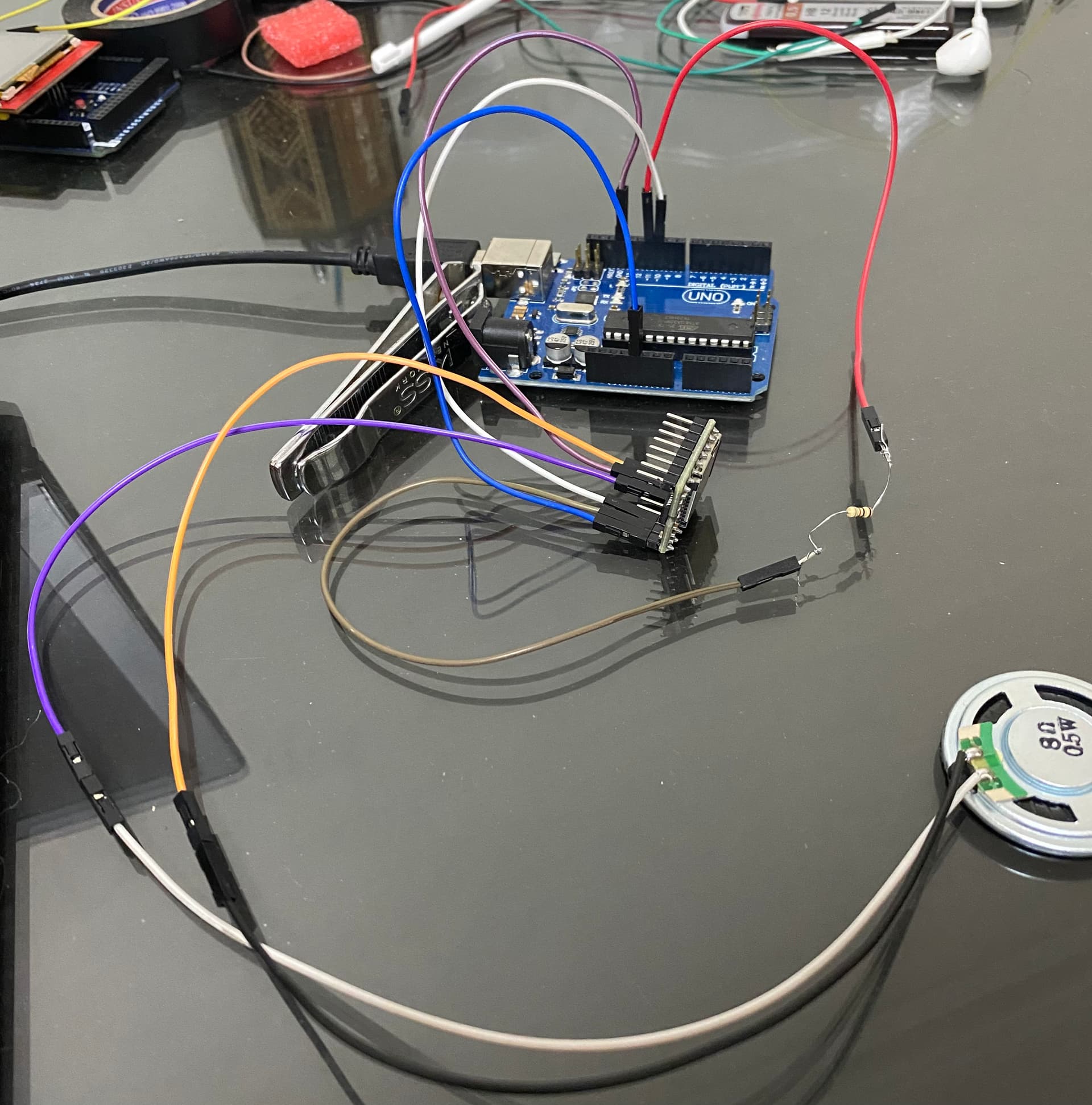
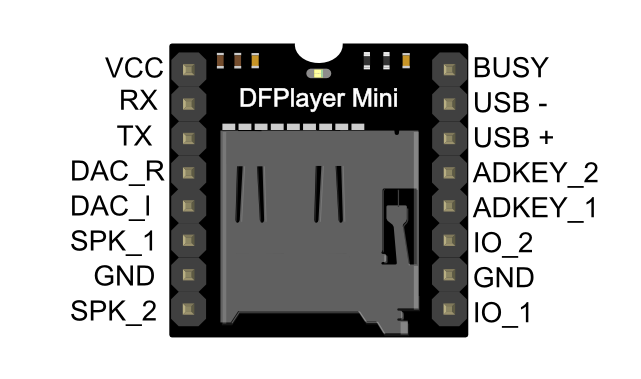
Quick and dirty trick here- let's see if we get anything. Take a double male Dupont wire and on the right side of the DF Mini ( the one with no wires currently) touch the pins to IO_2 and GND ( the 6th and 7th DF Mini pins from the top). With either program going, does anything happen? It should trigger the next .mp3 file to play.
Well , i did as you said , and when i Re opened the Serial Monitor it prints like this
Serial.println( myMP3.currentVolume()); ->20
Serial.println(myMP3.currentEQ()); ->0
Serial.println(myMP3.currentMode()); ->0
Serial.println(myMP3.currentVersion()); ->5
Serial.println(myMP3.numUsbTracks()); ->-1
Serial.println( myMP3.numSdTracks()); ->-1
Serial.println(myMP3.numFlashTracks()); ->0
Serial.println(myMP3.currentUsbTrack()); ->2
Serial.println(myMP3.currentSdTrack()); ->2
Serial.println(myMP3.currentFlashTrack()); ->2
Still There is no sound !
Do you think the problem is in the speaker or where ?
So just to understand , does this mean that the player is working correctly as well as the arduino ?
I know are almost there , just there is something missing . Really appreciate your work with me in solving the issue
Do you think i should ground the all pins on the right ?
Its got to be something in either the file nomenclature or the speaker. We know the Arduino is communicating with the DF Mini, we know the DF Mini LED is now solid so its on and working, its just not playing the file. We have noise to the speaker when you disconnect, and an 8ohm 0.5w should be well within specs to be played by the DF Mini. My guess now would be blown speaker or speaker wiring. If you can, try to buy a speaker like mine in the video- so easy to just plug in the Dupont wires and go. Keep trying!
Whoops forgot to add the pins on the right should have nothing to do with it, don't worry about grounding or messing with those.
Could you try to run the DFMiniFast example again? In the one you've posted above with all the Serial Monitor println- it never says "Play" anywhere in the program. Instead it uses PlayFirst- which I'm not familiar with. If you run the DF Mini Fast example and "Play" doesn't appear in the Serial Monitor- then I would think its the file nomenclature as it can't find the file. Reread the DFRobot Wiki on formatting the SD card- it has to be FAT32 format and in root.