Using the USB reader - writer for the first time. I am trying to log some machine activity in a CSV
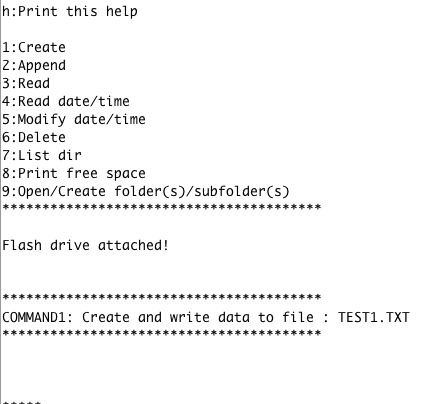
I got the hardware to work, I get the "Flash drive attached!".
I am using the hardware serial example from the library with an arduino mega on Serial3.
I went through all examples 1,2,3 etc and the serial feedback was fine, however when I eject the usb stick I find no file created on it. It is a 8g formatted as FAT32.
Shoulnt I see the TEST1.TXT in the root? I plugged it in a win10 pc and a mac os12.
Nothing,
What am I doing wrong?
here is my sketch
/*------------------------------------------------------------------------------------------------------------------
 *    Author: György Kovács                                                                                         |
 *    Created: 28 Mar 2019                                                                                          |
 *    Description: Basic usage of CH376 with hardware serial                                                        |
 *    Thanks for the idea to Scott C , https://arduinobasics.blogspot.com/2015/05/ch376s-usb-readwrite-module.html  |
 *------------------------------------------------------------------------------------------------------------------
 */


#include <Ch376msc.h>

//..............................................................................................................................
// Leave the default jumper settings for the baud rate (9600) on the CH376, the library will set it up the chosen speed(HW serial only)
Ch376msc flashDrive(Serial3, 115200); // Ch376 object with hardware Serial1 on arduino mega baudrate: 9600, 19200, 57600, 115200
//..............................................................................................................................
 // buffer for reading
char adatBuffer[255];// max length 255 = 254 char + 1 NULL character
//..............................................................................................................................
// strings for writing to file
char adat[]="Vivamus nec nisl molestie, blandit diam vel, varius mi. Fusce luctus cursus sapien in vulputate.\n";
char adat2[] = "Lorem ipsum dolor sit amet, consectetur adipiscing elit. Duis efficitur ac est eu pharetra. \n";
//..............................................................................................................................
unsigned long totSect = 0;
unsigned long freeSect = 0;
byte percentg = 0;
byte tmpCommand; //used to store data coming from serial port
boolean readMore;
static char helpString[]= {"h:Print this help\n\n1:Create\n2:Append\n3:Read\n4:Read date/time\n"
            "5:Modify date/time\n6:Delete\n7:List dir\n8:Print free space"
            "\n9:Open/Create folder(s)/subfolder(s)"};

void setup() {
  Serial.begin(115200);
  flashDrive.init();
  printInfo(helpString);
}

void loop() {
	if(flashDrive.checkIntMessage()){
		if(flashDrive.getDeviceStatus()){
			Serial.println(F("Flash drive attached!"));
		} else {
			Serial.println(F("Flash drive detached!"));
		}
	}
  if(Serial.available()){
    tmpCommand = Serial.read();                      //read incoming bytes from the serial monitor
    if(((tmpCommand > 48)&&(tmpCommand < 58)) && !flashDrive.driveReady()){ // if the data is ASCII 1 - 9 and no flash drive are attached
       printInfo("Attach flash drive first!");
      tmpCommand = 10; // change the command byte
    }
     switch (tmpCommand) {

      case 49: //1
        printInfo("COMMAND1: Create and write data to file : TEST1.TXT");    // Create a file called TEST1.TXT
          flashDrive.setFileName("TEST1.TXT");  //set the file name
          flashDrive.openFile();                //open the file

          for(int a = 0; a < 20; a++){          //write text from string(adat) to flash drive 20 times
            flashDrive.writeFile(adat, strlen(adat)); //string, string length
          }
          flashDrive.closeFile();               //at the end, close the file
        printInfo("Done!");
        break;
//*****************************************************************************************************************************************************
      case 50: //2
        printInfo("COMMAND2: Append data to file: TEST1.TXT");               // Append data to the end of the file.
        flashDrive.setFileName("TEST1.TXT");  //set the file name
        if(flashDrive.openFile() == ANSW_USB_INT_SUCCESS){               //open the file
        	flashDrive.moveCursor(CURSOREND);     //if the file exist, move the "virtual" cursor at end of the file, with CURSORBEGIN we actually rewrite our old file
        	//flashDrive.moveCursor(flashDrive.getFileSize()); // is almost the same as CURSOREND, because we put our cursor at end of the file
        }
        for(int a = 0; a < 20; a++){          //write text from string(adat) to flash drive 20 times
        	if(flashDrive.getFreeSectors()){ //check the free space on the drive
        		flashDrive.writeFile(adat2, strlen(adat2)); //string, string length
           Serial.println (adat2);
        	} else {
        		printInfo("Disk full");
        	}
        }
        flashDrive.closeFile();               //at the end, close the file
        printInfo("Done!");
        break;
//*****************************************************************************************************************************************************
      case 51: //3
        printInfo("COMMAND3: Read File: TEST1.TXT");                         // Read the contents of this file on the USB disk, and display contents in the Serial Monitor
        flashDrive.setFileName("TEST1.TXT");  //set the file name
        flashDrive.openFile();                //open the file
        readMore = true;
                //read data from flash drive until we reach EOF
        while(readMore){ // our temporary buffer where we read data from flash drive and the size of that buffer
        	readMore = flashDrive.readFile(adatBuffer, sizeof(adatBuffer));
        	Serial.print(adatBuffer);          //print the contents of the temporary buffer
        }
        flashDrive.closeFile();               //at the end, close the file
        printInfo("Done!");
        break;
//*****************************************************************************************************************************************************
      case 52: //4
        printInfo("COMMAND4: Read File date/time: TEST1.TXT");      // Read the date and time of file, default 2004.01.01 - 00:00:00
        flashDrive.setFileName("TEST1.TXT");            //set the file name
        flashDrive.openFile();                          //open the file
                //print informations about the file
          Serial.println(flashDrive.getFileName());
          Serial.print(flashDrive.getYear());
          Serial.print("y\t");
          Serial.print(flashDrive.getMonth());
          Serial.print("m\t");
          Serial.print(flashDrive.getDay());
          Serial.print("d\t");
          Serial.print(flashDrive.getHour());
          Serial.print("h\t");
          Serial.print(flashDrive.getMinute());
          Serial.print("m\t");
          Serial.print(flashDrive.getSecond());
          Serial.println('s');
        flashDrive.closeFile();                         //at the end, close the file
        printInfo("Done!");
        break;
//*****************************************************************************************************************************************************
      case 53: //5
        printInfo("COMMAND5: Modify File date/time: TEST1.TXT");    // Modify the file date/time and save
        flashDrive.setFileName("TEST1.TXT");  //set the file name
        flashDrive.openFile();                //open the file

          flashDrive.setYear(2019);
          flashDrive.setMonth(12);
          flashDrive.setDay(19);
          flashDrive.setHour(03);
          flashDrive.setMinute(38);
          flashDrive.setSecond(42);

          flashDrive.saveFileAttrb();           //save the changed data
        flashDrive.closeFile();               //and yes again, close the file after when you don`t use it
        printInfo("Done!");
        break;
//*****************************************************************************************************************************************************
      case 54: //6
        printInfo("COMMAND6: Delete File: TEST1.TXT");                       // Delete the file named TEST1.TXT
        flashDrive.setFileName("TEST1.TXT");  //set the file name
        flashDrive.deleteFile();              //delete file
        printInfo("Done!");
        break;
//*****************************************************************************************************************************************************
      case 55: //7
        printInfo("COMMAND7: List directory");                          //Print all file names in the current directory
          while(flashDrive.listDir()){ // reading next file
            if(flashDrive.getFileAttrb() == CH376_ATTR_DIRECTORY){//directory
              Serial.print('/');
              Serial.println(flashDrive.getFileName()); // get the actual file name
            } else {
              Serial.print(flashDrive.getFileName()); // get the actual file name
              Serial.print(" : ");
              Serial.print(flashDrive.getFileSize()); // get the actual file size in bytes
              Serial.print(" >>>\t");
              Serial.println(flashDrive.getFileSizeStr()); // get the actual file size in formatted string
            }
          }
          printInfo("Done!");
        break;
//*****************************************************************************************************************************************************
      case 56: //8
    	  totSect = flashDrive.getTotalSectors(); // get the total sector number
    	  freeSect = flashDrive.getFreeSectors(); // get the available sector number
    	  percentg = map(freeSect,totSect,0,0,100); 		// convert it to percentage (0-100)
    	  Serial.print("Disk size in bytes: ");
    	  /*if the sector number is more than 8388607 (8388607 * 512 = 4294966784 byte = 4Gb (fits in a 32bit variable) )
    	    							 e.g. 8388608 * 512 = 4294967296 byte (32bit variable overflows) */
    	  if(totSect > 8388607){
    		  Serial.print(">4Gb");
    	  } else {
        	  Serial.print(totSect * SECTORSIZE);
    	  }
    	  Serial.print("\tFree space in bytes: ");
    	  if(freeSect > 8388607){
    		  Serial.print(">4Gb");
    	  } else {
        	  Serial.print(freeSect * SECTORSIZE);
    	  }
    	  Serial.print(F("\tDisk usage :"));
    	  Serial.print(percentg);
    	  Serial.print(F("%"));
    	  switch (flashDrive.getFileSystem()) { //1-FAT12, 2-FAT16, 3-FAT32
			case 1:
				Serial.println(F("\tFAT12 partition"));
				break;
			case 2:
				Serial.println(F("\tFAT16 partition"));
				break;
			case 3:
				Serial.println(F("\tFAT32 partition"));
				break;
			default:
				Serial.println(F("\tNo valid partition"));
				break;
		}
    	 break;
//*****************************************************************************************************************************************************
      case 57: //9
        switch(flashDrive.cd("/DIR1/DIR2/DIR3",1)){
          case CH376_ERR_LONGFILENAME: //0x01
            Serial.println(F("Directory name is too long"));
          break;

          case ANSW_USB_INT_SUCCESS: //0x14
          Serial.println(F("Directory created successfully"));
          break;

          case ANSW_ERR_OPEN_DIR: //0x41
          Serial.println(F("Directory opened successfully"));
          break;

          case ANSW_ERR_MISS_FILE: //0x42
          Serial.println(F("Directory doesn't exist"));
          break;

          case ANSW_ERR_FOUND_NAME: //0x43
          Serial.println(F("File exist with the given name"));
          break;

          default:

          break;
        }
      break;
//*****************************************************************************************************************************************************
      case 104: //h
    	  printInfo(helpString);
        break;
      default:
        break;
    }//end switch

  }//endif serial available

}//end loop

//Print information
void printInfo(const char info[]){

  int infoLength = strlen(info);
  if(infoLength > 40){
    infoLength = 40;
  }
    Serial.print(F("\n\n"));
    for(int a = 0; a < infoLength; a++){
      Serial.print('*');
    }
   Serial.println();
   Serial.println(info);
   for(int a = 0; a < infoLength; a++){
      Serial.print('*');
    }
   Serial.print(F("\n\n"));
}
thanks a lot,
Mitch