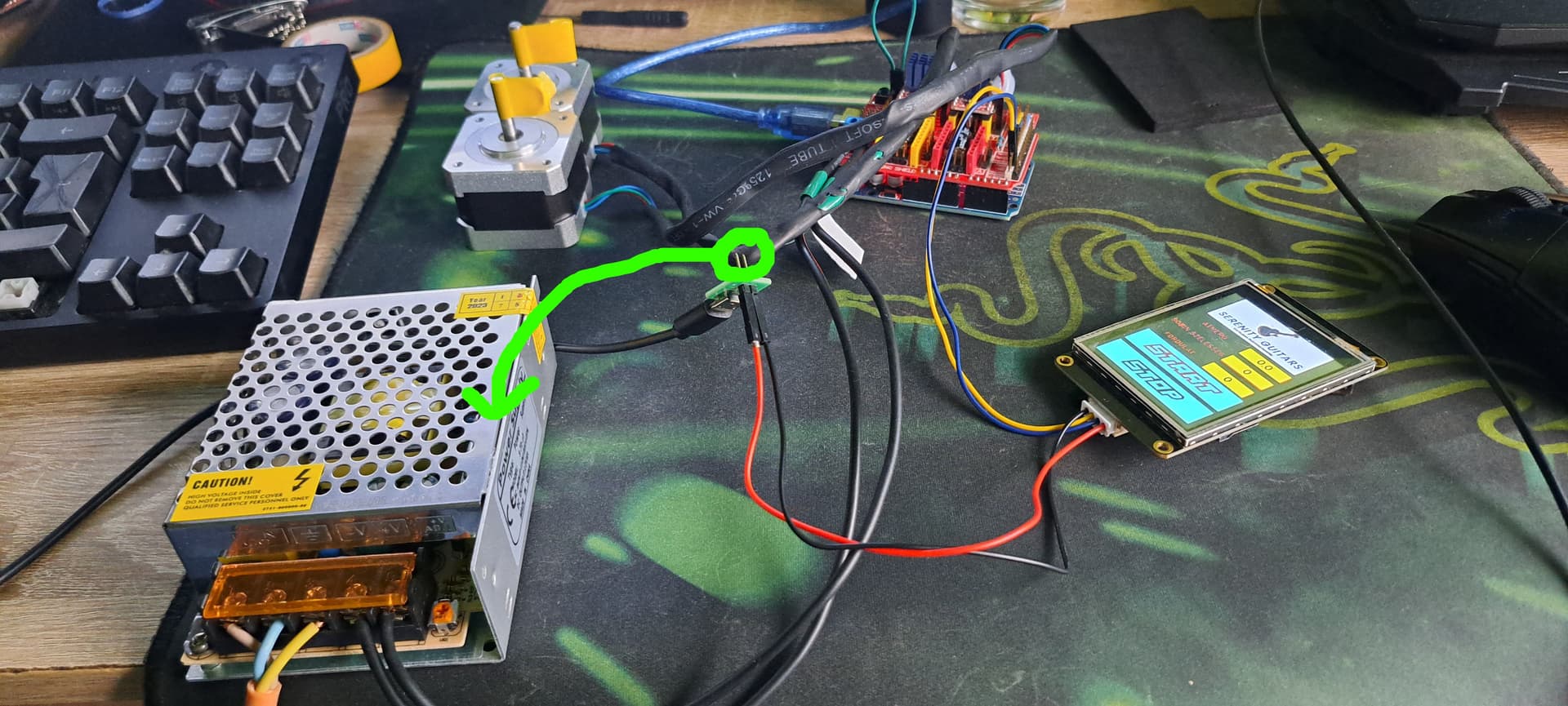
Hello, @PerryBebbington,
Thank you for your response. I've successfully established a connection between my Arduino and the Nextion display, and it appears to be functioning correctly. I've conducted debugging through the serial monitor, and all inputs seem to be working as expected, affirming a good connection.
However, I'm encountering an issue with the machine's functionality. Although it runs and performs countdowns, it's not responding to the A and B variables.
There are three input variables: A (wire), B (coil width), and C (turns). Among these, only the C variable seems to have an effect within the sketch. The others are solely visual; the sketch checks if they're non-zero before functioning.
Remarkably, there's a fourth variable called "L", not inputted from the display, serving as a 'static' variable within the sketch. It controls the motor movement's travel distance, a role that should be fulfilled by the A and B variables, not L.
My goal is to have the Y-axis execute a movement with a maximum distance equal to the B variable, stepping by the value of the A variable. This should continue until the C value reaches zero.
For instance:
A = 0.1
B = 15
C = 200
The X-axis initiates full revolution rotation. After each full revolution, C decrements. Meanwhile, the Y-axis travels the A value at each full X rotation until it reaches the B value. Then, it repeats this process until returning to the start position, looping until C hits zero.
I think the issue doesn't lie in how the Nextion communicates with the Arduino; it might be functioning correctly. It seems the void Data section is fine, and the necessary changes should be made in the loop section. It's possible I overlooked this question initially and got lost in the details. Despite trying numerous approaches, I haven't been able to make it work as intended.
I've gone through your Nextion display tutorial. The cat part scared me, although I have a dog. I've also come across suggestions against connecting the 5V to the Arduino, favoring a micro USB charger. Perhaps this explains the capacitor in your method.
Regarding your tutorial, I noticed the use of 0xa5 instead of 0xff. Could you guide me on changing these values?
I also referred to this site: Instruction Set - Nextion. However, there are aspects that I'm struggling to comprehend. Some sections seem entirely nonsensical to me.
I do possess programming knowledge in Java (developed a 5-axis postprocessor) and C# (hobbyist Unity game dev scripts). I'm learning slowly but steadily, although the process can be quite challenging. I admit, my coding skills are still in the learning phase.
It's nighttime here, and I'll be heading to bed soon. Tomorrow, I plan to reset both my Arduino and Nextion display, and I'll go through your tutorial from start to finish. I'll endeavor to build upon that foundation.
Attached is the last sketch that worked.
#include <Stepper.h>
#include <Arduino.h>
#include "BasicStepperDriver.h"
#include "MultiDriver.h"
#include "SyncDriver.h"
#include <SoftwareSerial.h>

SoftwareSerial mySerial(A0, A1);  // RX, TX
int A = 0;
int B = 0;
int C = 0;
int L = 40;  // Adjust the number of rotations as needed
int state = 0;
int EN = 8;  // Change the stepper enable pin to match CNC Shield
String message;
int QTY, numMessages, endBytes;
byte inByte;
int flag = 0;

#define DIR_X 5  // Change these pin numbers to match CNC Shield
#define STEP_X 2
#define DIR_Y 6
#define STEP_Y 3
#define MICROSTEPS 16
#define MOTOR_STEPS 400

int count = 0;
BasicStepperDriver stepperX(MOTOR_STEPS, DIR_X, STEP_X);
BasicStepperDriver stepperY(MOTOR_STEPS, DIR_Y, STEP_Y);
SyncDriver controller(stepperX, stepperY);

void setup() {
  pinMode(EN, OUTPUT);
  digitalWrite(EN, HIGH);
  numMessages, endBytes = 0;
  Serial.begin(9600);
  mySerial.begin(9600);
  stepperX.begin(1000, MICROSTEPS);
  stepperY.begin(1000, MICROSTEPS);
  delay(500);
  Serial.println("Setup complete.");  // Debugging: Check if setup completes
}

void loop() {
  data();
  if (A > 0 && B > 0 && C > 0) {
    digitalWrite(EN, LOW);
    while (count < C) { // Change to a while loop to ensure it runs till count reaches C
      for (int i = 0; i < L && count < C; i++) { // Ensure count is still less than C before rotating
        controller.rotate(360, 40);
        mySerial.print("n2.val=");
        mySerial.print(count);
        mySerial.write(0xff);
        mySerial.write(0xff);
        mySerial.write(0xff);
        count++;
        delay(0); // Introduce a delay to give time for the motor to rotate
      }

      for (int i = 0; i <= L && count < C; i++) { // Ensure count is still less than C before rotating
        controller.rotate(360, -40);
        mySerial.print("n2.val=");
        mySerial.print(count);
        mySerial.write(0xff);
        mySerial.write(0xff);
        mySerial.write(0xff);
        count++;
        delay(0); // Introduce a delay to give time for the motor to rotate
      }
    }


    if (count >= C) {
      // Reset job parameters after completion
      A = 0;
      B = 0;
      C = 0;
      count = 0;
      digitalWrite(EN, HIGH); // Disable the stepper motor
      // Add any other necessary resets here
    }
  }
}


void data() {
  if (state == 0) {
    if (numMessages == 1) {  //Did we receive the anticipated number of messages? In this case we only want to receive 1 message.
      A = QTY;
      Serial.println(A);  //See what the important message is that the Arduino receives from the Nextion
      numMessages = 0;    //Now that the entire set of data is received, reset the number of messages received
      state = 1;
    }
  }

  if (state == 1) {
    if (numMessages == 1) {  //Did we receive the anticipated number of messages? In this case we only want to receive 1 message.
      B = QTY;
      Serial.println(B);  //See what the important message is that the Arduino receives from the Nextion
      numMessages = 0;    //Now that the entire set of data is received, reset the number of messages received
      state = 2;
    }
  }

  if (state == 2) {
    if (numMessages == 1) {  //Did we receive the anticipated number of messages? In this case we only want to receive 1 message.
      C = QTY;
      Serial.println(C);  //See what the important message is that the Arduino receives from the Nextion
      numMessages = 0;    //Now that the entire set of data is received, reset the number of messages received
      state = 0;
    }
  }


  if (mySerial.available()) {  //Is data coming through the serial from the Nextion?
    inByte = mySerial.read();

    // Serial.println(inByte); //See the data as it comes in

    if (inByte > 47 && inByte < 58) {  //Is it data that we want to use?
      message.concat(char(inByte));    //Cast the decimal number to a character and add it to the message
    } else if (inByte == 255) {        //Is it an end byte?
      endBytes = endBytes + 1;         //If so, count it as an end byte.
    }

    if (inByte == 255 && endBytes == 3) {  //Is it the 3rd (aka last) end byte?
      QTY = message.toInt();               //Because we have now received the whole message, we can save it in a variable.
      message = "";                        //We received the whole message, so now we can clear the variable to avoid getting mixed messages.
      endBytes = 0;                        //We received the whole message, we need to clear the variable so that we can identify the next message's end
      numMessages = numMessages + 1;       //We received the whole message, therefore we increment the number of messages received.

      //Now lets test if it worked by playing around with the variable.
    }
  }
}