Edits: I kept posting the prior version of the code, it's correct now
Edit2: Added a bit cut off the schematic
Hi everyone
I'll post the full code and schematic at the bottom but here is a screenshot that demonstrates where it is happening and what the serial monitor is doing

As you can see, it's getting stuck right at the delay(vaDelay); part, the sound is not being triggered (but is working elsewhere in the code)
The variable vaDelay is 45000, so 45 seconds I guess. Kinda perplexed why this is happening, it's never been an issue for me.
There may be something it doesn't like about that particular mp3 so I will try play the specific mp3.playTrack(3); elsewhere
full code:
// #define DEBUG

// Scare control UNO

#include <AltSoftSerial.h> // Alt serial library, see library folder in dropbox
#include <Wire.h>
#include <MD_YX5300.h> // See library folder in dropbox
#include <Bounce2.h> // For debouncing button input. See https://github.com/thomasfredericks/Bounce2

// Tunable variables - These are so you can sync up sounds and scares easily


// #ifdef DEBUG
// int vaDelay = 5000; // violent attack delay. Debug 5000. Live 60000.
// int cbDelay1 = 5000; // first crying delay. Debug 5000. Live 10000.
// int cbDelay2 = 5000; // second cry delay. Debug 5000. Live  5000.

// int FHdim = 1500; // Time for the spotlight to dim after the MP3 has been triggered
// int FHrelay = 2500; // Time for relay to hit
// int BYdelay1 = 2000; // Time for first behind you after reed trigger
// int BYdelay2 = 4000; // Time for second behind you after first behind you
// int BYflicker1 = 2000; // Time for first flicker pulse
// int BYflicker2 = 3000; // Time for second flicker pulse
// int fadeAmount = 5;  // how many points to fade the spotlight by
// int fadeinTime = 50; // how quickly to fade the spotlight up (this is slower)
// int fadeoutTime = 20; // how quickly to fade the spotlight up (this is quick)
// int postScareTime = 5000;
// #endif


//#ifndef DEBUG
int vaDelay = 45000; // violent attack delay. Debug 5000. Live 60000.

int cbDelay1 = 10000; // first crying delay. Debug 5000. Live 10000.
int cbDelay2 = 5000; // second cry delay. Debug 5000. Live  5000.

int FHdim = 1000; // Time for the spotlight to dim after the MP3 has been triggered
int FHrelay = 2000; // Time for relay to hit
int FYflicker = 50; // Time for the flicker to pulse after facehugger has dropped
int BYdelay1 = 12000; // Time for first behind you after reed trigger
int BYdelay2 = 20000; // Time for second behind you after first behind you
int BYflicker1 = 2000; // Time for first flicker pulse
int BYflicker2 = 3000; // Time for second flicker pulse
int fadeAmount = 5;  // how many points to fade the spotlight by
int fadeinTime = 50; // how quickly to fade the spotlight up (this is slower)
int fadeoutTime = 10; // how quickly to fade the spotlight up (this is quick)
int postScareTime = 3000;
// #endif

// Input pins

int hiss = 12; // Yellow cable connected to office
int hissSelect = 0; // Number to cycle which hiss mp3 to select
int flicker = 6; // Orange cable connected to office
int exhale = 10; // White cable connected to office
int baby = 11; // Yellow cable connected to office


// Output pins

int megaFlicker = A5; // THIS IS NOW ATTACHED TO A red LED
// int megavolumeDown = 2;

// Input triggers

int circsqtriPin = A0; // CHANGED Trigger for 1612 and starts violet attack countdown
int circsqtriLev;
int rfidPin = A1; // CHANGED Trigger the facehugger sequence
int rfidLev;
int jump7Pin= A2; // CHANGED Trigger the window opening sounds
int jump7Lev;
int reedPin = A3; // CHANGED Trigger any behind you sequence
int reedLev;
int plugPin = A4; // Trigger the scare
// int ultrasoundPin = 7;

int threshold = 800; // Threshold for detecting the LED flashes

// Pins for scare switch
int scareSwitch = 13; // This is pulled low when scares are being turned on.
int switchState; //
bool scaresOn = false; // bool to keep track of if scares are on

// Utility

int spotlight = 5; // PWM pin to control the brightness of the light
int spotlightDelay = 0; // Counter to keep track of the delay for the spotlight
int spotlightThreshold = 10000; // Threshold for when to turn on the spotlight
int brightness = 0;  // how bright the spotlight is
int lightRelay = 3; // Relay attached to light NO is floor NC is hand
int facehuggerRelay = 4; // Relay to release the facehugger scare

bool plugState = false; // Keeps the "waiting for plug" loop going
bool plugConnected; // Bool to test if the plug is connected and warn the user if it is


// GLOBALS

// Create an array of Bounce objects for each input button

//Bounce circsqtriSwitch = Bounce();
//Bounce reedSwitch = Bounce();
//Bounce rfidSwitch = Bounce();
//Bounce jump7Switch = Bounce();
Bounce plugSwitch = Bounce();
//Bounce ultrasoundSwitch = Bounce();

Bounce hissSwitch = Bounce();
Bounce exhaleSwitch = Bounce();
Bounce babySwitch = Bounce();
Bounce flickerSwitch = Bounce();

// Initialise a software serial interface on the approriate Rx/Tx pins (8/9)
AltSoftSerial altSerial;
// And create an MP3 object based on the serial connection
MD_YX5300 mp3(altSerial);

void setup()
{
  delay (1000);

  // Initialise a serial connection (used for debugging only)
  Serial.begin(115200);
  Serial.println(__FILE__ __DATE__);
  Serial.println("Serial connection initialised");

  Serial.println ("Setup 2 begun, buffer initiated");
  delay (5000);
  Serial.println ("Buffer 2 complete");

  //reedSwitch.attach(reedPin, INPUT_PULLUP); // REED
  //rfidSwitch.attach(rfidPin, INPUT_PULLUP); // DOOR
  //circsqtriSwitch.attach(circsqtriPin, INPUT_PULLUP);// 16
  //jump7Switch.attach(jump7Pin, INPUT_PULLUP); // J7
  plugSwitch.attach(plugPin, INPUT_PULLUP);
  // ultrasoundSwitch.attach(ultrasoundPin, INPUT_PULLUP);

  // Changes adding the LDRs

  pinMode(reedPin, INPUT);
  pinMode(rfidPin, INPUT);
  pinMode(circsqtriPin, INPUT);
  pinMode(jump7Pin, INPUT);

  hissSwitch.attach(hiss, INPUT_PULLUP);
  flickerSwitch.attach(flicker, INPUT_PULLUP);
  exhaleSwitch.attach(exhale, INPUT_PULLUP);
  babySwitch.attach(baby, INPUT_PULLUP);

  Serial.println("Utility buttons initialised");

  // Scare mode?
  pinMode (scareSwitch, INPUT_PULLUP);
  switchState = digitalRead(scareSwitch);
  Serial.println(switchState);

  // Initialise pins and test

  pinMode(megaFlicker, OUTPUT); // Because this is the LED
  digitalWrite(megaFlicker, LOW); // Make sure it's not on
  //pinMode(megavolumeDown, OUTPUT);

  pinMode(spotlight, OUTPUT);
  pinMode(facehuggerRelay, OUTPUT);
  digitalWrite(facehuggerRelay, LOW);
  pinMode(lightRelay, OUTPUT);
  digitalWrite (lightRelay, HIGH);

  // Test

  // Initialise the serial interface to the MP3 player
  altSerial.begin(9600);
  mp3.begin();
  mp3.volume(30);
  delay(1000);

  if (switchState == 0){
    scaresOn = true;
    Serial.print(switchState);
    mp3.playTrack(1); // "Horror mode is turned on"
    Serial.println ("Horror mode is turned ON");
  }
  else {
    scaresOn = false;
    Serial.print(switchState);
    mp3.playTrack(2); // "Horror mode is turned off"
    Serial.println ("Horror mode is turned OFF");
  }

  delay(3000);
  plugConnected = digitalRead(plugPin);
  Serial.print ("plugConnected is ");
  Serial.println(plugConnected);

  if (plugConnected == 0)
  {
   mp3.playTrack(14); // Alien hiss
  }
  else
  {
    mp3.playTrack(11); // Exhale
  }

  delay(5000);
  Serial.println("Setup complete");
}

void loop()
{
  switchState = digitalRead(scareSwitch);

  if (switchState == 0){
    scaresOn = true;
    // #ifdef DEBUG
    Serial.println("SPOOKY");
    // #endif
  }
  if (switchState != 0) {
    scaresOn = false;
    // #ifdef DEBUG
    Serial.println("Safe");
    // #endif
  }

  // reedSwitch.update();
  // rfidSwitch.update();
  // circsqtriSwitch.update();
  // jump7Switch.update();
  // ultrasoundSwitch.update();

  // Read the light levels
  circsqtriLev = analogRead (circsqtriPin);
  rfidLev = analogRead (rfidPin);
  jump7Lev = analogRead (jump7Pin);
  reedLev = analogRead (reedPin);

  // Print the light levels

  Serial.print(circsqtriLev);
  Serial.print("\t");
  Serial.print(rfidLev);
  Serial.print("\t");
  Serial.print(jump7Lev);
  Serial.print("\t");
  Serial.print(reedLev);
  Serial.println("\t");

  // Update the manual switches
  hissSwitch.update();
  flickerSwitch.update();
  exhaleSwitch.update();
  babySwitch.update();

  // Now run through the statements to detect changes

  //if(circsqtriSwitch.fell())
  if (circsqtriLev>threshold)
  {
    Serial.println("1612 complete");
    violentAttack();
  }

  //if(rfidSwitch.fell())
  if (rfidLev>threshold)
  {
    Serial.println("rfid complete");

    if (scaresOn == true)
    {
      Serial.println("SCARES ARE ON");
      jumpScare();
    }
    else
    {
      Serial.println("SCARES ARE OFF");
      noScare();
    }
  }

  //if(jump7Switch.fell())
  if (jump7Lev>threshold)
  {
    Serial.println("jump7 complete");
    cryBabies();
  }

  //if(reedSwitch.fell())
  if (reedLev>threshold)
  {
    Serial.println("reed complete");

    behindYou();
  }

  if(flickerSwitch.fell())
  {
    Serial.println("flicker");
    if (scaresOn == true)
    {
      sendFlicker();
    }
  }

  if(babySwitch.fell())
  {
    Serial.println("baby");

    if (scaresOn == true)
    {
      mp3.playTrack(10);
      delay(1000);
    }
  }

  if(hissSwitch.fell())
  {
    Serial.println("hiss");

    if (scaresOn == true)
    {
      whataHisser();
    }
  }

  if(exhaleSwitch.fell())
  {
    Serial.println("exhale");

    if (scaresOn == true)
    {
      mp3.playTrack(11);
    }
  }
}

void violentAttack()
{
  Serial.println("in function violentAttack");

  if (scaresOn == true)
  {
    Serial.println("playing violent attack");
    delay(vaDelay);
    mp3.playTrack(3);
  }
  Serial.println("returning to loop");
  return;
}

void jumpScare() // TO DO
{
  Serial.println("in jumpScare");
  digitalWrite(lightRelay, LOW);
  mp3.playTrack(7); // Containment cell access granted, warning eteenfeijnfei
  do
  {
    plugSwitch.update();
    spotlightDelay ++;
    Serial.print("Spotlight delay is ");
    Serial.println(spotlightDelay);
    if (spotlightDelay == spotlightThreshold)
    {
      delay(1000);
      mp3.playTrack(6); // Facehugger cry
      Serial.println ("Facehugger crying");
      brightness = 0;

      do
      {
        analogWrite(spotlight, brightness); // Set current brightness
        // Serial.println (brightness);
        brightness = brightness + fadeAmount; // Increase brightness
        delay(fadeinTime);
      }
      while (brightness <= 225); // Till brightness maxed
      analogWrite(spotlight,225);
    }

    if(plugSwitch.fell())
    {
      Serial.println("plug connected");
      mp3.playTrack(9); // Facehugger strike begins
      delay(FHdim); // Delay a bit so people can react to the sound

      do
      {
        analogWrite(spotlight, brightness); // Set current brightness
        //Serial.println (brightness);
        brightness = brightness - fadeAmount; // Decrease brightness
        delay(fadeoutTime);
      }
      while (brightness >= 0); // Till brightness at minimum

      analogWrite(spotlight, 0);
      delay(FHrelay);
      digitalWrite (facehuggerRelay, HIGH);
      delay(200);
      digitalWrite(facehuggerRelay, LOW);
      plugState = true;
      delay(postScareTime);
      // digitalWrite(lightRelay, HIGH);

      sendFlicker();

      // digitalWrite(megavolumeDown, LOW); // Send volume up signal
      // delay(200);
      // digitalWrite(megavolumeDown, HIGH);
    }
  }
  while (plugState == false);
}

void noScare()
{
  Serial.println ("in noScare");
  mp3.playTrack(8);
  return;
}

void cryBabies ()
{
  if (scaresOn == true)
  {
    delay(cbDelay1);
    mp3.playTrack(5);
    delay(cbDelay2);
    mp3.playTrack(4);
  }

  else
  {
    return;
  }
}

void behindYou()
{
  if(scaresOn == true)
  {
    mp3.volume(25);
    delay (BYdelay1);
    mp3.playTrack(12);
    delay (BYdelay2);
    sendFlicker();
    delay (BYflicker1);
    mp3.playTrack(13);
    delay (BYflicker2);
    sendFlicker();
  }
  else
  {
    return;
  }
}

void spotlightOff()
{
  do
  {
    analogWrite(spotlight, brightness); // Set current brightness
    // Serial.println (brightness);
    brightness = brightness - fadeAmount; // Decrease brightness
    delay(fadeoutTime);

  }
  while (brightness >= 0); // Till brightness at minimum

  analogWrite(spotlight, 0);
  return;
}

void whataHisser()
{
  #ifdef DEBUG
    Serial.print ("hissSelect is ");
    Serial.println (hissSelect);
	  Serial.println("Debug pause");
	  delay(5000);
  #endif

  if (hissSelect == 0)
  {
    mp3.playTrack(14);
    hissSelect=1;
  }
  else if (hissSelect == 1)
  {
    mp3.playTrack(15);
    hissSelect=2;
  }
  else if (hissSelect == 2)
  {
    mp3.playTrack(16);
    hissSelect=0;
  }
}

void sendFlicker()
{
  if (scaresOn == true)
  {
    digitalWrite(megaFlicker, HIGH);
    delay(200);
    digitalWrite(megaFlicker, LOW);
    mp3.playTrack(18);
  }
}
Schematic (apologies, some of the power wires look dodgy because I haven't finalised their layout)
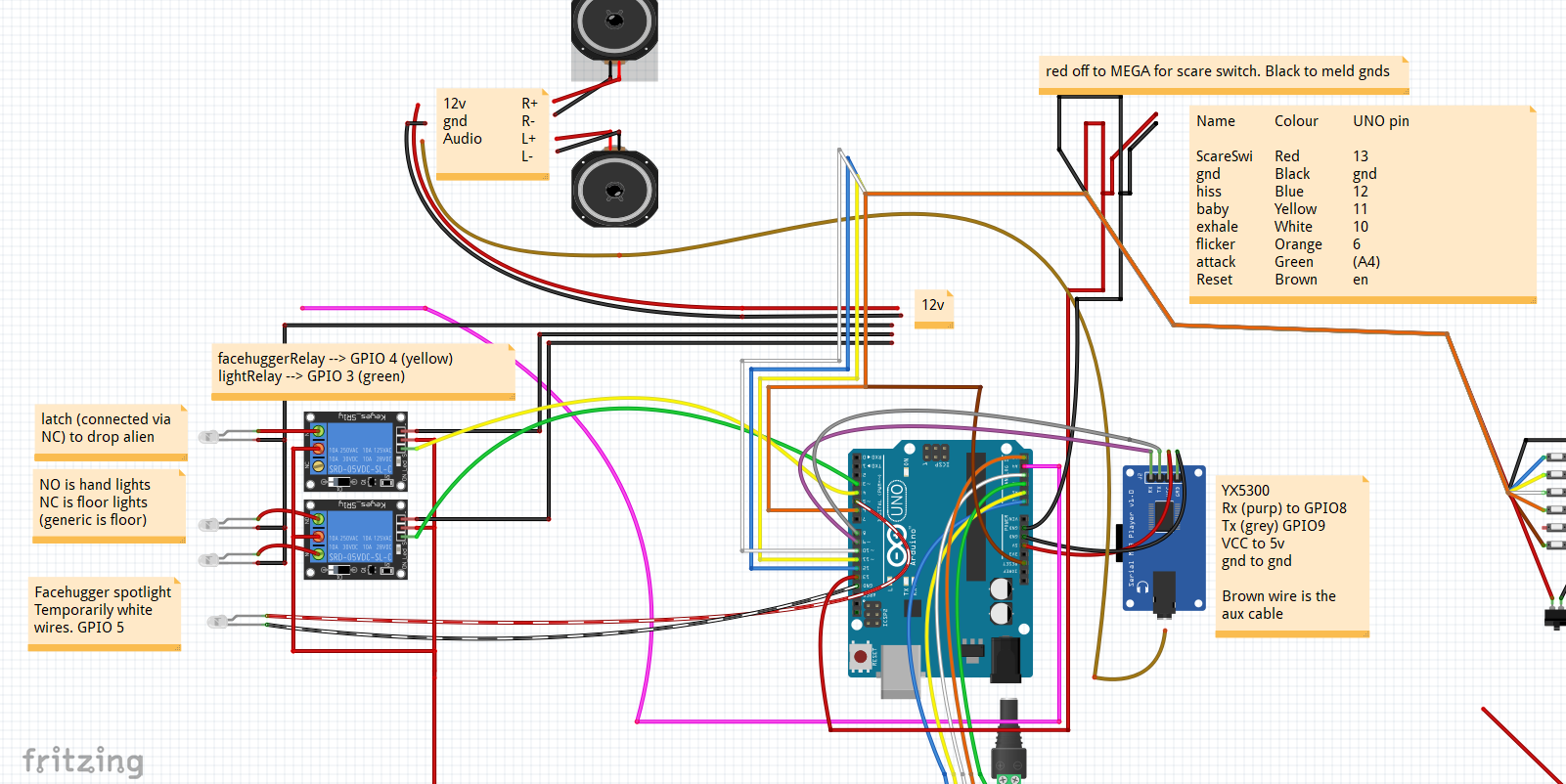
Part of the image cut off (these are essentially LDRs looking out for changes in light to trigger parts of the code, they are working as intended (but the diagram is not updated)

 however youve taught me some cool things