Hi
I am trying to follow this tutorial to create my own color chasing robot using pixy2, arduino, dual motor controller and two 48V BLDC motors. wiki:v2:pixy_zumo_howto [Documentation] (pixycam.com)
Instead of using zumo robot, I made my own so I want to try out with pixy2 and my dual motor controller using arduino’s zumo chase example sketch.
Could you tell me how to make the connection between arduino and my dual motor controller?
Please advise me what to connect between arduino and my dual motor controller so that I can test with my robot.
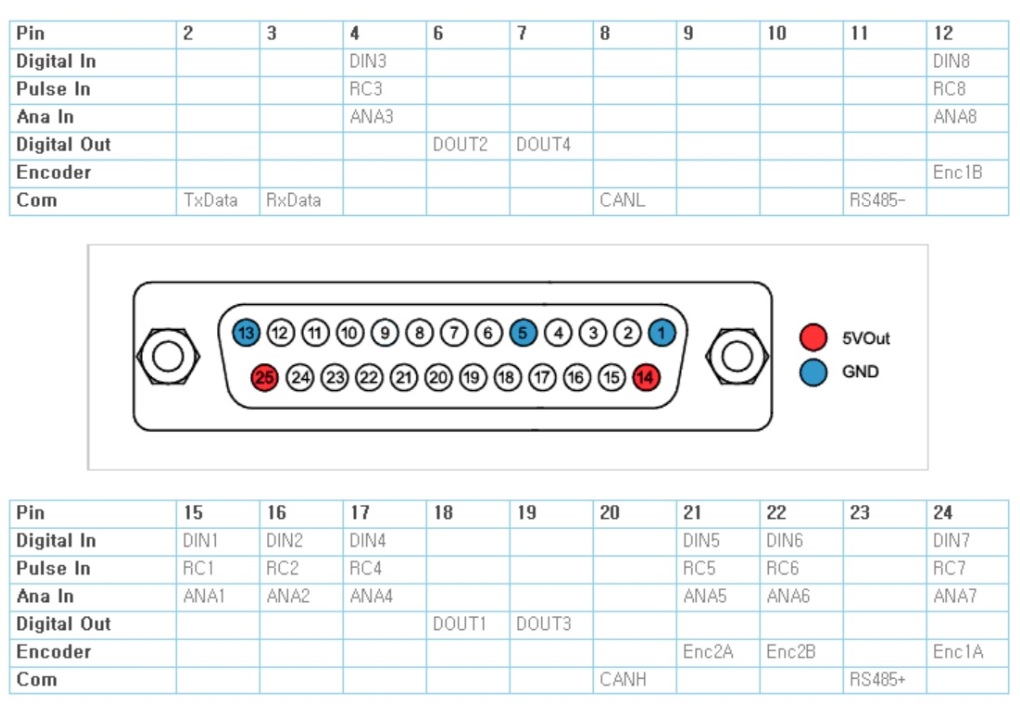
This is the pinout from my dual motor controller.
I'm going to need more data on that "Dual Motor Controller". I don't understand why it has 8 inputs (choice of 'digital', 'pulse', or 'analog'?) and 4 'digital' outputs.
Without additional hardware, I think you will be using the TxData and RxData communication pins. You will need the documentation for that protocol. The protocol manual should allow you to control your motors.
The serial signaling appears to be using RS232 logic levels (+12V:-12V). Those are incompatible with 0V:+5V TTL levels that the Arduino uses so an RS232 adapter module will be needed.
The datasheet says nothing about the control protocol (how to move motors).
Have you got the configuration software that configures the device via USB? There is probably a separate manual for that.
Yes, I have the configuration software for my dual motor controller.
Also, I could find a manual for my dual motor controller which describes the full details of the protocol.
Please find the attachment.
My dual motor controller model is SBLG2360T.
hi sorry to intrude but Mr Wasser I'm working on an Arduino Project which concerns A SIM 900 GSM module I looked at that discussion and couldn't reply to it and so I am asking it here here is a screen shot of my dilemma
After reading the specifications the only difference seems to be operating temperature range. CSE: 0-70°C, ESE: -40-85°C. Either one should work. Those don't have. manufacturer's logo (Maxim/AnalogDevices) so they are probably clones and who knows if the operating temperature ratings are valid.
Thank you, I appreciate it so much.
I will get ESE type tomorrow and test it with my controller.
Is this the proper way of connecting them all together?
You should probably not use Pin 0 and Pin 1 for your peripheral because then you won't be able to use Serial for messages to Serial Monitor. Most people use SoftwareSerial but that may have problems with the default 115200 baud rate. If you get a MEGA it has three spare serial ports (Serial1, Serial2, Serial3). If you get a Leonardo/Micro it uses Serial (USB) for Serial Monitor, leaving Serial1 (pins 0 and 1) for your preiipheral.
It looks like you have the TX (2) and RX (3) lines switched on the RS323 side.
Hi John
Thank you so much for your reply.
Ok, I ordered for Leonardo that has no header.
And thank you for pointing out the wrong connection.
I revised it as below.
Hi John
I connected all the parts and cables together and trying to test with zumo sketch right now.
Do I need to modify some code in the sketch so that it can control the protocol of my dual motor controller?
Hi John
Then I will open up a new topic in the software catagory.
I am totally knew with coding.
Thank you for helping me for setting up the part connections.
I appreciate it.