Combining Modbus RTU Relay with Modbus RS485 soil sensor

I want to combine the code for an RS485 Modbus RTU soil sensor with single relay control using Modbus RTU. The concept is that when the soil humidity is above 30 percent, the relay remains inactive; if the humidity is below 30 percent, the relay activates.

The main device I'm using is an ESP32 connected to a UART TTL to RS485 Two-way Converter Module.

When I connect only the RS485 Modbus RTU soil sensor, the serial monitor can display the sensor readings.
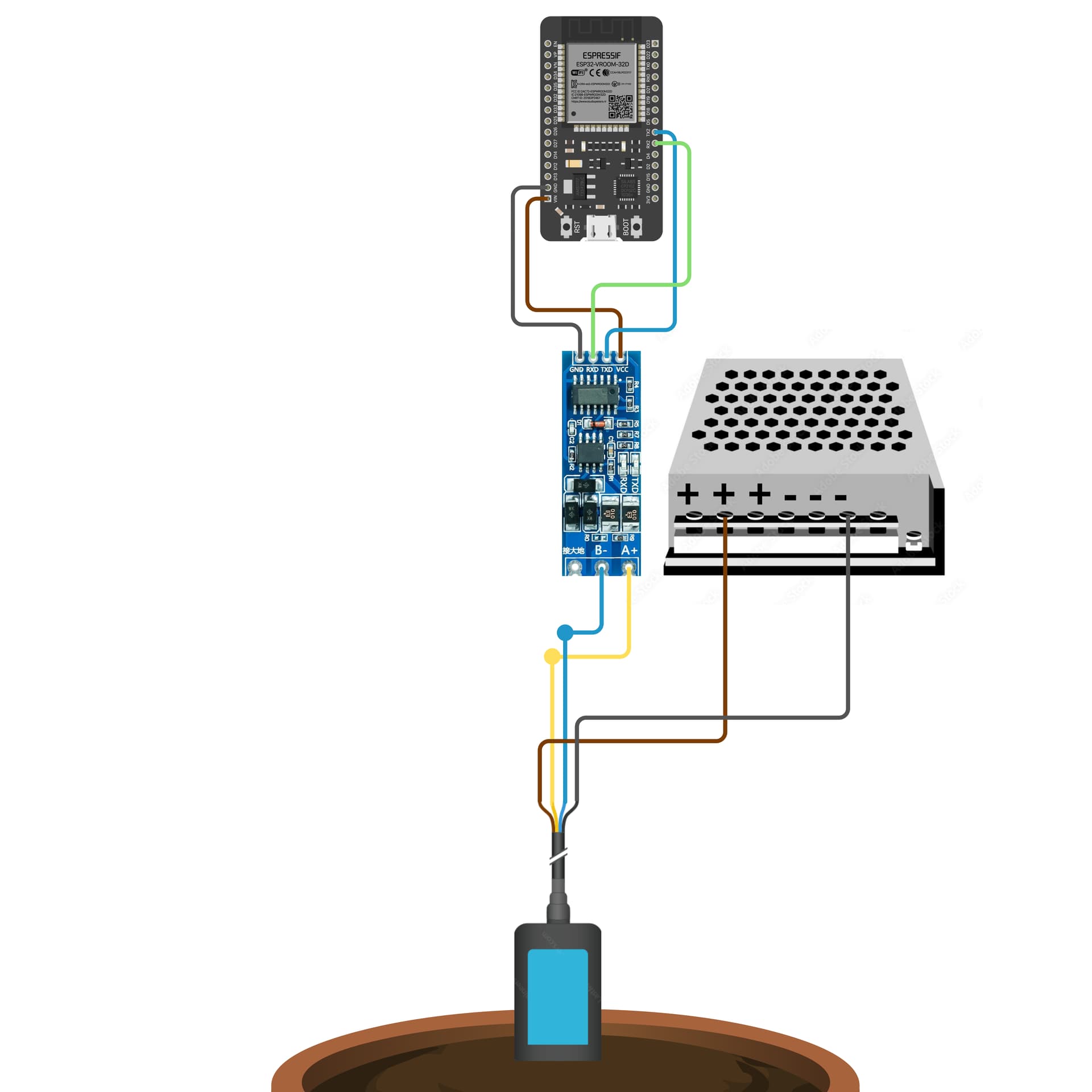
Here’s the code:

#include <ModbusMaster.h>
ModbusMaster THCPH;

char buff[10];

void setup() {
  Serial.begin(9600);
  Serial.println("Starting..");

  Serial2.begin(9600, SERIAL_8N1, 16, 17);
  THCPH.begin(2, Serial2);
}

void loop() {  
  Serial.println("Read 4in1 sensor...");
  uint8_t result;

  result = THCPH.readHoldingRegisters(0x0000, 1);
  if (result == THCPH.ku8MBSuccess)
  {
    sprintf(buff, "%.1f", THCPH.getResponseBuffer(0x00) / 10.0f);
    Serial.print("Humidity = ");
    Serial.println(buff);    
  }

  delay(100);

  result = THCPH.readHoldingRegisters(0x0001, 1);
  if (result == THCPH.ku8MBSuccess)
  {
    sprintf(buff, "%.1f", THCPH.getResponseBuffer(0x00) / 10.0f);
    Serial.print("Temperature = ");
    Serial.println(buff);    
  }

  delay(100);

  result = THCPH.readHoldingRegisters(0x0002, 1);
  if (result == THCPH.ku8MBSuccess)
  {
    sprintf(buff, "%.1f", THCPH.getResponseBuffer(0x00) / 10.0f);
    Serial.print("Conductivity = ");
    Serial.println(buff);    
  }

  delay(100);

  result = THCPH.readHoldingRegisters(0x0003, 1);
  if (result == THCPH.ku8MBSuccess)
  {
    sprintf(buff, "%.1f", THCPH.getResponseBuffer(0x00) / 10.0f);
    Serial.print("pH = ");
    Serial.println(buff);    
  }

  Serial.println("Done");
  
  delay(1000);
}

When only using the single relay, it can activate and deactivate properly.

Here’s the code:

#include <HardwareSerial.h>

// Initialize the serial port for RS485
HardwareSerial mySerial(1);

uint8_t Relay0_ON[8] = {0x01, 0x05, 0x00, 0x00, 0xFF, 0x00, 0x8C, 0x3A};
uint8_t Relay0_OFF[8] = {0x01, 0x05, 0x00, 0x00, 0x00, 0x00, 0xCD, 0xCA};

void setup() {
  // Start serial communication
  Serial.begin(9600);
  mySerial.begin(9600, SERIAL_8N1, 16, 17); // U2RXD pin 16, U2TXD pin 17
  
  // Wait for the serial to connect
  while (!Serial) {
    ; // Wait until Serial is connected
  }

  Serial.println("Modbus RTU Relay Control with ESP32");
}

void loop() {
  // Open the valve by activating relay 0 (red wire)
  Serial.println("Opening valve...");
  sendCommand(Relay0_ON, sizeof(Relay0_ON));
  delay(1000); // Wait for 3 seconds
  Serial.println("Closing valve...");
  sendCommand(Relay0_OFF, sizeof(Relay0_OFF));

  // Wait a bit before closing the valve
  delay(1000); // Wait for 1 second
}

// Function to send commands to the relay
void sendCommand(uint8_t *cmd, size_t length) {
  mySerial.write(cmd, length);
  mySerial.flush();
  Serial.print("Command sent: ");
  for (size_t i = 0; i < length; i++) {
    Serial.print(cmd[i], HEX);
    Serial.print(" ");
  }
  Serial.println();
}

I would like to combine these two codes so that they work according to the concept. I’ve tried modifying or combining the code several times, but I keep encountering errors.
here is the concept I want:
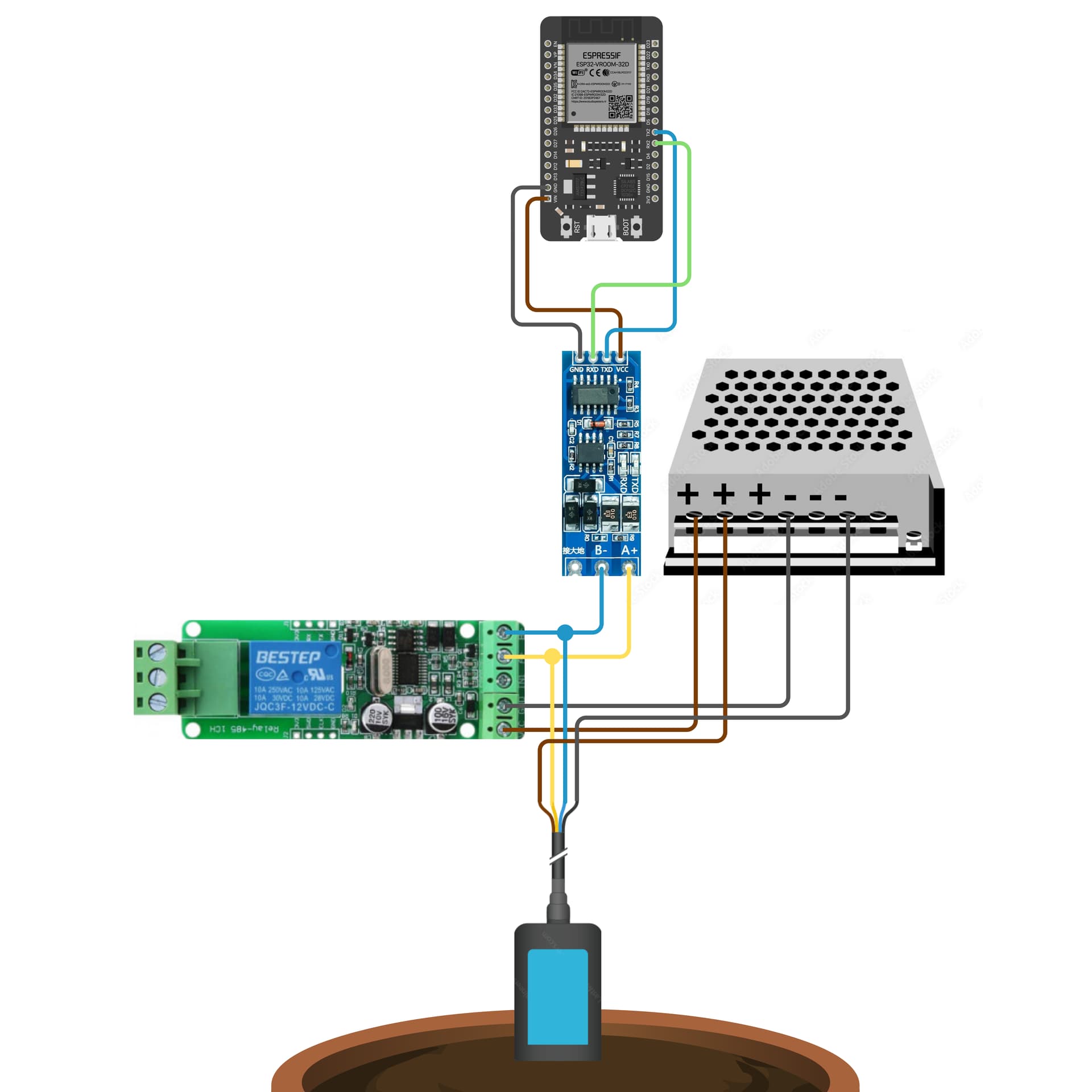
Here’s the soil sensor manual:
THCPH-S (5pin probe) manual_V1.3

Here’s the Modbus RTU relay manual:
Protocol Manual of Control Modbus RTU single relay

Thank you.

why aren't you using the ModBus Master Libray also to control the relay?

uint8_t ModbusMaster::writeSingleCoil(uint16_t u16WriteAddress, uint8_t u8State)

ModbusMaster/src/ModbusMaster.cpp at master · 4-20ma/ModbusMaster · GitHub

something like

constexpr uint8_t relayAddress {1};
constexpr uint16_t relayRegister {0};
//..

ModbusMaster relayNode;

//..
relayNode.begin(relayAddress, Serial2);

//..
relayNode.writeSingleCoil(relayRegister, 1); // 0 for off, any other value for on

first make a short "blink" sketch to switch on / off the relay with the modbus master lib.
Then the integration in one general sketch should be a simple "if / else"

my knowledge about modbus is still lacking. I have tried it, but the relay is not active but in the serial monitor it runs as it should. example of the code:

#include <ModbusMaster.h>

// Declare ModbusMaster object
ModbusMaster relay;

void setup() {
  // Start serial communication for debugging
  Serial.begin(9600);
  Serial.println("Modbus RTU Relay Control with ESP32");

  // Start serial communication for Modbus (RS485)
  Serial2.begin(9600, SERIAL_8N1, 16, 17);

  // Initialize Modbus relay
  relay.begin(1, Serial2); // Slave ID 1
}

void loop() {
  uint8_t result;

  // Open the valve by activating relay 0 (red wire)
  Serial.println("Opening valve...");
  result = relay.writeSingleCoil(0x0000, 0xFF00); // Send ON command
  if (result == relay.ku8MBSuccess) {
    Serial.println("Relay ON successfully activated");
  } else {
    Serial.print("Relay ON failed, error code: ");
    Serial.println(result);
  }
  delay(3000); // Wait for 3 seconds

  // Close the valve by deactivating relay 0
  Serial.println("Closing valve...");
  result = relay.writeSingleCoil(0x0000, 0x0000); // Send OFF command
  if (result == relay.ku8MBSuccess) {
    Serial.println("Relay OFF successfully deactivated");
  } else {
    Serial.print("Relay OFF failed, error code: ");
    Serial.println(result);
  }
  delay(1000); // Wait for 1 second
}

Screenshot 2024-08-19 185156

that is curious, because the master wouldn't report a success if the node wouldn't report an OK...

After I read your reply update and also read the github, I can run the relay code using modbusmaster.h. Thank you so much! now I just need to find a solution to combine the relay and the soil sensor. Here is the relay code:

#include <ModbusMaster.h>

// Declare ModbusMaster object
ModbusMaster relay;

void setup() {
  // Start serial communication for debugging
  Serial.begin(9600);
  Serial.println("Modbus RTU Relay Control with ESP32");

  // Start serial communication for Modbus (RS485)
  Serial2.begin(9600, SERIAL_8N1, 16, 17);

  // Initialize relay with slave ID 1
  relay.begin(1, Serial2);
}

void loop() {
  uint8_t result;

  // Activate relay 0 (equivalent to Relay0_ON)
  Serial.println("Activating relay 0...");
  result = relay.writeSingleCoil(0x0000, 1); // Send ON command
  if (result == relay.ku8MBSuccess) {
    Serial.println("Relay 0 successfully activated");
  } else {
    Serial.print("Failed to activate relay 0, error code: ");
    Serial.println(result);
  }
  delay(3000); // Wait for 3 seconds

  // Deactivate relay 0 (equivalent to Relay0_OFF)
  Serial.println("Deactivating relay 0...");
  result = relay.writeSingleCoil(0x0000, 0); // Send OFF command
  if (result == relay.ku8MBSuccess) {
    Serial.println("Relay 0 successfully deactivated");
  } else {
    Serial.print("Failed to deactivate relay 0, error code: ");
    Serial.println(result);
  }
  delay(1000); // Wait for 1 second
}

what is the problem?

after I made a new code from both codes, the relay is only active continuously (common connected to normally open) but in the serial monitor it runs well according to the command in the code. Here is the code:

#include <ModbusMaster.h>

ModbusMaster THCPH;
ModbusMaster relay; 

char buff[10];
float humidityValue = 0.0;

void setup() {
  // Start serial communication for debugging
  Serial.begin(9600);
  Serial.println("Modbus RTU Relay Control with ESP32");

  // Start serial communication for Modbus (RS485)
  Serial2.begin(9600, SERIAL_8N1, 16, 17);

  // Initialize soil sensor with slave ID 1
  THCPH.begin(2, Serial2);

  // Initialize relay with slave ID 1
  relay.begin(1, Serial2);
}

void loop() {  
  Serial.println("Read 4in1 sensor...");
  uint8_t result;

  // Read soil humidity
  result = THCPH.readHoldingRegisters(0x0000, 1);
  if (result == THCPH.ku8MBSuccess) {
    humidityValue = THCPH.getResponseBuffer(0x00) / 10.0f;
    sprintf(buff, "%.1f", humidityValue);
    Serial.print("Humidity = ");
    Serial.println(buff);    
  }

  // Control relay based on humidity
  if (humidityValue < 30) {
    Serial.println("Activating relay...");
    result = relay.writeSingleCoil(0x0000, 1); // Send ON command
    if (result == relay.ku8MBSuccess) {
      Serial.println("Relay successfully activated");
    } else {
      Serial.print("Failed to activate relay, error code: ");
      Serial.println(result);
    }
  } else {
    Serial.println("Deactivating relay...");
    result = relay.writeSingleCoil(0x0000, 0); // Send OFF command
    if (result == relay.ku8MBSuccess) {
      Serial.println("Relay successfully deactivated");
    } else {
      Serial.print("Failed to deactivate relay, error code: ");
      Serial.println(result);
    }
  }

  delay(1000); // Delay 1 second before reading the sensor again
}

it might be that you are sending to fast without the necessary idle time.
add two dirty delays (for testing)

if (humidityValue < 30) {
    delay(500); // dirty testing
    Serial.println("Activating relay...");
    result = relay.writeSingleCoil(0x0000, 1); // Send ON command
    if (result == relay.ku8MBSuccess) {
      Serial.println("Relay successfully activated");
    } else {
      Serial.print("Failed to activate relay, error code: ");
      Serial.println(result);
    }
  } else {
     delay(500); // dirty testing
    Serial.println("Deactivating relay...");
    result = relay.writeSingleCoil(0x0000, 0); // Send OFF command
    if (result == relay.ku8MBSuccess) {
      Serial.println("Relay successfully deactivated");
    } else {
      Serial.print("Failed to deactivate relay, error code: ");
      Serial.println(result);
    }
  }

Hey Noiasca,

Thank you so much for all your help with combining the relay and soil sensor! Your guidance made a huge difference and really helped me sort things out. I appreciate it a lot!

Thanks again!

but that's not a solution. It was just a PoC to find the problem.

Continue to replace the delays with millis()-previousMillis ("Blink Without Delay").

Further more - do you mind to move this thread from the generic "Programm Questions" to "Networking..."? When you edit your title you can change the subforum also.

I understand, thanks for pointing that out. I’ll also move the thread to the "Networking" subforum and update the title accordingly.

Appreciate your help!