Hello all,
I am almost done with my dashboard for American Trucking Simulator. I wanted to add one more component to my dash, an LCD. I am using Silas Parker's code downloaded from his website: Silas Parker: Euro Truck Simulator 2 - Prototype Real Dashboard
The code states:
LiquidCrystal lcd(12, 11, 10, 9, 8, 7, 6, 5, 4, 3, 2);
I know it uses digital pins 2-12, but I have no idea how to hook it up to the LCD. I know it sounds kind of stupid, but this is my first time using an LCD. Thanks!
You'll probably need to solder wires to the LCD assembly.
i have. I soldered pin headers to the lcd but i have no idea of how to WIRE the LCD according to the code i put above 
How do you know you bought the same type of LCD as the one he is using?
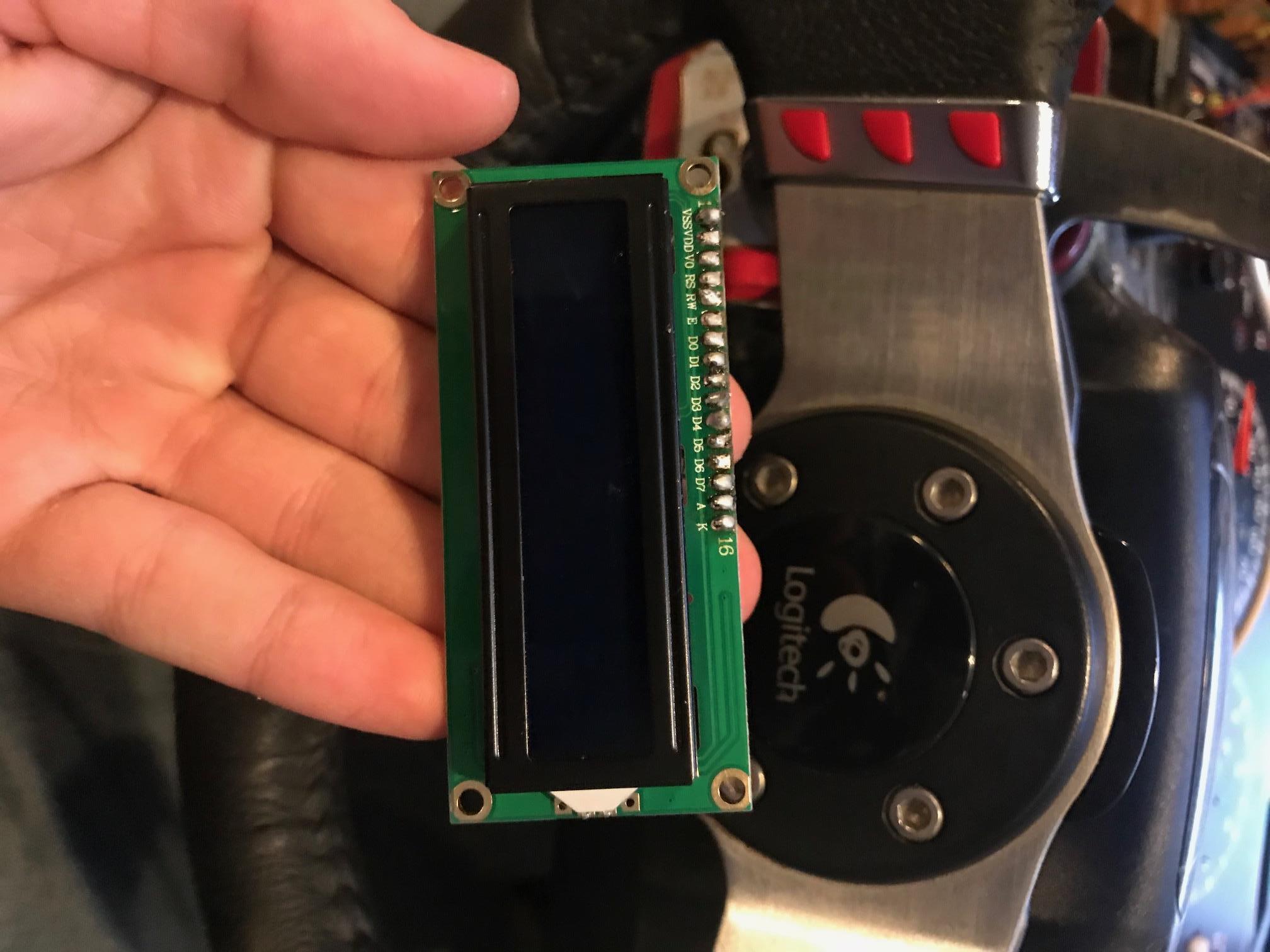
look at the one on his website (link in original post) and then look at mine ( attached below).
If you have a recent IDE, like 1.8.3+
you can look at the examples that come with the LiquidCrystal library that is bundled with the IDE.
Pick any one and look at the constructor.
They have updated the examples to show which LCD pin is connected to each pin.
Although none of the examples use 8 bit mode, they all use 4 bit mode which uses fewer pins.
Parameters are in the constructor are: rs, rw, en, d0, d1, d2, d3, d4, d5, d6, d7
There is no need to use all those pins, particularly a pin for rw since the library doesn't use it.
It sets it to LOW, so you might as well wire the LCD rw pin to ground.
If you don't use a pin for rw just leave it out of the parameter list.
Here is more about the parameter list: LiquidCrystal - Arduino Reference
8 bit mode is slightly faster but for most applications 4 bit is fine.
If you switched to my hd44780 library (available in the IDE library manager), the 4 bit mode in the hd44780 library hd44780_pinIO class is faster than the 8 bit mode on the standard LiquidCrystal library.
In fact hd44780 can drive an LCD using an I2C backpack faster than the LiquidCrystal library can drive it using direct pin control.
The wiring when using an I2C backpack is much simpler as it only uses 2 pins/wires and with hd44780 it is 'plug and play' as the library can automatically locate the backpack and automatically determine the pin mapping used on the backpack.
If you want to read status or data from the LCD, the hd44780 library supports doing that if you hook up an arduino pin to the rw pin.
You can read more about the hd44780 library here: GitHub - duinoWitchery/hd44780: Extensible hd44780 LCD library
--- bill
can you tell me what pins i can take out and the ones i need to use? i have all of the power wires in along with the potentiometer for brightness...so which pins can i take out in my code and what pins do i use on the LCD? I mean, I cant even get the HELLO WORLD! to work and that code is so simple. I just need some kind of wiring diagram or something to get the LCD hooked up.
The Arduino page for the LiquidCrystal constructor show every possible combination of what you can do.
If you don't want to waste an arduino pin for the rw signal, just wire the LCD rw pin to ground and leave it out of the constructor parameter list.
If you don't want to use 8 arduino pins for the data, then use only 4 and leave out d0, d1, d2, d3 pins.
Once you decide what you want, simply pick your desired Arduino pins, place them into the constructor as documented, and wire them to the LCD by their parameter position as indicated on the Arduino LiquidCrystal constructor documentation web page.
The helloworld page shows how for 4 bit mode without using rw:
--- bill
ok so i got the HELLO WORLD! working and ive been messing around with it. I then went on and changed the pins from the original sketch and now im getting a whole bunch of garbage on the LCD. What did I do wrong????
/*
  LiquidCrystal Library - Hello World

 Demonstrates the use a 16x2 LCD display.  The LiquidCrystal
 library works with all LCD displays that are compatible with the
 Hitachi HD44780 driver. There are many of them out there, and you
 can usually tell them by the 16-pin interface.

 This sketch prints "Hello World!" to the LCD
 and shows the time.

  The circuit:
 * LCD RS pin to digital pin 12
 * LCD Enable pin to digital pin 11
 * LCD D4 pin to digital pin 5
 * LCD D5 pin to digital pin 4
 * LCD D6 pin to digital pin 3
 * LCD D7 pin to digital pin 2
 * LCD R/W pin to ground
 * LCD VSS pin to ground
 * LCD VCC pin to 5V
 * 10K resistor:
 * ends to +5V and ground
 * wiper to LCD VO pin (pin 3)

 Library originally added 18 Apr 2008
 by David A. Mellis
 library modified 5 Jul 2009
 by Limor Fried (http://www.ladyada.net)
 example added 9 Jul 2009
 by Tom Igoe
 modified 22 Nov 2010
 by Tom Igoe

 This example code is in the public domain.

 http://www.arduino.cc/en/Tutorial/LiquidCrystal
 */

// include the library code:
#include <LiquidCrystal.h>

// initialize the library with the numbers of the interface pins
LiquidCrystal lcd(35, 34, 33, 32, 31, 30);

void setup() {
  // set up the LCD's number of columns and rows:
  lcd.begin(16, 2);
  // Print a message to the LCD.
  lcd.print("hello, world!");
}

void loop() {
  // set the cursor to column 0, line 1
  // (note: line 1 is the second row, since counting begins with 0):
  lcd.setCursor(0, 1);
  // print the number of seconds since reset:
  lcd.print(millis() / 1000);
}
Joseph3502:
I then went on and changed the pins from the original sketch and now im getting a whole bunch of garbage on the LCD. What did I do wrong????
Two possibilities:
1)
Told the library incorrectly which Arduino pin # is connected to which LCD pin.
i.e. the pin numbers you put in the constructor do not match how you have things wired up.
- bad wires, broken wire, bad connections on wires.
BTW, it is much clearer and less error prone if you use variables for each lcd function rather than using naked constants in the constructor.
Like they did in the original example:
const int rs = 12, en = 11, d4 = 5, d5 = 4, d6 = 3, d7 = 2;
LiquidCrystal lcd(rs, en, d4, d5, d6, d7);
--- bill