Hi All
I need some help with my understanding of Pull-Ups versus Pull-downs.
I'm puzzled by:
- I wish my receiving module to respond on RISING. So, why set the pin as pullup, pinMode(interruptPin, INPUT_PULLUP)? Surely this should be set as pulldown? Does this line specify the function (ie to act as a pull-up switch) or does it set the initilized state (starting as pulled-down)?
- The idea of being forced to set pin3 PULLUP. When I try to set it PULLDOWN, the programs demand a new library, some wiring.h library, which then destabilizes all my code.
- I seem to get a lot of bouncing - the signal keeps appearing. Is this normal? I have tried to eliminate it in the code, Possible bouncing is visible in the sample output below.
- I don't know whether the signal is rising then falling, or the opposite: falling, then rising.
I have set up an external trigger, invoked by the SENDING module (arduino uno) controlled by my Serial Bluetooth Terminal. The triggers function. They are programmed to rise from LOW to HIGH then back down to LOW. For now, using pin13, I SEND the interrupt using this code:
void loop() {
 ...
    if ( received_interrupt > 0 ) {
      digitalWrite(exported_interrupt_1, HIGH);
      digitalWrite(exported_interrupt_2, HIGH);
      delay(1);
      digitalWrite(exported_interrupt_1, LOW);
      digitalWrite(exported_interrupt_2, LOW);
      // Serial.println("interrupts were set HIGH");
    }
 ...
}
I have setup the RECEIVING module (Arduino Uno) as follows:
- receiving on pin3. In my understanding, the signal in pin3 goes from LOW to HIGH and back down again, because of the pull-up process.
- for the pull-up circuit, see image attached and/or the link: https://reviseomatic.org/help/e-resistors/Resistor-pull-up-down.gif
- pin13 (from the SENDER) connects as V+ in the image shown. I believe, Pin13 is acting as a PULL-UP switch, see image.
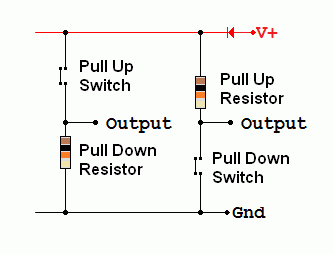
Either because of errors in the setup, and likely, because of misunderstandings about about PULLUPs and IPS mechanisms, I have had to generate some complicated workarounds. I'm not confident about the necessity of them - or their stability: will they unravel in slightly different circumstances!?
Below is the output from the receiving module, and below that is the code for the receiving module.
Hope you can shed some light on what's going on!!
I look forward to your replies
Regards
EGB
=========
Sample output from the RECEIVING module
ms,tempC,SCR
0,276.66,686.00
           ... [removed some records]
1700,257.62,687.00
1800,257.13,687.00
1900,257.62,686.00
2000,258.11,686.00
2100,258.11,687.00
2200,258.11,687.00
2276,timestamp+interrupt,1
2300,257.62,685.00
2400,257.62,686.00
2500,258.11,686.00
           ... [removed some records]
3700,259.08,687.00
3800,259.08,686.00
3881,timestamp+interrupt,2
3900,259.57,688.00
4000,259.08,686.00
4100,259.08,686.00
           ... [removed some records]
5100,259.57,687.00
5200,259.08,686.00
5300,260.06,687.00
5315,timestamp+interrupt,3
5400,259.57,686.00
5415,timestamp+interrupt,4
5500,259.08,686.00
5600,260.06,686.00
5700,259.57,686.00
5800,259.08,686.00
           ...
The code for the RECEIVING module.
#include <SPI.h>
#include <SD.h>

// Set pin 10 as OUTPUT/HIGH for initialization; other pins for control by SPI
const int dataReadyPin = 6;
const int chipSelectPin = 4; // 4 or 7;
const int W5500_SS = 10; // chip select

// SD utility library functions:
Sd2Card card;
SdVolume volume;
SdFile root;

// Arduino Ethernet SD shield
File targetFile;
String outputFile = "gb0803_6.csv";

//Time
unsigned long  next_time_check = millis();
unsigned long  next_allowed_check = millis();
unsigned long  last_time_check = millis();
int interval_time_check = 0;
unsigned long now = millis();

//Temperature
int sensorTemp = A1;
float valTemp = 0;
float voltage = 0;
float temp = 0;

//SCR
int scrSensor = A0;
float scrVal = 0;

//Output
String dataString = "ms,tempC,SCR";

// Interrupt variables
boolean do_this_again = true;
int interrupt_seq_number = 0;
const byte interruptPin = 2;
unsigned long time_next_interrupt_allowed = millis();
unsigned long non_volatile_time_of_interrupt = millis();
volatile unsigned long time_of_interrupt = millis();

void setup() {
  // Open serial communications and wait for port to open:
  Serial.begin(9600);

  // start the SPI library:
  SPI.begin();

  // initalize the  data ready and chip select pins:
  pinMode(dataReadyPin, INPUT);
  pinMode(W5500_SS, OUTPUT);
  digitalWrite(W5500_SS, HIGH); // davekw7x: If it's low, the Wiznet chip corrupts the SPI bus

  // initalize the interrupt pin/process:
  pinMode(interruptPin, INPUT_PULLUP);
  attachInterrupt(digitalPinToInterrupt(interruptPin), interrupt_state, RISING);

  // give the sensor time to set up:
  delay(100);

  // < ----------- Start SDfat-stuff ------------>

  // Works
  // Initialising and Testing if the card is working!
  Serial.print("\nInitializing SD card...");
  if (card.init(SPI_HALF_SPEED, chipSelectPin)) {
    Serial.println("SDCard okay.");
  } else {
    Serial.println("FAILED: SDCard NOT okay.");
    // while (1);
  }

  // Works
  Serial.println("\nList Files (name, date and size in bytes): ");
  if (volume.init(card)) {
    if (root.openRoot(volume)) {
      // List files
      root.ls(LS_R | LS_DATE | LS_SIZE);
      Serial.println("End of list!\n");
    }
  } else {
      Serial.println("FAIL: Can NOT init SDcard.");
  }

  // < ----------- Start of SD; keep SDfat and SD separate------------>

  if (SD.begin(chipSelectPin)) {
    Serial.println("SDCard init complete.\n");
  } else {
    Serial.println("FAIL: initialization failed");
    return;
  }

  // Works
  Serial.println("Writing to " + outputFile);
  targetFile = SD.open(outputFile, FILE_WRITE);
  if (targetFile) {
    targetFile.println(dataString);
  } else {
    Serial.println("FAIL: Can NOT open File.");
  }
  targetFile.close();
}

// Interrupt: Switches a HIGH/LOW variable from within the interrupt process
void interrupt_state() {
  detachInterrupt(0);
  time_of_interrupt = millis();
}

void output_to_SD_card() {
  // Open the file, write to it, if it's available
  targetFile = SD.open(outputFile, FILE_WRITE);
  if (targetFile) {
    targetFile.println(dataString);
    targetFile.close();
    // print to the serial port too:
    Serial.println(dataString);
  }
  else {    // if the file isn't open, pop up an error:
    Serial.println("Error opening output file: " + outputFile);
  }
}

void loop() {
  // /*
  do_this_again = true;
  dataString = "";
  // Control sampling frequency 10Hz readings
  while (now < next_time_check) {
    now = millis();
    if ( time_of_interrupt >= non_volatile_time_of_interrupt ) {
      // then a new interrupt has occurred; but is it a bounce??
      if ( time_of_interrupt < ( non_volatile_time_of_interrupt + 100)) {
        ; // // then it is a bounce; do nothing
      } else {
        // Set non_volatile_time_of_interrupt
        non_volatile_time_of_interrupt = time_of_interrupt;
        // Prep time-stamp, and write to File!
        interrupt_seq_number++;
        dataString += String(non_volatile_time_of_interrupt);
        dataString += (",timestamp+interrupt,");
        dataString += String(interrupt_seq_number);
        output_to_SD_card();
        // Serial.println(dataString);
        dataString = "";
        // do_this_again = false;
      }
    }
    // if (( last_time_check < time_of_interrupt) && (do_this_again)) {
  }
  // Convert now to String
  dataString += String(now);
  dataString += (",");

  //Measuring sensor values
  // - - Temp in C°
  valTemp = analogRead(sensorTemp);
  voltage = (valTemp / 1024.0) * 5.0;
  temp = (voltage - .5) * 100;
  dataString += String(temp, 2);
  dataString += (",");
  // - - GSR
  scrVal = analogRead (scrSensor);
  dataString += String(scrVal, 2);

  // - - Output to SD card
  output_to_SD_card();
  // Serial.println(dataString);

  // Initialising interrupt and cycle times
  attachInterrupt(digitalPinToInterrupt(interruptPin), interrupt_state, RISING);
  last_time_check = next_time_check;
  next_time_check = next_time_check+100;
  // */
}
