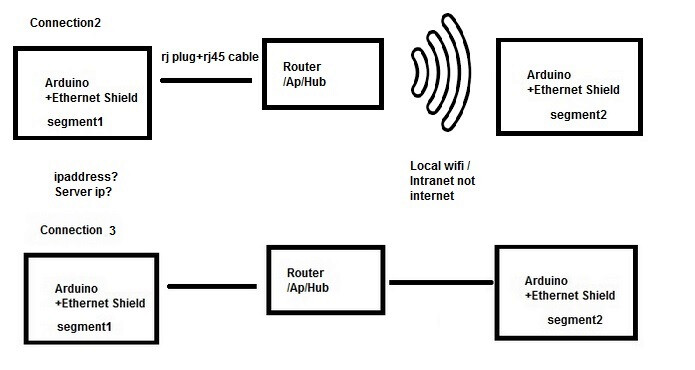
so on one of your Arduinos you need to use WiFiClient which will require an SSID and password to connect to the WiFi router.
there's no chance of establishing a connection to the other device if it is WiFi and hasn't connected to the WiFi router
again, and again , have you simply tries using the Ethernet or Wifi functions to report you localIP? is it set to what you think it is
here is some older code i used to communicate between WiFi devices (esp32). (i've abandoned this approach for broadcast UDP)
#ifdef ESP32
#include <WiFi.h>
#elif defined(ESP8266)
#include <ESP8266WiFi.h>
#endif

#include "eeprom.h"
#include "node.h"
#include "wifi.h"

int dbgWifi = 1;

// -----------------------------------------------------------------------------
// WiFi and JMRI Server Definitions
WiFiClient          wifi;

#define EEPROM_CREDENTIALS

#ifndef EEPROM_CREDENTIALS
const char *ssid  = "wally";
const char *pass  = "Pan0rama";

const char *host  = "192.168.0.41";

#else
char host [STR_SIZE] = "";
char ssid [STR_SIZE] = "";
char pass [STR_SIZE] = "";
#endif

int         port  = 4445;

// -------------------------------------
const char *Nstr [] = { "N_NUL", "N_INIT", "N_UP", "N_DOWN" };
enum { N_NUL, N_INIT, N_UP, N_DOWN };

struct Node {
    int        state;
    char       ip [16];
 // IPAddress  ip;
    WiFiClient client;
};

#define MaxClient    10
Node nodes [MaxClient] = {
    { N_INIT, "192.168.0.41" },
};
int nNodes = 1;

// -------------------------------------
void
wifiIpAdd (
    char *ip )
{
    if (MaxClient <= nNodes)  {
        printf ("%s: maxClients, %d, reached\n", __func__, nNodes);
        return;
    }

    Node *p = nodes;
    for (int n = 0; n < nNodes; n++, p++)
        if (! strcmp (p->ip, ip))  {
            printf ("%s: duplicate %s\n", __func__, ip);
            return;
        }

    nodes [nNodes].state = N_INIT;
    strcpy (nodes [nNodes].ip, ip);
    nNodes++;
}

// -------------------------------------
void
wifiIpClr (void)
{
    nNodes = 0;
}

// -------------------------------------
char *
wifiIpGet (
    int idx )
{
    if (nNodes <= idx)
        return NULL;
    return nodes [idx].ip;
}

// -------------------------------------
void
wifiIpList (void)
{
    printf ("%s:\n", __func__);
    Node *p = nodes;
    for (int n = 0; n < nNodes; n++, p++)  {
        printf (" %s: %2d: %d %-8s ", __func__, n, p->state, Nstr [p->state]);
        printf ("%s\n", p->ip);
    }
}

// ---------------------------------------------------------
enum { ST_NUL, ST_INIT, ST_GET_CREDENTIALS, ST_CHK, ST_UP, ST_ERROR };

const char *wifiStStr [] = {
    "ST_NUL",
    "ST_INIT",
    "ST_GET_CREDENTIALS",
    "ST_CHK",
    "ST_UP",
    "ST_ERROR"
};

int state    = ST_NUL;
int stateLst = ST_NUL;

// -------------------------------------
// connect to wifi
void wifiInit (void)
{
    WiFi.mode (WIFI_STA);

#ifdef ESP32
    WiFi.hostname (name);
#else
    printf ("default hostname: %s\n", WiFi.hostname().c_str());
    WiFi.hostname (name);
    printf ("new hostname: %s\n", WiFi.hostname().c_str());
#endif

    printf ("%s: ssid %s, pass %s\n", __func__, ssid, pass);
    WiFi.begin (ssid, pass);
}

// -------------------------------------
bool
wifiCheck (void)
{
    static unsigned long msecLst = 0;

    if ( (msec - msecLst) < 1000)
        return false;
    msecLst = msec;

    printf (" %s:", __func__);

    if (WL_CONNECTED != WiFi.status ())  {
        printf (" not connected\n");
        return false;
   }

   IPAddress ip = WiFi.localIP ();

   printf (" connected %d:%d:%d:%d\n", ip [0], ip[1], ip [2], ip[3]);

   return true;
}

// -------------------------------------------------------------------
// connect to jmri
void nodeConnect (void)
{
    do {
        printf (" ... Node connecting - %s %d\n", host, port);

    } while (! wifi.connect(host, port));
    printf (" connected Node %s %d\n", host, port);
}

// ---------------------------------------------------------
// display wifi responses on serial monitor
void wifiReceive (void)
{
    static char cLst = 0;

    while (wifi.available()) {
        char c = wifi.read ();
        if ('\r' == c)
            continue;

        if ('\n' == cLst && '\n' == c)
            continue;

        Serial.write (c);
        cLst = c;
    }
}

// ---------------------------------------------------------
// common routine for sending strings to wifi and flushing
void
wifiSend (
    const char*  msg )
{
    if (ST_UP != state)
        return;

    if (dbgWifi)  {
        printf ("wifiSend: %s\n", msg);
    }

    Node *p = nodes;
    for (int n = 0; n < nNodes; n++, p++)  {
        // handle re/connect
        if (N_INIT == p->state)  {
            if (p->client.connect (p->ip, port))  {
                p->state = N_UP;
                Serial.print ("  successful connect to ");
            }
            else {
                p->state = N_DOWN;
                Serial.print ("    failed connect to ");
            }
            Serial.println (p->ip);
        }

        // attempt send if connected
        if (N_UP == p->state)  {
            if (! p->client.print (msg)) {
                p->state = N_INIT;      // make one attempt to re-connect
                Serial.print ("    failed to send to  ");
                Serial.println (p->ip);
            }
            else {
                p->client.flush ();
                Serial.print ("  send succeeded to  ");
                Serial.println (p->ip);
            }
        }
    }
}

// ---------------------------------------------------------
void
wifiGetCredentials (void)
{
#ifdef EEPROM_CREDENTIALS
    if (! eepromRead (ID_HOSTNAME, host, sizeof(host)))  {
        printf ("%s: no hostname\n", __func__);
        state = ST_ERROR;
        error = ERR_NO_HOST;
    }

    if (! eepromRead (ID_SSID, ssid, sizeof(host)))  {
        printf ("%s: no ssid\n", __func__);
        state = ST_ERROR;
        error = ERR_NO_SSID;
    }

    if (! eepromRead (ID_PASSWORD, pass, sizeof(host))) {
        printf ("%s: no password\n", __func__);
        state = ST_ERROR;
        error = ERR_NO_PASS;
    }
#endif
}

// -------------------------------------
void
wifiReset (void)
{
    printf ("%s: ssid %s, pass %s, host %s\n", __func__, ssid, pass, host);
    state = ST_NUL;
}

// -------------------------------------
void
wifiMonitor (void)
{
    if (stateLst != state)
        printf ("%s: %d %s\n", __func__, state, wifiStStr [state]);
    stateLst = state;

    switch (state)  {
    case ST_NUL:
        if (ssid [0])
            state = ST_INIT;
        else {
            printf ("%s: no SSID\n", __func__);
            state = ST_ERROR;
        }
        break;

    case ST_INIT:
        wifiInit ();
        state = ST_CHK;
        break;

#if 0
    case ST_GET_CREDENTIALS:
        wifiGetCredentials ();

        if (ST_ERROR != state)  {
            printf ("%s: credentials acquired\n", __func__);
            wifiInit ();
            state = ST_CHK;
        }
        break;
#endif

    case ST_CHK:
        if (wifiCheck ())
            state = ST_UP;
        break;

    case ST_UP:
        break;

    case ST_ERROR:
    default:
        break;
    }
}