Hello all, any assistance would be greatly appreciated.
I am having continued issues connecting to the Arduino iOT cloud.
I have contacted Arduino support by email but they are not replying.
I need some assistance diagnosing why my MKR 1500 NB’s all become disconnected from the cloud after a certain amount of time.
Sometimes within a day, sometimes within a week.
I have tried many of the solutions mentioned on this forum from deactivating the watchdog timer to checking if the Arduino is connected before running Arduino.update.
I have even built an external circuit that checks if the Arduino is connected to the cloud and if not, turns off the power to the Arduino to reset it.
My Vodafone rep is saying that there is absolutely no restrictions on any of the 50 sims I have and are blaming hardware.
Failing this, can anyone suggest a platform with good support, perhaps Blynk?
Thank you all so much for any suggestions you can offer.
I hope you can understand that I have had so many iterations of the code that this current version may not be my best attempt, but I guess it is a starting point.
It is also difficult to catch the moment that the board becomes disconnected as often the board is powered from a PSU not from the PC and this can happen after a longer amount of time, it often also is followed by a Watchdog timeout so the serial monitor would be wiped..
Here is the current version of my code, I am attempting to create stability by deactivating the WDT with...
You cannot put the "ArduinoCloud.update()" inside the "if (ArduinoCloud.connected() == 1)" because, if the connection is lost, it is the "ArduinoCloud.update()" that tries to reconnect to the cloud. Therefore, in your situation, no attempt to reconnect is made.
Thank you so much for your response, please understand that this is one of 100 attempts to fix the issue of stability, I actually pasted the wrong part of the code, here is the whole section.
>   while (ArduinoCloud.connected() == 0)
>   {
>     ArduinoCloud.update();//required so things don't crash on us
>     Serial.println("Waiting");
>     delay(1000);
>   }
>
>   Serial.println("Connected");
>
>   unsigned long currentMillis = millis();
>
>       if (sht1.readSample()) {
>         humid = sht1.getHumidity();
>         temp = sht1.getTemperature();
>
>   }
>
>   if (currentMillis - previousUpdateMillis >= updateInterval) {
>
>     if   (ArduinoCloud.connected() == 1)
>     {
>       ArduinoCloud.update();
>       digitalWrite(statusC, HIGH);
>     }
>     previousUpdateMillis = currentMillis;
>
>     double Irms = emon1.calcIrms(1480);  // Calculate Irms only
>
>     current = Irms;
>
>   }
I originally put the 'ArduinoCloud.update(); ' Within a millis() delay on the theory that the Arduino was bombarding the network with requests, and this was causing the network to reject the Arduino. Additionally, the Arduino was using enormous amounts of data.
Do you have another technique for managing data transfer and slowing down the data rate?
I only really need the Arduino to send new values every minute or so.
Currently trying the 'NBScanNetworks' sketch (going back to basics)
On two different 'MKR 1500 NB' Boards, using two different SIM cards, both are only returning 'NB IoT/LTE Cat M1 networks scanner' in the serial log and nothing else.
In this code you showed now, the "ArduinoCloud.update()" is called only once for each "updateInterval". You cannot do this!!! I don't know why, but I know from reading from this forum that the "ArduinoCloud.update()" has to be called every 2 seconds or so. Otherwise the connection ends.
The conclusion is that the "ArduinoCloud.update()" has to be called unconditionally for every iteration of "loop()" and you have to do you code in order to assure that an iteration of the "loop()" doesn't take longer than that. So, no question of having "delay()" on your code. Your code has to be as fast as possible.
That is very interesting information and the first I have heard of this,
I will rewrite the code with this in mind and start a test.
@pennam and other members of the Arduino team, are you able to confirm that this is correct?
"ArduinoCloud.update()" has to be called every 2 seconds or so. Otherwise the connection ends.
Do you have any ideas for reducing the connection bandwidth, Vodafone's standard IoT sim card plans start at 10MB per month, however, when not reducing the amount of times that "ArduinoCloud.update()" was called the boards were using in the region of 15mb per day!
However even with "ArduinoCloud.update()" in an millis() loop, and when the boards are connected I still see high data usage, so perhaps this method was not valuable anyhow.
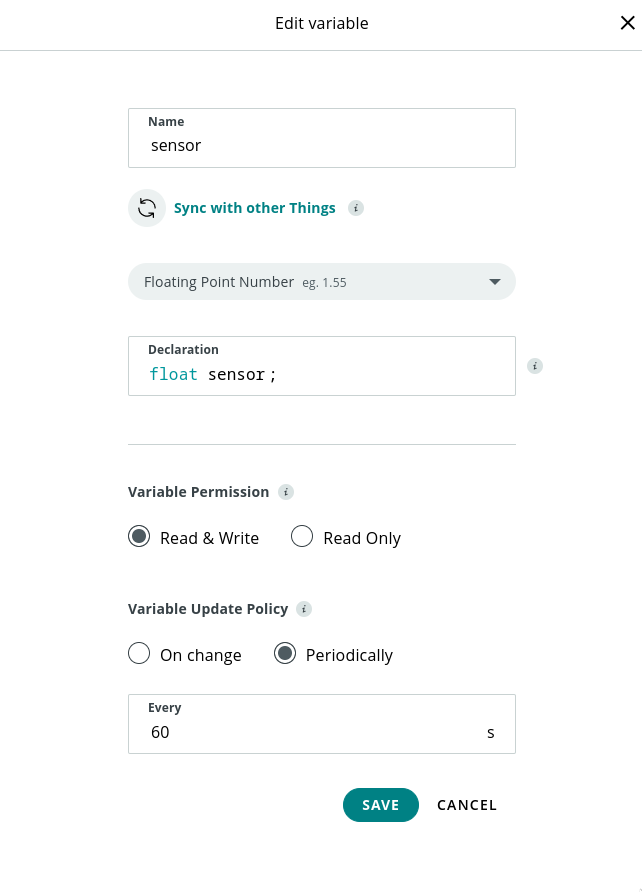
I would like my sketches to have approximately 12 variables updating to the Arduino IoT cloud, however, I don't need this to happen every loop. I have looked at the periodic variable types, however have not found any documentation on this subject and have had no success implementing them.
I am not sure about this because unfortunately there is no documentation at all about this but, I believe that what "ArduinoCloud.update()" does is:
Check if the connection (at low level) is live. If not tries to make a new connection.
Exchange a small packet of data with the IOT server to make sure that the "talking" is ok and to tell the server that the device is online.
Exchange variable information between both.
This 3th part happens taking in consideration the setup of the variables. If a variable is set to be updated every one hour, it doesn't matter how many times the "ArduinoCloud.update()" is called. it will only send the variable value to the server once every hour. The same for variables defined "On Change". they will only be sent when their value change.
So, I cannot understand how you are having so many problems with the quantity of data your boards are using....
The board gets as far as below and is reset by the WDT. Is now back in a reset loop.
I suspect the board is taking a bit too much to connect, please leave the watchdog temporarly disabled, and we will try to re-enable it at the end of the tests.
"ArduinoCloud.update()" has to be called every 2 seconds or so. Otherwise the connection ends.
ArduinoCloud.update() should left free to run in your loop() function because it handles connection and re-connection to the mqtt broker and it keeps connection alive if there is no traffic due to properties updates sendig PINGREQs to the broker.
I would like my sketches to have approximately 12 variables updating to the Arduino IoT cloud, however, I don't need this to happen every loop. I have looked at the periodic variable types, however have not found any documentation on this subject and have had no success implementing them.
To configure your periodic variables you can use the Edit variable panel and configure the pudate policy as periodically writing the desired interval
Following the advice of @jarriaga, I have removed the ArduinoCloud.update() from the millis() if delay and it is now the first thing in the loop.
To attempt to reduce data usage I have put a lot of the sensor reads in a millis() if delay so that they only update every four minutes, this way if there is no change in the variable they will not be updated to the cloud as often. Is this a logical approach?
I am using a number of analog and digital inputs as well as these libraries and associated sensors/outputs.
Hi again @bigdingo, your approach is logical yes! If you don't read the sensors for a while, their values will not be sent by the ArduinoCloud.update() as they haven't changed.
Let me just add one more thing. When you define a IOT cloud numeric variable to "On Change", you can define a "threshold" for the update. This means that the variable will only be sent to IOT Cloud if it has changed more then the "threshold". This allows you not to have to worry about putting the sensor readings subject to a "delay".
On the other hand, if it is ok for you to have the readings sent to the cloud once every four minutes, you can define the variable as "Periodically" (instead of "On Change") and define the period as 4 minutes.
I have tried stripping back my code to the bare minimum as below, but it still becomes disconnected after a couple of hours.
Please, please help!
/*
  Sketch generated by the Arduino IoT Cloud Thing "Untitled"
  https://create.arduino.cc/cloud/things/69664eea-2fca-42e8-88a5-66cb51a2f1d3

  Arduino IoT Cloud Variables description

  The following variables are automatically generated and updated when changes are made to the Thing

  bool button;
  bool led;

  Variables which are marked as READ/WRITE in the Cloud Thing will also have functions
  which are called when their values are changed from the Dashboard.
  These functions are generated with the Thing and added at the end of this sketch.
*/

#include "thingProperties.h"

void setup() {
  // Initialize serial and wait for port to open:
  Serial.begin(9600);
  // This delay gives the chance to wait for a Serial Monitor without blocking if none is found
  delay(1500);

  // Defined in thingProperties.h
  initProperties();

  // Connect to Arduino IoT Cloud
  ArduinoCloud.begin(ArduinoIoTPreferredConnection);

  /*
     The following function allows you to obtain more information
     related to the state of network and IoT Cloud connection and errors
     the higher number the more granular information you’ll get.
     The default is 0 (only errors).
     Maximum is 4
  */
  setDebugMessageLevel(2);
  ArduinoCloud.printDebugInfo();
}

void loop() {
  ArduinoCloud.update();

  led = button;


}


/*
  Since Button is READ_WRITE variable, onButtonChange() is
  executed every time a new value is received from IoT Cloud.
*/
void onButtonChange()  {
  // Add your code here to act upon Button change
}

/*
  Since Led is READ_WRITE variable, onLedChange() is
  executed every time a new value is received from IoT Cloud.
*/
void onLedChange()  {
  // Add your code here to act upon Led change
}