Converting fixed length string to char and float

Hi,

I have data coming in via soft serial. I want to extract text and float data from it. It is from an A&D FX-300i scale, via an RS232 to TTL module. I have worked out how to capture the data and send it to the serial monitor.

Here is the data format:

ST,+00016.64 GN

The relevant page from the manual is as follows. Note that I am receiving the data in units of GN (grains), whereas the example below is in grams, so the decimal point is in a different position.
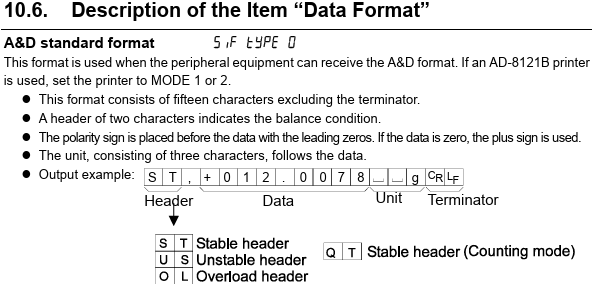
Firstly, what approach should I use? Should I pick up each character as I read it, or read the whole data string first, then parse it (using something like sscanf(), which does not work for float variables in Arduino, so.....not sscanf)?

I could put the first to letters into a char variable, put the numbers into a char variable then use atof(), then put the last two characters into a char variable.

Here is my code so far:

/*
  Author  : David R

*/

#include <SoftwareSerial.h>

// Sets pins as software serial ports
const int rxPin = 5;
const int txPin = 6;

SoftwareSerial mySerial(rxPin, txPin); // RX, TX.

// Pin definition for motor driver
const int AIA = 9;   // (pwm) pin A-IA on motor driver
const int AIB = 10;  // (pwm) pin A-IB on motor driver

//Variables to control the motor turning on and off
int timeOn = 100;     //amount of time the motor stays on
int timeOff = 100;
int motorState = LOW;

//Variable to store the incoming data from the A&D
const byte numChars = 17;
char dataAnD[numChars];   // an array to store the received data
boolean newData = false;

//Variables for weight sent by scale
float scaleReading;
char Steady[2];
char units[4];

//Variables for BlinkWithoutDelay
const int ledPin =  LED_BUILTIN;// the number of the LED pin
int ledState = LOW;             // ledState used to set the LED
unsigned long previousMillis = 0;        // will store last time LED was updated
const long blinkInterval = 1000;           // interval at which to blink (milliseconds)


void setup()
{
  Serial.begin(19200);    // set the data rate for the serial monitor
  mySerial.begin(19200);  // set the data rate for the SoftwareSerial port

  pinMode(rxPin, INPUT);
  pinMode(txPin, OUTPUT);
  pinMode(ledPin, OUTPUT);
  pinMode(AIA, OUTPUT);  
  pinMode(AIB, OUTPUT);

  // Wait for Serial Monitor to be opened
  while (!Serial)
  {
    //do nothing
  }
  delay(200);   //Stops a line of question marks appearing when it first starts reading data
}


void loop()
{
  recvFixedLength();
  vibrate(100);

}

void recvFixedLength() {
  byte Count = 1;

  if (mySerial.available() >= numChars) {
    while (Count <= numChars) {
      dataAnD[Count] = mySerial.read();
      Serial.print(dataAnD[Count]);   //Debugging step
      Count++;
    }
  }
}


void vibrate(int speedVibe)
{
  unsigned long currentMillis = millis();

  // if the motor is off turn it on and vice-versa:
  if (motorState == LOW) {
    if (currentMillis - previousMillis >= timeOff) {
      motorState = HIGH;
      analogWrite(AIA, 0);         // Tell motor to rotate
      analogWrite(AIB, speedVibe);
      previousMillis = millis();
    }
  }
  else {
    if (currentMillis - previousMillis >= timeOn) {
      motorState = LOW;
      analogWrite(AIA, 0);        // Tell motor to stop
      analogWrite(AIB, 0);
      previousMillis = millis();
    }
  }

Since everything's apparently fixed lengths it's not too difficult. A rough and ready example follows:

void setup() {
   char header[3] = {0};
   char data[10] = {0};
   char units[4] = {0};
   char buf[] = {"ST,+00016.64 GN\r\n"};

   Serial.begin(115200);
   sscanf(buf, "%2c,%9c%3c\r\n", header, data, units);
   float val = atof(data);
   
   Serial.print("Header: ");
   Serial.println(header);
   
   Serial.print("Data: ");
   Serial.println(val);
   
   Serial.print("Units: ");
   Serial.println(units);
}

void loop() {
}

your sample code injects a trailing null char which is needed for sscanf() to work. The protocol uses CR LF as an end marker, so OP will need to add manually the trailing null char to get a proper c-string before calling sscanf() as you rightly suggested.

also I would suggest to study Serial Input Basics to handle getting the fixed frame asynchronously.

Yep, good catch.

Thanks. That worked. It did something interesting though and I am concerned that it might point to a weakness in the code. There is a delay at the start of the sketch that stops a row of question marks appearing on the serial monitor, but if the delay is too long (200) then the serial buffer builds up to 63 characters and it causes a problem on about the 4th read.

Here is the code:

/*
  Author  : David R

*/

#include <SoftwareSerial.h>

// Sets pins as software serial ports
const int rxPin = 5;
const int txPin = 6;

SoftwareSerial mySerial(rxPin, txPin); // RX, TX.

// Pin definition for motor driver
const int AIA = 9;   // (pwm) pin A-IA on motor driver
const int AIB = 10;  // (pwm) pin A-IB on motor driver

//Variables to control the motor turning on and off
int timeOn = 100;     //amount of time the motor stays on
int timeOff = 100;
int motorState = LOW;

//Variable to store the incoming data from the A&D
const byte numChars = 17;
char dataAnD[numChars] = {"ST,+12345.67 GN\r\n"};   // an array to store the received data
boolean newData = false;

//Variables for weight sent by scale
float scaleReading;
char Steady[2];
char units[4];

//Variables for BlinkWithoutDelay
const int ledPin =  LED_BUILTIN;// the number of the LED pin
int ledState = LOW;             // ledState used to set the LED
unsigned long previousMillis = 0;        // will store last time LED was updated
const long blinkInterval = 1000;           // interval at which to blink (milliseconds)


void setup()
{
  Serial.begin(19200);    // set the data rate for the serial monitor
  mySerial.begin(19200);  // set the data rate for the SoftwareSerial port

  pinMode(rxPin, INPUT);
  pinMode(txPin, OUTPUT);
  pinMode(ledPin, OUTPUT);
  pinMode(AIA, OUTPUT);
  pinMode(AIB, OUTPUT);

  // Wait for Serial Monitor to be opened
  while (!Serial)
  {
    //do nothing
  }
  delay(200);   //Stops a line of question marks appearing when it first starts reading data
}


void loop()
{
  recvFixedLength();
  vibrate(200);

}

void recvFixedLength() {
  byte Count = 0;

    Serial.println(mySerial.available());
    if (mySerial.available() >= numChars) {
    while (Count < numChars) {
      dataAnD[Count] = mySerial.read();
      Serial.print(dataAnD[Count]);   //Debugging step
      Count++;
    }
    Serial.print(dataAnD);

    char header[3] = {0};
    char data[10] = {0};
    char units[4] = {0};

    sscanf(dataAnD, "%2c,%9c%3c\r\n", header, data, units);
    float val = atof(data);

    Serial.print("Header: ");
    Serial.print(header);

    Serial.print("   Data: ");
    Serial.print(val);

    Serial.print("   Units: ");
    Serial.println(units);
    Serial.println();
    }
}


void vibrate(int speedVibe)
{
  unsigned long currentMillis = millis();

  // if the motor is off turn it on and vice-versa:
  if (motorState == LOW) {
    if (currentMillis - previousMillis >= timeOff) {
      motorState = HIGH;
      analogWrite(AIA, 0);         // Tell motor to rotate
      analogWrite(AIB, speedVibe);
      previousMillis = millis();
    }
  }
  else {
    if (currentMillis - previousMillis >= timeOn) {
      motorState = LOW;
      analogWrite(AIA, 0);        // Tell motor to stop
      analogWrite(AIB, 0);
      previousMillis = millis();
    }
  }
}

and here is the output to the monitor when delay is 200. It starts out fine then looses its way after 3 iterations:

63
ST,+00016.62 GN
ST,+00016.62 GN
Header: ST Data: 16.62 Units: GN

46
ST,+00016.62 GN
ST,+00016.62 GN
Header: ST Data: 16.62 Units: GN

46
ST,+00016.62 GN
ST,+00016.62 GN
Header: ST Data: 16.62 Units: GN

35
ST,+00016.62ST,+0ST,+00016.62ST,+0Header: ST Data: 16.62 Units: ST,

29
0016.62 GN
ST,+00016.62 GN
ST,+0Header: 00 Data: 0.00 Units:

29

and here is the serial monitor with no delay (delay commented out):

⸮⸮⸮⸮⸮⸮⸮⸮⸮⸮⸮⸮⸮⸮⸮⸮⸮⸮⸮⸮⸮⸮⸮⸮⸮⸮⸮⸮⸮⸮⸮⸮⸮⸮⸮⸮⸮⸮⸮⸮⸮⸮⸮⸮⸮⸮⸮⸮⸮⸮⸮⸮⸮⸮⸮⸮⸮⸮⸮⸮⸮⸮⸮⸮⸮⸮⸮⸮⸮⸮⸮⸮⸮⸮
0
0
0
0
0
0
0
0
0
0
0
0
0
0
0
0
0
0
0
0
0
0
0
0
0
0
0
0
0
0
0
0
0
0
0
0
0
2
6
10
15
ST,+00016.60 GN
ST,+00016.60 GN
Header: ST Data: 16.60 Units: GN
0
2
6
10
15
ST,+00016.60 GN
ST,+00016.60 GN
Header: ST Data: 16.60 Units: GN
0
2
6
10
15
ST,+00016.60 GN
ST,+00016.60 GN
Header: ST Data: 16.60 Units: GN

...and delay(80) gets rid of the ???? and it works properly

34
ST,+00016.62 GN
ST,+00016.62 GN
Header: ST Data: 16.62 Units: GN

17
ST,+00016.62 GN
ST,+00016.62 GN
Header: ST Data: 16.62 Units: GN

17
ST,+00016.62 GN
ST,+00016.62 GN
Header: ST Data: 16.62 Units: GN

As discussed previously, the way your receive the data is not correct.

You need to rewrite that part and the best way is to handle the data as it comes.

You first need to sync with the start of a frame, so you need to listen to the first terminator CR LF (as you don't know if the first byte you get is really the first byte of the payload, you might have missed some) ➜ so ignore the first incoming bytes until you identify the CR LF. Then you are in sync and you receive the payload, check it's the right length when you get the next CR LF and then add a trailing null char in the buffer. Only then you can call sscanf() to extract the data from your buffer.

second guessing the timing of an asynchronous protocol is a recipe for failure...

You might benefit from studying state machines. Here is a small introduction to the topic: Yet another Finite State Machine introduction

Thanks JML.

I had already read a bit of Serial Input Basics, but I will have another look. Then I will write the code to handle the data as it comes in, checking for the CR LF terminator.

Thanks for the tips gents.

You can probably use the code from the tutorial and just LF as the end marker.

When you get a new frame, check if he last character was CR and if you have the right count ➜ if so proceed with sscanf. you can also check the returned value from sscanf which will tell you the number of fields extracted to ensure you got a good match.

Thanks again for your help. It is working perfectly.

Now on to the next step of the project....

Great! Have fun