Counter and storing value in EEPROM

Dear Sir/Mam;

I am using Arduino Uno, for counting high's in digital pulse and the value is required to be stored in EEPROM. I need to take value every minute repeatedly.

Please suggest to improve program as it is not working correctly. please refer the below code.
#include <EEPROM.h>

unsigned int count = 0,fv=0,c=0; //fv=final value
int direction = 0;
long int start_time = 0;
void setup()
{
Serial.begin(9600);
pinMode(13, INPUT);

}

void loop()
{

while(millis() - start_time < 20000)
{
   
    EEPROM.get(direction, count);

    if (digitalRead(13) == HIGH) 
    {

        count++;
        direction += sizeof(int);   
        EEPROM.update(direction, count); 
    }
    if(start_time > millis())
    {
      start_time = millis();
      count=0;
    }
}
fv=EEPROM.read(count);
Serial.println(fv);
Serial.println(count);

}

Welcome to the forum

Your topic was MOVED to its current forum category as it is more suitable than the original

Please follow the advice given in the link below when posting code, in particular the section entitled 'Posting code and common code problems'

Use code tags (the </> icon above the compose window) to make it easier to read and copy for examination

When you posted your code without code tags did you receive a warning message ?

What is it doing that is wrong ?

Your count variable is declared as an in int which uses 2 bytes to store its value but later in the code you use EEPROM.read() which only reads a single byte. Elsewhere in the code you use EEPROM.get() and EEPROM.update() which can use any data type if used correctly

To make things worse you use count as the address parameter for the EEPROM.read()

    if (start_time > millis())

Will start_time ever be greater than millis() having not been changed since it was last set equal to millis() ?

Sir, I have changed few things in code still not running correct. Please suggest
Preformatted text#include <EEPROM.h>

unsigned int count = 0,fv=0,c=0; //fv=final value
int direction = 0;
long int start_time = 0,diff = 0;
void setup()
{
Serial.begin(9600);
pinMode(13, INPUT);
EEPROM.get(direction, count);
}

void loop()
{
diff = millis()-start_time;

while(diff <= 1000)
{
    
   
    if (digitalRead(13) == LOW) 
    {

        count++;
        direction += sizeof(int);   
        EEPROM.put(direction, count); 
    }
    if(diff==1000)
    {
      start_time = millis();
      
    }
}

Serial.println(count);

}Preformatted text

Take time to exercise the following tutorial in order to acquire knowledge on how to count the HIGH states of incoming pulses and then store them into the internal EEPROM the ATmega328P MCU of the UNO Board.

1. Let us try to count the HIGH states of a known frequency pulse train; where, a pulse count of about 176/177 per minute will be fed at DPin-13. The pulses will be automatically coming from DPin-9 of the UNO. Therefore, short DPin-13 and DPin-9 with a jumper wire as per circuit of Fig-1.
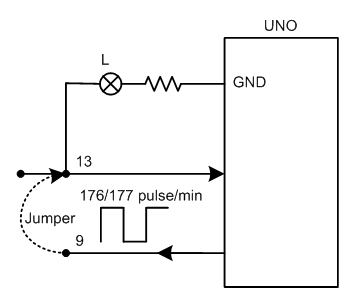
ctcPulse
Figure-1:

2. Upload the following sketch and check that L (built-in LED of UNO) blinks indicating that pulses are coming from DPin-9. Also, observe that the Serial Monitor shows about 176/176 figure at 1-min interval.

int highCounter = 0;

void setup()
{
  Serial.begin(9600);
  pinMode(13, INPUT);

  //--the following codes generate pulses at DPin-9------------------
  TCCR1A = 0x00;
  TCCR1B = 0x00;

  bitClear(TCCR1B, WGM13);
  bitSet(TCCR1B, WGM12);
  bitClear(TCCR1A, WGM11);
  bitClear(TCCR1A, WGM10);

  bitClear(TCCR1A, COM1A1);
  bitSet(TCCR1A, COM1A0);
  pinMode(9, OUTPUT);

  OCR1A = 42499;  //sets the initial frequency about 2.9 Hz
  TCNT1 = 0x0000;

  bitClear(TCCR1B, CS12);
  bitSet(TCCR1B, CS11);
  bitSet(TCCR1B, CS10);
}

void loop()
{
  unsigned long int prMillis = millis();
  while (millis() - prMillis < 60000UL)//count HIGH states until 1-min is elapsed
  {
    if (digitalRead(13) == HIGH)
    {
      highCounter++;    //HIGH state is found; increment pulse counter, hightCounter
      while (digitalRead(13) != LOW)
      {
        ;    //wait unntil pulse goes to LOW state
      }
    }
  }
  Serial.println(highCounter);
  highCounter = 0;
}

3. Study the codes of the loop() function of the sketch of Step-2 to see how the HIGH states of the incoming pulses are being counted over 1-minute time using millis() function.

4. Now add/insert the following codes at the appropriate places of the sketch of Step-2 for the storage/retrieval of the counts (value of highCounter) into EEPROM.

  #include<EEPROM.h>

  int readCounter = 0;
  EEPROM.put(0x0010, highCounter); //store data > 1 byte
  EEPROM.get(0x0010, readCounter); //retrieve data from EEPROM
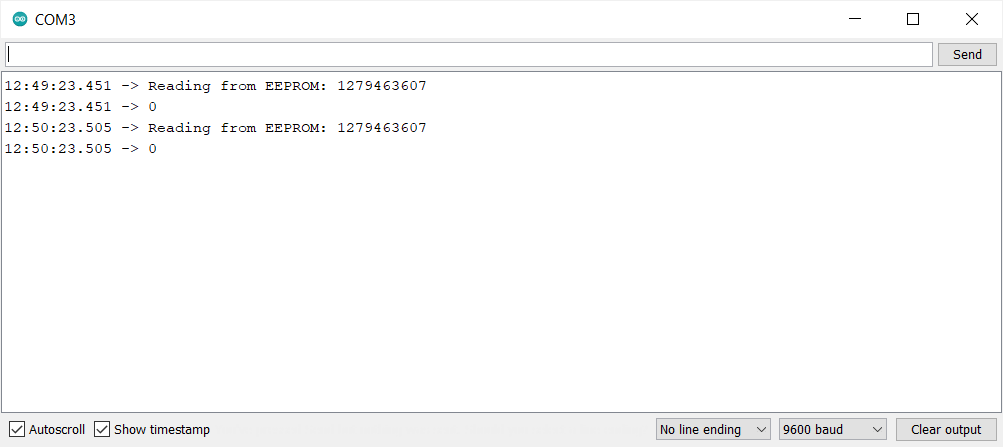
  Serial.print("Reading from EEPROM: ");
  Serial.println(readCounter);

5. Now based on the above tutorial, adjust the codes of your original sketch of post #1 and make that running.
Sir, the count rate is 20,000 it is possible to count

Use external 555-based 20 kHz oscillator or a Function Generator or change my codes of the setup() function based on the tutorial of this link.

Are you an electronics hobbyist? Can you a build a 555-based oscillator on the breadboard if I give a circuit? Do you have parts like resistors, capacitors, and jumpers?

You say that you want to test the state of an input every minute and if it is HIGH at that time then the count is to be incremented and stored to EEPROM

How many readings should be taken and what is the point of saving the count to EEPROM ?

Reading should be taken for every minute and count value is nearly 20000 in scaler counter.

Further I need to store data in excel.

This is getting more confusing, probably due to a language barrier

There is a big difference between

  • counting the number of pulses that occur in one minute

and

  • testing whether a pin is HIGH every minute.

Is it the first option that you want to do and what exactly is to be stored in the EEPROM ? Probably the total number of HIGHs counted in each minute, but how many minutes will the sketch be running for ?

Dear Sir,
Thank you for your response, while running the above code the high value is not sensing, please suggest possible reason for this.

Tell me the number that you want to save. If it is bigger than 35535, then choose the following data type which will give you the range: 0 to 4,294,967,295. Also post your sketch.
unsigned long int

Still the high value is 0, we are giving TTL signal of 4v to pin13

#include<EEPROM.h>

unsigned long int readCounter = 0;
unsigned long int highCounter = 0;

void setup()
{
Serial.begin(9600);
pinMode(13, INPUT);

//--the following codes generate pulses at DPin-9------------------
TCCR1A = 0x00;
TCCR1B = 0x00;

bitSet(TCCR1B, WGM13);
bitSet(TCCR1B, WGM12);
bitClear(TCCR1A, WGM11);

bitClear(TCCR1A, WGM10);

bitClear(TCCR1A, COM1A1);
bitSet(TCCR1A, COM1A0);
pinMode(9, OUTPUT);

ICR1 = 12; //sets the initial frequency at 10 Hz
TCNT1 = 0x0000;

bitClear(TCCR1B, CS12);
bitSet(TCCR1B, CS11);
bitSet(TCCR1B, CS10);
}

void loop()
{
unsigned long int prMillis = millis();
while (millis() - prMillis < 60000UL)//count HIGH states until 1-min is elapsed
{
if (digitalRead(13) == HIGH)
{
highCounter++; //HIGH state is found; increment pulse counter, hightCounter
EEPROM.put(0x0010, highCounter); //store data > 1 byte
while (digitalRead(13) != LOW)
{
; //wait unntil pulse goes to LOW state
}
}
}
EEPROM.get(0x0010, readCounter); //retrieve data from EEPROM
Serial.print("Reading from EEPROM: ");
Serial.println(readCounter);

Serial.println(highCounter);
highCounter = 0;
}Preformatted text

You have set ICR1 to 12. What is the frequency of the signal that you are injecting at DPin-13?

Time period-12microsec and frequency 80KHz

RONG!

Ironic.

Sir, it is output from NIM. The frequencies are verified on oscilloscope.

You set ICR1 at 12. So, the frequency at pescaler 64 is:
f = 16x10^6/(2N(1+ICR1)
==> f = 9615 Hz

I have simulated 80 kHz. This is the message on the Serial Monitor after write/read operation with EEPROM. HIGH states of the signal are counted for 1-sec . The error is: only 0.68% (acceptable).

79455
Reading from EEPROM: 79455
79454
Reading from EEPROM: 79454
79300
Reading from EEPROM: 79300

Thank you, for your response. Please suggest how to scale this for 20 signals.