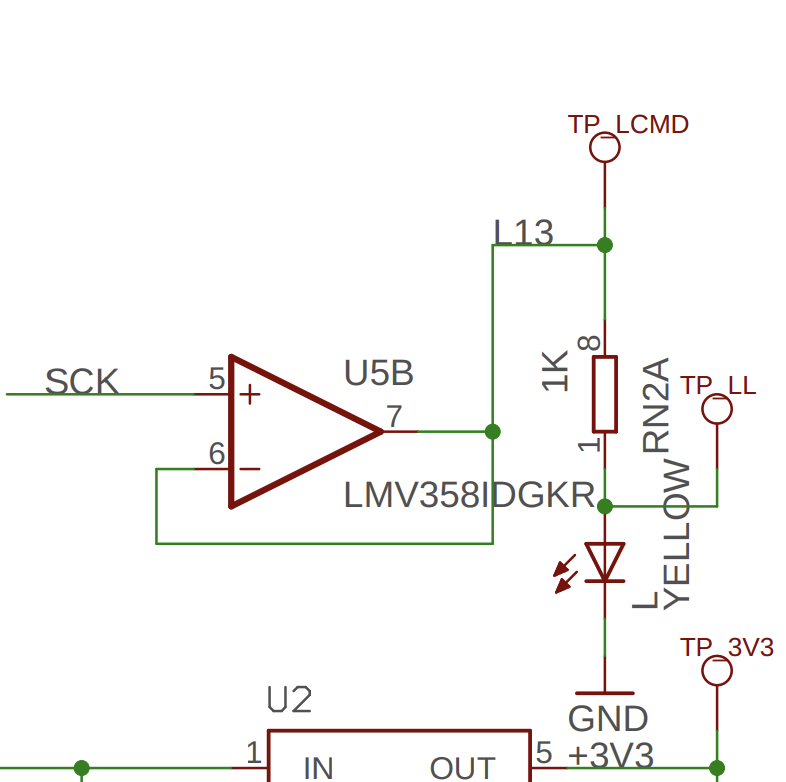
I am trying to program a count up counter with a reset. The code is supposed to turn on an LED when I push a button 5 times then turns off the LED and resets the counter to 0. I was able to get the LED to turn on and off but I don't think the counter is resetting. I tried to use serial.print(count) to see what number is in the count value but I couldn't get that to work.`Use code tags to format code for the forum
const int BUTTON_B = 5;
const int ledPin = 13;
int Count = 0;


unsigned long debounceDelay = 50; // Debounce delay in milliseconds
unsigned long lastDebounceTime_B = 0; // Last debounce time for Button B

int lastSteadyState_B = HIGH; // Last steady state for Button B
int lastFlickerableState_B = HIGH; // Last flickerable state for Button B

void setup() {
  // put your setup code here, to run once:
  Serial.begin(9600);
  pinMode(BUTTON_B, INPUT_PULLUP);
  digitalWrite(ledPin, LOW);
}

void loop() {

  handleButton(BUTTON_B, lastDebounceTime_B, lastSteadyState_B, lastFlickerableState_B);

}

void handleButton(int buttonPin, unsigned long &lastDebounceTime, int &lastSteadyState, int &lastFlickerableState) {
  int currentState = digitalRead(buttonPin);

  if (currentState != lastFlickerableState) {
    lastDebounceTime = millis();
    lastFlickerableState = currentState;
  }

  if ((millis() - lastDebounceTime) > debounceDelay) {
    if (lastSteadyState == HIGH && currentState == LOW) {
      Count++;

      if (Count == 5) {
        digitalWrite(ledPin, HIGH);  // Turn on the LED

      }
      if (Count > 5) {
        digitalWrite(ledPin, LOW);
        int Count = 0;
      }


    } else if (lastSteadyState == LOW && currentState == HIGH) {

    }
    lastSteadyState = currentState;
  }
}
As written, that code declares a completely new variable inside the scope of the if() statement. That variable happens to have the same name as a global variable, but the compiler knows they are different and separate. You initialize that variable to zero. The scope of the if() statement ends and that variable goes out of scope and disappears. You did not interact with the global variable Count in any way.
Specifying the type of the variable before the name (e.g. int) is a declaration which begins the definition of a new variable. Just using the name refers to an already defined variable.
I wrote the worst program, ever. It shows what to avoid when using variables...
// Variable scope shown on the Serial Monitor output.

int a = 9600; // global "a"
void setup() {
  Serial.begin(a); // using the global variable value of "a"
  Serial.println(a); // global "a"

  int a = 2; // this new "a" is locally defined here, in "setup()"

  for (int a = 7; a < 9; a++) { // this new "a" is local only inside "for"
    Serial.println(a); // this "a" is local to "for"
  }

  Serial.println(a); // local "a" from the definition inside "setup"
}

void loop() {
  Serial.println(a); // this is the global "a"
  while(1); //stay!
}
I was messing around with it some more and it starting working and I don't know why.
const int BUTTON_B = 5;
const int ledPin = 13;
int Count = 0;
unsigned long debounceDelay = 5; // Debounce delay in milliseconds
unsigned long lastDebounceTime_B = 0; // Last debounce time for Button B
int lastSteadyState_B = HIGH; // Last steady state for Button B
int lastFlickerableState_B = HIGH; // Last flickerable state for Button B
void setup() {
  // put your setup code here, to run once:
  Serial.begin(9600);
  pinMode(BUTTON_B, INPUT_PULLUP);
  digitalWrite(ledPin, LOW);
}
void loop() {
handleButton(BUTTON_B, lastDebounceTime_B, lastSteadyState_B, lastFlickerableState_B);
}
void handleButton(int buttonPin, unsigned long &lastDebounceTime, int &lastSteadyState, int &lastFlickerableState) {
int currentState = digitalRead(buttonPin);
if (currentState != lastFlickerableState) {
lastDebounceTime = millis();
lastFlickerableState = currentState;
}
if ((millis() - lastDebounceTime) > debounceDelay) {
if (lastSteadyState == HIGH && currentState == LOW) {
Count++;
if (Count == 5) {
digitalWrite(ledPin, HIGH); // Turn on the LED
}
if (Count > 5) {
digitalWrite(ledPin, LOW);
Count = 0;
}
} else if (lastSteadyState == LOW && currentState == HIGH) {
}
lastSteadyState = currentState;
}
}
It was not "working." Your connections are not secure, and "messing" caused voltages to appear and leave, and the controller tries to interpret everything at all times. See post #7.
I was only messing with the code and the connections seem pretty solid, but I have added the pinmode(ledPin, OUTPUT) and works the same. Thank You for your help.
Do you know anything about arrays work. I converted my counter to print out a different name when I push the button. It gives me a warning about using char* "warning: ISO C++ forbids converting a string constant to 'char*' [-Wwrite-strings]"but my code can't work without * "Compilation error: too many initializers for 'char []"
#include <SPI.h>
#include <Wire.h>
#include <Adafruit_GFX.h>
#include <Adafruit_SH110X.h>
#include <Adafruit_NeoPixel.h>
#include <Keyboard.h>

char *names[] = {"apple", "banana", "Hi", "Hello", "Bye", "goodbye"};

const int BUTTON_B = 5;
const int ledPin = 13;
int Count = 0;


unsigned long debounceDelay = 5; // Debounce delay in milliseconds
unsigned long lastDebounceTime_B = 0; // Last debounce time for Button B

int lastSteadyState_B = HIGH; // Last steady state for Button B
int lastFlickerableState_B = HIGH; // Last flickerable state for Button B

#define i2c_Address 0x3c
#define SCREEN_WIDTH 128 // OLED display width, in pixels
#define SCREEN_HEIGHT 64 // OLED display height, in pixels
#define OLED_RESET -1   //   QT-PY / XIAO
Adafruit_SH1107 display = Adafruit_SH1107(SCREEN_HEIGHT, SCREEN_WIDTH, &Wire, OLED_RESET);

void setup() {
  // put your setup code here, to run once:
  Serial.begin(9600);

  delay(250);
  display.begin(i2c_Address, true);
  display.display();
  delay(2000);
  display.clearDisplay();

  display.setRotation(1);

  display.setTextSize(1);
  display.setTextColor(SH110X_WHITE);
  display.setCursor(0, 0);
  display.println("Failure is always an option");
  display.setTextColor(SH110X_BLACK, SH110X_WHITE); // 'inverted' text
  display.println("3.141592");
  display.setTextSize(2);
  display.setTextColor(SH110X_WHITE);
  display.print("0x"); display.println(0xDEADBEEF, HEX);
  display.display();
  delay(2000);
  display.setCursor(0, 0);
  display.clearDisplay();

  pinMode(BUTTON_B, INPUT_PULLUP);
  pinMode(ledPin, OUTPUT);
  digitalWrite(ledPin, LOW);

}

void loop() {

  handleButton(BUTTON_B, lastDebounceTime_B, lastSteadyState_B, lastFlickerableState_B);

  display.display();

}

void handleButton(int buttonPin, unsigned long &lastDebounceTime, int &lastSteadyState, int &lastFlickerableState) {
  int currentState = digitalRead(buttonPin);

  if (currentState != lastFlickerableState) {
    lastDebounceTime = millis();
    lastFlickerableState = currentState;
  }

  if ((millis() - lastDebounceTime) > debounceDelay) {
    if (lastSteadyState == HIGH && currentState == LOW) {
      Count++;

      if (Count == 5) {
        digitalWrite(ledPin, HIGH);  // Turn on the LED

      }
      if (Count > 5) {
        digitalWrite(ledPin, LOW);
        Count = 0;
      }
      display.print(names[Count]);

    } else if (lastSteadyState == LOW && currentState == HIGH) {

    }
    lastSteadyState = currentState;
  }
}
Assuming you have an Uno, and the LED you are looking at is the on-board LED labelled "L" attached to pin13, teh digitalWrite() without a pinMode(OUTPUT) just turns on the pullup resistor, pulling the pin high, but not supplying enough current to drive a LED. But that pin also happens to be attached to an op-amp driver that amplifies the voltage seen on the pin to be strong enough to drive the on-board LED.