Counter using a reed switch for a lever arm

Hello everyone!

I am looking for some feedback on a project I am going to work on. The project involves cycle testing a hydraulic pump which is actuated by a lever arm. I want to create a counter which counts the total number of pumps done during the cycle test. I decided I am going to attach a magnet to the lever arm and allow it to come into contact with the reed switch at the end of the down stroke. I have completed a simulation and code using Tinkercad as I am still waiting on parts to arrive. Currently, I have the reed switch modeled as a push button switch. The other push button is used to reset the counter.

My question to you guys is about debouncing. I am not familiar with switch debouncing so any information will be helpful. Also, is a reed switch a viable option for a counter in this project? The cycle testing will probably be conducted for several hours straight with multiple sessions. The frequency pumps will probably be around every 2-4 seconds.

Here is my code for reference

#include <LiquidCrystal.h>

int incButton = 2;
int resetButton = 3;
int incButtonState;
int lastIncButtonState = 0;
int resetButtonState;
int lastResetButtonState = 0;
int counter = 0;

//LiquidCrystal object pin #(RS, Enable, Registers D4-D7);
const int RS = 5, E = 6, D4 = 8, D5 = 9, D6 = 10, D7 = 11;
LiquidCrystal lcd(RS, E, D4, D5, D6, D7); 


void setup(){
  
  lcd.begin(16,2);
  
  Serial.begin(9600);
  
  pinMode(incButton, INPUT);
  pinMode(resetButton, INPUT);
}


void loop(){
  
  incButtonState = digitalRead(incButton);
  resetButtonState = digitalRead(resetButton);
  
  if(incButtonState != lastIncButtonState){
    
    if(incButtonState == 1){
      counter++;
      Serial.print(counter);
    }
    
    delay(100);
  }
  
  lastIncButtonState = incButtonState;

  
  if(resetButtonState != lastResetButtonState){
    
    if(resetButtonState == 1){
      counter = 0;
      lcd.clear();
    }
    
    delay(100);
  }
  
  lastResetButtonState = resetButtonState;

  
//lcd.setCursor(column, row)
  lcd.setCursor(0,0);
  lcd.print("Counter");
  lcd.setCursor(0,1);
  lcd.print(counter);
  
}

Thanks you!

All mechanical connection making dvice bounces. Some 45 years ago debouncing such things was told during the very first microprocessor course. What's told nowdays?
Why not use a Hall sensor instead of a reea relay? If I'm wrong, correct me, but Hall sensors don't Bounce provided a none shaking magnet.

OK, I will throw some serious code at you.

This does various things, the trick is to take pieces which do what you need, in this case the debounce routine. It is admittedly overly complex, but is designed to allow you to debounce many things at once.

Note that this is the full debounce algorithm - it requires the input to be stable for every test of the specified debounce interval, not just at the end of the interval or just - as you code - waiting and hoping. :roll_eyes:

It also detects a specific direction of change - from HIGH to LOW - in the input. Inputs should always be a switch connected from the input to ground and either using pinMode of INPUT_PULLUP or/ and a 4k7 pull-up resistor to 5 V. You may even wish to use the protection circuit I posted yesterday:
Flash_Shoe.png
D1 prevents a higher voltage being applied to the Arduino input but allows it to pull down to ground when the "contact" is closed.

D2 prevents a voltage less than (negative to) ground being applied to the Arduino input at any time.

I actually suggest you try out the code to get a feel for how it works. Obviously you need to have the parts to do that but frankly, I feel using a simulator is a bit of a waste of time.

// Blink without "delay()" - multi!  With button de-bounce.
// Note that this code is immediately extensible to *many* buttons.

const int led1Pin =  13;    // LED pin number
const int led2Pin =  10;
const int led3Pin =  11;
const int button1 =  4;     // buttons & switches always connect from input to ground

int led1State = LOW;        // initialise the LED
int led2State = LOW;
int led3State = LOW;
char bstate1 = 0;

unsigned long count1 = 0;   // will store last time LED was updated
unsigned long count2 = 0;
unsigned long count3 = 0;
unsigned long bcount1 = 0; // button debounce timer.  Replicate as necessary.

// Have we completed the specified interval since last confirmed event?
// "marker" chooses which counter to check 
boolean timeout(unsigned long *marker, unsigned long interval) {
  if (millis() - *marker >= interval) { 
    *marker += interval;    // move on ready for next interval
    return true;       
  } 
  else return false;
}

// Deal with a button read; true if button pressed and debounced is a new event
// Uses reading of button input, debounce store, state store and debounce interval.
boolean butndown(char button, unsigned long *marker, char *butnstate, unsigned long interval) {
  switch (*butnstate) {               // Odd states if was pressed, >= 2 if debounce in progress
  case 0: // Button up so far, 
    if (button == HIGH) return false; // Nothing happening!
    else { 
      *butnstate = 2;                 // record that is now pressed
      *marker = millis();             // note when was pressed
      return false;                   // and move on
    }

  case 1: // Button down so far, 
    if (button == LOW) return false; // Nothing happening!
    else { 
      *butnstate = 3;                 // record that is now released
      *marker = millis();             // note when was released
      return false;                   // and move on
    }

  case 2: // Button was up, now down.
    if (button == HIGH) {
      *butnstate = 0;                 // no, not debounced; revert the state
      return false;                   // False alarm!
    }
    else { 
      if (millis() - *marker >= interval) {
        *butnstate = 1;               // jackpot!  update the state
        return true;                  // because we have the desired event!
      }
      else 
        return false;                 // not done yet; just move on
    }

  case 3: // Button was down, now up.
    if (button == LOW) {
      *butnstate = 1;                 // no, not debounced; revert the state
      return false;                   // False alarm!
    }
    else { 
      if (millis() - *marker >= interval) {
        *butnstate = 0;               // Debounced; update the state
        return false;                 // but it is not the event we want
      }
      else 
        return false;                 // not done yet; just move on
    }
  default:                            // Error; recover anyway
    {  
      *butnstate = 0;
      return false;                   // Definitely false!
    }
  }
}

void setup() {
  pinMode(led1Pin, OUTPUT);      
  pinMode(led2Pin, OUTPUT);      
  pinMode(led3Pin, OUTPUT);      
  pinMode(button1, INPUT);      
  digitalWrite(button1,HIGH);        // internal pullup all versions
}

void loop() {
  // Toggle LED if button debounced
  if (butndown(digitalRead(button1), &bcount1, &bstate1, 10UL )) {
    if (led1State == LOW) {
      led1State = HIGH;
    }
    else {
      led1State = LOW; 
    } 
    digitalWrite(led1Pin, led1State);
  } 

  // Act if the latter time (ms) has now passed on this particular counter,
  if (timeout(&count2, 300UL )) {
    if (led2State == LOW) {
      led2State = HIGH;
    }
    else {
      led2State = LOW; 
    } 
    digitalWrite(led2Pin, led2State);
  } 

  if (timeout(&count3, 77UL )) {
    if (led3State == LOW) {
      led3State = HIGH;
    }
    else {
      led3State = LOW; 
    } 
    digitalWrite(led3Pin, led3State);
  } 
}

A reed switch should work fine; make sure the magnet goes past the point where the reed switch closes.

As far a debouncing, scan your switch every 50 milliseconds and then look for a change in switch state.

BTW, this assumes the reed switch will be closed for longer than 50ms.

Nick Gammon has a switch monitor library you can use if need be.

http://gammon.com.au/Arduino/SwitchManager.zip

A Hall sensor would work also.

Hey Paul, is that a Dekatron?

Good old days. :slight_smile:

Indeed it is.

Have a board I made with - IIRC - four of them with (germanium!) transistor inter-stage amplifiers. Never actually tried it, but it looks good. Perhaps when I retire ...

Unfortunately the forum software munges the GIF animation.

We had those at the power plant back in the 60s and 70s.

Animations look good here.

larryd:
We had those at the power plant back in the 60s and 70s.

That (70s) would have been when I built the thing. After that life got complex (married). :astonished:

If you use a bar magnet and it is PARALLEL to the reed switch as it approaches, you don't need debounce as the magnetic field will not allow bouncing, it makes a snap action with the two reed pieces in the switch. They just snap together like two magnets of opposite poles, which they are. When the bar magnet pulls away the reeds spring apart, again.

Paul

Reed switch will always bounce because it is a Contact Switch with air between the contacts.

Hello ---- even 1V sparks across a small enough gap, especially when the contacts have small surface area.

You will see bounce when the contacts are all but closed and when just opening.

I look in the OP's code and I see 100 ms debounce delays. I sure hope that lever doesn't cycle at 10 Hz.

GoForSmoke:
Reed switch will always bounce because it is a Contact Switch with air between the contacts.

There is not supposed to be (air)!

GoForSmoke:
I look in the OP's code and I see 100 ms debounce delays. I sure hope that lever doesn't cycle at 10 Hz.

If he can manage to use parts of the code I provided, he will be well off!

I might look at none of those IR detector modules used by line followers and such. Use a little bit of white on a black back ground as the trigger.

Hi,
What do you have pushing the lever arm, a hydraulic cylinder.
Some cylinders have provision for a reed switch to be attached to the cylinder outer, the ram inside has a magnet on it and you can position the switch anywhere along the cylinder length.

Tom... :slight_smile:

GoForSmoke:
Reed switch will always bounce because it is a Contact Switch with air between the contacts.

Hello ---- even 1V sparks across a small enough gap, especially when the contacts have small surface area.

You will see bounce when the contacts are all but closed and when just opening.

I look in the OP's code and I see 100 ms debounce delays. I sure hope that lever doesn't cycle at 10 Hz.

No. Reed switches use the same reed switches as reed relays. My reed switches and reed relays all have the reeds in evacuated glass tubes. Reed relays are still used because there is no bounce.

My commercially, expensive, anemometer head uses a reed switch with a rotating bar magnet centered right above the switch. When the bar magnet is parallel to the reeds, they are pulled closed by the magnetic field. When the magnet is at right angles to the switch, the reeds open. The programming instructions for the anemometer make no mention of bounce and there is none.

If there is bounce with a reed switch it is caused by improper design, including the magnetic field.

Paul

Yah, because sparks don't jump across vacuum?

Maybe the reed switch has a capacitive element that debounces it?

What is this talking about sparks? Any mechanical sequnce of CLOSED, OPEN, CLOSED, OPEN has nothing to do with sparks. Take a steel ball and drop it on a steel plate and it will bounce up and down. The same happends in every mechanicaly working switch.

What is this talking about sparks?

Okay, you only see the spark in air because air molecules are heated to incandescence. In vacuum like in a vacuum tube or CRT you don't see the electrons. Fair nuff but bounce is about spastic current flow across a gap.

It's part of physics. EVERY voltage has a gap it will jump. For space and air the distance is about 1 cm per 30KV.

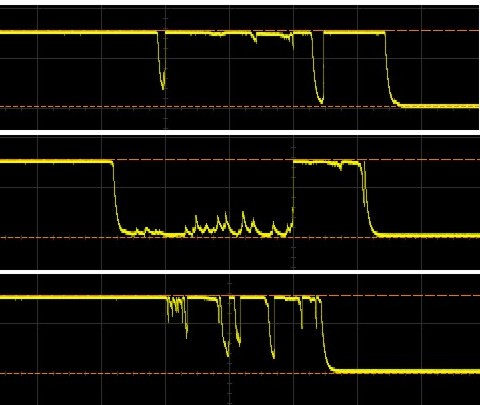
Sometime take a look at bounce on an oscilloscope, when the contacts are close you see a whole mess of state changes. The mechanical bounce is neither the most-by-far nor last state changing effect there.

Have a look under Debouncing: Gammon Forum : Electronics : Microprocessors : Switches tutorial

Time scale?

Look up the reason where there are AC switches and DC switches instead of just "switches".