I believe. This signal is hooked up same on both boards, I jumpered it along with setting switch such that RA4M1 controls usb and I can upload bootloader same way you do it on minima
Hi @KurtE - on my R4 WiFi the resistor R8 is not installed so the MD pin is not connected directly to 5V, as it is on the Minima, and solely controlled by the ESP32.
Not sure if it makes a difference to the behavior.
Thanks, you are right.
The interactive schematic shows R8, but the noninteractive shows it removed, and it goes through the level shifter to the ESP32. I know that shorting this pin to GND with the USB solder joint closed works, at least with the default ESP32 code. At least for burning bootloader. Not sure of other things though.
Thanks again
Thanks,
I have been using this pin in order to burn a new bootloader on the RA4M1 chip, while I still have the USB jumper set (through switch). Which works.
As mentioned above, the R8 jumper is not in place, so the IO level is done by the ESP32 through the level converter.
Looking at the ESP32 code I see:
void setup() {
/* -------------------------------------------------------------------------- */

  /* redirect stdout */
  stdout = funopen(NULL, NULL, &write_fn, NULL, NULL);
  static char linebuf[256];
  setvbuf(stdout, linebuf, _IOLBF, sizeof(linebuf));

  /* redirect ets_printf / esp_rom_printf output */
  ets_install_putc1(&ets_putc_handler);

  pinMode(GPIO_BOOT, OUTPUT);
  pinMode(GPIO_RST, OUTPUT);
  digitalWrite(GPIO_BOOT, HIGH);
  digitalWrite(GPIO_RST, HIGH);
I am pretty sure that GPIO_BOOT is the signal (9) So it is initialized HIGH
The only other place I see it used within the ESP32 sketch is in the usbEventCallback, where it detects a new line coding for baud rates of 1200 or 2400.
Which won't happen in my case as the ESP32 is not seeing the USB signals.
But one thing I wonder as a non-EE type, it is OK to SHORT out the signal (Boot pin to GND), where the signal is coming out HIGH from the level converter? ...
Edit: I should mention ditto for the reset signal as well
** IT WORKS  **
**
The problem was not with my variant or with my bootloader makefile. The problem was I was missing a piece of glue!
There were hints of it, that I was not paying enough attention to it.
In the Device Manager, when I plugged in the modified WiFi board, a Serial port would be added, but in addition to this, there was another item added, under unknown device DFU-RT Port.
The second hint later on, was when I plugged in a MINIMA board, It also added the Serial port. What I had not noticed was it also added a second device as well (DFU-RT Port), but I did not notice it as it was under the Device Type of Universal Serial Bus devices. I looked at this information, and then applied it to the DFU-RT port of the updated WiFi.
Under the Update Driver choose the Let me pick from list...

First time through I scrolled through list and found an item in the list with a name like: Universal Serial Bus Device, which I choose.
It then had a list of vendors, I choose Arduino.
And under it I selected: Santiago Firmware Upgrade

And now it works
Not sure if there is an easier way to do this. Also have not checked to see how it might work on Linux or MAC.
What windows version are you on ? If i assume windows 10 then when there is enough people updating the driver, it should become automatic at some point.
Thanks,
It was not working on Ubuntu, but then I found I was not able to upload to the MINIMA either.
So found the web page:
Fix udev rules on Linux – Arduino Help Center
And did the instructions for UNO R4 boards and now can upload on MINIMA as well as the updated WiFi board
Suppose at some point I should dig out my old MAC notebook...
My machine is Windows 11
Just tried on my old MacBook Pro(Retina, early 2013) running Catalina 10.15.7)
It runs.
Today I also verified, that the WiFi would still run. I did have to update the WiFiS3 library, to include my variant name. The scan example worked.
I Also tried the BLE scan. I needed to update the ArduinoBLE library to compile. Had to update the #if to include my variant name.
Not sure what else I will do yet. It was more a proof of concept and it WORKS.
Summary: I thought I might be good to have a one message summary of the things I changed or extended to allow the WiFi board to run with the RA4M1 processor controlling the USB buss.
It appears to work... So far! Still lots of things that should be tested!
Hardware Mods: I soldered a switch to the bottom of the board, where the solder jumper is for USB. Nothing fancy

The switch I had lying around from a tall_dog kit for Teensy 3.5/6, but I think it is pretty close to
EG1218 E-Switch | Switches | DigiKey
I bent two leads over, and cut off the third and soldered. I also cut out piece of the plastic ...
Boot Loader:
I built my own that is a is like the MINIMA, but is updated to have the correct IO pin for the LED, and it's own name:
The sources are up in my fork/branch: KurtE/arduino-renesas-bootloader at wifiusb (github.com)
Note: I built the bootloader using Ubuntu, both on own machine and also on my WIndows machine in a WSL terminal window (or using Visual Studio code with WSL).
The instructions on how to build the bootloaders can be found in your install, in the bootloaders directory. Of found up on github:
The zip file below has one I generated on my Windows machine.
dfu_wifiusb.zip (14.0 KB)
The way I flash the bootloader on my board, is I have the switch in the position where the USB solder jumper is logically jumpered. I then use a jumper wire, where I run it from the boot pin (unmarked on next to IOREF) to GND and then either powerup or reset.
I then use the command:
rfp-cli -device ra -port $portname -p dfu_wifiusb.hex
remove the jumper wire and reboot (or unplug replug).
New Variant:
My changes are up in my fork/branch:
KurtE/ArduinoCore-renesas at variant_wifiusb (github.com)
Mostly in a new directory, that contains the new variant.
A snapshot copy of that variant:
UNOWIFIR4USB.zip (6.7 MB)
This can be unzipped into your variants folder. Currently on my machines this is located at:
C:\Users\kurte\AppData\Local\Arduino15\packages\arduino\hardware\renesas_uno\1.0.4\variants
Yours will depend on user name and OS.
And added section to boards.txt that defines it.
boards.txt (9.0 KB)
You should be able to copy this to your install (or modify your current one to add the new section)
Note: There is/was an issue with IDE2 where changes to boards.txt is not picked up.
changes to boards.txt are not picked up · Issue #1030 · arduino/arduino-ide (github.com)
Which has a work around. For windoes this is to delete the directory:
C:\Users\<user name>\AppData\Roaming\arduino-ide\
Windows Fix to upload programs
I was having difficulties uploading new sketches on my Windows 11 (and 10) machines. Found there is an issue with the DFU device object that was created. The USB serial was fine. You can see that in the device manager, like:
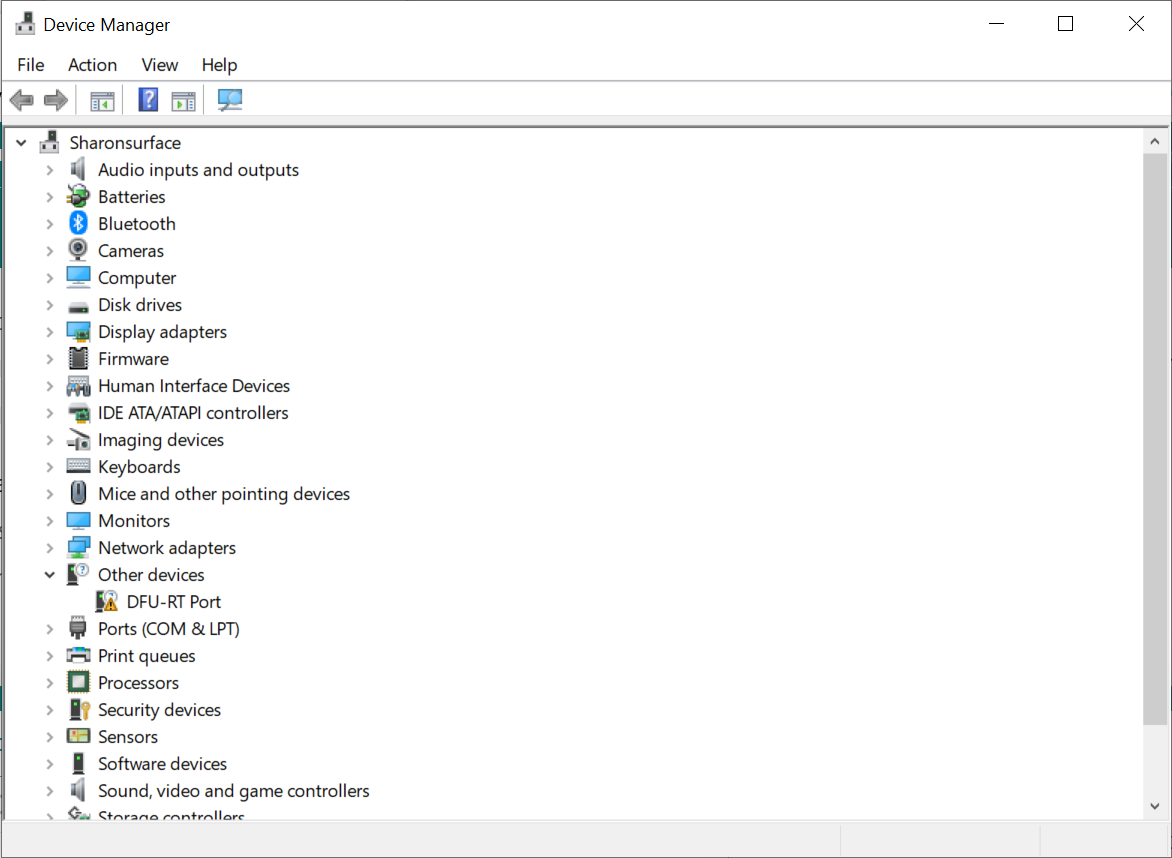
See the DFU-RT port.
To fix: choose the update driver command, choose the browse my computer for drivers option. Then choose the let me pick from a list...
scroll toward the bottom

And choose the Universal Serial Bus devices
Choose:
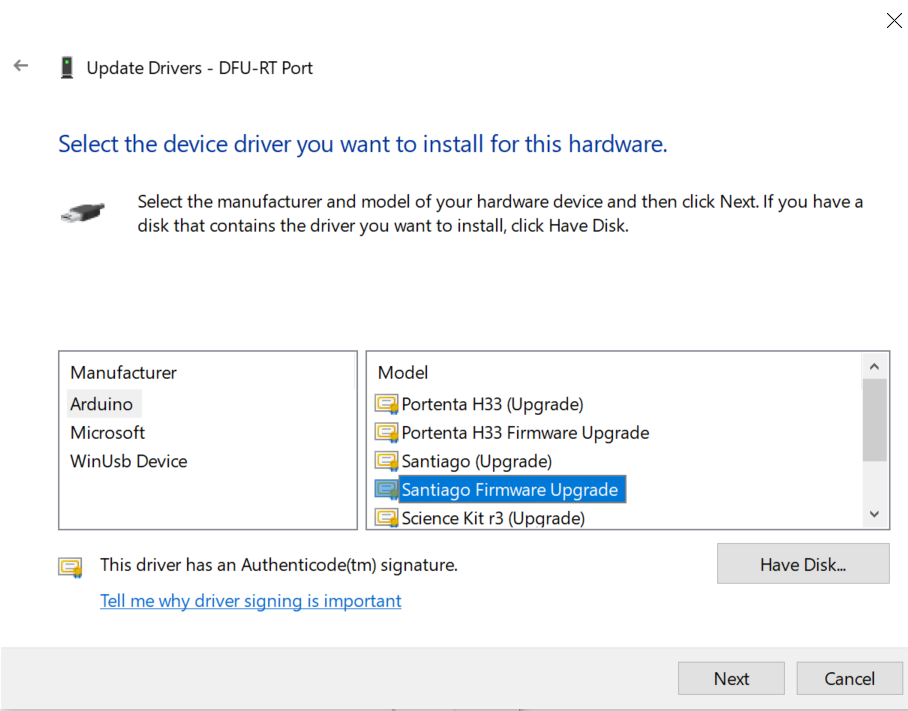
Click the next and then say yes.
You should then then be able to choose the updated variant

And after you choose it as well as the Serial port you should be able to upload. LIke:

Notice, it is now using DFU to do the upload.
Note: the above steps were done on secondary Windows machine I had sitting around.
USB HID
Appears to still work. So far I only tested the example sketch for Keyboard. Nice thing is that, I did not have the same issues about Serial port changing and uploading the next sketch worked without issues.
Wifi and BLE:
I was able to run the scan example sketch of the WifiS3 library, however I need to update it to recognize my new board type. I pushed up a change to my fork/branch:
In the Modem.cpp file I changed line 292 from:
#ifdef ARDUINO_UNOWIFIR4
to:
#if defined(ARDUINO_UNOWIFIR4) || defined(ARDUINO_UNOWIFIR4USB)
I was also able to make the ArduinoBLE library work as well, but again I needed to edit a couple of files, which I have not pushed up yet:
D:\github\ArduinoBLE>git diff
diff --git a/src/utility/HCIUartTransport.cpp b/src/utility/HCIUartTransport.cpp
index d3c44d8..4a73bce 100644
--- a/src/utility/HCIUartTransport.cpp
+++ b/src/utility/HCIUartTransport.cpp
@@ -17,7 +17,7 @@
   Foundation, Inc., 51 Franklin Street, Fifth Floor, Boston, MA  02110-1301  USA
 */

-#if !defined(ARDUINO_ARCH_MBED) && !defined(ESP32) && !defined(ARDUINO_UNOR4_WIFI) || defined(TARGET_NANO_RP2040_CONNECT)
+#if !defined(ARDUINO_ARCH_MBED) && !defined(ESP32) && !defined(ARDUINO_UNOR4_WIFI) && !defined(ARDUINO_UNOR4_WIFIUSB)|| defined(TARGET_NANO_RP2040_CONNECT)

 #include "HCIUartTransport.h"

diff --git a/src/utility/HCIVirtualTransportAT.cpp b/src/utility/HCIVirtualTransportAT.cpp
index 7b3a24a..ffcf83d 100644
--- a/src/utility/HCIVirtualTransportAT.cpp
+++ b/src/utility/HCIVirtualTransportAT.cpp
@@ -17,7 +17,7 @@
   Foundation, Inc., 51 Franklin Street, Fifth Floor, Boston, MA  02110-1301  USA
 */

-#if defined(ARDUINO_UNOR4_WIFI)
+#if defined(ARDUINO_UNOR4_WIFI) || defined(ARDUINO_UNOR4_WIFIUSB)

 #include "HCIVirtualTransportAT.h"
Note: the WifiS3 and the ArduinoBLE libraries are using different names for the same boards.
Changing ESP32-S3 firmware:
I have not tried to change any of this code yet. With my setup, to do this, I would first try to update, by changing the switch position to not have the USB jumper closed...
if I were doing something serious with these boards, I might be tempted to for example, update it to allow the RA4M1 processor to use the UART that is typically used to communicate with the ESP32-S3, in the default setup to handle the Serial object IO. That way might be able to use the 3.3v version of the signals, that are in the ESP32 header pins.
One note on changing the ESP32 firmware. You probably need to make sure that the updated code continues to set the boot and reset signals high, as this is the only thing that pulls them high, as the Pull Up resistors for these signals are not populated on the boards.
All for now
Hope I did not bore you too badly
I think it would be very helpful if the platform was available for installation via Boards Manager. That would allow others to easily set up their environment for using your project.
Another improvement would be to configure the platform so that the bootloader could be installed via Tools > Burn Bootloader. Unfortunately I get the impression from looking at the license that it would still be necessary for the user to install the proprietary Renesas Flash Programmer separately rather than it being installed automatically as part of the platform toolchain as is usually done for Arduino platforms. However, the platform could still include the bootloader binary and define the necessary command pattern based on the assumption the user installed Renesas Flash Programmer to the default location (which would be specified in the platform installation instructions).
I have fork branch that adds it as new variant…
Should I submit as a PR?
It is worth a try. I'm not sure whether Arduino will want to distribute it as part of the official "Arduino UNO R4 Boards" platform since it is a fairly niche use case and the additional board option might cause confusion for beginners (e.g., "which UNO R4 WiFi board do I select?"). But even if it is rejected, the pull request can still serve to document the proposal and decision.
Even if it doesn't end up being distributed as part of the official platform, a 3rd party platform would definitely be of value to the community (as we have proof of already from @Delta_G's interest in using it for a project). I haven't looked closely at your changes, but I think it should be possible to make the platform and distribution quite minimal by referencing the core, platform bundled libraries, tool command patterns, and tool dependencies from the "Arduino UNO R4 Boards" platform:
Not really because I don't have the legal qualifications to do so. You should carefully study the "End User License Agreement" of the Renesas Flash Programmer that you agree to when downloading the application.
The restrictions on distribution specified in the agreement.
Specifically to distribute the proprietary Renesas Flash Programmer application as a tool dependency of the boards platform, similar to how AVRDUDE is installed as a tool dependency along with the "Arduino AVR Boards" platform, or bossac with the "Arduino SAMD Boards (32-bits ARM Cortex-M0+)" platform.
There is no problem with distributing KurtE's modified bootloader because the licensing of the open source bootloader source code permits it:
The potential problem is only with installing the tool that is required to flash the bootloader to the RA4M1.
No.
Something to note is that the Arduino IDE 2.x application does not include any tools at all. Arduino IDE 1.x does include a bundled copy of the "Arduino AVR Boards" platform including its tool dependencies (avr-gcc, AVRDUDE, arduinoOTA).
Arduino IDE 2.x does automatically install the "Arduino AVR Boards" platform on the first run after a fresh installation of the IDE. So from a user perspective there isn't a significant difference between the two (other than the fact that Arduino IDE 2.x will always provide the newest version of the platform, whereas Arduino IDE 1.x only provides whatever version was current at the time of the IDE release), but I think it is important to understand this once we are talking about the creation of a platform.
The tool dependencies that are installed with the "Arduino UNO R4 Boards" platform are defined by the packages[*].platforms[*].toolsDependencies[] and packages[*].platforms[*].discoveryDependencies[] fields of the package index:
https://downloads.arduino.cc/packages/package_index.json
          "toolsDependencies": [
            {
              "packager": "arduino",
              "name": "openocd",
              "version": "0.11.0-arduino2"
            },
            {
              "packager": "arduino",
              "name": "arm-none-eabi-gcc",
              "version": "7-2017q4"
            },
            {
              "packager": "arduino",
              "version": "0.11.0-arduino5",
              "name": "dfu-util"
            },
            {
              "packager": "arduino",
              "version": "1.9.1-arduino5",
              "name": "bossac"
            }
          ],
          "discoveryDependencies": [
            {
              "packager": "builtin",
              "name": "dfu-discovery"
            }
          ]
Yes, because three necessary things are available:
Tool Dependency
reference:
Command Patterns
https://arduino.github.io/arduino-cli/latest/platform-specification/#burn-bootloader
Tool Specification
Reference:
https://arduino.github.io/arduino-cli/latest/platform-specification/#burn-bootloader
The "Arduino UNO R4 Boards" platform does not provide any of those things. You can see the documented procedure for burning a bootloader to the UNO R4 boards here:
(note that the procedure does not use Arduino IDE)
My proposal was that KurtE's 3rd party platform should provide clear instructions for manually installing the tool dependency (assuming the EULA does not permit distributing it via the Boards Platform system) and for the platform to provide the other two (it is only a matter of adding a few lines to the configuration files).
Thanks @ptillisch
Understood. I will try to document it up into a PR. As you are implying, probably a low probability that it will be Pulled in, but maybe worth a shot. What I would suggest if you/they are at all interested is to potentially pull it in, in such a way that it only shows up in the (installed in sketchbook) version includes it. Your release cycle for the board manager, would at least at first exclude it. Which it already does for some other entries as you can see:

Then if over time others find it helps them enough and does not introduce major issues, then update your board release process to include that variant.
While @Delta_G usage case may or may not be a niche use case, in most usage cases that I have played with, I prefer having the board in this mode.
That is, I prefer that when I use the Serial object, that I have the full USB Serial interface available, like asking what the current baud rate is. Plus prefer to not have the delays and latency introduced by having each USB packet having to be funneled through a UART ,,,
What to me is confusing is that in the current variant, Things act very differently when you are using the default Serial, versus using HID. This potential variant acts very much like the MINIMA
It would be curious if @Grumpy_Mike still has the MIDI issue, where the code works on the MINIMA but not the WIFI, if this variant makes any difference.
EDIT: went ahead and created a PR
Create a variant to support the UNO R3 WIFI when the USB Jumper(SJ-1) is closed by KurtE · Pull Request #236 · arduino/ArduinoCore-renesas (github.com)
In my my_boards 'package' I have a customized Uno R4 (drastic sketch size optimization)
The problem is that manually installing a platform is quite inconvenient or challenging even for the average advanced Arduino user. If people are discouraged from using the board definition due to the difficulty/inconvenience of doing so, then it makes it less likely that there would be enough of an indication of value to the community to justify distributing it via Boards Manager. Probably a better approach would be for Arduino to distribute it as a separate platform, similar to what I suggested you do yourself. There is already some infrastructure for doing that sort of thing in the arduino/ArduinoCore-renesas repository (used to create the individual "Arduino UNO R4 Boards" and "Arduino Renesas Portenta Boards" platforms from a the unified "Arduino Renesas fsp Boards" platform in the repository).