PZEM-004T (v3) __ compile failure with Due, UnoR4 Minima

I tried to run Example code from the PZEM libraries (Mandula's, also Mathieu Carbou's). I got frustrated initially because these would not run on my Due, and I finally gave up and bought myself a Uno R4 (Minima). But the problem persists. It seems I keep getting errors associated with Software Serial. I have noticed that there seems to be a LOT of emphasis on Arduino and Arduino-like microcontrollers based on chips of the ESP32 architecture (with which ⸺ I admit! ⸺ I have ZERO experience). Perhaps it is because of the focus on the ESP32 that the Example code relies on the use of "Software Serial", and Software Serial seems to be the root of the problem with running the PZEM examples on both the Due and on the Uno-R4 Minima. Another person has posted PZEM not working on Uno R4 , and it seems that he reached a dead-end.

I would like to know:

  1. Whether I can make the existing Library(ies) and Examples work on either my Due or on the Uno R4 (Minima); and,
  2. At the risk of sounding like I am just kvetching for the sake of kvetching......If anyone can offer some insight into WHY Arduino has insisted on calling the R4 Minima an "Uno" if it isn't back-compatible with previous Uno architectures? It seems to me that that is a basic requirement to be called "Uno". In other engineering endeavors, new versions MUST be back-compatible with prior versions. Parts or assemblies which have undergone design changes that make them NOT back-compatible are not versions (nor "revisions")...those new designs must be considered to be entirely NEW devices / parts and they must be given a new **part-**number and a new name.
A lot of forum members agree with you about the naming of the "R4 Uno". Some things just cannot be laid to rest, it seems.

There is no need to use software serial anymore, as all of the newer Arduino-compatible MCUs have more than one hardware serial port.

The Arduino Due has four hardware serial ports, so why aren't you using them?

For something very similar to the original Uno, and almost completely backward compatible, one choice is an ATmega32u4 board, which has built in USB serial and a hardware serial port. The Pololu AStar or Arduino Leonardo are examples.

This is because the decision has been made with the Nano, and the Uno, that this represents the form factor (size) of the board, not a processor type.

There are lots of different type of Nano, I think 5 and counting, most with different processors and the associated incompatibilities associated mainly with third party libiries that directly interact with specific machines. For example software serial uses internal timer structure which is different on each different type of processor.

So far there have only been two types of R4 Uno, the Minima and the WiFi and the two have slightly different pinouts.

There is a place where you can check with what libraries have been tried, and tested, along with the results.

A4 compatibility library tracker

Thanks jremington. My first (and until just yesterday, my only) Arduino board was the Dué. I jumped in at the deep end of the Arduino pool by following the lead of an author of a book focussed on developing devices for scientific applications (e.g., high-precision, fast, datalogging).

In any case, I have been struggling in that Deep End. Each time I think I am going to have a simple implementation of a sensor / controller etc that already has an Arduino Library and examples, it seem to take me hours and days to figure out WHY it does not work on the Dué.
So, I finally caved in, and bought an [to my mind, "up to date"] Uno (R4), which I thought would at least allow me to have some initial success with the examples included with the libraries; then, with that encouraging success, I could modify the software to run on the Dué (if deemed necessary).

I have NO experience with the call to 'software serial', and its structure etc.

If 'software serial' is not required, neither on the Dué nor on the Uno R4....

  • Is there a straightforward way to remove that "call" to 'software serial' ? Or,

  • Will this, essentially, require writing a completely new Sketch?

Thanks for your patience. I am not asking you or anybody else to write the code for me, I'm looking for some pointers in the right direction so that I don't waste time going down the wrong rabbit-hole.

Thanks! that explains a lot. And thanks for the link to the compatibility table (we need MORE of that sort of thing, officially supported by Arduino!)

I seem to be in good (but grumpy!) company regarding the naming- and version-control convention applied within the Arduino universe. I now understand that Arduino does NOT follow the protocols that have been in place for properly managing engineering-changes for more than a century.

In the case of PC boards, the form-factor and function are not synonymous and (in 99% of the cases, I would venture...) nor do they need to be synonymous. Most Arduino boards are employed in one-of-a-kind / prototype situations, so the need to physically re-fit a NEW replacement board of the same FORM FACTOR into an old prototype (did the old board run out of electrons?) seems to be a very rare and special situation. Moreover, How many prototypes could not be modified to accommodate a replacement board of slightly smaller or larger dimensions? Not many, I would think.

My point is: unlike mechanical engineering, PC-board function and form are not intimately linked. Arduino boards are not items of mechanical engineering. Because form-factor isn't the primary characteristic of forward / reverse compatibility, the FORM of the board should NOT be the primary characteristic of naming and "version-ing"⸺ board "family name" and version-numbers should be based on the ability of the board to 1) comply with prior hardware connections (physical header design and pin allocations) and 2) its ability to re-use existing software ("sketches")

There. I've had my rant. It won't change anything. But pointing out this mis-application of mechanical form-factory-and-function priorities may shed further light on why Arduino users (such as myself) sometimes find themselves at a total loss

Yes, and that is trivial using the Arduino IDE code editor.

Post the code, using code tags, and forum members will be happy to show you what to change.

Thanks for the invitation, jremington.
Here is the code from Jakub Mandula's PZEM-004T library; it is the Example "Software Serial" (he did not offer any version using 'hardware serial' ). I would like to remove the S_Serial, making it compatible with Dué and Uno R4 platforms. I have already changed the RX pin assignment to #8, and the TX pin assignment to #9, so that it can run on Uno R4 Minima

#include <PZEM004Tv30.h>
#include <SoftwareSerial.h>

#if defined(ESP32)
    #error "Software Serial is not supported on the ESP32"
#endif

/* Use software serial for the PZEM
 * Pin 8 Rx (Connects to the Tx pin on the PZEM)
 * Pin 9 Tx (Connects to the Rx pin on the PZEM)
*/
#if !defined(PZEM_RX_PIN) && !defined(PZEM_TX_PIN)
#define PZEM_RX_PIN 8
#define PZEM_TX_PIN 9
#endif


SoftwareSerial pzemSWSerial(PZEM_RX_PIN, PZEM_TX_PIN);
PZEM004Tv30 pzem(pzemSWSerial);

void setup() {
    /* Debugging serial */
    Serial.begin(115200);
}

void loop() {
         
    Serial.print("Custom Address:");
    Serial.println(pzem.readAddress(), HEX);

    // Read the data from the sensor
    float voltage = pzem.voltage();
    float current = pzem.current();
    float power = pzem.power();
    float energy = pzem.energy();
    float frequency = pzem.frequency();
    float pf = pzem.pf();

    // Check if the data is valid
    if(isnan(voltage)){
        Serial.println("Error reading voltage");
    } else if (isnan(current)) {
        Serial.println("Error reading current");
    } else if (isnan(power)) {
        Serial.println("Error reading power");
    } else if (isnan(energy)) {
        Serial.println("Error reading energy");
    } else if (isnan(frequency)) {
        Serial.println("Error reading frequency");
    } else if (isnan(pf)) {
        Serial.println("Error reading power factor");
    } else {

        // Print the values to the Serial console
        Serial.print("Voltage: ");      Serial.print(voltage);      Serial.println("V");
        Serial.print("Current: ");      Serial.print(current);      Serial.println("A");
        Serial.print("Power: ");        Serial.print(power);        Serial.println("W");
        Serial.print("Energy: ");       Serial.print(energy,3);     Serial.println("kWh");
        Serial.print("Frequency: ");    Serial.print(frequency, 1); Serial.println("Hz");
        Serial.print("PF: ");           Serial.println(pf);
    }

    Serial.println();
    delay(2000);
}

Did you not notice that there is a hardware serial example in the library?

Start with that, and choose the correct pin numbers for the PZEM serial port and the consol serial port. Be sure to carefully read and obey the instructions in the code comments.

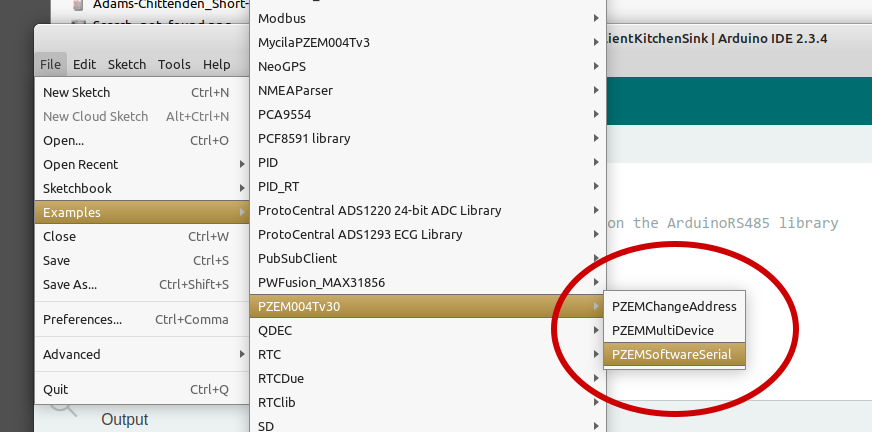
Well, that is a surprise.....the hard serial option is NOT accessible from the drop-down sub-menu Examples from the PZEM-004T library, ⸺ see below

So, I will now investigate that further. Thanks for taking the time to look in the directory-tree (it does exist there, on my computer).

I will keep you posted on my progress!

The reason it is not listed in Arduino IDE's menu is that it is not an Arduino sketch (Arduino sketches must contain a .ino file, and this program is instead in a .cpp file).

I think the reason they did not make this an Arduino sketch is because they wanted to define a global macro PZEM004_NO_SWSERIAL when compiling the program:

Arduino IDE doesn't allow this to be done, but PlatformIO does. So they made this example a PlatformIO project instead of an Arduino sketch.

However, the PZEM004_NO_SWSERIAL is not actually relevant when compiling for an UNO R4 Minima board because the macro only has an effect when compiling for a board that uses a ESP8266 or AVR architecture microcontroller:

The example code is configured as an Arduino sketch (PlatformIO supports the Arduino framework) so you can simply copy the code of the example into Arduino IDE and compile it. It doesn't compile for the UNO R4 Minima, but I think that is because the library was not written for the board, rather than being caused by using Arduino IDE instead of PlatformIO.

OK, I now understand that the drop-down menu is filtering for items of the pattern *.ino .....that is good to know.

But the bottom-line here is (quite literally)...

Thanks for taking the time to work with me on this. It would be infinitely frustrating without some external feedback!

It is when you are talking about the large number of shields that are designed specifically for the UNO and Mega form factors.

*What follows below is NOT intended to be argumentative. Rather, I am trying to understand the design philosophy at Arduino, which feels at odds with my 'intuition' resulting from 3 decades of professional engineering-design experience. Everyone can benefit from a better understanding of the design philosophy which is, more often than not, never explicitly stated. :slight_smile:

Thanks, ptillisch ⸺ I understood that before I wrote about "form factor" in Post #5: yes, there is the matter of the Shields because Shields are a huge part (and benefit!) of the Arduino "ecosystem". But let me ramble further...

From a practical standpoint, that physical "form-factor" only pertains to the headers' placement (relative to each other, not to the board's edges -- which could be made to vary wildly) and the circuitry pin-out. Once that standardized header-placement -and-circuitry-pin-out is in place, additional headers could be added, as long as they did not physically interfere with mating Shields already existing in the "ecosystem".

But really my point was, and it still is: just because the standardized header-and-pin-out is satisfied, that should not be sufficient to make any particular device "an UNO." My limited Arduino experience has been that, despite the physically compatible headers, not all Shield devices can be expected to always be plug-and-play (especially those that are customized or bespoke), even if the headers mate physically.

I think you could agree: the size-and-shape (outline) of the PC-board to which the headers are mounted to (again: according to the standardized pattern) is trivial, except in those rare situations where somebody has tightly fitted their Arduino (and its other hardware) inside an enclosure, which enclosure cannot be modified, and they need to replace that Arduino board. Stated another way: an UNO would still be an UNO, even if the outline of the PC board were to be the size-and-shape of a dinner plate, and even if most of that overly large board was devoid of traces.

So, What really qualifies as an UNO?

Are they just boards with the same outline-shape-and-dimensions, and the same header placement & pin-outs? Or is back-compatibility with prior software (written for older UNO versions) most important? Case in point: The Leonardo has the same header placement, pin-out, and form-factor as the UNO family of boards, so....Why did the Arduino design-team not name it "UNO-R_davinci"? :thinking:

Yeah, that has been done with the GIGA R1 WiFi (which uses the Mega form factor) and the Portenta form factor (which adds high density connectors to the established MKR form factor.

If "UNO" is the form factor, then that is perfectly sufficient.

Hello, ptillisch, I think that I am getting the gist of the "design philosophy". But please tell me, Why is the Leonardo a Leonardo....and not an Uno?

Hello,
In an effort to figure out the Arduino ecosystem's jungle, it seems that I have gotten a little off the beaten track. So here is my effort to steer things back.

So, I tried using HardwareSerial.CPP with the Uno R4-Minima. It will compile, and it will upload (mostly) but fails, and throws the following error:

...[content trimmed]....
"/home/username/.arduino15/packages/arduino/tools/dfu-util/0.11.0-arduino5/dfu-util" --device 0x2341:0x0069,:0x0369 -D "/home/username/.cache/arduino/sketches/C2185D34C805CCD4DA0878FA2C453558/sketch_feb19a.ino.bin" -a0 -Q
dfu-util: **No DFU capable USB device available**
dfu-util 0.11-arduino4

I've substituted known-to-be-good USB cables, with the same error message each time. I conclude that the problem is not the USB cabling.

Any ideas?

Have you managed to upload any program to the R4-Minima? Start with the blink example.

Well, that is a good suggestion!

I did try it. In fact, I tried it using the Arduino IDE 1.8.13 as well as the IDE 2.3.4 .....and neither of them worked. Here is the error code from the IDE 2.3.4 ⸺

Global variables use 3940 bytes (12%) of dynamic memory, leaving 28828 bytes for local variables. Maximum is 32768 bytes.
"/home/myusername/.arduino15/packages/arduino/tools/dfu-util/0.11.0-arduino5/dfu-util" --device 0x2341:0x0069,:0x0369 -D "/home/myusername/.cache/arduino/sketches/CA76F19BE5B2539C23016062DEDBAA97/Blink.ino.bin" -a0 -Q
dfu-util: No DFU capable USB device available
dfu-util 0.11-arduino4

It would seem that this is a very low-level problem.

How on Earth to proceed, now?

If it is helpful, I am running Linux MINT, v21.3 ('Virginia')

Kernel: 5.15.0-133-generic x86_64 bits: 64 compiler: gcc v: 11.4.0 Desktop: Cinnamon 6.0.4
    tk: GTK 3.24.33 wm: muffin vt: 7 dm: LightDM 1.30.0 Distro: Linux Mint 21.3 Virginia
    base: Ubuntu 22.04 jammy

The O/S and installed programs are (...according to the semi-automatic updating system) 'fully up-to-date'

The system seems to be expecting a DFU programmer, which is not common. All I can suggest is to research that topic to learn why, as I don't use either of those processors.

BING0!
Here is the solution to the "No DFU capable USB device" ....you must 'double-tap reset' the board. See:
Double-tap reset of Arduino UNO R4
Official Datasheet, Arduino UNO R4 Minima--- see Section 12.5
After doing the reset, it loads the BLINK sketch without any issues, and it runs as it is supposed to.
Now....back to the PZEM module....

1 Like