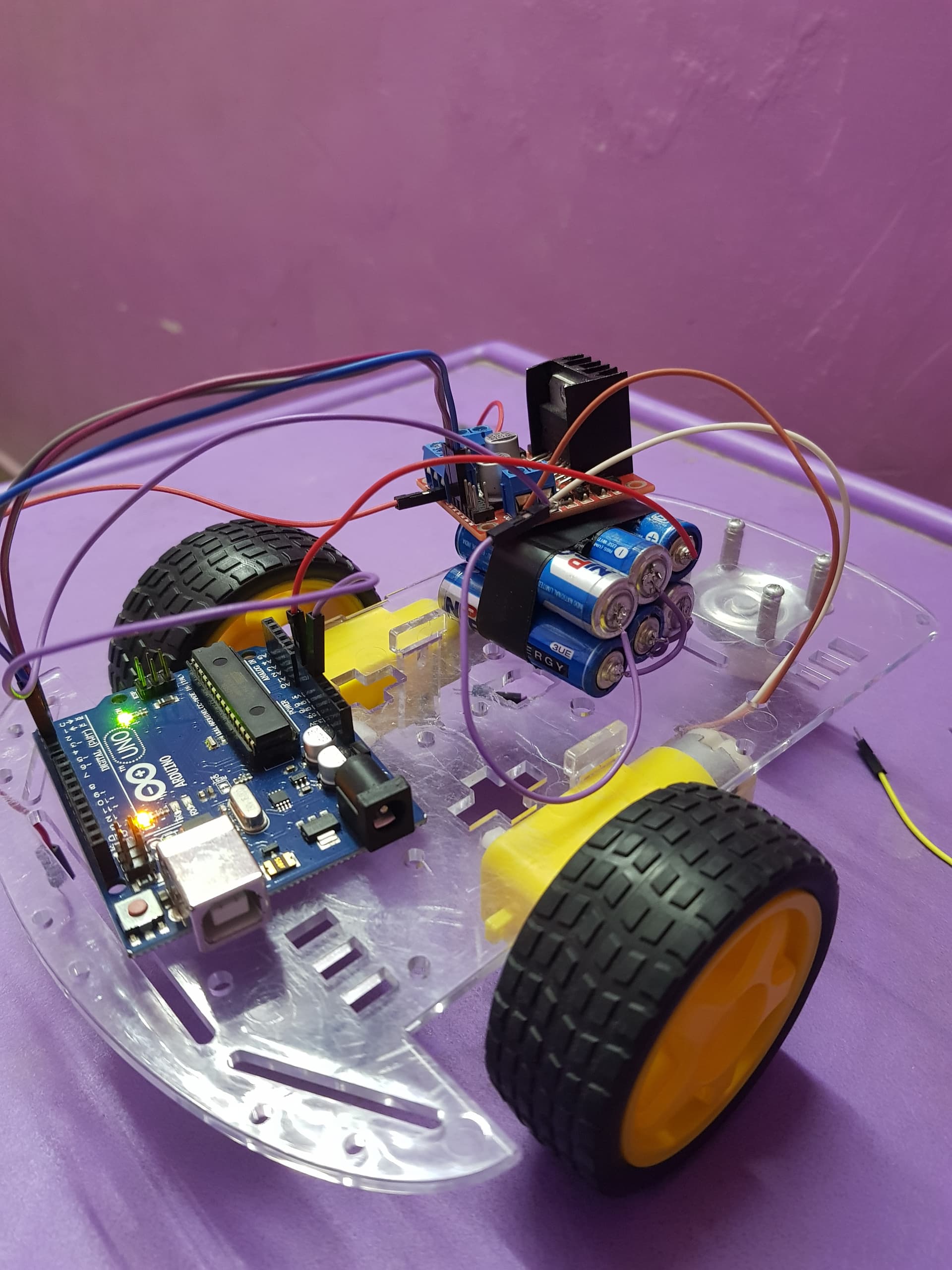
I am trying to run a DC motor using a Arduino Uno. I am using a L298N to connect the motor, Arduino and a 9v battery. My EnA is connected to pin 3 and IN1 and IN2 are connected to Pins 7 and 8 respectively. Its a very simple circuit and my connections are like 9v battery to L2908n 12v pin and gnd then gnd and 5v pins from arduino is also connected to L298n. when I uploaded the below code, it works for couple seconds and if disconnect the battery and I upload the same code and connect the battery again the motor is not working. I also tested by connecting battery to motor directly(to test the if battery or motor working properly). the motor is perfectly running. Can you please help me on this.
here is my code(I commented the lines which i want to use further)
int enA = 3;    //Left motor
int MotorAip1=7;
int MotorAip2=8;

// motor two
/*int enB = 6;    //Right motor
int MotorBip1=4;
int MotorBip2=7;*/
void setup()
{
  // put your setup code here, to run once:
  pinMode(enA, OUTPUT);
  //pinMode(enB, OUTPUT);
  pinMode(MotorAip1,OUTPUT);
  pinMode(MotorAip2,OUTPUT);
  //pinMode(MotorBip1,OUTPUT);
  //pinMode(MotorBip2,OUTPUT);
}

void loop()
{
digitalWrite(MotorAip1,HIGH);
    digitalWrite(MotorAip2,LOW);
   //digitalWrite(MotorBip1,HIGH);
   //digitalWrite(MotorBip2,LOW);
    analogWrite (enA, 200);
    //analogWrite (enB, 200);
}
Here is the Image, (the right side motor which has brown and white wires are not connected to the motor driver or arduino). I have connected only the left side motor.
I have moved your topic to a more suitable forum section. It is not an introductory tutorial. There are several warnings about posting questions and problems in that section which you somehow failed to see.
Those 9V batteries are not suitable for Arduino projects, especially those involving motors. Their capacity and current capability is very small and will cause various problems. I suggest you consider 6x AA batteries or a 7.2V lipo battery, if you have a suitable charger.
Hi @LarryD , If I am not connecting the 5 v pin to arduino, the driver is not showing any indication(the LED in the driver not getting turned on).(attached image for reference)
I tried the new wires couple of times(3-4) times and I also replaced the arduino board twice but not getting the desired results.
Strange thing is that, it is working when I upload the code for the first time that too couple of secs and If again repeat the same code and without disturbing any wirings it is not working.
Firstly I tried it for 2 motors, that was failed, so I decided to test the motors one by one, and this is the result.
as of now I am not having digital multimeter but I have ordered one will be getting in coupe of days.
The driver board has a voltage regulator on it that takes the motor voltage (example 12v) and creates 5v.
Therefore the 5v terminal on the driver board is a power out pin.
The Arduino 5v pin sits at 5v when the Arduino USB cable is plugged into your PC.
Connecting the Arduino 5v pin to the driver 5v terminal has the potential of causing damage when things are wired this way.
When you are uploading a sketch to the Arduino, disconnect the Arduino from the driver terminal.
Once the sketch is updated disconnect the Arduino USB cable then you can connect the driver 5v terminal again if your intention is to power the Arduino from the driver board.
Your PP3 9v battery cannot power motors and/or the Arduino.
Hi @LarryD , will try it today or tomorrow as I need to purchase the holder.Will follow the approach of powering the arduino after the sketch upload.Thank You.
I didnt get the battery holder,instead I connected all 6 AA batteries by soldering them to get 9.7 V and it is delivering the same (i checked with a DMM). But when i connect the board and the driver the power source both are not getting power.I have connected source +ve to the driver 12v and source -ve to the driver gnd and the driver gnd to arduino gnd .5V from the driver to Vin of arduino. Can you please correct my connections and help me?
It appears you have the 5v output from the motor driver PCB going to the Vin pin on the Arduino UNO.
The Vin pin needs to be greater than 7V.
However, you can connect this wire to the UNO 5v pin instead; remember to disconnect the wire from the UNO 5v pin when the UNO is connected to a USB cable then to your PC.