i made a webpage based on ESP32S3 with authentication.
Now i want to add an option to create new users, but i want the users have different authentication levels.
Is this possible?
If yes and if i want to change the password for an specific user, then should i check for the right user in HTML side code (JavaScript) or in Server side (Arduino IDE) code?
Yes, it is possible to implement the different user authentication at different levels to access your webpage at ESP32S3. You have set the assign different permission level of each user when they try to access the pages on your site.
I'm working on an example for managing RFID tags using a MySQL database (no use of PHP script!) and a management page where only a user with "admin" rights can add, delete and modify users records.
Other logged users can only view the data.
MySQL is not mandatory, it's used for storing users table and access logs.
Since the pages served from ESP32 are static resources (flash stored literal strings), to manage the level of access on the client side I use a cookie that is set on the server side.
Passwords are not stored in the DB as plain text, nor during handshaking between server and client. A SHA256 encryption it's used instead.
The example is almost complete, I'll put it online later.
The library esp-fs-webserver.h is just a wrapper for the WebServer.h library already included in the ESP32 Arduino core, so it's not mandatory to use it.
I don't know what your level is with C++ and especially with HTML/Javascript; this example can be quite complex for a novice to fully understand, so if you need clarification don't worry and just ask.
In particular, regarding your original request, I will try to explain in detail how I acted:
ESP32 already provides authentication methods based on BASIC_AUTH or DIGEST_AUTH, but since I find the standard login prompt ugly, I created my own /login page;
the login page on submit will calculate the hash of password and will require the /rfid webpage passing username and password hash (the request is handled from ESP32 here);
the web server will check user/password hash/user role in DB records, then reply to client setting a cookie with data;
the cookie value will be parsed from /rfid page at this line to take action in relation to level passed (enable a button and the /setup link).
If you are fine with the standard login prompt, it's possible to simplify the handshaking skipping the custom /login webpage.
@cotestatnt
Thank you for your reply and example.
My level is not good with HTML/Javascript but i will take a look at your example.
I am working with Ethernet and not WiFi but that should not be a problem.
I managed to write a page where i can create new user and delete them but the problem now i am facing is that created cards for new user do not get deleted when i delete one user.
My webpage is based on one example of W3school
<div class="container">
<form method="post" id="userForm" action="/user">
<label for="newUsername">Neuer Benutzername:</label>
<input type="text" id="newUsername" name="newUsername" required>
<label for="newPassword">Neues Passwort:</label>
<input type="password" name="newPassword" required>
<label for="confirmPassword">Bestätige Passwort:</label>
<input type="password" name="confirmPassword" required>
<input type="submit" onclick="createUserCard()" value="Benutzer erstellen">
</form>
<div id="userList">
</div>
</div>
</div>
</div>
<script>
document.addEventListener("DOMContentLoaded", function() {
// Check if there are any stored user cards in local storage
const storedUsers = JSON.parse(localStorage.getItem("userCards")) || [];
// Render stored user cards
storedUsers.forEach(user => {
createUserCard(user);
});
// Add event listener for form submission
document.getElementById("userForm").addEventListener("submit", function(event) {
event.preventDefault();
const newUsername = document.getElementById("newUsername").value;
createUserCard(newUsername);
// Save the updated user cards to local storage
const updatedUsers = [...storedUsers, newUsername];
localStorage.setItem("userCards", JSON.stringify(updatedUsers));
// Clear the input field
document.getElementById("newUsername").value = "";
});
});
// Function to create a user card
function createUserCard(newUsername) {
const userList = document.getElementById("userList");
//var userList = document.getElementById("userList");
// Get the value of the new username input field
//var newUsername = document.getElementsByName("newUsername")[0].value;
// Create a new div element for the user card
const userCard = document.createElement("div");
//var userCard = document.createElement("div");
userCard.className = "user-card";
// Create a paragraph element to display the username
var usernamePara = document.createElement("p");
usernamePara.textContent = "Username: " + newUsername;
// Create a delete icon
const deleteIcon = document.createElement("i");
//var deleteIcon = document.createElement("i");
deleteIcon.className = "fa fa-trash";
deleteIcon.onclick = function() {
// Remove the user card from the DOM
userCard.remove();
// Remove username from local storage
const updatedUsers = storedUsers.filter(user => user !== newUsername);
localStorage.setItem("userCards", JSON.stringify(updatedUsers));
// Send an HTTP request to delete the user from the server
deleteUser(newUsername);
};
// Append username and delete icon to the user card
userCard.appendChild(usernamePara);
userCard.appendChild(deleteIcon);
// Append the user card to the user list container
userList.appendChild(userCard);
}
// Function to send an HTTP request to delete the user from the server
function deleteUser(newUsername) {
var xhr = new XMLHttpRequest();
xhr.open("GET", "/userdelete?newUsername=" + encodeURIComponent(newUsername), true);
xhr.onreadystatechange = function() {
if (xhr.readyState === XMLHttpRequest.DONE) {
     if (xhr.status === 200) {
        // User deleted successfully
        const updatedUsers = storedUsers.filter(user => user !== newUsername);
        localStorage.setItem("userCards", JSON.stringify(updatedUsers));
      } else {
// Handle error if deletion fails
console.error("Failed to delete user:", xhr.status);
}
}
};
xhr.send();
}
function logout() {
// Perform any necessary logout actions here
// For example, clearing session storage or cookies
localStorage.removeItem('authToken'); // Remove authentication token
setTimeout(function(){ window.open("/login", "_self");}, 0);
window.sessionStorage.clear();
var xhr = new XMLHttpRequest();
xhr.open("GET", "/logout", true);
xhr.send();
}
</script>
Your snippet of code is uncomplete.
It's hard in this way give you a proper answer. Aniway I can see is you are using local storage.
Have you tried using the browser developer tools (F11 key) to see what errors you have on the console?
In my opinion, yours is a scope problem of the storedUsers variable within the lambda function associated with the delete icon click which is not accessible (because it is a local variable of the event handler for DOMContentLoaded)
Try to use as global putting the declaration outside the event handler.
You are doing the same thing here:
if (xhr.status === 200) {
// User deleted successfully
const updatedUsers = storedUsers.filter(user => user !== newUsername);
localStorage.setItem("userCards", JSON.stringify(updatedUsers));
} else {
but at this point is useless as you have already removed newUsername before calling this function.
Indeed, it would be better to do it only here, after you have actually received a response from the ESP32.
Finally, you are also calling the function createUserCard() twice for each user inserted and off course is not correct.
The first time because you have defined the button as following
and the second one because you have added the listener to the form submit (which is the right one, since with the onclick you don't pass the username value to the function).
Remove the onclick from button declaration.
Yes you were right. The problem was declaring storedUsers localy.
After i declared it globaly, now the created new user cards do not keep appearing after deleting them.
Now this is the problem:
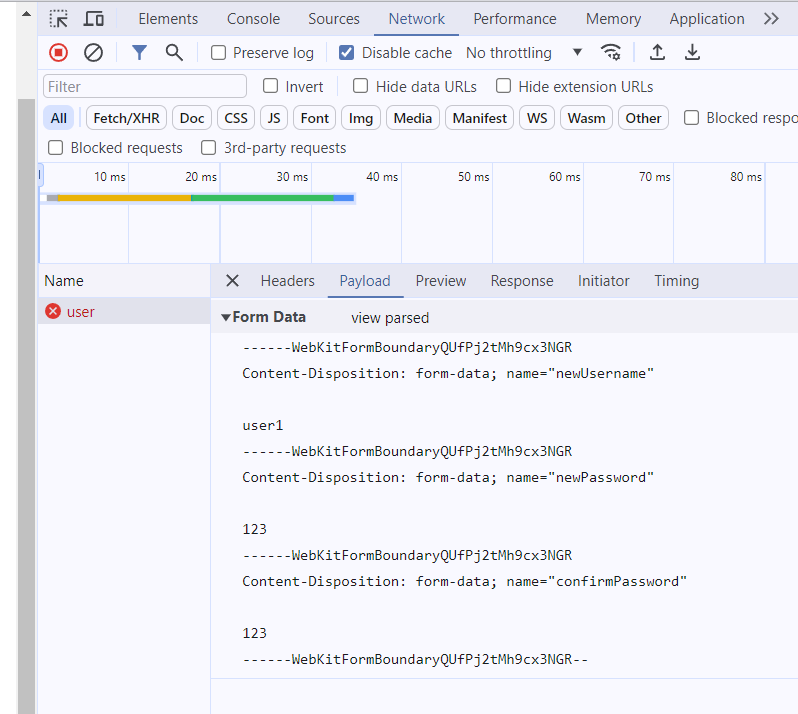
when i click on Benutzer erstellen the user cards are created on the webpage correctly ( i guess) but the handling function in the server side code does not get triggered.
The server can not read any new created user.
I have removed the onclick from the button declaration.
I think my event listener for the form submissin is not working propperly.
Here is the complete HTML file:
<!DOCTYPE html>
<html>
<head>
<meta charset="UTF-8">
<meta name="viewport" content="width=device-width, initial-scale=1">
<link rel="stylesheet" href="https://cdnjs.cloudflare.com/ajax/libs/font-awesome/4.7.0/css/font-awesome.min.css">
<style>
h2{margin-top: 60px;
margin-left: 60px;}
body {
font-family: Arial, Helvetica, sans-serif;
}
* {
box-sizing: border-box;
}
.container {
max-width: 450px;
margin: 50px auto;
border-radius: 5px;
background-color: white; /* #f2f2f2 */
padding: 20px;
margin-top: 25px;
}
label {
display: block;
}
input {
width: 100%;
padding: 8px;
margin-bottom: 10px;
box-sizing: border-box;
}
input[type=text], select, textarea {
width: 100%;
padding: 8px;
margin-top: 10px;
border: 1px solid #ccc;
border-radius: 4px;
resize: vertical;
}
input[type=submit] {
background-color: #04AA6D;
color: white;
padding: 12px 20px;
border: none;
border-radius: 4px;
cursor: pointer;
margin-top: 15px;
}
input[type=submit]:hover {
background-color: #45a049;
}
.user-card {
border: 1px solid #ccc;
border-radius: 5px;
padding: 10px;
margin-bottom: 10px;
background-color: #f9f9f9;
position: relative;
}
.fa-trash {
color: black;
cursor: pointer;
position: absolute;
top: 30%;
right: 10px;
}
.user-card p {
margin: 0;
font-weight: bold;
}
.navbar {
overflow: hidden;
background-color: white;
}
.navbar a {
float: left;
font-size: 16px;
color: black;
text-align: center;
padding: 14px 16px;
text-decoration: none;
}
.sidenav {
height: 70%;
width: 200px;
position: fixed;
z-index: 1;
top: 120px;
left: 100px;
background-color: white;
overflow-x: hidden;
padding-top: 20px;
}
.sidenav a {
padding: 6px 6px 36px 32px;
text-decoration: none;
font-size: 16px;
color: black;
display: block;
}
.dropdown {
float: left;
padding-left: 120px;
overflow: hidden;
}
.dropdown .dropbtn {
font-size: 16px;
border: none;
outline: none;
color: black;
padding: 14px 16px;
background-color: inherit;
font-family: inherit;
margin: 0;
}
.navbar a:hover, .dropdown:hover .dropbtn {
color: blue;
}
.dropdown-content {
display: none;
position: absolute;
background-color: white;
min-width: 160px;
box-shadow: 0px 8px 16px 0px rgba(0,0,0,0.2);
z-index: 1;
}
.dropdown-content a {
float: none;
color: black;
padding: 12px 16px;
text-decoration: none;
display: block;
text-align: center;
}
.dropdown-content a:hover {
background-color: white;
}
.dropdown:hover .dropdown-content {
display: block;
}
.sidenav a:hover {
color: blue;
}
.main {
margin-left: 200px; /* Same as the width of the sidenav */
}
@media screen and (max-height: 450px) {
.sidenav {padding-top: 15px;}
.sidenav a {font-size: 18px;}
}
/* Responsive layout - when the screen is less than 600px wide, make the two columns stack on top of each other instead of next to each other */
@media screen and (max-width: 600px) {
.col-25, .col-75, input[type=submit] {
width: 100%;
margin-top: 0;
}
}
</style>
</head>
<body style="background-color:white;">
<div class="w3-main" style="display: flex; justify-content: center; margin-top: 20px;">
<span class="w3-button w3-hide-large w3-xxlarge w3-hover-text-grey" onclick="w3_open()"></span>
<div class="w3-container">
<img src='https://wiki.amberg.deprag.de/allgemein/images/thumb/d/de/Logo-DEPRAG-machinesunlimited.svg/120px-Logo-DEPRAG-machinesunlimited.svg.png' style='margin-right: 20px; float: left;' id='deprag-logo' width= '100' height= '30'>
<div class="navbar">
<a href="index">Dashboard</a>
<a href="aktualisiere">Software</a>
<a href="network">Einstellungen</a>
<a href="sysinfo">Systeminfo</a>
<a href="sensordata">Service</a>
<div class="dropdown">
<button class="dropbtn"><i class="fa fa-fw fa-user"></i>Admin<i class="fa fa-caret-down"></i></button>
<div class="dropdown-content">
<a class="fa fa-user" href="meinprofil">Mein Profil</a>
<a class="fa fa-times" href="#" onclick="logout()">Abmelden</a>
</div>
</div>
</div>
<div class="sidenav">
<a href="network">Netzwerk</a>
<a href="user">Benutzerverwaltung</a>
<a href="feldbus">Feldbus</a>
</div>
<h2>Einstellungen<span style='font-size:30px;'>→</span>Benutzerverwaltung</h2>
<div class="container">
<form method="post" id="userForm" action="/user">
<label for="newUsername">Neuer Benutzername:</label>
<input type="text" id="newUsername" name="newUsername" required>
<label for="newPassword">Neues Passwort:</label>
<input type="password" name="newPassword" required>
<label for="confirmPassword">Bestätige Passwort:</label>
<input type="password" name="confirmPassword" required>
<input type="submit" value="Benutzer erstellen">
</form>
<div id="userList">
</div>
</div>
</div>
</div>
<script>
const storedUsers = JSON.parse(localStorage.getItem("userCards")) || [];
document.addEventListener("DOMContentLoaded", function() {
// Render stored user cards
storedUsers.forEach(user => {
createUserCard(user);
});
// Add event listener for form submission
document.getElementById("userForm").addEventListener("submit", function(event) {
event.preventDefault();
const newUsername = document.getElementById("newUsername").value;
createUserCard(newUsername);
// Save the updated user cards to local storage
const updatedUsers = [...storedUsers, newUsername];
localStorage.setItem("userCards", JSON.stringify(updatedUsers));
// Clear the input field
document.getElementById("newUsername").value = "";
});
});
// Function to create a user card
function createUserCard(newUsername) {
const userList = document.getElementById("userList");
// Create a new div element for the user card
const userCard = document.createElement("div");
userCard.className = "user-card";
// Create a paragraph element to display the username
var usernamePara = document.createElement("p");
usernamePara.textContent = "Username: " + newUsername;
// Create a delete icon
const deleteIcon = document.createElement("i");
deleteIcon.className = "fa fa-trash";
deleteIcon.onclick = function() {
// Remove the user card from the DOM
userCard.remove();
// Send an HTTP request to delete the user from the server
deleteUser(newUsername);
};
// Append username and delete icon to the user card
userCard.appendChild(usernamePara);
userCard.appendChild(deleteIcon);
// Append the user card to the user list container
userList.appendChild(userCard);
}
// Function to send an HTTP request to delete the user from the server
function deleteUser(newUsername) {
var xhr = new XMLHttpRequest();
xhr.open("GET", "/userdelete?newUsername=" + encodeURIComponent(newUsername), true);
xhr.onreadystatechange = function() {
if (xhr.readyState === XMLHttpRequest.DONE) {
if (xhr.status === 200) {
// User deleted successfully
const updatedUsers = storedUsers.filter(user => user !== newUsername);
localStorage.setItem("userCards", JSON.stringify(updatedUsers));
} else {
// Handle error if deletion fails
console.error("Failed to delete user:", xhr.status);
}
}
};
xhr.send();
}
function logout() {
// Perform any necessary logout actions here
// For example, clearing session storage or cookies
localStorage.removeItem('authToken'); // Remove authentication token
setTimeout(function(){ window.open("/login", "_self");}, 0);
window.sessionStorage.clear();
var xhr = new XMLHttpRequest();
xhr.open("GET", "/logout", true);
xhr.send();
}
</script>
</body>
</html>
After i successfully manage this issue i will try with your example on the multiple authentication.
It's not the listener.
You have disabled the default behavior of form with this instruction, so you need to handle the submit manually for example as you have done for user deleting
As before, I think it should be better create the user card after the ESP32 has replied successfully
  // Get reference to HTML element
  var form = document.getElementById('userForm');
  // Get data from fromm fields
  var formData = new FormData(form);

  // Send the AJAX request to ESP32 server
  var xhr = new XMLHttpRequest();
  xhr.open("POST", "/user");
  xhr.onreadystatechange = function () {
    if (xhr.readyState === XMLHttpRequest.DONE) {
      if (xhr.status === 200) {
        // Operations to perform if the request is successful
        console.log(xhr.responseText);
      } else {
        // Operations in case of error
        console.error('An error occurred:', xhr.status);
      }
    }
  };

  xhr.send(formData);
}
I tried that but it does send empty strings as username and password, so my handle function report error.
Enabling the default behavor did the same thing.
I should check in more detail, but with the ESP32 it's probably better to use the "application/x-www-form-urlencoded"
This means that the javascript needs to be modified slightly:
  var form = document.getElementById("userForm");
  var formData = new FormData(form);
  var encodedData = new URLSearchParams(formData).toString(); // Convert FormData to URL-encoded string

  var xhr = new XMLHttpRequest();
  xhr.open("POST", "/user");
  xhr.setRequestHeader("Content-Type", "application/x-www-form-urlencoded"); // Set the content type

  xhr.onreadystatechange = function () {
    if (xhr.readyState === XMLHttpRequest.DONE) {
      if (xhr.status === 200) {
        // Operations to perform if the request is successful
        console.log(xhr.responseText);
      } else {
        // Operations in case of error
        console.error('An error occurred:', xhr.status);
      }
    }
  };

  xhr.send(encodedData);
Now i have two questions:
First: How do you clear the fields (username, password...) after creating new user?
Second: How do you save the new created user in your server?
For the second question, i am using preferences but it looks like it not working properly.
I have a defined max number for the user int numUsers = 0; and everytime a new user is created i increment the number, but somehow it does not keeps its static value although i have declare it global.
ethernetServer.on("/user", HTTP_POST,handleNewUsername ); // the handler is in setup

// the handler function is in a header file defined
void handleNewUsername(){
  if(!ethernetServer.authenticate(ust.m_Benutzername, ust.m_Passwort))
    return ethernetServer.requestAuthentication();

  Serial.println("handleNewUserName get triggered!");

  String response;

  if(ethernetServer.args() == 0){
    response = "<h1>Empty username field</h1>";
    response += "<META http-equiv= 'refresh' content='5;URL=/'>Back to homepage...\n";
    ethernetServer.send(200, "text/html", response);
    return;
  }

  String newUsername = ethernetServer.arg("newUsername");
  String newPassword = ethernetServer.arg("newPassword");
  String confirmPassword = ethernetServer.arg("confirmPassword");

  if(newUsername == ""){
    response = "<h1>Invalid Username format! Try something like: username</h1>";
    response += "<META http-equiv='refresh' content='5;URL=/'>Back to homepage...\n";
    // Send the response to the client
    ethernetServer.send(200, "text/html", response);
    return;
  }

  if(newPassword == confirmPassword){
    // Register the new user
    registerUser(newUsername.c_str(), newPassword.c_str());
    // New user is creadted
    // response = "<h1>New user correctly created</h1>";
    // response += "<META http-equiv='refresh' content='5;URL=/'>Back to homepage...\n";
    ethernetServer.send(200);
  } else {
    // Passwords do not match, handle the error (e.g., return an error message)
    response = "<h1>Password and confirmPassword do not match</h1>";
    response += "<META http-equiv='refresh' content='5;URL=/'>Back to homepage...\n";
    ethernetServer.send(200, "text/html", response);
    return;
  }
}

// The function which uses preferences to save on flash, is in another header defined
void registerUser(const char* newUsername, const char* newPassword){
  // Validate input data (e.g. check username and password)

  if(numUsers > 11){
    return;
  }

  // Store the new user's information in the data structure or database
  strcpy(users[numUsers].m_Benutzername, newUsername);
  // memcpy(users[numUsers].m_Benutzername, newUsername, sizeof(newUsername) + 1);
  Serial.print("New username to be stored: ");
  Serial.println(users[numUsers].m_Benutzername);
  strcpy(users[numUsers].m_Passwort, newPassword);
  // memcpy(users[numUsers].m_Passwort, newPassword, sizeof(newPassword) + 1);
  Serial.print("password for the new user: ");
  Serial.println(users[numUsers].m_Passwort);


  // Store the new username in non-volatile memory
  pref.begin("UserSettings", false);
  pref.putString(("Username_" + String(numUsers)).c_str(), newUsername); // Store the username with a unique key based on the user index
  pref.end();

  // Increment the number of users
  numUsers++;
  Serial.print("numUsers after increment: ");
  Serial.println(numUsers);
}
In my example, I'm using a MySQL DB for all data, users list included.
Regarding the usermame and password fields showed in the webpage I don't take care of it because selecting a new one, it will be filled with the relative text (taken from DB) except the password.
However, if you want to clear the contents of an inputbox you simply need to get the reference to the HTML element and then set the value to an empty string.
i noticed that :
1- You don't have a logout functionality in your webpage.
2- Your handles are not in the setup function.
3- I didn't understand the porpuse of myWebserver.setAuthentication("admin","admin"); , since i am using EthnernetServer i don't have such a function.
Yes you are right, I haven't implemented it. When I have some free time I will add also the logout.
And why should they be in setup? Handlers are callback functions, you can define them wherever you want.
The method setAuthentication() allows you to set a login using "simple digest" for the /setup and /edit pages (which can possibly be deactivated completely).
If the library for your Ethernet client does not support this feature, you can simply remove those lines
One question:
Where did you get the library: #include "mbedtls/md.h"?
Can you please provide the link to it so i can download it?
And would it work with the Ethernet? I think yes.