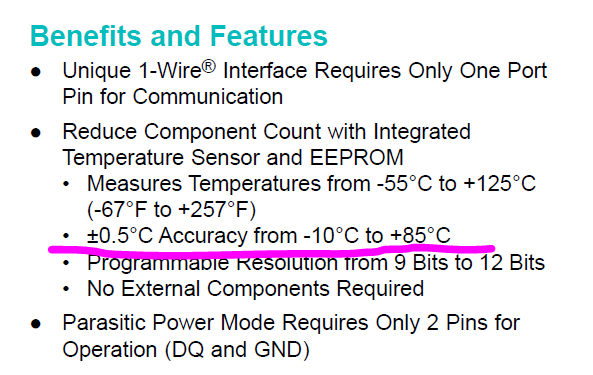
Why would my DS18B20 only be displaying half degree accuracy?
It used to display 0.01ºC accuracy, then suddenly it won't display anything other than 0.5ºC differences in the temperature. I have not changed the code since it displayed temperatures correctly.
unsigned long previousMillis = 0;
const long interval = 10;

#include "Full.c"
#include "Draining.c"
#include "Drained.c"
#include "Empty.c"
#include "Charging.c"

#include <OneWire.h>
#include <DallasTemperature.h>

#define ONE_WIRE_BUS 2
#define TEMPERATURE_PRECISION 1000

OneWire oneWire(ONE_WIRE_BUS);

DallasTemperature sensors(&oneWire);

#define USE_TOUCH    0x2046

#include <virtuabotixRTC.h> //Libraries needed

virtuabotixRTC myRTC(6, 7, 8);

#include "Adafruit_GFX.h"    // Hardware-specific library
#include <MCUFRIEND_kbv.h>
#include <SPI.h>
#include <SD.h>
MCUFRIEND_kbv tft;       //
#define TFT_BEGIN()    tft.begin(0x9488)

#include <XPT2046_Touchscreen.h>           // Hardware SPI library
char *name = "Shield XPT2046 Calibration";  //edit name of shield
const int TS_LANDSCAPE = 1; //XPT2046_TouchScreen.h
const int TS_LEFT = 261, TS_RT = 3770, TS_TOP = 3869, TS_BOT = 296;
#define XPT_CS  53      // MEGA2560 SHIELD
#define XPT_IRQ 255     // XPT2046 library does not like IRQ
XPT2046_Touchscreen ts(XPT_CS, XPT_IRQ);

int pixel_x, pixel_y;     //Touch_getXY() updates global vars
bool Touch_getXY(void)
{
  bool pressed = ts.touched();
  if (pressed) {
    TS_Point p = ts.getPoint();
    if (TS_LANDSCAPE) mapxy(p.y, p.x);
    else mapxy(p.x, p.y);
  }
  return pressed;
}

void Touch_init(void)
{
  ts.begin();
}

void mapxy(int x, int y)                //maps ADC to pixel_x, pixel_y
{
  int aspect = tft.getRotation();     //LANDSCAPE
  int tft_width = tft.width();
  int tft_height = tft.height();
  switch (aspect & 3) {
    case 0:      //PORTRAIT
      pixel_x = map(x, TS_LEFT, TS_RT, 0, tft_width);
      pixel_y = map(y, TS_TOP, TS_BOT, 0, tft_height);
      break;
    case 1:      //LANDSCAPE
      pixel_x = map(y, TS_TOP, TS_BOT, 0, tft_width);
      pixel_y = map(x, TS_RT, TS_LEFT, 0, tft_height);
      break;
    case 2:      //PORTRAIT REV
      pixel_x = map(x, TS_RT, TS_LEFT, 0, tft_width);
      pixel_y = map(y, TS_BOT, TS_TOP, 0, tft_height);
      break;
    case 3:      //LANDSCAPE REV
      pixel_x = map(y, TS_BOT, TS_TOP, 0, tft_width);
      pixel_y = map(x, TS_LEFT, TS_RT, 0, tft_height);
      break;
  }
}

Adafruit_GFX_Button temp_btn, humidity_btn, home_btn, more_btn;

#define BLACK 0x0000       /*   0,   0,   0 */
#define NAVY 0x000F        /*   0,   0, 128 */
#define DARKGREEN 0x03E0   /*   0, 128,   0 */
#define DARKCYAN 0x03EF    /*   0, 128, 128 */
#define MAROON 0x7800      /* 128,   0,   0 */
#define PURPLE 0x780F      /* 128,   0, 128 */
#define OLIVE 0x7BE0       /* 128, 128,   0 */
#define LIGHTGREY 0xC618   /* 192, 192, 192 */
#define DARKGREY 0x7BEF    /* 128, 128, 128 */
#define BLUE 0x001F        /*   0,   0, 255 */
#define GREEN 0x07E0       /*   0, 255,   0 */
#define CYAN 0x07FF        /*   0, 255, 255 */
#define RED 0xF800         /* 255,   0,   0 */
#define MAGENTA 0xF81F     /* 255,   0, 255 */
#define YELLOW 0xFFE0      /* 255, 255,   0 */
#define WHITE 0xFFFF       /* 255, 255, 255 */
#define ORANGE 0xFD20      /* 255, 165,   0 */
#define GREENYELLOW 0xAFE5 /* 173, 255,  47 */
#define PINK 0xF81F

uint8_t displayScreenNo, prevDay, prevMonth, prevSec, prevMin, prevHour, prevVolt, prevMoon;
uint16_t prevYear;

static float prevTemp = 999.99 ; // an unlikely value
float currentTempF = sensors.getTempCByIndex(0) ;

void setup() {
  Serial.begin(9600);
  sensors.begin();
  TFT_BEGIN();
  Touch_init();
  Serial.println("Calibrate for your Touch Panel");
  tft.setRotation(1);            //PORTRAIT
  tft.fillScreen(BLACK);
  home_btn.initButton(&tft,  440, 280, 80, 80, LIGHTGREY, CYAN, BLACK, "HOME", 2);
  home_btn.drawButton(false);
  more_btn.initButton(&tft,  440, 40, 80, 80, LIGHTGREY, CYAN, BLACK, "MORE", 2);
  more_btn.drawButton(false);
  temp_btn.initButton(&tft,  440, 120, 80, 80, LIGHTGREY, CYAN, BLACK, "TEMP", 2);
  humidity_btn.initButton(&tft, 440, 200, 80, 80, LIGHTGREY, CYAN, BLACK, "%", 2);
  temp_btn.drawButton(false);
  humidity_btn.drawButton(false);
  tft.setTextSize(3);
}

void loop() {
  unsigned int IntensityOfLight;

  IntensityOfLight = analogRead(A0);

  myRTC.updateTime();
  sensors.requestTemperatures();

  bool down = Touch_getXY();
  home_btn.press(down && home_btn.contains(pixel_x, pixel_y));
  more_btn.press(down && more_btn.contains(pixel_x, pixel_y));
  temp_btn.press(down && temp_btn.contains(pixel_x, pixel_y));
  humidity_btn.press(down && humidity_btn.contains(pixel_x, pixel_y));
  if (home_btn.justReleased()) {
    home_btn.drawButton(true);
    more_btn.drawButton();
    temp_btn.drawButton();
    humidity_btn.drawButton();
  }
  if (more_btn.justReleased()) {
    more_btn.drawButton(true);
    home_btn.drawButton();
    temp_btn.drawButton();
    humidity_btn.drawButton();
  }
  if (temp_btn.justReleased()) {
    home_btn.drawButton();
    temp_btn.drawButton(true);
    more_btn.drawButton();
    humidity_btn.drawButton();
  }
  if (humidity_btn.justReleased()) {
    home_btn.drawButton();
    temp_btn.drawButton();
    humidity_btn.drawButton(true);
    more_btn.drawButton();
  }
  if (home_btn.justPressed())
  {
    tft.fillScreen(BLACK);
    prevDay = 99;
    prevMonth = 99;
    prevYear = 9999;
    prevHour = 99;
    prevMin = 99;
    prevSec = 99;
    prevTemp = 999.99;
    prevVolt = 9.99;
    drawHomeScreen();
    displayScreenNo = 1;
    home_btn.drawButton(true);
    temp_btn.drawButton(false);
    humidity_btn.drawButton(false);
    more_btn.drawButton(false);
  }
  if (more_btn.justPressed())
  {
    prevDay = 99;
    prevMonth = 99;
    prevYear = 9999;
    prevHour = 99;
    prevMin = 99;
    prevSec = 99;
    prevTemp = 999.99;
    prevVolt = 9.99;
    tft.fillScreen(BLACK);
    drawMoreScreen();
    displayScreenNo = 2;
    more_btn.drawButton(true);
    temp_btn.drawButton(false);
    humidity_btn.drawButton(false);
    home_btn.drawButton(false);
  }
  if (temp_btn.justPressed())
  {
    prevDay = 99;
    prevMonth = 99;
    prevYear = 9999;
    prevHour = 99;
    prevMin = 99;
    prevSec = 99;
    prevTemp = 999.99;
    prevVolt = 9.99;
    tft.fillScreen(BLACK);
    drawDetailScreenTemp();
    displayScreenNo = 3;
    temp_btn.drawButton(true);
    home_btn.drawButton(false);
    humidity_btn.drawButton(false);
    more_btn.drawButton(false);
  }
  if (humidity_btn.justPressed())
  {
    prevDay = 99;
    prevMonth = 99;
    prevYear = 9999;
    prevHour = 99;
    prevMin = 99;
    prevSec = 99;
    prevTemp = 999.99;
    prevVolt = 9.99;
    tft.fillScreen(BLACK);
    drawDetailScreenHumidity();
    displayScreenNo = 4;
    humidity_btn.drawButton(true);
    temp_btn.drawButton(false);
    home_btn.drawButton(false);
    more_btn.drawButton(false);
  }
  static uint32_t prevMillis = 0;
  if (millis() - prevMillis > 1000 ) {
    prevMillis = millis() ;
    if ( displayScreenNo == 1 ) drawDynHomeScreen();
    else if ( displayScreenNo == 2 ) drawDynMoreScreen();
    else if ( displayScreenNo == 3 ) drawDynDetailScreenTemp();
    else if ( displayScreenNo == 4 ) drawDynDetailScreenHumidity();
  }
}

void drawHomeScreen() {
  tft.drawLine(0, 27, 480, 27, LIGHTGREY);
  tft.drawLine(0, 28, 480, 28, LIGHTGREY);
  tft.drawLine(200, 0, 200, 28, LIGHTGREY);
  tft.drawLine(201, 0, 201, 28, LIGHTGREY);

  tft.drawLine(0, 288, 480, 288, LIGHTGREY);
  tft.drawLine(0, 289, 480, 289, LIGHTGREY);
  tft.drawLine(200, 288, 200, 320, LIGHTGREY);
  tft.drawLine(201, 289, 201, 320, LIGHTGREY);
}

void drawDetailScreenHumidity() {

  tft.drawLine(0, 27, 480, 27, LIGHTGREY);
  tft.drawLine(0, 28, 480, 28, LIGHTGREY);
  tft.drawLine(200, 0, 200, 28, LIGHTGREY);
  tft.drawLine(201, 0, 201, 28, LIGHTGREY);


  tft.drawLine(27, 33, 339, 33, LIGHTGREY);
  tft.drawLine(27, 59, 339, 59, LIGHTGREY);
  tft.drawLine(27, 85, 339, 85, LIGHTGREY);
  tft.drawLine(27, 111, 339, 111, LIGHTGREY);
  tft.drawLine(27, 137, 339, 137, LIGHTGREY);
  tft.drawLine(27, 163, 339, 163, LIGHTGREY);
  tft.drawLine(27, 189, 339, 189, LIGHTGREY);
  tft.drawLine(27, 215, 339, 215, LIGHTGREY);
  tft.drawLine(27, 241, 339, 241, LIGHTGREY);
  tft.drawLine(27, 267, 339, 267, LIGHTGREY);
  tft.drawLine(27, 293, 339, 293, LIGHTGREY);

  tft.drawLine(339, 33, 339, 293, LIGHTGREY);
  tft.drawLine(313, 33, 313, 293, LIGHTGREY);
  tft.drawLine(287, 33, 287, 293, LIGHTGREY);
  tft.drawLine(261, 33, 261, 293, LIGHTGREY);
  tft.drawLine(236, 33, 236, 293, LIGHTGREY);
  tft.drawLine(209, 33, 209, 293, LIGHTGREY);
  tft.drawLine(183, 33, 183, 293, LIGHTGREY);
  tft.drawLine(157, 33, 157, 293, LIGHTGREY);
  tft.drawLine(131, 33, 131, 293, LIGHTGREY);
  tft.drawLine(105, 33, 105, 293, LIGHTGREY);
  tft.drawLine(79, 33, 79, 293, LIGHTGREY);
  tft.drawLine(53, 33, 53, 293, LIGHTGREY);
  tft.drawLine(27, 33, 27, 293, LIGHTGREY);

  tft.setTextSize(1);
  tft.setTextColor(LIGHTGREY);
  tft.setCursor(2, 33);
  tft.print("100%");
  tft.setCursor(6, 59);
  tft.print("90%");
  tft.setCursor(6, 85);
  tft.print("80%");
  tft.setCursor(6, 111);
  tft.print("70%");
  tft.setCursor(6, 137);
  tft.print("60%");
  tft.setCursor(6, 163);
  tft.print("50%");
  tft.setCursor(6, 189);
  tft.print("40%");
  tft.setCursor(6, 215);
  tft.print("30%");
  tft.setCursor(6, 241);
  tft.print("20%");
  tft.setCursor(6, 267);
  tft.print("10%");
  tft.setCursor(6, 293);
  tft.print("0%");

  tft.setTextSize(1);
  tft.setTextColor(LIGHTGREY);
  tft.setCursor(26, 300);
  tft.print("6");
  tft.setCursor(44, 300);
  tft.print("5.5");
  tft.setCursor(77, 300);
  tft.print("5");
  tft.setCursor(96, 300);
  tft.print("4.5");
  tft.setCursor(128, 300);
  tft.print("4");
  tft.setCursor(148, 300);
  tft.print("3.5");
  tft.setCursor(181, 300);
  tft.print("3");
  tft.setCursor(200, 300);
  tft.print("2.5");
  tft.setCursor(234, 300);
  tft.print("2");
  tft.setCursor(253, 300);
  tft.print("1.5");
  tft.setCursor(285, 300);
  tft.print("1");
  tft.setCursor(305, 300);
  tft.print("0.5");
  tft.setCursor(337, 300);
  tft.print("0");
}

void drawMoreScreen() {
  more_btn.drawButton(true);
}

void drawDetailScreenTemp() {

  tft.drawLine(0, 27, 480, 27, LIGHTGREY);
  tft.drawLine(0, 28, 480, 28, LIGHTGREY);
  tft.drawLine(200, 0, 200, 28, LIGHTGREY);
  tft.drawLine(201, 0, 201, 28, LIGHTGREY);

  tft.drawLine(27, 33, 339, 33, LIGHTGREY);
  tft.drawLine(27, 59, 339, 59, LIGHTGREY);
  tft.drawLine(27, 85, 339, 85, LIGHTGREY);
  tft.drawLine(27, 111, 339, 111, LIGHTGREY);
  tft.drawLine(27, 137, 339, 137, LIGHTGREY);
  tft.drawLine(27, 163, 339, 163, LIGHTGREY);
  tft.drawLine(27, 189, 339, 189, LIGHTGREY);
  tft.drawLine(27, 215, 339, 215, LIGHTGREY);
  tft.drawLine(27, 241, 339, 241, LIGHTGREY);
  tft.drawLine(27, 267, 339, 267, LIGHTGREY);
  tft.drawLine(27, 293, 339, 293, LIGHTGREY);

  tft.drawLine(339, 33, 339, 293, LIGHTGREY);
  tft.drawLine(313, 33, 313, 293, LIGHTGREY);
  tft.drawLine(287, 33, 287, 293, LIGHTGREY);
  tft.drawLine(261, 33, 261, 293, LIGHTGREY);
  tft.drawLine(236, 33, 236, 293, LIGHTGREY);
  tft.drawLine(209, 33, 209, 293, LIGHTGREY);
  tft.drawLine(183, 33, 183, 293, LIGHTGREY);
  tft.drawLine(157, 33, 157, 293, LIGHTGREY);
  tft.drawLine(131, 33, 131, 293, LIGHTGREY);
  tft.drawLine(105, 33, 105, 293, LIGHTGREY);
  tft.drawLine(79, 33, 79, 293, LIGHTGREY);
  tft.drawLine(53, 33, 53, 293, LIGHTGREY);
  tft.drawLine(27, 33, 27, 293, LIGHTGREY);

  tft.setTextSize(1);
  tft.setTextColor(LIGHTGREY);
  tft.setCursor(6, 33);
  tft.print("45");
  tft.print((char)247);
  tft.setCursor(6, 59);
  tft.print("40");
  tft.print((char)247);
  tft.setCursor(6, 85);
  tft.print("35");
  tft.print((char)247);
  tft.setCursor(6, 111);
  tft.print("30");
  tft.print((char)247);
  tft.setCursor(6, 137);
  tft.print("25");
  tft.print((char)247);
  tft.setCursor(6, 163);
  tft.print("20");
  tft.print((char)247);
  tft.setCursor(6, 189);
  tft.print("15");
  tft.print((char)247);
  tft.setCursor(6, 215);
  tft.print("10");
  tft.print((char)247);
  tft.setCursor(6, 241);
  tft.print(" 5");
  tft.print((char)247);
  tft.setCursor(6, 267);
  tft.print(" 0");
  tft.print((char)247);
  tft.setCursor(6, 285);
  tft.print("-5");
  tft.print((char)247);

  tft.setTextSize(1);
  tft.setTextColor(LIGHTGREY);
  tft.setCursor(26, 300);
  tft.print("6");
  tft.setCursor(44, 300);
  tft.print("5.5");
  tft.setCursor(77, 300);
  tft.print("5");
  tft.setCursor(96, 300);
  tft.print("4.5");
  tft.setCursor(128, 300);
  tft.print("4");
  tft.setCursor(148, 300);
  tft.print("3.5");
  tft.setCursor(181, 300);
  tft.print("3");
  tft.setCursor(200, 300);
  tft.print("2.5");
  tft.setCursor(234, 300);
  tft.print("2");
  tft.setCursor(253, 300);
  tft.print("1.5");
  tft.setCursor(285, 300);
  tft.print("1");
  tft.setCursor(305, 300);
  tft.print("0.5");
  tft.setCursor(337, 300);
  tft.print("0");
}

void battery () {
  int sensor = analogRead(A1);
  //Serial.println(sensor);
  float voltage = (sensor * 5.0) / 1023;
  //Serial.println(voltage);
  if (voltage > 3.00) {
    tft.drawRGBBitmap(355, 3, Charging, 36, 21);
  }
  if ((voltage <= 3.00) && (voltage > 2.35)) {
    tft.drawRGBBitmap(355, 3, Full, 36, 21);
  }
  if ((voltage <= 2.35) && (voltage > 1.70)) {
    tft.drawRGBBitmap(355, 3, Draining, 36, 21);
  }
  if ((voltage <= 1.70) && (voltage > 1.00)) {
    tft.drawRGBBitmap(355, 3, Drained, 36, 21);
  }
  if (voltage <= 1.00) {
    tft.drawRGBBitmap(355, 3, Empty, 36, 21);
  }
}

void buttons () {
  home_btn.drawButton(false);
  more_btn.drawButton(false);
  temp_btn.drawButton(false);
  humidity_btn.drawButton(false);
}
void drawDynHomeScreen() {
  tft.setTextSize(3);
  tft.setTextColor(WHITE);
  if (myRTC.dayofmonth != prevDay)
  {
    prevDay = myRTC.dayofmonth;
    tft.fillRect(5, 3, 33, 21, BLACK);
    tft.setCursor(5, 3);
    if (myRTC.dayofmonth < 10)
    {
      tft.print("0");
      tft.print(myRTC.dayofmonth);
    }
    else
    {
      tft.print(myRTC.dayofmonth);
    }
  }
  tft.setCursor(41, 3);
  tft.print("/");
  if (myRTC.month != prevMonth)
  {
    prevMonth = myRTC.month;
    tft.fillRect(59, 3, 33, 21, BLACK);
    tft.setCursor(59, 3);
    if (myRTC.month < 10) {
      tft.print("0");
      tft.print(myRTC.month);
    }
    else {
      tft.print(myRTC.month);
    }
  }
  tft.setCursor(95, 3);
  tft.print("/");
  if (myRTC.year != prevYear)
  {
    prevYear = myRTC.year;
    tft.fillRect(113, 3, 70, 21, BLACK);
    tft.setCursor(113, 3);
    tft.print(myRTC.year);
  }
  if (myRTC.hours != prevHour)
  {
    prevHour = myRTC.hours;
    tft.fillRect(206, 3, 33, 21, BLACK);
    tft.setCursor(206, 3);
    if (myRTC.hours < 10) {
      tft.print("0");
      tft.print(myRTC.hours);
    }
    else {
      tft.print(myRTC.hours);
    }
  }
  tft.setCursor(239, 3);
  tft.print(":");
  if (myRTC.minutes != prevMin)
  {
    prevMin = myRTC.minutes;
    tft.fillRect(256, 3, 33, 21, BLACK);
    tft.setCursor(256, 3);
    if (myRTC.minutes < 10) {
      tft.print("0");
      tft.print(myRTC.minutes);
    }
    else {
      tft.print(myRTC.minutes);
    }
  }
  tft.setCursor(290, 3);
  tft.print(":");
  unsigned long currentMillis = millis();
  if (currentMillis - previousMillis >= interval) {
    previousMillis = currentMillis;
    if (myRTC.seconds != prevSec)
    {
      prevSec = myRTC.seconds;
      tft.fillRect(306, 3, 33, 21, BLACK);
      tft.setCursor(306, 3);
      if (myRTC.seconds < 10) {
        tft.print("0");
        tft.print(myRTC.seconds);
      }
      else {
        tft.print(myRTC.seconds);
      }
    }
  }
  int sensor = analogRead(A1);
  float voltage = (sensor * 5.0) / 1023;
  if (voltage != prevVolt)
  {
    prevVolt = voltage;
    battery();
  }
  sensors.requestTemperatures();
  // abs() is a special Arduino function defined in Arduino.h but maybe not on all platforms
  // in case of problems, look at fabs() instead.
  if ( abs( currentTempF - prevTemp ) > 0.01  )  // if the value change is outsid 0.01 degrees C
  {
    prevTemp = currentTempF ;
    tft.setCursor(5, 294);
    tft.fillRect(5, 294, 90, 21, BLACK);
    tft.print( currentTempF );
    tft.print(" ");
    tft.print((char)247);
    tft.print("C");
  }
}

void drawDynDetailScreenHumidity() {
  myRTC.updateTime();
  tft.setTextSize(3);
  tft.setTextColor(WHITE);
  tft.setCursor(5, 3);
  if (myRTC.dayofmonth < 10)
  {
    tft.print("0");
    tft.print(myRTC.dayofmonth);
  }
  else
  {
    tft.print(myRTC.dayofmonth);
  }
  tft.print("/");
  if (myRTC.month < 10) {
    tft.print("0");
    tft.print(myRTC.month);
  }
  else {
    tft.print(myRTC.month);
  }
  tft.print("/");
  tft.print(myRTC.year);
  tft.setCursor(206, 3);
  if (myRTC.hours < 10) {
    tft.print("0");
    tft.print(myRTC.hours);
  }
  else {
    tft.print(myRTC.hours);
  }
  tft.print(":");
  if (myRTC.minutes < 10) {
    tft.print("0");
    tft.print(myRTC.minutes);
  }
  else {
    tft.print(myRTC.minutes);
  }
  int sensor = analogRead(A1);
  float voltage = (sensor * 5.0) / 1023;
  if (voltage != prevVolt)
  {
    prevVolt = voltage;
    battery();
  }
}

void drawDynMoreScreen() {
  buttons();
}

void drawDynDetailScreenTemp() {
  myRTC.updateTime();
  tft.setTextSize(3);
  tft.setTextColor(WHITE);
  tft.setCursor(5, 3);
  if (myRTC.dayofmonth < 10)
  {
    tft.print("0");
    tft.print(myRTC.dayofmonth);
  }
  else
  {
    tft.print(myRTC.dayofmonth);
  }
  tft.print("/");
  if (myRTC.month < 10) {
    tft.print("0");
    tft.print(myRTC.month);
  }
  else {
    tft.print(myRTC.month);
  }
  tft.print("/");
  tft.print(myRTC.year);
  tft.setCursor(206, 3);
  if (myRTC.hours < 10) {
    tft.print("0");
    tft.print(myRTC.hours);
  }
  else {
    tft.print(myRTC.hours);
  }
  tft.print(":");
  if (myRTC.minutes < 10) {
    tft.print("0");
    tft.print(myRTC.minutes);
  }
  else {
    tft.print(myRTC.minutes);
  }
  int sensor = analogRead(A1);
  float voltage = (sensor * 5.0) / 1023;
  if (voltage != prevVolt)
  {
    prevVolt = voltage;
    battery();
  }
}
Does anyone know how to fix this?