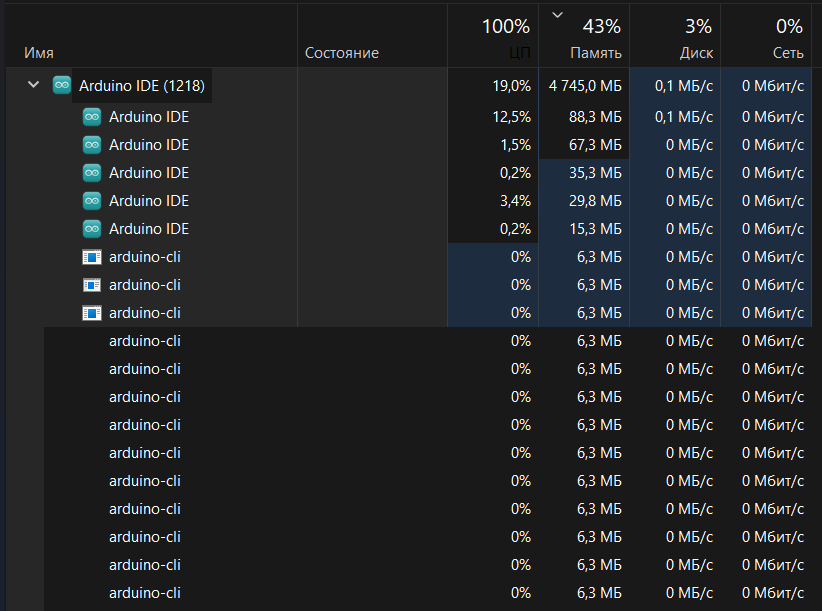
Endless creation of Arduino-CLI until RAM runs out
The application itself does not start, I reinstalled it and also added it to the antivirus exceptions
Hi @qwasdq. I'm going to ask you to post some additional information that might help us to identify the problem.
Please do this:
- Close all Arduino IDE windows if the IDE is already running.
- Start Windows "File Explorer".
- Open the Arduino IDE installation folder.
ⓘ The default installation location is at one of the following paths:-
C:\Program Files\Arduino IDE -
(whereC:\Users\<username>\AppData\Local\Programs\Arduino IDE<username>is your Windows username)
-
- In the folder listing of the Arduino IDE installation folder, hold the Shift key while clicking the right hand button on the mouse.
- From the context menu, click "Open PowerShell window here".
Windows PowerShell will now open with the current directory set to the Arduino IDE installation folder. - Type the following command:
& ".\Arduino IDE" - Press the Enter key.
Debug output should now be printed to the PowerShell window as Arduino IDE starts. - Wait for Arduino IDE to finish starting.
- Switch back to the PowerShell window.
- Right click on the title bar of the PowerShell window.
This will open a context menu. - Select Edit > Select All from the context menu.
This will select all the text in the PowerShell window. - Press Ctrl+C.
This will copy the contents of the PowerShell window to the clipboard. - Open a forum reply here by clicking the Reply button.
- Click the
<CODE/>icon on the post composer toolbar.
This will add the forum's code block markup (```) to your reply to make sure the error messages are correctly formatted.

- Press Ctrl+V.
This will paste the output into the code block. - Move the cursor outside of the code block markup before you add any additional text to your reply.
- Click the Reply button to post the output.
Please let me know if you have any questions or problems while following those instructions.
Since the Arduino IDE runs endlessly with me, I decided to wait a bit and finish the process myself, and apparently there was the same error in the console and there is a restriction on the forum, so I threw off a small part from the console that I cut off
"IP":"127.0.0.1","Port":"62943"}


2023-05-08T03:16:16.610Z daemon INFO Unable to get Documents Folder: The system cannot find the file specified.

2023-05-08T03:16:16.610Z daemon ERROR Error: Unable to get Documents Folder: The system cannot find the file specified.
    at Socket.<anonymous> (C:\Users\maksi\AppData\Local\Programs\Arduino IDE\resources\app\node_modules\arduino-ide-extension\lib\node\arduino-daemon-impl.js:177:42)
    at Socket.emit (node:events:394:28)
    at addChunk (node:internal/streams/readable:312:12)
    at readableAddChunk (node:internal/streams/readable:287:9)
    at Socket.Readable.push (node:internal/streams/readable:226:10)
    at Pipe.onStreamRead (node:internal/stream_base_commons:190:23)
2023-05-08T03:16:16.610Z daemon INFO Starting daemon from C:\Users\maksi\AppData\Local\Programs\Arduino IDE\resources\app\node_modules\arduino-ide-extension\build\arduino-cli.exe...
2023-05-08T03:16:16.648Z daemon INFO time="2023-05-08T06:16:16+03:00" level=warning msg="Unable to get Documents Folder: The system cannot find the file specified."

2023-05-08T03:16:16.655Z daemon INFO INFO[0000] Using config file: c:\Users\maksi\.arduinoIDE\arduino-cli.yaml
INFO[0000] arduino-cli.exe version 0.32.2
INFO[0000] Executing `arduino-cli daemon`

2023-05-08T03:16:16.655Z daemon INFO Daemon is now listening on 127.0.0.1:62944
{"IP":"127.0.0.1","Port":"62944"}

2023-05-08T03:16:52.097Z daemon INFO Unable to get Documents Folder: The system cannot find the file specified.

2023-05-08T03:16:52.097Z daemon ERROR Error: Unable to get Documents Folder: The system cannot find the file specified.
    at Socket.<anonymous> (C:\Users\maksi\AppData\Local\Programs\Arduino IDE\resources\app\node_modules\arduino-ide-extension\lib\node\arduino-daemon-impl.js:177:42)
    at Socket.emit (node:events:394:28)
    at addChunk (node:internal/streams/readable:312:12)
    at readableAddChunk (node:internal/streams/readable:287:9)
    at Socket.Readable.push (node:internal/streams/readable:226:10)
    at Pipe.onStreamRead (node:internal/stream_base_commons:190:23)
2023-05-08T03:16:52.097Z daemon INFO Starting daemon from C:\Users\maksi\AppData\Local\Programs\Arduino IDE\resources\app\node_modules\arduino-ide-extension\build\arduino-cli.exe...
2023-05-08T03:16:52.153Z daemon INFO time="2023-05-08T06:16:52+03:00" level=warning msg="Unable to get Documents Folder: The system cannot find the file specified."

2023-05-08T03:16:52.154Z daemon INFO INFO[0000] Using config file: c:\Users\maksi\.arduinoIDE\arduino-cli.yaml
INFO[0000] arduino-cli.exe version 0.32.2
INFO[0000] Executing `arduino-cli daemon`
Daemon is now listening on 127.0.0.1:63400
{"IP":"127.0.0.1","Port":"63400"}


Closing channel on service path '/services/electron-window-ext'.
Closing channel on service path '/services/electron-window'.
Closing channel on service path '/services/ide-updater'.
Stored workspaces roots:
No sketches were scheduled for deletion.
Are you using Microsoft "OneDrive"? I think this "Unable to get Documents Folder" error is usually caused by having your Documents folder on OneDrive but the computer not being able to access OneDrive.
You're right.
Thx, all work
You are welcome. I'm glad it is working now.
Regards,
Per