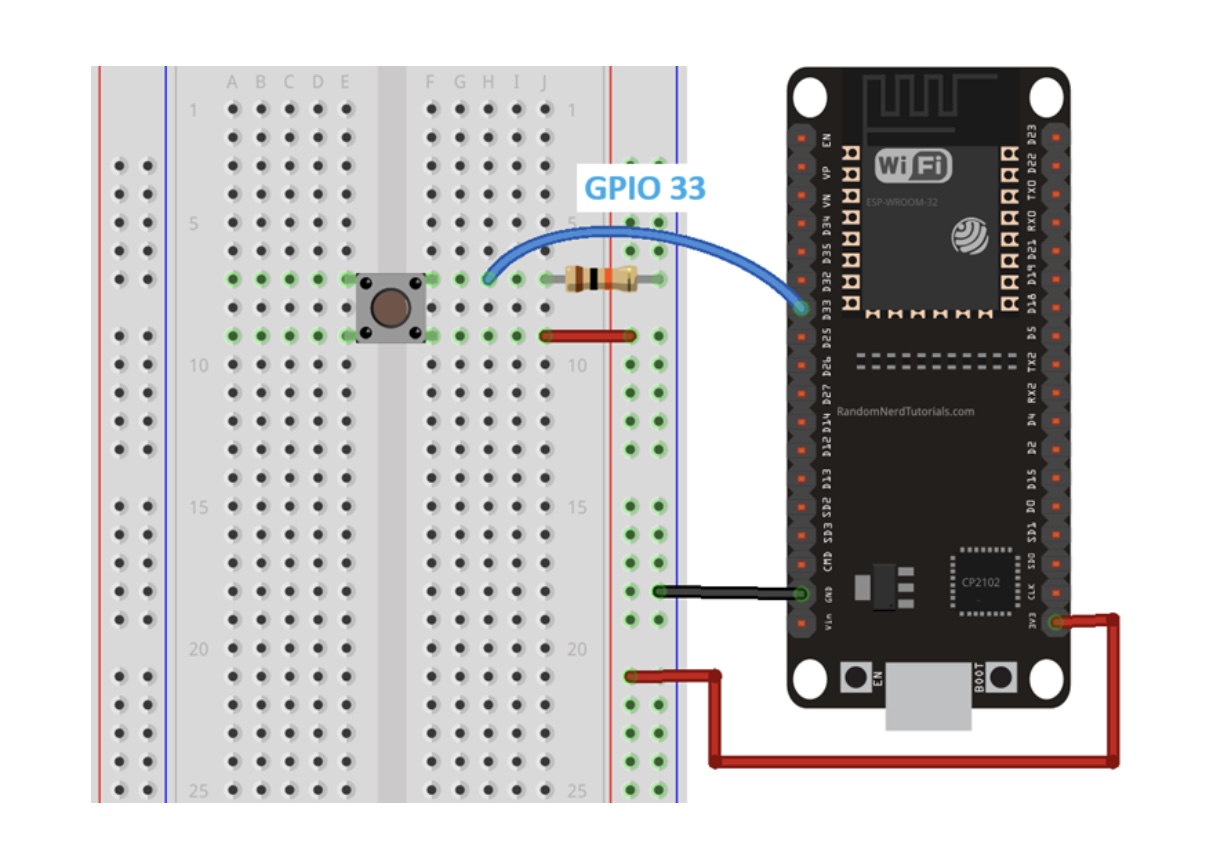
I'm trying to get an ESP32 C6 (Seeed) to go into deep sleep, and only have it wake up on button press. However, after a few hours of doing nothing, the battery is dead. So I think I either wired the thing wrong, or my code is flawed. Can anyone help me here? I tried to follow the steps here: ESP32 External Wake Up from Deep Sleep | Random Nerd Tutorials
Not even sure if I need the resistor, but I couldn't get it to work without it.
Here's the code. I actually want to use ESP NOW to send a signal, but the battery drain already occurs with just the onboard led blinking, so here's the stripped code:
#include <WiFi.h>
#include <esp_now.h>

#define BUTTON_PIN_BITMASK (1ULL << GPIO_NUM_0)


void setup(){
  pinMode(LED_BUILTIN, OUTPUT);

  digitalWrite(LED_BUILTIN, LOW);

  esp_sleep_wakeup_cause_t wakeup_reason;

  wakeup_reason = esp_sleep_get_wakeup_cause();

  if (wakeup_reason == ESP_SLEEP_WAKEUP_EXT1) {


    delay(300);
    digitalWrite(LED_BUILTIN, HIGH);

    delay(50);
  } else {
    //
  }

  esp_sleep_enable_ext1_wakeup(BUTTON_PIN_BITMASK,ESP_EXT1_WAKEUP_ANY_HIGH);

  //Go to sleep now
  esp_deep_sleep_start();
}

void loop(){
  //This is not going to be called
}
If I did the maths right, the resistor should not be a problem. Using INPUT_PULLUP mode and reacting to the switch inout going LOW would eliminate any question.
I respect the random nerd, and you've prolly sick of research, but I cannot help but point out
as a source.
How are you measuring the current? I had to get a new meter when my low power projects starting really succeeding.
A meter on its low current setting in parallel with a closed slide switch is handy. Place that combo in series with you load, let the sleep begin, then opens the switch to measure 12 uA or 1.2 uA or whatever.
Some boards don't sleep very well; I have no experience with either you are using from this perspective.
Is there anything on the board, front or back that will drain current and add to the 15uA. Those super low numbers are generally for a bare chip, not a dev board.
Oh sorry missed that. Not measuring, I don't have a meter. Will get one this week to check, thanks.
And how I know it's sleeping - I don't for sure. But when I run esp_deep_sleep_start(); the Serial message that follows isn't printed and it's disconnected from my Arduino IDE. On battery I indeed do not know for sure it sleeps, but I kind of assume that would be similar to when it's connected to my laptop.
Are you 100% sure the battery was fully charged?
Did you inspect your soldering?
You could code a single LED blink when waking up and continuous blinking in loop to have feedback from Esp.
Hey @hypercubz
Could you try to setup an led in your circuit? It would help you to see when your MCU is up or sleeping.
Also, could you try to enable and disable pullup/pulldown resistors with rtc_gpio_pulldown_en/rtc_gpio_pullup_dis functions? Check Seeed and espessif documentation (your board is xiao, not arduino).
I had weird misbehavior when my mcu worked fine with deep sleep when was connected to usb, however was totaly randomly woken up when was connected to battery (like in your case).
Another piece of advice (don't take me wrong), try to prototype with a breadboard before soldering. It could help you to easily switch components. I only solder jst-ph2 battery connector to xiao board, and headers, the rest is connected with wires.
And the last one - if you have extra $100, buy Nordic PPK2 power profiler. It blown away my self-delusion that I made efficient low power circuit.
simply measure the current with your digital multimeter.
Another reason for not soldering everything right away.
I bet the current will 8 mA to 15 mA in deep-sleepmode.
Explanation down below.
If you have no digital multimeter this is the right time to buy one.
a DMM is a must if you tinker with microcontrollers
microampere is 15 / 1 million
This is 0.000015 A
0.5 Ah / 0.000015 = 33333.33 hours
or your calculation
500 mAh / 0.015 mA = 33333.33 hours
The real reason that the current is much higher than 15 µA is the TTL-to-USB-chip
and eventually onboard LEDs that are switched on
The board must be totally optimised for super-low-current.
ezSBC has such an ESP32 board with the deep-sleep current as low as 15 µA
I have them and measured the current.
Supplied with 5V 12.9 µA
It appeared my solder job was indeed the cause of leaking current. I used the wrong flux.. Cleaned the whole thing and now it measures 14-16 µA in deep sleep (I also bought a multimeter now). Thanks for the suggestions guys!