some more tests using ILI9341 color TFT touch display using VSPI and SD card using HSPI
main .ino file with TFT code and setup() and loop()
// ESP32 TFT_eSPI library  example TFT_Print_Test with SD card reader
//
// cycles recrawing screen every 5 seconds
// on keypress read sd card


// in file TFT_eSPI/User_Setup_Select.h the following is defined
// #include <User_Setups/Setup42_ILI9341_ESP32.h>           // Setup file for ESP32 and SPI ILI9341 240x320

// in file TFT_eSPI/User_Setups/Setup42_ILI9341_ESP32.h the following is defined
// #define ILI9341_DRIVER
//
// #define TFT_MISO 19  // (leave TFT SDO disconnected if other SPI devices share MISO)
// #define TFT_MOSI 23
// #define TFT_SCLK 18
// #define TFT_CS   15  // Chip select control pin
// #define TFT_DC   2  // Data Command control pin
// #define TFT_RST  4  // Reset pin (could connect to RST pin)
// VCC to 5V if J1 open else 3.3V
/*
 Test the tft.print() viz. the libraries embedded write() function

 This sketch used font 2, 4, 7

 Make sure all the required fonts are loaded by editing the
 User_Setup.h file in the TFT_eSPI library folder.

  #########################################################################
  ###### DON'T FORGET TO UPDATE THE User_Setup.h FILE IN THE LIBRARY ######
  #########################################################################
 */

#include <SPI.h>

#include <TFT_eSPI.h>  // Hardware-specific library

TFT_eSPI tft = TFT_eSPI();  // Invoke custom library

#define TFT_GREY 0x5AEB  // New colour


void setup(void) {
  Serial.begin(115200);
  delay(2000);
  Serial.println("\n\nESP32 TFT_eSPI library  example TFT_Print_Test with SD card reader");
  Serial.println("TFT setup");
  tft.init();
  tft.setRotation(2);
  Serial.println("SD setup");
  setupSD();
  //loopSD();
}

void loop() {
  static long int timer1 = 0;  //millis();
  if (millis() - timer1 > 5000) {
    timer1 = millis();
    Serial.println("TFT redraw screen");
    // Fill screen with random colour so we can see the effect of printing with and without
    // a background colour defined
    tft.fillScreen(random(0xFFFF));

    // Set "cursor" at top left corner of display (0,0) and select font 2
    // (cursor will move to next line automatically during printing with 'tft.println'
    //  or stay on the line is there is room for the text with tft.print)
    tft.setCursor(0, 0, 2);
    // Set the font colour to be white with a black background, set text size multiplier to 1
    tft.setTextColor(TFT_WHITE, TFT_BLACK);
    tft.setTextSize(1);
    // We can now plot text on screen using the "print" class
    tft.println("Hello World!");

    // Set the font colour to be yellow with no background, set to font 7
    tft.setTextColor(TFT_YELLOW);
    tft.setTextFont(7);
    tft.println(1234.56);

    // Set the font colour to be red with black background, set to font 4
    tft.setTextColor(TFT_RED, TFT_BLACK);
    tft.setTextFont(4);
    tft.println((long)3735928559, HEX);  // Should print DEADBEEF

    // Set the font colour to be green with black background, set to font 4
    tft.setTextColor(TFT_GREEN, TFT_BLACK);
    tft.setTextFont(4);
    tft.println("Groop");
    tft.println("I implore thee,");

    // Change to font 2
    tft.setTextFont(2);
    tft.println(F("my foonting turlingdromes."));  // Can store strings in FLASH to save RAM
    tft.println("And hooptiously drangle me");
    tft.println("with crinkly bindlewurdles,");
    // This next line is deliberately made too long for the display width to test
    // automatic text wrapping onto the next line
    tft.println("Or I will rend thee in the gobberwarts with my blurglecruncheon, see if I don't!");

    // Test some print formatting functions
    float fnumber = 123.45;
    // Set the font colour to be blue with no background, set to font 4
    tft.setTextColor(TFT_BLUE);
    tft.setTextFont(4);
    tft.print("Float = ");
    tft.println(fnumber);  // Print floating point number
    tft.print("Binary = ");
    tft.println((int)fnumber, BIN);  // Print as integer value in binary
    tft.print("Hexadecimal = ");
    tft.println((int)fnumber, HEX);  // Print as integer number in Hexadecimal
    //delay(10000);
  }
  if (Serial.available()) {
    while (Serial.available()) Serial.read();
    loopSD();
  }
}
second .ino file with SD code (place in same directory as above file)
// SD card test ILI9341 color TFT touch display using VSPI and SD card using HSPI
// see https://forum.arduino.cc/t/esp32-initialize-hspi-as-default-spi/1155093/12

/*
  Rui Santos
  Complete project details at https://RandomNerdTutorials.com/esp32-microsd-card-arduino/

  This sketch can be found at: Examples > SD(esp32) > SD_Test
*/

// define HSPI pins
#define HSPI_MISO 12
#define HSPI_MOSI 13
#define HSPI_SCLK 14
#define HSPI_SS 26

#include "FS.h"
#include "SD.h"
#include "SPI.h"

SPIClass *hspi = NULL;  // SPI object

void listDir(fs::FS &fs, const char *dirname, uint8_t levels) {
  Serial.printf("Listing directory: %s\n", dirname);

  File root = fs.open(dirname);
  if (!root) {
    Serial.println("Failed to open directory");
    return;
  }
  if (!root.isDirectory()) {
    Serial.println("Not a directory");
    return;
  }

  File file = root.openNextFile();
  while (file) {
    if (file.isDirectory()) {
      Serial.print("  DIR : ");
      Serial.println(file.name());
      if (levels) {
        listDir(fs, file.name(), levels - 1);
      }
    } else {
      Serial.print("  FILE: ");
      Serial.print(file.name());
      Serial.print("  SIZE: ");
      Serial.println(file.size());
    }
    file = root.openNextFile();
  }
}

void createDir(fs::FS &fs, const char *path) {
  Serial.printf("Creating Dir: %s\n", path);
  if (fs.mkdir(path)) {
    Serial.println("Dir created");
  } else {
    Serial.println("mkdir failed");
  }
}

void removeDir(fs::FS &fs, const char *path) {
  Serial.printf("Removing Dir: %s\n", path);
  if (fs.rmdir(path)) {
    Serial.println("Dir removed");
  } else {
    Serial.println("rmdir failed");
  }
}

void readFile(fs::FS &fs, const char *path) {
  Serial.printf("Reading file: %s\n", path);

  File file = fs.open(path);
  if (!file) {
    Serial.println("Failed to open file for reading");
    return;
  }

  Serial.print("Read from file: ");
  while (file.available()) {
    Serial.write(file.read());
  }
  file.close();
}

void writeFile(fs::FS &fs, const char *path, const char *message) {
  Serial.printf("Writing file: %s\n", path);

  File file = fs.open(path, FILE_WRITE);
  if (!file) {
    Serial.println("Failed to open file for writing");
    return;
  }
  if (file.print(message)) {
    Serial.println("File written");
  } else {
    Serial.println("Write failed");
  }
  file.close();
}

void appendFile(fs::FS &fs, const char *path, const char *message) {
  Serial.printf("Appending to file: %s\n", path);

  File file = fs.open(path, FILE_APPEND);
  if (!file) {
    Serial.println("Failed to open file for appending");
    return;
  }
  if (file.print(message)) {
    Serial.println("Message appended");
  } else {
    Serial.println("Append failed");
  }
  file.close();
}

void renameFile(fs::FS &fs, const char *path1, const char *path2) {
  Serial.printf("Renaming file %s to %s\n", path1, path2);
  if (fs.rename(path1, path2)) {
    Serial.println("File renamed");
  } else {
    Serial.println("Rename failed");
  }
}

void deleteFile(fs::FS &fs, const char *path) {
  Serial.printf("Deleting file: %s\n", path);
  if (fs.remove(path)) {
    Serial.println("File deleted");
  } else {
    Serial.println("Delete failed");
  }
}

void testFileIO(fs::FS &fs, const char *path) {
  File file = fs.open(path);
  static uint8_t buf[512];
  size_t len = 0;
  uint32_t start = millis();
  uint32_t end = start;
  if (file) {
    len = file.size();
    size_t flen = len;
    start = millis();
    while (len) {
      size_t toRead = len;
      if (toRead > 512) {
        toRead = 512;
      }
      file.read(buf, toRead);
      len -= toRead;
    }
    end = millis() - start;
    Serial.printf("%u bytes read for %u ms\n", flen, end);
    file.close();
  } else {
    Serial.println("Failed to open file for reading");
  }


  file = fs.open(path, FILE_WRITE);
  if (!file) {
    Serial.println("Failed to open file for writing");
    return;
  }

  size_t i;
  start = millis();
  for (i = 0; i < 2048; i++) {
    file.write(buf, 512);
  }
  end = millis() - start;
  Serial.printf("%u bytes written for %u ms\n", 2048 * 512, end);
  file.close();
}

void setupSD(void) {
  //Serial.begin(115200);
  Serial.println("\n\nSetting up SD card");
   hspi = new SPIClass(HSPI);  // create SPI class
  hspi->begin(HSPI_SCLK, HSPI_MISO, HSPI_MOSI, HSPI_SS);  //SCLK, MISO, MOSI, SS
  if (!SD.begin(HSPI_SS, *hspi)) {                        // mount card
    Serial.println("Card Mount Failed");
    return;
  }
  //pinMode(hspi->pinSS(), OUTPUT); //HSPI SS
  uint8_t cardType = SD.cardType();

  if (cardType == CARD_NONE) {
    Serial.println("No SD card attached");
    return;
  }
  Serial.print("SD Card Type: ");
  if (cardType == CARD_MMC) {
    Serial.println("MMC");
  } else if (cardType == CARD_SD) {
    Serial.println("SDSC");
  } else if (cardType == CARD_SDHC) {
    Serial.println("SDHC");
  } else {
    Serial.println("UNKNOWN");
  }

  loopSD();
}

// initialised SD card and test
void loopSD() {
  // moved to setupSD()
  /*hspi = new SPIClass(HSPI);  // create SPI class
  hspi->begin(HSPI_SCLK, HSPI_MISO, HSPI_MOSI, HSPI_SS);  //SCLK, MISO, MOSI, SS
  if (!SD.begin(HSPI_SS, *hspi)) {                        // mount card
    Serial.println("Card Mount Failed");
    return;
  }
  //pinMode(hspi->pinSS(), OUTPUT); //HSPI SS
  uint8_t cardType = SD.cardType();

  if (cardType == CARD_NONE) {
    Serial.println("No SD card attached");
    return;
  }
  Serial.print("SD Card Type: ");
  if (cardType == CARD_MMC) {
    Serial.println("MMC");
  } else if (cardType == CARD_SD) {
    Serial.println("SDSC");
  } else if (cardType == CARD_SDHC) {
    Serial.println("SDHC");
  } else {
    Serial.println("UNKNOWN");
  }
  */
  uint64_t cardSize = SD.cardSize() / (1024 * 1024);
  Serial.printf("SD Card Size: %lluMB\n", cardSize);

  listDir(SD, "/", 0);
  createDir(SD, "/mydir");
  listDir(SD, "/", 0);
  removeDir(SD, "/mydir");
  listDir(SD, "/", 2);
  writeFile(SD, "/hello.txt", "Hello ");
  appendFile(SD, "/hello.txt", "World!\n");
  readFile(SD, "/hello.txt");
  deleteFile(SD, "/foo.txt");
  renameFile(SD, "/hello.txt", "/foo.txt");
  readFile(SD, "/foo.txt");
  testFileIO(SD, "/test.txt");
  Serial.printf("Total space: %lluMB\n", SD.totalBytes() / (1024 * 1024));
  Serial.printf("Used space: %lluMB\n", SD.usedBytes() / (1024 * 1024));
  //SD.end();
  //hspi->end();
}
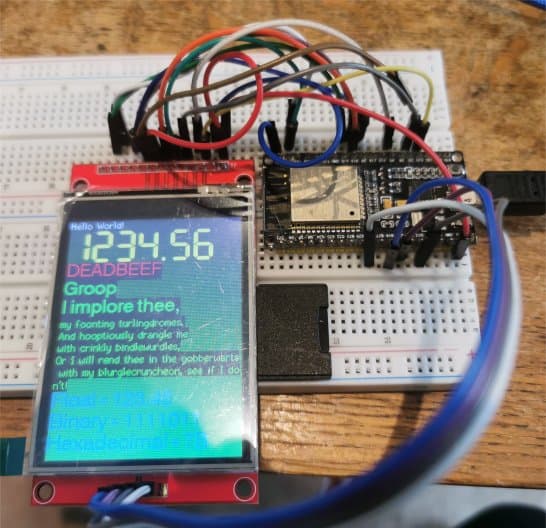
both TFT test (refreshes screen every five seconds) and SD card test (reads SD on a keypress) work OK
serial monitor displays
ESP32 TFT_eSPI library  example TFT_Print_Test with SD card reader
TFT setup
SD setup


Setting up SD card
SD Card Type: SDHC
SD Card Size: 15193MB
Listing directory: /
  DIR : System Volume Information
  FILE: test.txt  SIZE: 1048576
  FILE: foo.txt  SIZE: 13
  DIR : FOUND.000
  DIR : Blink_LED
  FILE: information.txt  SIZE: 11527
  DIR : FOUND.001
Creating Dir: /mydir
Dir created
Listing directory: /
  DIR : System Volume Information
  FILE: test.txt  SIZE: 1048576
  FILE: foo.txt  SIZE: 13
  DIR : FOUND.000
  DIR : mydir
  DIR : Blink_LED
  FILE: information.txt  SIZE: 11527
  DIR : FOUND.001
Removing Dir: /mydir
Dir removed
Listing directory: /
  DIR : System Volume Information
Listing directory: System Volume Information
Failed to open directory
  FILE: test.txt  SIZE: 1048576
  FILE: foo.txt  SIZE: 13
  DIR : FOUND.000
Listing directory: FOUND.000
Failed to open directory
  DIR : Blink_LED
Listing directory: Blink_LED
Failed to open directory
  FILE: information.txt  SIZE: 11527
  DIR : FOUND.001
Listing directory: FOUND.001
Failed to open directory
Writing file: /hello.txt
File written
Appending to file: /hello.txt
Message appended
Reading file: /hello.txt
Read from file: Hello World!
Deleting file: /foo.txt
File deleted
Renaming file /hello.txt to /foo.txt
File renamed
Reading file: /foo.txt
Read from file: Hello World!
1048576 bytes read for 2373 ms
1048576 bytes written for 2500 ms
Total space: 15173MB
Used space: 3MB
TFT redraw screen
TFT redraw screen
photo of setup
Note: connect VCC to 5V if J1 open else 3.3V