Esp32 devkit v1, boot loop error while using wifi.h

Configuring access point...

ets Jul 29 2019 12:21:46

rst:0x3 (SW_RESET),boot:0x13 (SPI_FAST_FLASH_BOOT)

configsip: 0, SPIWP:0xee

clk_drv:0x00,q_drv:0x00,d_drv:0x00,cs0_drv:0x00,hd_drv:0x00,wp_drv:0x00

mode:DIO, clock div:1

load:0x3fff0030,len:4688

load:0x40078000,len:15516

load:0x40080400,len:4

load:0x40080404,len:3196

entry 0x400805a4

Configuring access point...

ets Jul 29 2019 12:21:46

rst:0x3 (SW_RESET),boot:0x13 (SPI_FAST_FLASH_BOOT)

configsip: 0, SPIWP:0xee

clk_drv:0x00,q_drv:0x00,d_drv:0x00,cs0_drv:0x00,hd_drv:0x00,wp_drv:0x00

mode:DIO, clock div:1

load:0x3fff0030,len:4688

load:0x40078000,len:15516

load:0x40080400,len:4

load:0x40080404,len:3196

entry 0x400805a4

the board is looping in boot like these when i use wifi.h.
But It is working perfectly without wifi.h.

Chip is ESP32-D0WD-V3 (revision v3.1)
Features: WiFi, BT, Dual Core, 240MHz, VRef calibration in efuse, Coding Scheme None
Crystal is 40MHz
MAC: 3c:8a:1f:a4:b3:68
Uploading stub...
Running stub...
Stub running...
Changing baud rate to 921600
I uploaded wifi program that is simple only to get macaddress.
But it didn't uploaded.gave me fail error.
After this,i got this problem.

Board Info
Chip is ESP32-D0WD-V3 (revision v3.1)
Features: WiFi, BT, Dual Core, 240MHz, VRef calibration in efuse, Coding Scheme None
Crystal is 40MHz
MAC: 3c:8a:1f:a4:b3:68
Uploading stub...
Running stub...
Stub running...
Changing baud rate to 921600

the board is looping in boot like these when i use wifi.h.
But It is working perfectly without wifi.h.
I uploaded wifi program that is simple only to get macaddress.
But it didn't uploaded.gave me fail error.
After this,i got this problem.

Configuring access point...
ets Jul 29 2019 12:21:46

rst:0x3 (SW_RESET),boot:0x13 (SPI_FAST_FLASH_BOOT)
configsip: 0, SPIWP:0xee
clk_drv:0x00,q_drv:0x00,d_drv:0x00,cs0_drv:0x00,hd_drv:0x00,wp_drv:0x00
mode:DIO, clock div:1
load:0x3fff0030,len:4688
load:0x40078000,len:15516
load:0x40080400,len:4
load:0x40080404,len:3196
entry 0x400805a4

Configuring access point...
ets Jul 29 2019 12:21:46

rst:0x3 (SW_RESET),boot:0x13 (SPI_FAST_FLASH_BOOT)
configsip: 0, SPIWP:0xee
clk_drv:0x00,q_drv:0x00,d_drv:0x00,cs0_drv:0x00,hd_drv:0x00,wp_drv:0x00
mode:DIO, clock div:1
load:0x3fff0030,len:4688
load:0x40078000,len:15516
load:0x40080400,len:4
load:0x40080404,len:3196
entry 0x400805a4

please everyone

Your two topics on the same subject have been merged. please do not cross-post, it wastes people's time.

Sorry for my mistakes.

I have no experience with ESP32 based boards so can't help further. It might be a good idea however to post your sketch; please do not forget to use code tags.

That is my code.It is from eaxmples

#include <WiFi.h>

const char *ssid = "your-ssid";
const char *password = "your-password";

int btnGPIO = 0;
int btnState = false;

void setup() {
  Serial.begin(115200);
  delay(10);

  // Set GPIO0 Boot button as input
  pinMode(btnGPIO, INPUT);

  // We start by connecting to a WiFi network
  // To debug, please enable Core Debug Level to Verbose

  Serial.println();
  Serial.print("[WiFi] Connecting to ");
  Serial.println(ssid);

  WiFi.begin(ssid, password);
  // Auto reconnect is set true as default
  // To set auto connect off, use the following function
  //    WiFi.setAutoReconnect(false);

  // Will try for about 10 seconds (20x 500ms)
  int tryDelay = 500;
  int numberOfTries = 20;

  // Wait for the WiFi event
  while (true) {

    switch (WiFi.status()) {
      case WL_NO_SSID_AVAIL: Serial.println("[WiFi] SSID not found"); break;
      case WL_CONNECT_FAILED:
        Serial.print("[WiFi] Failed - WiFi not connected! Reason: ");
        return;
        break;
      case WL_CONNECTION_LOST: Serial.println("[WiFi] Connection was lost"); break;
      case WL_SCAN_COMPLETED:  Serial.println("[WiFi] Scan is completed"); break;
      case WL_DISCONNECTED:    Serial.println("[WiFi] WiFi is disconnected"); break;
      case WL_CONNECTED:
        Serial.println("[WiFi] WiFi is connected!");
        Serial.print("[WiFi] IP address: ");
        Serial.println(WiFi.localIP());
        return;
        break;
      default:
        Serial.print("[WiFi] WiFi Status: ");
        Serial.println(WiFi.status());
        break;
    }
    delay(tryDelay);

    if (numberOfTries <= 0) {
      Serial.print("[WiFi] Failed to connect to WiFi!");
      // Use disconnect function to force stop trying to connect
      WiFi.disconnect();
      return;
    } else {
      numberOfTries--;
    }
  }
}

void loop() {
  // Read the button state
  btnState = digitalRead(btnGPIO);

  if (btnState == LOW) {
    // Disconnect from WiFi
    Serial.println("[WiFi] Disconnecting from WiFi!");
    // This function will disconnect and turn off the WiFi (NVS WiFi data is kept)
    if (WiFi.disconnect(true, false)) {
      Serial.println("[WiFi] Disconnected from WiFi!");
    }
    delay(1000);
  }
}

Have you got anything connected to any of the ESP32 pins, if so which pin ?
Did it get as far as printing any of your debug messages to the console ?

Try setting the Core Debug level to verbose

               app0 : addr: 0x00010000, size:  1280.0 KB, type:  APP, subtype: OTA_0
               app1 : addr: 0x00150000, size:  1280.0 KB, type:  APP, subtype: OTA_1
             spiffs : addr: 0x00290000, size:  1408.0 KB, type: DATA, subtype: SPIFFS
           coredump : addr: 0x003F0000, size:    64.0 KB, type: DATA, subtype: COREDUMP
------------------------------------------
Software Info:
------------------------------------------
  Compile Date/Time : Feb 25 2025 21:22:36
  Compile Host OS   : windows
  ESP-IDF Version   : v5.3.2-584-g489d7a2b3a-dirty
  Arduino Version   : 3.1.3
------------------------------------------
Board Info:
------------------------------------------
  Arduino Board     : ESP32_DEV
  Arduino Variant   : esp32
  Arduino FQBN      : esp32:esp32:esp32:UploadSpeed=921600,CPUFreq=240,FlashFreq=80,FlashMode=qio,FlashSize=4M,PartitionScheme=default,DebugLevel=verbose,PSRAM=disabled,LoopCore=1,EventsCore=1,EraseFlash=all,JTAGAdapter=default,ZigbeeMode=default
============ Before Setup End ============
[   698][V][esp32-hal-uart.c:421] uartBegin(): UART0 baud(115200) Mode(800001c) rxPin(3) txPin(1)
[   707][V][esp32-hal-uart.c:510] uartBegin(): UART0 not installed. Starting installation
[   718][V][esp32-hal-uart.c:575] uartBegin(): UART0 initialization done.
[   742][V][esp32-hal-periman.c:235] perimanSetBusDeinit(): Deinit function for type GPIO (1) successfully set to 0x401634c8
[   753][V][esp32-hal-periman.c:160] perimanSetPinBus(): Pin 0 successfully set to type GPIO (1) with bus 0x1

I got this,sir

Do you have an external resistor on that pin ?

no sir.
Even i just only try to connect wifi,I got the error (boot loop)

#include <WiFi.h>

const char* ssid = "examplewifi";       // Replace with your Wi-Fi SSID
const char* password = "234234234"; // Replace with your Wi-Fi password

void setup() {
  Serial.begin(115200);
  WiFi.disconnect(true);  // Reset Wi-Fi settings
  delay(1000);

  Serial.println("Connecting to Wi-Fi...");
  WiFi.begin(ssid, password);

  unsigned long startAttemptTime = millis();
  
  while (WiFi.status() != WL_CONNECTED && millis() - startAttemptTime < 10000) {
    Serial.print(".");
    delay(500);
  }

  if (WiFi.status() == WL_CONNECTED) {
    Serial.println("\nWi-Fi Connected!");
    Serial.print("IP Address: ");
    Serial.println(WiFi.localIP());
  } else {
    Serial.println("\nFailed to connect to Wi-Fi. Restarting...");
    
  }
}

void loop() {
  // Your main code here
}

That is very simple code to connect wifi.
Still looping. :frowning:
the response is

Flash Info:
------------------------------------------
  Chip Size         :  4194304 B (4 MB)
  Block Size        :    65536 B (  64.0 KB)
  Sector Size       :     4096 B (   4.0 KB)
  Page Size         :      256 B (   0.2 KB)
  Bus Speed         : 80 MHz
  Bus Mode          : QIO
------------------------------------------
Partitions Info:
------------------------------------------
                nvs : addr: 0x00009000, size:    20.0 KB, type: DATA, subtype: NVS
            otadata : addr: 0x0000E000, size:     8.0 KB, type: DATA, subtype: OTA
               app0 : addr: 0x00010000, size:  1280.0 KB, type:  APP, subtype: OTA_0
               app1 : addr: 0x00150000, size:  1280.0 KB, type:  APP, subtype: OTA_1
             spiffs : addr: 0x00290000, size:  1408.0 KB, type: DATA, subtype: SPIFFS
           coredump : addr: 0x003F0000, size:    64.0 KB, type: DATA, subtype: COREDUMP
------------------------------------------
Software Info:
------------------------------------------
  Compile Date/Time : Feb 25 2025 21:22:36
  Compile Host OS   : windows
  ESP-IDF Version   : v5.3.2-584-g489d7a2b3a-dirty
  Arduino Version   : 3.1.3
------------------------------------------
Board Info:
------------------------------------------
  Arduino Board     : ESP32_DEV
  Arduino Variant   : esp32
  Arduino FQBN      : esp32:esp32:esp32:UploadSpeed=921600,CPUFreq=240,FlashFreq=80,FlashMode=qio,FlashSize=4M,PartitionScheme=default,DebugLevel=verbose,PSRAM=disabled,LoopCore=1,EventsCore=1,EraseFlash=all,JTAGAdapter=default,ZigbeeMode=default
============ Before Setup End ============
[   698][V][esp32-hal-uart.c:421] uartBegin(): UART0 baud(115200) Mode(800001c) rxPin(3) txPin(1)
[   707][V][esp32-hal-uart.c:510] uartBegin(): UART0 not installed. Starting installation
[   718][V][esp32-hal-uart.c:575] uartBegin(): UART0 initialization done.
[   733][W][STA.cpp:541] disconnect(): STA already disconnected.

But Without using wifi,It is working perfectly.

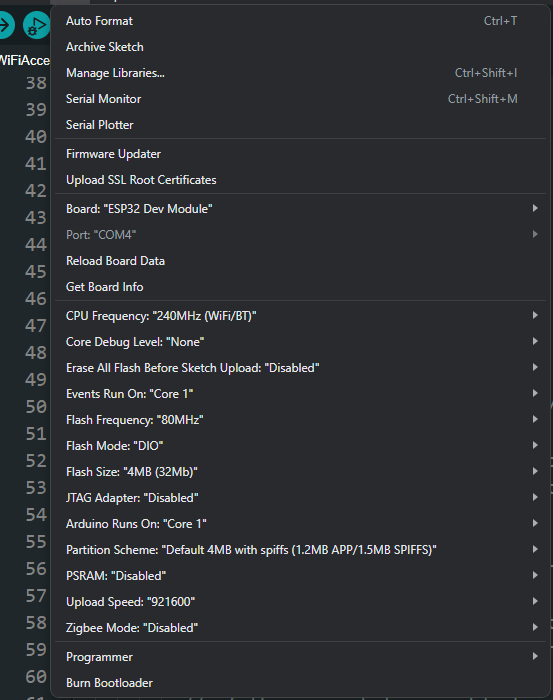
There could be an inconsistency here. Have you made any changes to the flash mode settings ?

image

Yep,I tried flash Mode both of DIO ad QIO.
It changed nothing.still happening

LOG INFO

Software Info:
------------------------------------------
  Compile Date/Time : Feb 25 2025 21:47:02
  Compile Host OS   : windows
  ESP-IDF Version   : v5.3.2-584-g489d7a2b3a-dirty
  Arduino Version   : 3.1.3
------------------------------------------
Board Info:
------------------------------------------
  Arduino Board     : ESP32_DEV
  Arduino Variant   : esp32
  Arduino FQBN      : esp32:esp32:esp32:UploadSpeed=921600,CPUFreq=240,FlashFreq=80,FlashMode=qio,FlashSize=4M,PartitionScheme=default,DebugLevel=debug,PSRAM=disabled,LoopCore=1,EventsCore=1,EraseFlash=all,JTAGAdapter=default,ZigbeeMode=default
============ Before Setup End ============
Setup Started...
[  2513][W][STA.cpp:541] disconnect(): STA already disconnected.
Wi-Fi settings reset.
Connecting to Wi-Fi...
ets Jul 29 2019 12:21:46

rst:0x3 (SW_RESET),boot:0x13 (SPI_FAST_FLASH_BOOT)
configsip: 0, SPIWP:0xee
clk_drv:0x00,q_drv:0x00,d_drv:0x00,cs0_drv:0x00,hd_drv:0x00,wp_drv:0x00
mode:DIO, clock div:1
load:0x3fff0030,len:4916
load:0x40078000,len:16492

Sketch code

#include <WiFi.h>

const char* ssid = "your_SSID";       // Replace with your Wi-Fi SSID
const char* password = "your_PASSWORD"; // Replace with your Wi-Fi password

void setup() {
  Serial.begin(115200);
  Serial.println("Setup Started...");
  delay(1000);
  
  WiFi.disconnect(true);  // Reset Wi-Fi settings
  Serial.println("Wi-Fi settings reset.");

  Serial.println("Connecting to Wi-Fi...");
  WiFi.begin(ssid, password);
  
  Serial.println("Wi-Fi.begin() called. Waiting for connection...");

  unsigned long startAttemptTime = millis();
  
  while (WiFi.status() != WL_CONNECTED && millis() - startAttemptTime < 10000) {
    Serial.print("."); // Print dots while trying to connect
    delay(500);
  }

  if (WiFi.status() == WL_CONNECTED) {
    Serial.println("\nWi-Fi Connected!");
    Serial.print("IP Address: ");
    Serial.println(WiFi.localIP());
  } else {
    Serial.println("\nFailed to connect to Wi-Fi. Restarting...");
    delay(2000);
    ESP.restart(); // Restart ESP32 to prevent infinite loop
  }
}

void loop() {
  Serial.println("Looping...");
  delay(1000);
}

It is working on this line and then after reaching WiFi.begin(),board is resetting.

Serial.println("Wi-Fi settings reset.");

Serial.println("Connecting to Wi-Fi...");

Show a link to the exact board you have. It may be that ESP32 Dev Module is not an appropriate choice of board.

It is Board Link

BOard info
ESP-wroom-32 (esp32 devkit v1)
LinK

Try selecting this board since yours appears to have DOIT printed on it:

image