ESP32 S3 Devkit c1 unresponsive

My ESP32 board wont respond to my code. I can erase the flash via Platformio and VS Code and through esptool.py, but I cannot get anything out of the board (Serial, LED blinking). It doesnt do even the most basic stuff like:

#include "Arduino.h"

void setup() {
    
  }
  
  void loop() {
    digitalWrite(PIN_NEOPIXEL, HIGH);  // Turn the RGB LED white
    delay(1000);
    digitalWrite(PIN_NEOPIXEL, LOW);  // Turn the RGB LED off
    delay(1000);
  }

or

 digitalWrite(RGB_BUILTIN, HIGH);  // Turn the RGB LED white
  delay(1000);
  digitalWrite(RGB_BUILTIN, LOW);  // Turn the RGB LED off
  delay(1000);

or

digitalWrite(LED_BUILTIN, HIGH);  // Turn the LED on
  delay(1000);
  digitalWrite(LED_BUILTIN, LOW);  // Turn the LED off
  delay(1000);

How I ended up at this point: I am currently working on a project where i want to use an MPU9250 for some running style analysis. Since I have hit a dead end, I wanted to have a small programm that I can use to write and read register of the MPU via serial while its running.
So I used an LLM to give me some code, that parses incoming serial input and does some stuff:

#include <Wire.h>
#include "Arduino.h"
#include "MPU9250.h"

// MPU9250 I2C Adresse
#define MPU9250_ADDRESS 0x68
#define I2C_SCL 6
#define I2C_SDA 7

// Globale Variablen für Sensordaten
int16_t aX, aY, aZ, gX, gY, gZ;

bool continuousPrinting = false;
float gyroScale = 500.0 / 32768.0; // ±500°/s Skalierung
float accelScale = 4.0 / 32768.0;  // ±4g Skalierung

void setup()
{
    Serial.begin(115200);
    Wire.begin(I2C_SDA, I2C_SCL);
    delay(500);
    writeRegister(MPU9250_ADDRESS, 0x6B, 0x00); // Wake up MPU9250
    delay(100);
}

void loop()
{
     if (Serial.available() > 0) {
 
        String input = Serial.readStringUntil('\n');
        input.trim();

        if (input.startsWith("w:"))
        {
            // Schreibbefehl verarbeiten
            processWriteCommand(input);
        }
        else if (input.startsWith("r:"))
        {
            // Lesebefehl verarbeiten
            processReadCommand(input);
        }
        else if (input.startsWith("Collect:"))
        {
            // Sammelbefehl verarbeiten
            processCollectCommand(input);
        }
        else if (input.equalsIgnoreCase("print"))
        {
            continuousPrinting = true;
            Serial.println("Starte kontinuierliche Ausgabe...");
        }
        else if (input.equalsIgnoreCase("stop"))
        {
            continuousPrinting = false;
            Serial.println("Stoppe Ausgabe...");
        }
        else if (input.equalsIgnoreCase("help"))
        {
            printoutOptions();
        }
    

    if (continuousPrinting)
    {
        getaccelgyro();
        printSensorData();
        delay(500); // 500ms Verzögerung
    }
}
}

My platformio.ini:

[env:esp32-s3-devkitc-1]

platform = espressif32

board = esp32-s3-devkitc-1

framework = arduino

monitor_speed = 115200

monitor_echo = yes ; <-- Echo immer aktivieren

monitor_filters = send_on_enter

debug_tool = esp-builtin

upload_protocol = esptool

upload_speed = 921600

build_flags =

-D ARDUINO_USB_MODE=1

-D ARDUINO_USB_CDC_ON_BOOT=1

-O0

debug_build_flags = -O0 -ggdb3 -g3

I got it to recieve the "help" input and execute that function once from within the vs code serial monitor. I dont know what I did exactly but after that, I could not get any responses out of it, and doing minimal programs like just Serial.println("some stuff") in the setup sections or anywhere else or blinking the onboad led did not work anymore. I can upload my code normally and i get no errors from that process, but it just doesnt go further. I get the correct IDs here:

COM3

Hardware ID: USB VID:PID=303A:1001 SER=74:4D:BD:AB:AC:EC
Description: USB Serial Device (COM3)

I am kind of lost, and i dont know if im missing something very obvious about the whole situation. Also a weird behavior i whitnessed: when I was using hterm (a serial terminal program) I could not connect to the serial port. On the first try it said Baud rate not supported, when i changed the baudrate from 115200 to 9600 it said port blocked by another application. when i pressed the reset button on the esp32 and tried again, it said with 9600 baudrate stop bit not supported(setting was on 1), and then again with 2 stop bits port blocked by another application. Also in VS code i whitnessed that even when there was no serial monitor open, I could often not flash my code and had to hold the boot button, press reset, release boot button before I gained serial access again.
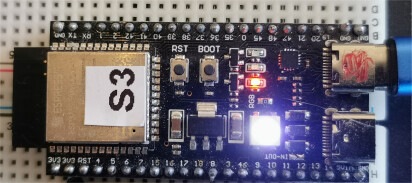
are you sure your blink test is using the correct GPIO pin for the LED?
I have had this working on a ESP32-S3-DevKitC-1

/*
  Blink

  Turns an LED on for one second, then off for one second, repeatedly.

  Most Arduinos have an on-board LED you can control. On the UNO, MEGA and ZERO
  it is attached to digital pin 13, on MKR1000 on pin 6. LED_BUILTIN is set to
  the correct LED pin independent of which board is used.
  If you want to know what pin the on-board LED is connected to on your Arduino
  model, check the Technical Specs of your board at:
  https://www.arduino.cc/en/Main/Products

  modified 8 May 2014
  by Scott Fitzgerald
  modified 2 Sep 2016
  by Arturo Guadalupi
  modified 8 Sep 2016
  by Colby Newman

  This example code is in the public domain.

  https://www.arduino.cc/en/Tutorial/BuiltInExamples/Blink
*/

#define LED_BUILTIN 97

// the setup function runs once when you press reset or power the board
void setup() {
  // initialize digital pin LED_BUILTIN as an output.
  pinMode(LED_BUILTIN, OUTPUT);
  Serial.begin(115200);
  delay(3000);
  Serial.printf("\n\nESP32S3 Blink - LED_BUILTIN %d\n", LED_BUILTIN);
}

// the loop function runs over and over again forever
void loop() {
  Serial.print('*');
  digitalWrite(LED_BUILTIN, HIGH);  // turn the LED on (HIGH is the voltage level)
  delay(1000);                      // wait for a second
  digitalWrite(LED_BUILTIN, LOW);   // turn the LED off by making the voltage LOW
  delay(1000);                      // wait for a second
}

for the MPU9250 have look at MPU9250_asukiaaa library

I swapped over to my laptop, where i used to be able to work with the esp32 without a problem just to make sure it was not a problem with my desktop somehow. I tried using the Arduino IDE now, but to no avail. I uploaded the example blinky from the IDE, @horace code and horaces code without the LED_BUILITN define. Nothing happens. No led blinks, no error from the Arduino IDE. This is the IDEs output from the upload process:

Sketch uses 269801 bytes (20%) of program storage space. Maximum is 1310720 bytes.
Global variables use 18816 bytes (5%) of dynamic memory, leaving 308864 bytes for local variables. Maximum is 327680 bytes.
esptool.py v4.5.1
Serial port COM7
Connecting...
Chip is ESP32-S3 (revision v0.2)
Features: WiFi, BLE
Crystal is 40MHz
MAC: 74:4d:bd:ab:ac:ec
Uploading stub...
Running stub...
Stub running...
Changing baud rate to 921600
Changed.
Configuring flash size...
Flash will be erased from 0x00000000 to 0x00003fff...
Flash will be erased from 0x00008000 to 0x00008fff...
Flash will be erased from 0x0000e000 to 0x0000ffff...
Flash will be erased from 0x00010000 to 0x00051fff...
Compressed 15104 bytes to 10430...
Writing at 0x00000000... (100 %)
Wrote 15104 bytes (10430 compressed) at 0x00000000 in 0.2 seconds (effective 529.6 kbit/s)...
Hash of data verified.
Compressed 3072 bytes to 146...
Writing at 0x00008000... (100 %)
Wrote 3072 bytes (146 compressed) at 0x00008000 in 0.1 seconds (effective 442.3 kbit/s)...
Hash of data verified.
Compressed 8192 bytes to 47...
Writing at 0x0000e000... (100 %)
Wrote 8192 bytes (47 compressed) at 0x0000e000 in 0.1 seconds (effective 756.3 kbit/s)...
Hash of data verified.
Compressed 270160 bytes to 151648...
Writing at 0x00010000... (10 %)
Writing at 0x0001c764... (20 %)
Writing at 0x00024a91... (30 %)
Writing at 0x00029efe... (40 %)
Writing at 0x0002f570... (50 %)
Writing at 0x00034b73... (60 %)
Writing at 0x0003d2bb... (70 %)
Writing at 0x000456a7... (80 %)
Writing at 0x0004ab7f... (90 %)
Writing at 0x00050562... (100 %)
Wrote 270160 bytes (151648 compressed) at 0x00010000 in 1.8 seconds (effective 1182.1 kbit/s)...
Hash of data verified.

Leaving...
Hard resetting via RTS pin...

is it normal that it ends with the hard resetting message and not a Success message?

Thank you for the tip with the library but I got a Madgwick Filter working already with the Kris Wiener Library. My problem is that from one moment to the other my ESP32 just stopped working, as I described. No blinking led, no serial output - nothing. and I dont get any error or something similar from any of the toolchains that I tried now.

just compiled and loaded the code of post 2 on a ESP32-S3-DevKitC-1

Sketch uses 325042 bytes (24%) of program storage space. Maximum is 1310720 bytes.
Global variables use 20556 bytes (6%) of dynamic memory, leaving 307124 bytes for local variables. Maximum is 327680 bytes.
"C:\Users\bb\AppData\Local\Arduino15\packages\esp32\tools\esptool_py\4.9.dev3/esptool.exe" --chip esp32s3 --port "COM13" --baud 921600  --before default_reset --after hard_reset write_flash  -z --flash_mode keep --flash_freq keep --flash_size keep 0x0 "C:\Users\bb\AppData\Local\arduino\sketches\C1F0714E37E0FEF09DDFD486D244601E/Blink_serial.ino.bootloader.bin" 0x8000 "C:\Users\bb\AppData\Local\arduino\sketches\C1F0714E37E0FEF09DDFD486D244601E/Blink_serial.ino.partitions.bin" 0xe000 "C:\Users\bb\AppData\Local\Arduino15\packages\esp32\hardware\esp32\3.2.0/tools/partitions/boot_app0.bin" 0x10000 "C:\Users\bb\AppData\Local\arduino\sketches\C1F0714E37E0FEF09DDFD486D244601E/Blink_serial.ino.bin" 
esptool.py v4.8.1
Serial port COM13
Connecting...
Chip is ESP32-S3 (QFN56) (revision v0.1)
Features: WiFi, BLE, Embedded PSRAM 2MB (AP_3v3)
Crystal is 40MHz
MAC: 68:b6:b3:2c:16:08
Uploading stub...
Running stub...
Stub running...
Changing baud rate to 921600
Changed.
Configuring flash size...
Flash will be erased from 0x00000000 to 0x00004fff...
Flash will be erased from 0x00008000 to 0x00008fff...
Flash will be erased from 0x0000e000 to 0x0000ffff...
Flash will be erased from 0x00010000 to 0x0005ffff...
Compressed 20208 bytes to 13057...
Writing at 0x00000000... (100 %)
Wrote 20208 bytes (13057 compressed) at 0x00000000 in 0.5 seconds (effective 302.1 kbit/s)...
Hash of data verified.
Compressed 3072 bytes to 146...
Writing at 0x00008000... (100 %)
Wrote 3072 bytes (146 compressed) at 0x00008000 in 0.1 seconds (effective 336.9 kbit/s)...
Hash of data verified.
Compressed 8192 bytes to 47...
Writing at 0x0000e000... (100 %)
Wrote 8192 bytes (47 compressed) at 0x0000e000 in 0.2 seconds (effective 430.6 kbit/s)...
Hash of data verified.
Compressed 325184 bytes to 175699...
Writing at 0x00010000... (9 %)
Writing at 0x0001c173... (18 %)
Writing at 0x00028bed... (27 %)
Writing at 0x0002e29a... (36 %)
Writing at 0x00033cde... (45 %)
Writing at 0x0003947b... (54 %)
Writing at 0x0003ebb0... (63 %)
Writing at 0x00044669... (72 %)
Writing at 0x0004a10f... (81 %)
Writing at 0x00054ea3... (90 %)
Writing at 0x0005ad0d... (100 %)
Wrote 325184 bytes (175699 compressed) at 0x00010000 in 3.0 seconds (effective 863.7 kbit/s)...
Hash of data verified.

Leaving...
Hard resetting via RTS pin...

I then press the RST button and the LED blinks and the serial monitor displays

ESP32S3 Blink - LED_BUILTIN 97
**********************

For me it does not work. I changed the cored debug level to verbose and this is the only thing i get from the serial monitor:
[ 3125][D][esp32-hal-rmt.c:615] rmtInit(): -- TX RMT - CH 0 - 1 RAM Blocks - pin 48

i get it once per resetting. Googling shows rmtInit is part of the remote control transciever - something I never used. Mind you im using the ESP32 library version 2.0.16.
I deleted the LED part of your sketch and tried just printing via the arduino IDE and it doesnt work.
It just prints: ESP-ROM:esp32s3-20210327 and then nothing happens.

Interestingly enough Serial print now works again with Code from VS code on my laptop... gotta check on my desktop now

I am using ESP32 core 3.2.0
what Tools>Board do you select? I use ESP32S3 Dev Module

That is also the one I selected. Do you know if there is a specific behaviour of the esp32 in regards to it beeing connected to a serial monitor? Because it seems like my esp32 used to restart whenever I opened a serial monitor in vs code or connected to the port using another program.