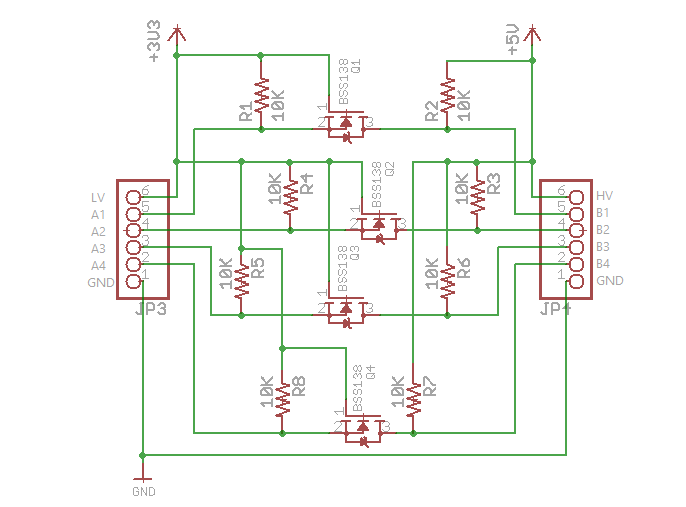
There are strings from Node-RED I want to send, from the ESP32, to an Uno.
// Master sender ESP32

#define RXD2 16
#define TXD2 17

void setup() {
  Serial.begin(115200);
  Serial2.begin(9600, SERIAL_8N1, RXD2, TXD2);
}

shape = "1,2,3";
numOfElements = (shape.length());
char charbuffer[numOfElements];
shape_sequence.toCharArray(charbuffer, numOfElements);

while (Serial2.available()) {
  Serial2.write(charbuffer); //Write the serial data
}
}
Uno:
//Receiver Code

char str[4];

void setup() {
  pinMode(LED_BUILTIN, OUTPUT);
  Serial.begin(9600); // initialize UART with baud rate of 9600 bps
}

void loop() {
  //  digitalWrite(LED_BUILTIN, HIGH); // turn the LED on (HIGH is the voltage level)
  //  delay(1000);                     // wait for a second
  //  digitalWrite(LED_BUILTIN, LOW);  // turn the LED off by making the voltage LOW
  //  delay(1000);                     // wait for a second
  int i = 0;

  if (Serial.available()) {
    delay(100); //allows all serial sent to be received together
    while (Serial.available() && i < 4)
      str[i++] = Serial.read();
    str[i++]='\0';
  }

  if (i > 0)
    Serial.println(str);
}
Is there a way to tell if the characters are being sent? I don't think I can use the serial monitor. Should I try to output something using the built-in LED on the Uno?
Pin TX2 of the ESP32 is connected to a bidirectional logic level shifter that outputs to the RX pin of the Uno.
According to the schematic you posted, IMHO, you have NOT connected the bidirectional logic level shifter correctly.
LV -> ESP32 3.3V
HV -> Uno 5V
GND -> ESP32 & UNO GND (this is correct)
A1 -> ESP32 UART2 TX
B1 -> Uno RX.
Is there a way to tell if the characters are being sent? I don't think I can use the serial monitor. Should I try to output something using the built-in LED on the Uno?
Your sending code does not compile, so it is not totally clear what you are doing.
Can you confirm what is in charbuffer before you try and send it? Is is null terminated?
cattledog:
EDIT: You may do better with
received = Serial1.readStringUntil('\n');
readStringUntil('\n')
//Receiver Mega

void setup() {
  pinMode(LED_BUILTIN, OUTPUT);
  Serial1.begin(9600);
  Serial.begin(19200);
  delay(100);
}

void loop() {
  if (Serial1.available()) {
    String received = "";
    received = Serial1.readStringUntil('\n');
    Serial.println(received);
  }
}
It's about how Serial.readString() works: it reads from the serial port forever in this case. It stops reading if the serial interface is given a time-out. There are two possibilities:
use readStringUntil() on the receiver
call mySerial.setTimeout(300); (from setup()) to set a 300ms (for instance, as long as it's significantly less than 1000) time out on the receiver — it defaults to one second!
Yes, there is a bit problem when the .readString() timeout is longer than the period between messages.
You control the sent message and add the '\n' terminator.
My preference is to use the readStringUntil('\n') instead of setting a timeout less than the transmission period.
I don't know where you are headed with this program, but on the Mega it would be safer to use either c-strings(null terminated character arrays with reserved memory) or the .reserve() method with String objects.
Depending on what is happening on the Mega other than reading the message from the ESP32, the final program might benefit from non-blocking reading methods on the Mega.
In my testing, I did not need the level shifter between the ESP32 tx and Arduino rx.
safer to use either c-strings(null terminated character arrays with reserved memory) or the .reserve() method with String objects.
Neither of these are 'safe'. Strings are advised against on Arduino and low level c-strings are very pone to coding errors.
Processing using C character arrays is a major source of program crashes
My SafeString library solves both these issues. i) is provides a replacement for Arduino Strings without the memory issues but with the functionality and better error checking and error messages ii) Avoids have to use low level c-string processing (which was way C++ Strings were created)
The SafeString library includes a SafeStringReader which makes it easy to read lines of data, with optional timeout and echo.
All of the SafeString methods are non-blocking as is the SafeStringReader (even when you specify a read timeout)
#include <SafeStringReader.h>
// install SafeString library from the library manager
// see the tutorial https://www.forward.com.au/pfod/ArduinoProgramming/SafeString/index.html

createSafeStringReader(sfReader,120,'\n');  // reads upto 120 char line terminated by \n'

void setup() {
  Serial.begin(115200); // <<<<<<<<<<< make debug output as fast as possible
  Serial1.begin(9600);  // << data connection

  for (int i=10; i>0; i--) {
    Serial.priint(i); Serial.print(' ');
  }
  Serial.println();

  SafeString::setOutput(Serial); // turn on error msgs

  sfReader.conect(Serial1);  // connect to read from Serial1
}

void loop() {
  if (sfReader.read()) {
    // got a line of input
    Serial.println(sfReader); // if sfReader echo not turned on
    parseInput();  // use SafeString methods on sfReader to extract data
    sfReader.clear(); // for next read
  }
}
My tutorial Text I/O for the Real World has more details on how to reliably read and write text data in Arduino without blocking the rest of your loop() code