I try to help someone to upload a program to an ESP32.
His settings are the same as mine, but no matter how he presses the Boot and Reset-button It will not connect.. After many dots it stops..
Now we found out that on the right down corner is mentioned ESP32 Dev Module on COM4:, which sound ok, but when the USB-plug is pulled, it still says it is connected..
With an Arduino Uno (328P) it works lik it should: with a pulled connector it says (not connected)
What makes the IDE say the ESP32 is connected while it is not.
I think when this issue is solved, we should be able to upload a sketch..
HELP!!
(And better: when it is connected, Boot and reset pressed, how can it connect?)
Hi @TechGraphix. This might be caused by having the wrong port selected from the Tools > Port menu in Arduino IDE. It might be that COM4 is a serial port produced by some unrelated device connected to their computer. This would explain both of the things you are reporting:
- The upload can never succeed if you have the port of some other device selected.
- The port the other device will not disappear from the computer when the ESP32 board is disconnected.
Please perform this experiment to verify that the port you have selected is your Arduino board:
- Disconnect the USB cable of the Arduino board from your computer.
- Select Tools > Port from the Arduino IDE menus.
- Take note of the ports, if any, listed in the menu.
- Close the Tools menu.
 The ports list is only updated when the Tools menu is re-opened, so this step is essential.
- Connect the Arduino board to your computer with a USB cable.
- Select Tools > Port from the Arduino IDE menus. - If a new port is listed in the menu, that is the port of your Arduino board.
Select that port from the menu and try uploading again.
If the upload still fails, or if no new port appeared after you plugged the Arduino board into your computer, add a reply here to let us know and we'll investigate the problem further.
Thanks for the answer.. can be a double problem:
- there is a unrelated device that shows a COMx:
- the ESP32 is not communicating at all, so it does not show any COM-port (broken interface for instance)
When a Arduino attached it will show a new COM-port that also disappears when the Arduino is removed..
That is correct.
Now please ask your friend to perform the instructions I provided in my previous reply and then let us know what they found.
All the steps did not solve it.. In fact, we did all that before..
I asked him to install the IDE on another computer (he has one spare) and strange but it shows one permanent available COM-port (COM3 this time) from the first moment without anything attached. (different computer, same problem)
i use version 2.2.1 and he has 2.3.2 ... asked him to install an older version... see if that solves the COM-port issue..
Make sure the USB cable is completely plugged into both the Arduino board and the PC.
If that doesn't help, you may have a damaged/defective or charge-only USB cable. Try a different cable.
Either of the above can result in the power connections being made (and thus LEDs lit on the board), but no data connections (and thus no port for the board).
It is not about the arduino (uno) board, that works fine, but it is about a ESP32 that is to be connected through a levelshifter (5V->3.3V) with a RESET- and a BOOT-button and a CP2102 (USB 2.0 to Uart) to the USB port.
Even with the same version of IDE and the same Boards freshly installed as i have here, he sees a COM-Port constantly present on both computers without anything connected..
plugging in the ESP32 doesn't change anything..
I would have hoped that you would be able to extrapolate that the entire assembly can be considered a "board" for the purposes of this discussion, but perhaps that is expecting too much.
So we start again from the beginning:
Please perform this experiment to verify that the port you have selected is your CP2102 (USB 2.0 to Uart):
- Disconnect the USB cable of the CP2102 (USB 2.0 to Uart) from your computer.
- Select Tools > Port from the Arduino IDE menus.
- Take note of the ports, if any, listed in the menu.
- Close the Tools menu.
The ports list is only updated when the Tools menu is re-opened, so this step is essential.
- Connect the CP2102 (USB 2.0 to Uart) to your computer with a USB cable.
- Select Tools > Port from the Arduino IDE menus. - If a new port is listed in the menu, that is the port of your CP2102 (USB 2.0 to Uart).
Select that port from the menu and try uploading again.
If the upload still fails, or if no new port appeared after you plugged the CP2102 (USB 2.0 to Uart) into your computer, add a reply here to let us know and we'll investigate the problem further.
Hi ptillisch,
without anything attached, fresh reboot etc etc.. the IDE shows COM4
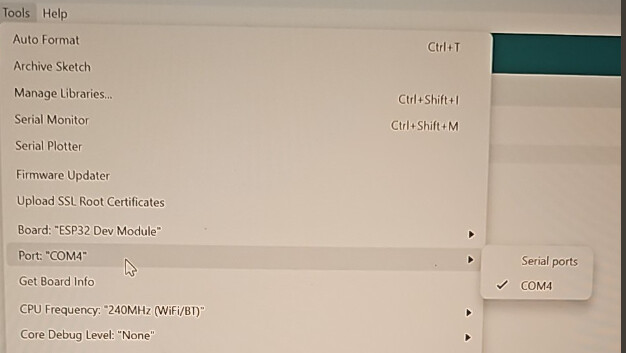
closing it, plug in the CP2102, opening it again:
NO difference, the same COM4 and nothing else...
Closing the IDE, reboot the computer (with the CP2102 plugged in) opening the IDE and there is only the same COM4.. (which is appearently not working)
It is still strange that on the other laptop (both are laptops) the situation is the same, albeit that on the other laptop it shows COM3...
OK, great. This tells us two things:
- COM4 is not the port of the CP2102 (USB 2.0 to Uart). Instead, it is some unrelated port (e.g., the internal serial port of the computer's motherboard)
- The CP2102 (USB 2.0 to Uart) is not producing a serial port.
Please try this troubleshooting procedure and then report your results in a reply on this forum thread:
This procedure is not intended to solve the problem. The purpose is to gather more information.
- Disconnect the USB cable of the Arduino board from your computer.
- Open the Windows Device Manager.
- Select View > Devices by type from the Device Manager menus.
- Open the "View" menu.
- If there is a ✓ to the left of the "Show hidden devices" menu item, click on "Show hidden devices" to disable it.
- Take note of the contents of the "Other devices" and "Ports (COM & LPT)" sections of the Device Manager tree.
- Connect the Arduino board to your computer with a USB cable.
- Select Action > Scan for hardware changes" from the Device Manager menus.
Did you see any new device appear in the Device Manager tree after doing this? If so, please tell us where it is located in the tree and what it is named.
You can repeat steps 5-8 multiple times if you are not sure.
Part of the mystery is solved:
MY best guess is that the CP2102 is broken,,,
I will advise him to get another one..
It is one of three things:
- Missing driver (in which case the device would be under the "Other devices" section of the Device Manager tree)
- Charge-only or defective USB cable
- Disabled CP2102 module (which could be caused by a problem in the circuit connected to the module)
- Damaged CP2102 module
He lives at the other side of the globe, so there is a timelag... but i'll be back 
