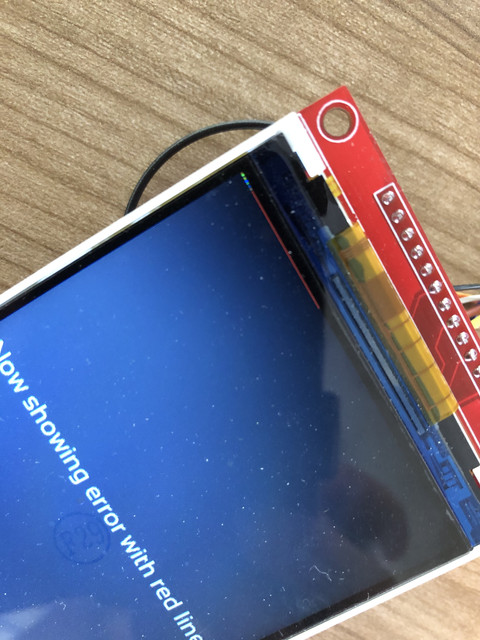
ESP32 - TFT - MFRC522 > Red stripes

ESP32 IO35 is input only. Are you expecting it to be an output? Fix that if you expect to reset the RC552. Note: IO34, 36 and 39 are also input only.

Other potential mistakes:

  1. If your are using tft.startWrite() in your code make sure you use tft.endWrite() before you access any other SPI devices. The red stripes are likely to be cause by messages that are destined for the RF522 are also going to the TFT.

  2. Check you really have wired it up as you think you have. Look at the chip select pins again and again and again.

  3. Run the Read_User_Setup diagnostic sketch to make sure you have configured the TFT_eSPI library correctly.

I expect the software lines you posted are not the problem, they just happen to create conditions for a fault in a completley different part of the code or hardware configuration setup to show itself. That is why full information disclosure is important!

david_prentice:
Think about it.

The Arduino system means that everyone has the "core" set of libraries and examples that come with the IDE.
Everyone can access any "approved" third party libraries via the IDE Library Manager.

So you can paste a sketch or attach a project ZIP to the Forum.
And anyone in the world can replicate your project.

Yes, you can flout the C / C++ conventions if you want. e.g. code in H files

But you will keep people happier if you just create a minimal example that exhibits your problem.

Or at least add any "unusual files" to local tabs in your project.
Build your project yourself first. All the libraries, versions and locations are reported in a "verbose compile".
You just need to go through the list in the Library Manager.

David.

p.s. we make allowances for young members, newcomers, non-English speakers, ...
I am guessing that you don't fall into those categories.

I understand, i made a new really small project with just the files needed to compile. I do get the same error again so i think if you can compile with the same hardware you should get it too.

I am a non-english speaker but i understand i should have done more to get help from others.
I really hope the new zip file has enough information to compile it (i included all the libraries).

bodmer:
ESP32 IO35 is input only. Are you expecting it to be an output? Fix that if you expect to reset the RC552. Note: IO34, 36 and 39 are also input only.

Other potential mistakes:

  1. If your are using tft.startWrite() in your code make sure you use tft.endWrite() before you access any other SPI devices. The red stripes are likely to be cause by messages that are destined for the RF522 are also going to the TFT.

  2. Check you really have wired it up as you think you have. Look at the chip select pins again and again and again.

  3. Run the Read_User_Setup diagnostic sketch to make sure you have configured the TFT_eSPI library correctly.

I expect the software lines you posted are not the problem, they just happen to create conditions for a fault in a completley different part of the code or hardware configuration setup to show itself. That is why full information disclosure is important!

Thanks for stepping in.
I switched from IO35 to IO33 for the reset but the result is still the same.

I didn't use tft.startWrite() so far but if this can solve my problem i can see if i can modify the code to this
I have checked multiple times and i really think my wires are as i displayed on the image. The only thing i cannot get used to is the gpio port numbering. I have used arduino's before (this is my first time using an ESP32) but on the arduino GPIO 6 is pin 6.

Here i feel the numbers can be different.
If i run the Read_User_Setup i get this output and i am not sure if this is what i should get:

09:16:50.329 -> ets Jun  8 2016 00:22:57
09:16:50.329 -> 
09:16:50.329 -> rst:0x10 (RTCWDT_RTC_RESET),boot:0x33 (SPI_FAST_FLASH_BOOT)
09:16:50.329 -> configsip: 0, SPIWP:0xee
09:16:50.329 -> clk_drv:0x00,q_drv:0x00,d_drv:0x00,cs0_drv:0x00,hd_drv:0x00,wp_drv:0x00
09:16:50.329 -> mode:DIO, clock div:1
09:16:50.329 -> load:0x3fff0018,len:4
09:16:50.329 -> load:0x3fff001c,len:1216
09:16:50.329 -> ho 0 tail 12 room 4
09:16:50.329 -> load:0x40078000,len:9720
09:16:50.329 -> ho 0 tail 12 room 4
09:16:50.329 -> load:0x40080400,len:6352
09:16:50.329 -> entry 0x400806b8
09:16:51.395 -> 
09:16:51.395 -> [code]
09:16:51.395 -> TFT_eSPI ver = 2.2.6
09:16:51.395 -> Processor    = ESP32
09:16:51.395 -> Frequency    = 240MHz
09:16:51.395 -> Transactions = Yes
09:16:51.395 -> Interface    = SPI
09:16:51.395 -> Display driver = 7796
09:16:51.395 -> Display width  = 320
09:16:51.395 -> Display height = 480
09:16:51.395 -> MOSI    = GPIO 23
09:16:51.395 -> MISO    = GPIO 19
09:16:51.395 -> SCK     = GPIO 18
09:16:51.395 -> TFT_CS   = GPIO 15
09:16:51.395 -> TFT_DC   = GPIO 2
09:16:51.395 -> TFT_RST  = GPIO 4
09:16:51.395 -> Font GLCD   loaded
09:16:51.395 -> Font 2      loaded
09:16:51.395 -> Font 4      loaded
09:16:51.395 -> Font 6      loaded
09:16:51.395 -> Font 7      loaded
09:16:51.395 -> Font 8      loaded
09:16:51.395 -> Smooth font enabled
09:16:51.395 -> 
09:16:51.395 -> Display SPI frequency = 27.00
09:16:51.395 ->

My file is 4MB in size so i can't upload it here. I have uploaded it without the libraries (i have used the MFRC522 library AND TFT_eSPI) but i also uploaded everything here:

WeTransfer - Send Large Files & Share Photos Online - Up to 2GB Free (wetransfer link)

Thanks again, i really appreciate all the help and please let me know if i didn't do anything correct with posting the files
sourcecode.zip (93.2 KB)

I downloaded your new ZIP.
It contains a "sourcecode" directory with your sketch files:
sourcecode.ino
display.h
fonts.h
mfrc22.h

And a libraries directory with MFRC22 and TFT_eSPI libraries which are both available via the IDE Library Manager.

So there is no point in putting them into your ZIP.

Yes, the sketch builds:

Using library SPI at version 1.0 in folder: C:\Users\David Prentice\AppData\Local\Arduino15\packages\esp32\hardware\esp32\1.0.4\libraries\SPI 
Using library TFT_eSPI at version 2.2.11 in folder: C:\Users\David Prentice\Documents\Arduino\libraries\TFT_eSPI 
Using library FS at version 1.0 in folder: C:\Users\David Prentice\AppData\Local\Arduino15\packages\esp32\hardware\esp32\1.0.4\libraries\FS 
Using library SPIFFS at version 1.0 in folder: C:\Users\David Prentice\AppData\Local\Arduino15\packages\esp32\hardware\esp32\1.0.4\libraries\SPIFFS 
Using library MFRC522 at version 1.4.6 in folder: C:\Users\David Prentice\Documents\Arduino\libraries\MFRC522 
"C:\\Users\\David Prentice\\AppData\\Local\\Arduino15\\packages\\esp32\\tools\\xtensa-esp32-elf-gcc\\1.22.0-80-g6c4433a-5.2.0/bin/xtensa-esp32-elf-size" -A "C:\\Users\\DAVIDP~1\\AppData\\Local\\Temp\\arduino_build_900591/sourcecode.ino.elf"
Sketch uses 292369 bytes (22%) of program storage space. Maximum is 1310720 bytes.
Global variables use 16180 bytes (4%) of dynamic memory, leaving 311500 bytes for local variables. Maximum is 327680 bytes.

Obviously I don't have your MFRC22 hardware.

Unfortunately it just stops with Serial showing:

Firmware Version: 0x0 = (unknown)
WARNING: Communication failure, is the MFRC522 properly connected?

and TFT saying:

Now showing error with red line

but this is just white text on a black background.

As I said earlier. By convention you don't put executable code in H files.
Either you put it in .INO files (that get concatenated and translated into a .CPP) and compiled as a single unit.
Or you put in separate .CPP, .C, .S files that get compiled individually.

It is not uncommon to put Arduino font data or image data into .H files. It may not be the regular C++ way of doing things but is convenient.

I would expect you to put your "display" and "mfrc22" code into .INO files
Because of the way that Arduino-builder concatenates the INO files you might need to add some forward declarations.

Sorry to be unable to reproduce your problem.
The ideal "test" sketch avoids unusual hardware. Then anyone can not only compile but also run the sketch.

David.

I understand, but i added the libraries so you got the exact same of what i have.

I use a MFRC522 module like this (https://nl.aliexpress.com/item/4000407524760.html?spm=a2g0o.productlist.0.0.19667fe6KVYjxC&s=p&ad_pvid=202007170231405203111814230240007956829_16&algo_pvid=5a8351dd-d754-4bcd-a73e-4b175c794b71&algo_expid=5a8351dd-d754-4bcd-a73e-4b175c794b71-15&btsid=0b0a050115949783007912023e8d02&ws_ab_test=searchweb0_0,searchweb201602_,searchweb201603_)
but even when i don't connect the scanner i get strange dots on the top left (instead of a red stripe i get blue dots).

I will change the .h files into .INO files, and see if that still work (and maybe works better).

If i remove the unusual hardware (MFRC522) the display works correctly, it is the MFRC522 what creates the red lines on the display so removing this in the "test" sketch won't really help i think?

I will change the .h files into .INO files, and see if that still work (and maybe works better).

I doubt if it makes any practical difference. Your current mfrc522.h file is pretty straightforward.

What do you see on the Serial Terminal ?

It would give us some clues about what is happening.

I suspect like Bodmer that there is unintentional SPI data going to the TFT. e.g. a missing tft.endwrite() or missing SPI.endTransaction()

Regarding library versions.
It is important for readers to use the same versions or at least identify versions.
Which is why God invented the IDE Library Manager.
Anyone, anywhere in the world can install a known version from a known Release (on GitHub)

I do not want to search through 4MB of your library just in case you have changed something.
However, GitHub enables you to do this (if you were on GitHub)

David.

Terminal shows this (after boot i put a rfid card in front of the reader)

13:45:25.857 -> ets Jun  8 2016 00:22:57
13:45:25.857 -> 
13:45:25.857 -> rst:0x1 (POWERON_RESET),boot:0x33 (SPI_FAST_FLASH_BOOT)
13:45:25.857 -> flash read err, 1000
13:45:25.857 -> ets_main.c 371 
13:45:26.265 -> ets Jun  8 2016 00:22:57
13:45:26.265 -> 
13:45:26.265 -> rst:0x10 (RTCWDT_RTC_RESET),boot:0x33 (SPI_FAST_FLASH_BOOT)
13:45:26.265 -> configsip: 0, SPIWP:0xee
13:45:26.265 -> clk_drv:0x00,q_drv:0x00,d_drv:0x00,cs0_drv:0x00,hd_drv:0x00,wp_drv:0x00
13:45:26.265 -> mode:DIO, clock div:1
13:45:26.265 -> load:0x3fff0018,len:4
13:45:26.265 -> load:0x3fff001c,len:1216
13:45:26.265 -> ho 0 tail 12 room 4
13:45:26.265 -> load:0x40078000,len:9720
13:45:26.265 -> ho 0 tail 12 room 4
13:45:26.265 -> load:0x40080400,len:6352
13:45:26.265 -> entry 0x400806b8
13:45:27.458 -> Firmware Version: 0x92 = v2.0
13:45:39.590 -> **Card Detected:**
13:45:39.590 -> Card UID: 04 66 74 02 66 60 81
13:45:39.590 -> Card SAK: 00
13:45:39.590 -> PICC type: MIFARE Ultralight or Ultralight C
13:45:39.590 -> Name: crs_123456__9876 f`⸮⸮H

As you can see i get the card information so that part works

The libraries i used are the ones from the IDE Library Manager
The only thing i updated in the TFT_ESPI library are:

//#define ILI9341_DRIVER
//#define ST7735_DRIVER      // Define additional parameters below for this display
//#define ILI9163_DRIVER     // Define additional parameters below for this display
//#define S6D02A1_DRIVER
//#define RPI_ILI9486_DRIVER // 20MHz maximum SPI
//#define HX8357D_DRIVER
//#define ILI9481_DRIVER
//#define ILI9486_DRIVER
//#define ILI9488_DRIVER     // WARNING: Do not connect ILI9488 display SDO to MISO if other devices share the SPI bus (TFT SDO does NOT tristate when CS is high)
//#define ST7789_DRIVER      // Full configuration option, define additional parameters below for this display
//#define ST7789_2_DRIVER    // Minimal configuration option, define additional parameters below for this display
//#define R61581_DRIVER
//#define RM68140_DRIVER
#define ST7796_DRIVER


#define TFT_MISO 19
#define TFT_MOSI 23
#define TFT_SCLK 18
#define TFT_CS   15  // Chip select control pin
#define TFT_DC    2  // Data Command control pin
#define TFT_RST   4  // Reset pin (could connect to RST pin)

In the above code, u commeted #define ILI9341_DRIVER and uncommented #define ST7796_DRIVER and uncommented the pins (the 6 tft_ declarations at the end). The rest is unedited

The RC522 auto detects the interface type (SPI in this case) after reset but it looks like it has an internal reset so the reset signal wiring error had no effect.

Your setup looks OK and corresponds with the schematic. Whether the schematic reflects the wiring is for you to check.

The fault signature suggests the data sent to/received by the RFID reader is coupling into the TFT signals even though the TFT should not be selected. The RC522 is essentially a transmitter and receiver, it outputs a moderately strong RF signal typically at 13.56MHz. Maybe if you have the reader very close to the TFT or your have used long signal wires or you have poor GND connections there is an RF signal coupling into the TFT. Move the RFID reader away as far as you can from the other parts. Shorten the power, GND and signal wires to the TFT.

The RFID is about 30 cm from the display, but even with disconnecting the RFID, the display shows the stripes. Also moving the display closer or further away from the RFID doesn't change the stripes.

I have connected everything via breadboard. Maybe the cables (therefore the ground) is not really good.
I will design a PCB for it but first i need to make sure everything works.

I will try to get better grounds and maybe better cables in general to see if that changes the red lines.

Thank you for the help!

bluebirdsoftware:
The RFID is about 30 cm from the display...

That is likely to be the problem, the high speed signals from the processor really need to have short <100mm connections especially if you are using thin wires. The issue is not the clock rate but the speed of the signal edges. The return path in your setup is 30+30 = 60cm this is too long will cause edge ringing and cross coupling of signals. The inductance of the GND path must be kept low, one way to do this is to wire several GND wires in parallel to each board. Do not "daisy chain" the GND path between boards, use a "star" GND arrangement with the processor at the centre of the star. In your PCB using a ground (0V) plane will help.

Thank you, i will design a test pcb and check if that helps.
I have never used a " ground (0V) plane " so i will check how that works