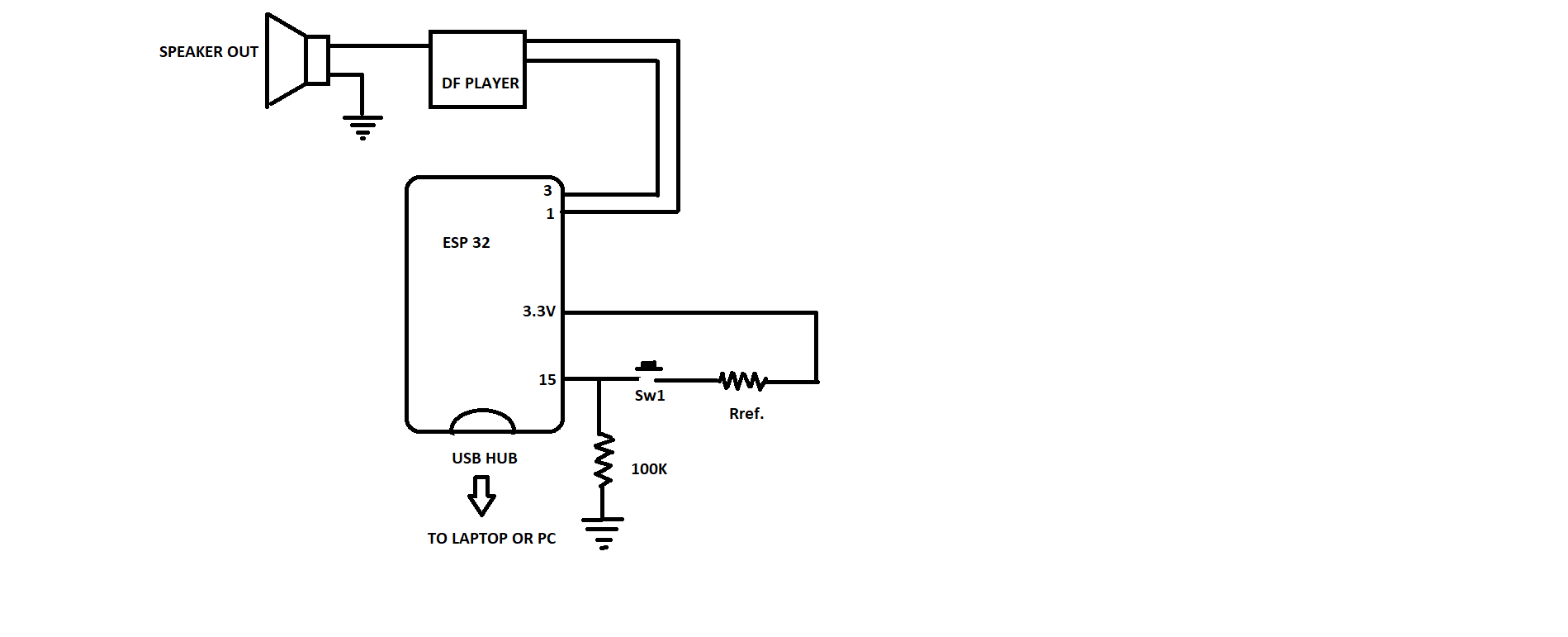
Here the code below I am dealing with ESP 8266 & a DF Player is for the analog input triggering purpose
But here when I use to trigger the A0 input in series with a resistor value via earth line
It simply starts triggering the file repeatedly with a very high triggering speed
Unless and until I release the push button it keeps on triggering the defined file for the analog value range given
Even if I quickly press and release the button, it triggers so many times in the mean time
Triggering speed is too too much high and produces an effect like some electrical device is creating a spark due to loose wiring.
I want to have here triggering like
Just I press the button and it ll trigger the file once that's it
No matter I release immediately or keep pressing it
If I want to trigger the file again, I ll have to press the button again after releasing it
#include <LCD_I2C.h> // THIS PART IS REQUIRED IN CASE OF ARDUINO UNO NANO AND MEGA BUT NOT WITH ESP 8266
LCD_I2C lcd(0x27, 16, 2); // I2C address 0x27, 16 column and 2 rows

const int AnalogPin = A0;
int AnalogValue = 0;
int button = 14; //D2(gpio4)
int ledpin = 2; // 2
const byte pinDfpBusy1 = 15;
#include <DFPlayerMini_Fast.h>
#include <SoftwareSerial.h>
SoftwareSerial mySerial1(3, 1); // RX, TX
DFPlayerMini_Fast player1;
void setup() {
  lcd.begin(); // initialize the lcd
  lcd.backlight();
  pinMode(pinDfpBusy1, INPUT);
  pinMode(button, INPUT);    //  14
  pinMode(ledpin, OUTPUT);  //   2
  Serial.begin(9600);

  mySerial1.begin(9600);
  // if(player1.begin(mySerial1, true, false))
   if(player1.begin(mySerial1, false))
  {
  player1.volume(12);
  player1.play(3);
  }
}
void loop() {
AnalogValue = analogRead(AnalogPin);
Serial.println(AnalogValue);
if(AnalogValue>=690&&AnalogValue<=720)
{
player1.loop(84);
}
}
So is there any coding technique required or it is completely depending on some hardware changes or introduction of few networks their ??
This part is bit complex for me Sir
Would you please elaborate ??
For this part I am trying with some thing like this but not sure what I am up to
const int buttonPin  = 39;     // the pin that the pushbutton is attached to
const int ledPin     = 2;    // the pin that the LED is attached to

const int AnalogPin = 15;
int AnalogValue = 0;

int buttonState      = 0;     // current state of the button
int lastButtonState  = 0;     // previous state of the button
int ledState         = 0;     // remember current led state

#include <DFPlayerMini_Fast.h>
#include <SoftwareSerial.h>
SoftwareSerial mySerial1(3, 1); // RX, TX
DFPlayerMini_Fast player1;

void setup() {
  pinMode(buttonPin, INPUT);  // initialize the button pin as a input
  pinMode(ledPin, OUTPUT);    // initialize the button pin as a output
  mySerial1.begin(9600);
  if (player1.begin(mySerial1, false)) {
    player1.volume(22);
    player1.play(3);
  }
}

void loop() {
  // read the pushbutton input pin

  AnalogValue = analogRead(AnalogPin);
  Serial.println(AnalogValue);
  buttonState = analogRead(AnalogPin);
  // buttonState = digitalRead(buttonPin);


  // check if the button is pressed or released
  // by comparing the buttonState to its previous state
  // if (buttonState != lastButtonState) {
    // if(AnalogValue>=1100&&AnalogValue<=1250)
    // {

    // change the state of the led when someone pressed the button
    if (buttonState == 1) {
      if(AnalogValue>=1100&&AnalogValue<=1250)
      {
      if(ledState==1)
      {
      player1.loop(84);
      ledState=0;
      }
      else
      ledState=1;
    }
    }

    // remember the current state of the button
    lastButtonState = buttonState;
  // }

  // turns LED on if the ledState=1 or off if the ledState=0
  // digitalWrite(ledPin, ledState);

  // adding a small delay prevents reading the buttonState to fast
  // ( debouncing )
  delay(20);


}
Don't know what I am doing
Would you please help me in this kind of design
Probably, since it was used in one of your other topics on the same subject. A boolean flag is instrumental when you have an on/off (1/0, yes/no, up/down, left/right) decision in your program (and DFPlayerMini topic, not the other three, including OneWire topic). The "flag" was meant for the program to know "I have played this"... but again, on another topic.
If you are saying you understand my references to Stone Soup, it is because you start a subject, and by post #140, you have changed the subject by adding increasing numbers of devices and tangential "and another thing" parts to your project. You should start a subject and follow it to completion, even if "just one more ingredient" sounds innocuous. Last year or the year before I was on a thread of yours that burned me out after a month and reached over 200 posts. Part of the "200" posts is your refusal to learn. Everything that you have complete has been written by NOT you, not even the smallest "how to wire a button" function.
Keep having fun with all your ideas, and all the changes in your ideas, for all your projects. You MUST put your effort into learning and these ideas will actually be your ideas, your work and your completed project. I guarantee it.
buttonState = analogRead(AnalogPin) > 512 ? HIGH : LOW;
then you would be able to use buttonState exactly as if a regular pushbutton was informing its value for purposes of state change detection, to which your attention has already been drawn.
State change detection and its cousin debouncing noisy (all!) switches is among a handful,of things you must. Learn. How. To. Do.
I already regret what I would bet is this waste of time. Please prove me wrong and demonstrate that you can go read through a few examples and come to grips with
switch debouncing
and
state change detection.
I am certain google works well enough wherever you are that it woukd help you find a learning source that matches your learning style.
If we don't put while statement then it triggers the file repeatedly with a very very high speed
But putting a while statement like above remove this defect and triggers the file once after pressing the push button
If we want to trigger the file again then we have to release the button (if pressed and hold in case) and again have to press it.
All those above things happen in case of digital input
But in case of analog input, if we put a while then it trigger the file once and then no function no action on pressing button quickly or slowly or after a gap of time
I need to reset the MCU or power off the switch then restart the system to make action again
So in place of applying any kind of external mono stable or one shot type complex circuits, I just want to place a code for the purpose to solve it
What's the value of ref. here doesn't matter any of the way
A single analog input line can be used for different levels to do different task like LED or MOTOR or a RELAY or anything by using different resistor values
Now the matter is to trigger a DF Player
where it has some kind of issue
Analog pin is for the purpose while dealing with ESP series where pins are less
If there is a proper option with hardware and coding to increase pins externally
Please tell, I would love to go that way
But not just overviews
I need to have a perfect coding and hardware connections everything
As I never din that kind of thing so no idea about any kind of such stuff !!!
I tried with that kind of delay
It takes a long time to get triggered after pressing the key
and with that time period it repeatedly triggers the file if we keep holding the press button