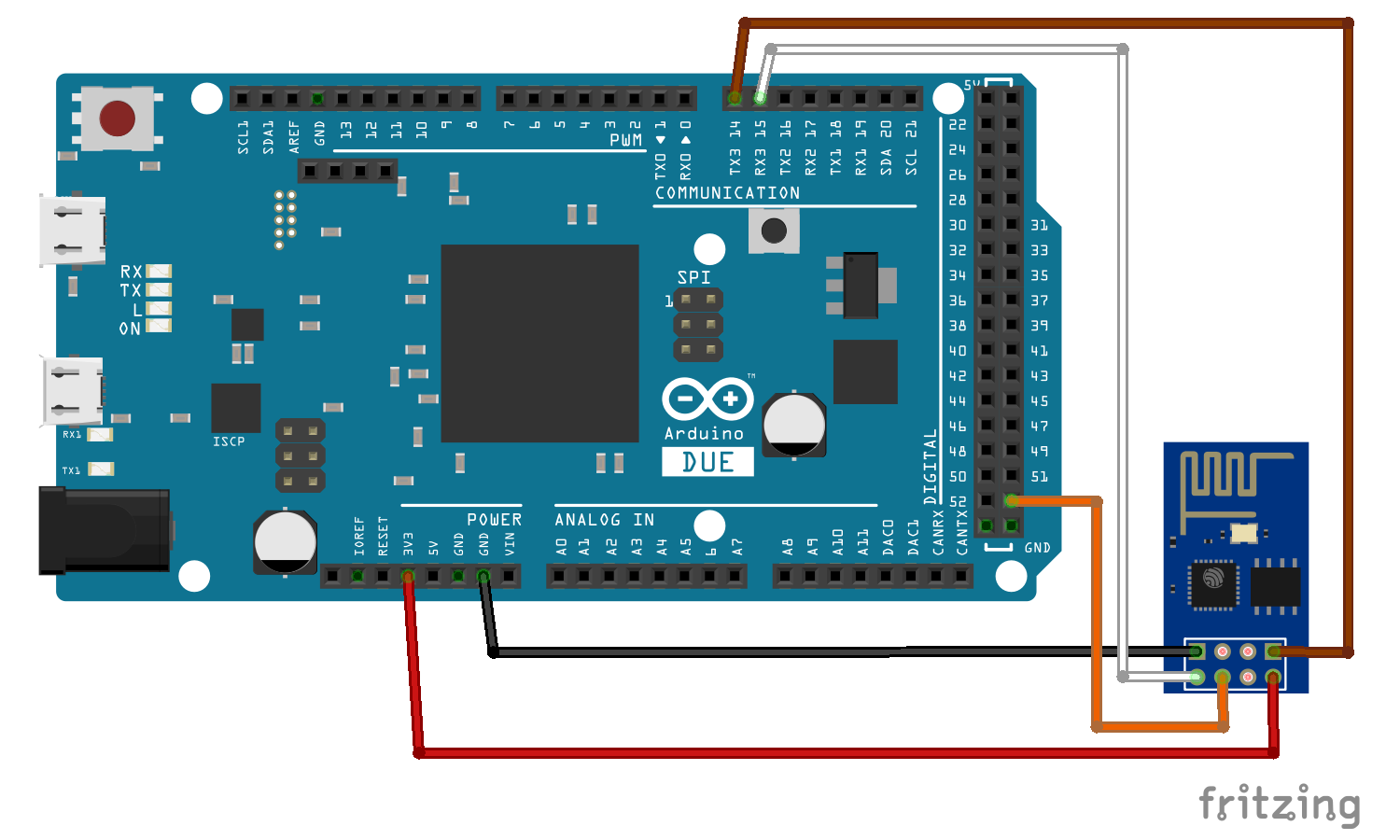
Hi, I connected ESP8266 to Arduino Due but I received this error whilst trying to upload any code. I am totally new to Internet of Things platform. Any clue how to fix this?
I have included a link that shows the connection between ESP8266 and Arduino Due.
esptool v0.4.12 - (c) 2014 Ch. Klippel ck@atelier-klippel.de
setting board to ck
setting baudrate from 115200 to 115200
setting port from to COM4
setting address from 0x00000000 to 0x00000000
espcomm_upload_file
espcomm_upload_mem
setting serial port timeouts to 1000 ms
opening bootloader
resetting board
trying to connect
flush start
setting serial port timeouts to 1 ms
setting serial port timeouts to 1000 ms
flush complete
espcomm_send_command: sending command header
espcomm_send_command: sending command payload
serialport_receive_C0: E0 instead of C0
trying to connect
flush start
setting serial port timeouts to 1 ms
setting serial port timeouts to 1000 ms
flush complete
espcomm_send_command: sending command header
espcomm_send_command: sending command payload
serialport_receive_C0: E0 instead of C0
trying to connect
flush start
setting serial port timeouts to 1 ms
setting serial port timeouts to 1000 ms
flush complete
espcomm_send_command: sending command header
espcomm_send_command: sending command payload
serialport_receive_C0: E0 instead of C0
resetting board
trying to connect
flush start
setting serial port timeouts to 1 ms
setting serial port timeouts to 1000 ms
flush complete
espcomm_send_command: sending command header
espcomm_send_command: sending command payload
serialport_receive_C0: E0 instead of C0
trying to connect
flush start
setting serial port timeouts to 1 ms
setting serial port timeouts to 1000 ms
flush complete
espcomm_send_command: sending command header
espcomm_send_command: sending command payload
serialport_receive_C0: E0 instead of C0
trying to connect
flush start
setting serial port timeouts to 1 ms
setting serial port timeouts to 1000 ms
flush complete
espcomm_send_command: sending command header
espcomm_send_command: sending command payload
serialport_receive_C0: E0 instead of C0
resetting board
trying to connect
flush start
setting serial port timeouts to 1 ms
setting serial port timeouts to 1000 ms
flush complete
espcomm_send_command: sending command header
espcomm_send_command: sending command payload
serialport_receive_C0: E0 instead of C0
trying to connect
flush start
setting serial port timeouts to 1 ms
setting serial port timeouts to 1000 ms
flush complete
espcomm_send_command: sending command header
espcomm_send_command: sending command payload
serialport_receive_C0: E0 instead of C0
trying to connect
flush start
setting serial port timeouts to 1 ms
setting serial port timeouts to 1000 ms
flush complete
espcomm_send_command: sending command header
espcomm_send_command: sending command payload
serialport_receive_C0: E0 instead of C0
warning: espcomm_sync failed
error: espcomm_open failed
error: espcomm_upload_mem failed
error: espcomm_upload_mem failed
wvmarle:
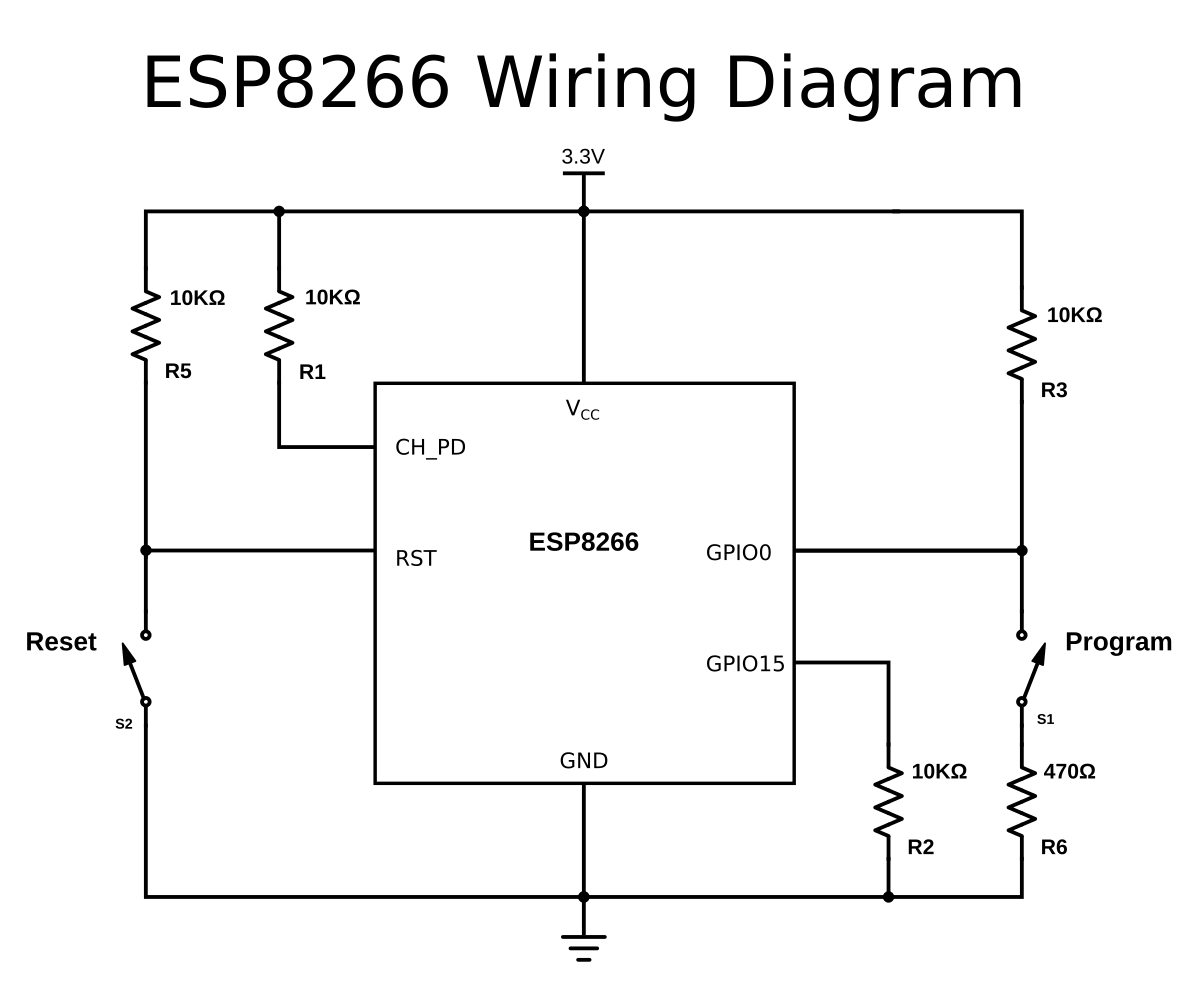
Most likely your ESP is not in upload mode. Make sure you have GPIO0 pulled low while switching it on.
Hi, thanks for your response. But how do I have GPIO0 pulled low? Do I connect it to ground or something? Sorry I am completely new to IoT platform. Please advise.
Indeed.
And for more info on the ESP8266 (which is a very capable microprocessor on itself - for many projects you can do without hte Arduino part altogether) read this starter's guide.
wvmarle:
Indeed.
And for more info on the ESP8266 (which is a very capable microprocessor on itself - for many projects you can do without hte Arduino part altogether) read this starter's guide.
I've tried connecting the GPIO0 to ground but both the LED, blue and red lights up and in the serial monitor, it is displaying weird characters.
I have the same with my modules often - have to plug out and in the USB, reset the device, and after a few tries it usually works. It's also a good idea to enable OTA updates right away so you don't have to mess around too much later.
wvmarle:
I have the same with my modules often - have to plug out and in the USB, reset the device, and after a few tries it usually works. It's also a good idea to enable OTA updates right away so you don't have to mess around too much later.
Thanks for the tips, I have actually tried plugging in and out the USB, but yet to reset the device as my ESP8266 does not have a reset button. Do I directly connect the RST pin to a button?
wvmarle:
Most likely your ESP is not in upload mode. Make sure you have GPIO0 pulled low while switching it on.
Actually, I connected GPIO2 to GND instead of connecting GPIO0 to GND yesterday. That was my mistake. I fixed the mistake and I was able to upload the code but I received another error in the serial monitor.
I think I really messed up this time. After connecting GPIO0 to GND and got it uploading but getting fatal error in the serial monitor, I tried disconnecting GPIO0 off GND and I tried AT commands but it is not giving me back any response at all. Before I connected GPIO0 to GND, I was able to get response typing AT commands to the serial monitor. Any advice on how to fix this...???
You probably got a stack trace with it, use the ESP Exception Decoder to get readable info out of that. There's probably an error in your code.
No idea about the AT commands, using the ESP as standalone processor myself. You should be able to upload another sketch (my favourite test sketch is Blink, to blink the internal blue LED at GPIO2).
wvmarle:
You probably got a stack trace with it, use the ESP Exception Decoder to get readable info out of that. There's probably an error in your code.
No idea about the AT commands, using the ESP as standalone processor myself. You should be able to upload another sketch (my favourite test sketch is Blink, to blink the internal blue LED at GPIO2).
I tried connecting GPIO0 to GND again but it gives the same error... How do I reset the ESP8266?