Hi,
I use VSCode and with Arduino IDE 2.0.0-rc8, the generate failed, as you can see

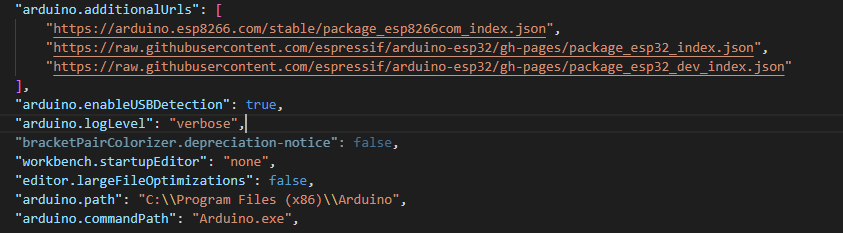
With these settings

I don't have this problem with the previous version.
Please read the forum guidelines and post your errors appropriately. All I see is blurry white on black with some splashes of color. It is not worth the effort to help you if I cannot read your postings.
If you click on the images they expand and are very readable.
Hi @un_francais. Arduino IDE 2.x does not have a command line interface, so it can not be used with the "Arduino" VS Code extension.
The reason why Arduino IDE 2.x doesn't have a command line interface, and the reason why that is not a problem for the VS Code extension users is because there is now an official standalone command line tool for working with Arduino projects: Arduino CLI. This tool is used by Arduino IDE 2.x for all non-GUI specific operations. The "Arduino" VS Code extension can be used with Arduino CLI instead of Arduino IDE as explained in the extension's documentation:
https://marketplace.visualstudio.com/items?itemName=vsciot-vscode.vscode-arduino#arduino-cli
When you think about it, the old approach of installing a whole IDE just to use as a command line tool for another IDE was kind of silly. Compare the ~500 MB installation size of Arduino IDE 2.x to the ~25 MB size of Arduino CLI!