False triggering on my Arduino Nano

I need a little help with my Arduino project, I'm not brand new to Arduino however I have a lot to learn about it.

I'm using and Arduino nano, I have a start button and three limit switches as inputs.

I also have eight relays which I am controlling with those inputs and code-based timers.

In a simulator the project works flawlessly, on my breadboard it works flawlessly, but when I install it into the project it falls triggers and works very erratically. Something else I need to add to this, I also have two AC motors that are being controlled with relays which are controlled by this Arduino Nano.

  • Welcome to the mix.

  • Always show us a good schematic of your proposed circuit.
    Show us good images of your ‘actual’ wiring.

  • In the Arduino IDE, use Ctrl T or CMD T to format your code then copy the complete sketch.

  • Use the < CODE / > icon from the ‘posting menu’ to attach the copied sketch.

Reality is more brutal than a simulator. Switch bounce, EMI, inadequate power supply, real power dissipation, etc are possibilities.

Try changing the REAL AC motors for either nothing or light bulbs. I am wondering if the AC motors are creating noise, so temporarily eliminate them.

Sounds like a power supply problem. Please post a wiring diagram with all pins, parts and connections clearly labeled (hand drawn is fine). Household AC wiring MUST be well separated from the Arduino.

Which of the 20+ models of Nano do you mean?

here’s a copy of my sketch, not sure if I properly formatted it or not, however here it is I hope this works,

// C++ code
//
int buttonstat = 0;

int debounce = 0;

int button_debounce = 0;

void setup()
{
  pinMode(5, OUTPUT);
  pinMode(10, INPUT);
  pinMode(7, OUTPUT);
  pinMode(1, OUTPUT);
  pinMode(11, INPUT);
  pinMode(6, OUTPUT);
  pinMode(2, OUTPUT);
  pinMode(12, INPUT);
  pinMode(8, OUTPUT);
  pinMode(3, OUTPUT);
  pinMode(13, INPUT);
  pinMode(4, OUTPUT);

  digitalWrite(5, HIGH);
  // BLOCKS LS. 3
}

void loop()
{
  // START BUTTON
  buttonstat = digitalRead(10);
  if (buttonstat == LOW) {
    digitalWrite(7, HIGH);
    // BLOCKS START BUTTON
    digitalWrite(1, HIGH);
    // CLAMP CLOSING
  }
  // LS.1, CLAMP CLOSED
  buttonstat = digitalRead(11);
  if (buttonstat == LOW) {
    digitalWrite(6, HIGH);
    // BLOCKS LS.1
    digitalWrite(1, LOW);
    // CUTS POWER TO CLAMP
    delay(1000); // Wait for 1000 millisecond(s)
    digitalWrite(2, HIGH);
    // POWERS MOTORS
    delay(6000); // Wait for 6000 millisecond(s)
    // LS. 3 IS NO LONGER BLOCKED
    digitalWrite(5, LOW);
  }
  // LS. 2, MOTORS FORWARD
  buttonstat = digitalRead(12);
  if (buttonstat == LOW) {
    digitalWrite(8, HIGH);
    // BLOCKS LS. 2
    digitalWrite(2, LOW);
    // TURNS OFF MOTORS
    delay(2000); // Wait for 2000 millisecond(s)
    digitalWrite(3, HIGH);
    // PUTS MOTORS IN REVERSE READINESS
    delay(1000); // Wait for 1000 millisecond(s)
    digitalWrite(2, HIGH);
    // STARTS MOTORS IN REVERSE
    delay(3000); // Wait for 3000 millisecond(s)
    digitalWrite(8, LOW);
    // LS.2 IS NO LONGER BLOCKED
  }
  // LS. 3
  buttonstat = digitalRead(13);
  if (buttonstat == LOW) {
    digitalWrite(5, HIGH);
    // BLOCKS LS. 3
    digitalWrite(2, LOW);
    // CUTS POWER TO MOTORS
    delay(1000); // Wait for 1000 millisecond(s)
    digitalWrite(3, LOW);
    // PUTS MOTORS IN FORWARD READINESS
    delay(1000); // Wait for 1000 millisecond(s)
    digitalWrite(4, HIGH);
    digitalWrite(1, HIGH);
    // STARTS CLAMP OPEN
    delay(15000); // Wait for 15000 millisecond(s)
    digitalWrite(6, LOW);
    // LS.1 IS NO LONGER BLOCKED
    digitalWrite(4, LOW);
    digitalWrite(1, LOW);
    digitalWrite(7, LOW);
  }
}

I actually did turn off the motors completely, I felt just seeing their relays pull in was sufficient,

yet the same problem occurred.

  • We need to see your proposed schematic.

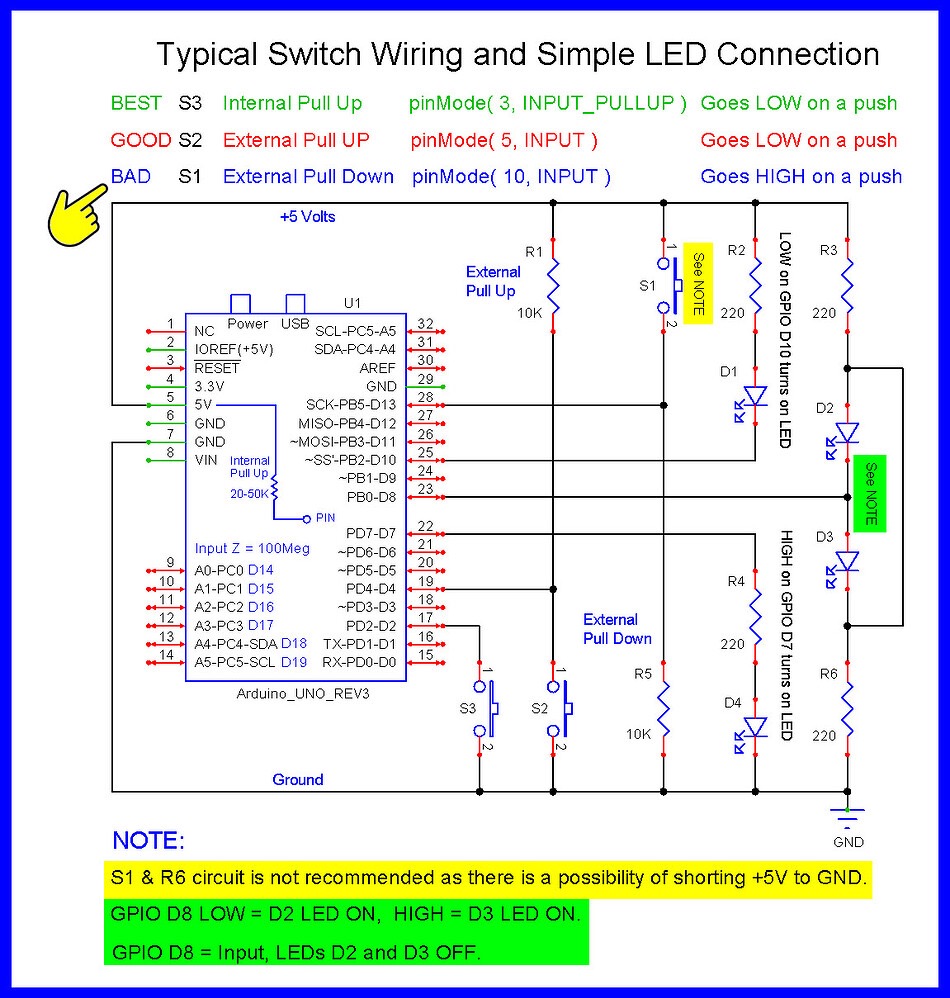
  • The 1st thing to try is turning on the internal pull-up resistors.
    Example:
    pinMode(10, INPUT_PULLUP); etc.

  • Wire inputs as S3 is wired in the circuit below.

Here is the link to the board I’m using,

https://www.amazon.com/LAFVIN-Board-ATmega328P-Micro-Controller-Arduino/dp/B07G99NNXL/ref=sr_1_1?crid=3QASVUFCWDRX8&dib=eyJ2IjoiMSJ9.6QPRL9EGieCqVheJYNSvYCP4nyMaBegrye565UbAFrxT4Lr2OZGdSH0sWidY9rgKtmXS93_wPipsnYrN3K1TVcA8KdQKqKIc9EUYc12MkNr-iFpZtZO5lPyaBiWG071RFPNxFpR4z4bQwMYdVbUpFxcehk7r0P39xOwH5sdpcaURs3usTuc4kOVHj2qy7IPSpTWmp3ojPmwYj8X9Q8RVDrHBxSTdiBOLH3UJ-OMto5c.qClZ_O9UNGzSqr2qUyqTwk-TPR80x7dQQ5yyrn-dxeQ&dib_tag=se&keywords=arduino+nano&qid=1755001347&sprefix=arduino+nano%2Caps%2C250&sr=8-1

and here is the link for the expansion board I’m using,https://www.amazon.com/HiLetgo-Controller-Expansion-Extension-ATMEGA328P/dp/B073JGV87F/ref=pd_ci_mcx_di_int_sccai_cn_d_sccl_1_2/135-4773275-4952752?pd_rd_w=NNV0Q&content-id=amzn1.sym.751acc83-5c05-42d0-a15e-303622651e1e&pf_rd_p=751acc83-5c05-42d0-a15e-303622651e1e&pf_rd_r=NB0EHHF25JK6NM2J7TZC&pd_rd_wg=LSHlR&pd_rd_r=3f82fbd7-e6aa-4cda-a6aa-c8b0cfb624b1&pd_rd_i=B073JGV87F&psc=1

Here is a wiring diagram, and I will also post a schematic.

The following is the link for the relay board that I’m using,

Hi, @gmcappy53
Welcome to the forum.

Do you have a DMM? Digital MultiMeter?

Tom.... :smiley: :+1: :coffee: :australia:

yes i do have DMM

So none of the relays are driving any load at the moment? What is clamp?
How is the relay board powered?
How long is your switch wiring? Are they running together with power wires?
What is the exact misbehavior?

The wiring diagrams make no sense.

Please post an accurate, hand drawn wiring diagram with all parts clearly labeled, together with their actual values. Also post a picture of your setup.

  • We need to see a schematic that fully and correctly represents your hardware, place holders are not sufficient.
    We need to see how your relay module is wired.
  • Pin 1 is the NANO’s TX communications pin, avoid using.
    You can use pin A0 (D14) as a digital output.

Unless only one of the leds will ever be lit at the same time, you need one resistor per led.

You don't need the resistors or the connections to 5V for the buttons. Just have them connect the Arduino pins to ground and use INPUT_PULLUP mode. The buttons will read LOW when pressed. Use 2 diagonally opposite pins of each button and leave the other 2 pins disconnected.

I don't see any relays in your schematic.

Do not use pin 1 on your Nano. Pins 0 and 1 are not available for beginners to use on any Arduino based on ATmega328 chip, which are the most common type.

It is really bad. Maze puzzles can be fun, but your schematic should not look like one. A schematic is supposed to look simple and easy to understand. The opposite of a maze puzzle.