FastLed.clear() ( clear one strip only )

I want to clear 1 of two led strips on it's own, FastLed.clear() does all of them

i have seen numerous hints at using

FastLed[0].clear();

but the compiler complains with

Multigraph:63:14: error: 'class CLEDController' has no member named 'clear'

** FastLED[1].clear();**

** ^~~~~**

'class CLEDController' has no member named 'clear'

I have search round and although people say it works I can't find any reference to it in the multiplexing part of the GIT Documentation.

Am I mad or does it not work as people have suggested?

Thanks

Robin

#include <FastLED.h>

// How many leds in your strip?
#define NUM_LEDS 48
#define NUM_LEDS2 60
#define BRIGHTNESS  15
const int WaterG[24] = {0,1,6,7,8,9,14,15,16,17,22,23,24,25,30,31,32,33,38,39,40,41,46,47};
const uint32_t WaterC[24] = {CRGB::Blue,CRGB::Blue,CRGB::Blue,CRGB::Blue,CRGB::Blue,CRGB::Blue,CRGB::Blue,CRGB::Blue,CRGB::Green,CRGB::Green,CRGB::Green,CRGB::Green,CRGB::Green,CRGB::Green,CRGB::Green,CRGB::Green,CRGB::Green,CRGB::Green,CRGB::Red,CRGB::Red,CRGB::Red,CRGB::Red,CRGB::Red,CRGB::Red};

const int FuelG[24] = {2,3,4,5,10,11,12,13,18,19,20,21,26,27,28,29,34,35,36,37,42,43,44,45};
const uint32_t FuelC[24] = {CRGB::Red,CRGB::Red,CRGB::Red,CRGB::Red,CRGB::Orange,CRGB::Orange,CRGB::Orange,CRGB::Orange,CRGB::Yellow,CRGB::Yellow,CRGB::Yellow,CRGB::Yellow,CRGB::Green,CRGB::Green,CRGB::Green,CRGB::Green,CRGB::Green,CRGB::Green,CRGB::Green,CRGB::Green,CRGB::Green,CRGB::Green,CRGB::White,CRGB::White};


// For led chips like WS2812, which have a data line, ground, and power, you just
// nCRGB::CRGB::Red to define DATA_PIN.  For led chipsets that are SPI based (four wires - data, clock,
// ground, and power), like the LPD8806 define both DATA_PIN and CLOCK_PIN
// Clock pin only nCRGB::CRGB::Reded for SPI based chipsets when not using hardware SPI
#define DATA_PIN 8
#define DATA_PIN2 4

//#define CLOCK_PIN 13

// Define the array of leds
CRGB leds[NUM_LEDS];
CRGB leds2[NUM_LEDS2];

void setup() { 
    FastLED.addLeds<WS2812B, DATA_PIN, GRB>(leds, NUM_LEDS);  // GRB ordering is typical
    FastLED.addLeds<WS2812B, DATA_PIN2, GRB>(leds2, NUM_LEDS2);  // GRB ordering is typical
    
    FastLED.clear();  // clear all pixel data
    FastLED.show();
    FastLED.setBrightness(BRIGHTNESS);
    Serial.begin(9600);
}

void loop() { 
  // Turn the LED on, then pause
  for ( int x = 0 ; x < 24 ; x = x + 2 ){
  Serial.println(x);
  int led1 = WaterG[x];
  int led2 = WaterG[x+1];
  leds[led1] = WaterC[x];
  leds[led2] = WaterC[x+1];
  int led3 = FuelG[x];
  Serial.print(" Fule G "); Serial.println(led3);
  int led4 = FuelG[x+1];
  Serial.print(" Fule G  "); Serial.println(led4);
  leds[led3] = FuelC[x];
  leds[led4] = FuelC[x+1];
  leds2[x] = CRGB::Red;
  FastLED.show();
  delay(100);
  leds2[x] = CRGB::Black;
  leds2[x+1] = CRGB::Blue;
  FastLED.show();
  delay(100);
  
  
  }
  // Now turn the LED off, then pause
  //leds[0] = CRGB::Black;
  FastLED[1].clear();
  //FastLED.clear();
  //CLEAR1();
  
  delay(500);
}

Instead of using FastLED[1].clear(); , use FastLED.clear(); and it will compile.

thanks, but that will clear all led strips. I just need one to be cleared..

i can work round the issues and just outuput BLACK on the strip to clear, but seems like a simple ask and one that people say works..

Rob

Try the following:

FastLED[1].clearLeds();

Thanks, do you have this working yourself? I have tird it but can't recall the error ,

Have you read

Check the controller’s API

Tried this way

#include "FastLED.h"

#define NUM_LEDS 80
#define NUM_STRIPS 4

CRGB leds[NUM_LEDS];
CLEDController *controllers[NUM_STRIPS];
uint8_t gBrightness = 128;

void setup() { 
  controllers[0] = &FastLED.addLeds<WS2812,1>(leds, NUM_LEDS);
  controllers[1] = &FastLED.addLeds<WS2812,2>(leds, NUM_LEDS);
  controllers[2] = &FastLED.addLeds<WS2812,10>(leds, NUM_LEDS);
  controllers[3] = &FastLED.addLeds<WS2812,11>(leds, NUM_LEDS);
}

void loop() { 
  // draw led data for the first strand into leds
  fill_solid(leds, NUM_LEDS, CRGB::Red);
  controllers[0]->clear();

  // draw led data for the second strand into leds
  fill_solid(leds, NUM_LEDS, CRGB::Green);
  controllers[1]->showLeds(gBrightness);

  // draw led data for the third strand into leds
  fill_solid(leds, NUM_LEDS, CRGB::Blue);
  controllers[2]->showLeds(gBrightness);

  // draw led data for the first strand into leds
  fill_solid(leds, NUM_LEDS, CRGB::White);
  controllers[3]->showLeds(gBrightness);
}

controllers[0]->clear();
^~~~~
exit status 1
'class CLEDController' has no member named 'clear'


and the example direct from the documentation updated for clear

#include "FastLED.h"

#define NUM_LEDS 80
#define NUM_STRIPS 4

CRGB leds[NUM_LEDS];
uint8_t gBrightness = 128;

void setup() { 
  FastLED.addLeds<WS2812,1>(leds, NUM_LEDS);
  FastLED.addLeds<WS2812,2>(leds, NUM_LEDS);
  FastLED.addLeds<WS2812,10>(leds, NUM_LEDS);
  FastLED.addLeds<WS2812,11>(leds, NUM_LEDS);
}

void loop() { 
  // draw led data for the first strand into leds
  fill_solid(leds, NUM_LEDS, CRGB::Red);
  FastLED[0].clear();

  // draw led data for the second strand into leds
  fill_solid(leds, NUM_LEDS, CRGB::Green);
  FastLED[2].showLeds(gBrightness);

  // draw led data for the third strand into leds
  fill_solid(leds, NUM_LEDS, CRGB::Blue);
  FastLED[3].showLeds(gBrightness);

  // draw led data for the first strand into leds
  fill_solid(leds, NUM_LEDS, CRGB::White);
  FastLED[4].showLeds(gBrightness);
}

sketch_jan30a:19:14: error: 'class CLEDController' has no member named 'clear'
FastLED[0].clear();
^~~~~
exit status 1
'class CLEDController' has no member named 'clear'

So it looks unsupported despite posts out there on the internet.

Did you try clearLeds() instead of clear()???

Do you have the latest version of the FastLED library?

There is also a function clearLedDataInternal() that zeros out the LED strip.

3.9.13

I can't find any reference to clearLeds , and no it does not compile.

Thanks

Robin

https://fastled.io/docs/class_c_l_e_d_controller.html#a6cd8a28d7585fba96407c9678c00d588

Works for me™.

Show the error(s). Which board are you using?

So, I think I am a victim of following other "part" examples , trying multiple things but not hitting the right mix..

In the examples I had seen it showed

FastLED[0].clear();

Which did not work.

I thought Ahh it must be the parameter in the addLeds statements

 FastLED.addLeds<WS2812,1>(leds, NUM_LEDS);


 FastLED[leds].clear();

does not work so discarded that idea

I then went with

  FastLED[0].clearLeds();

does not work

I then went with

  FastLED[leds].clearLeds();

yay, finaly worked...

So to summarise ,
FastLED[whatever].clear(); does not work as far as I can tell.

Cheers

Rob

The object leds is an array. If your array was only the first element/LED/0, then I suspect the second example would "work."

Would you add some description after "does not work" for future searchers (and me)? Thank you.

This is highly suspicious. leds is an array of CRGB and there is no overload for the [] operator for this.

Could you post the full code ?

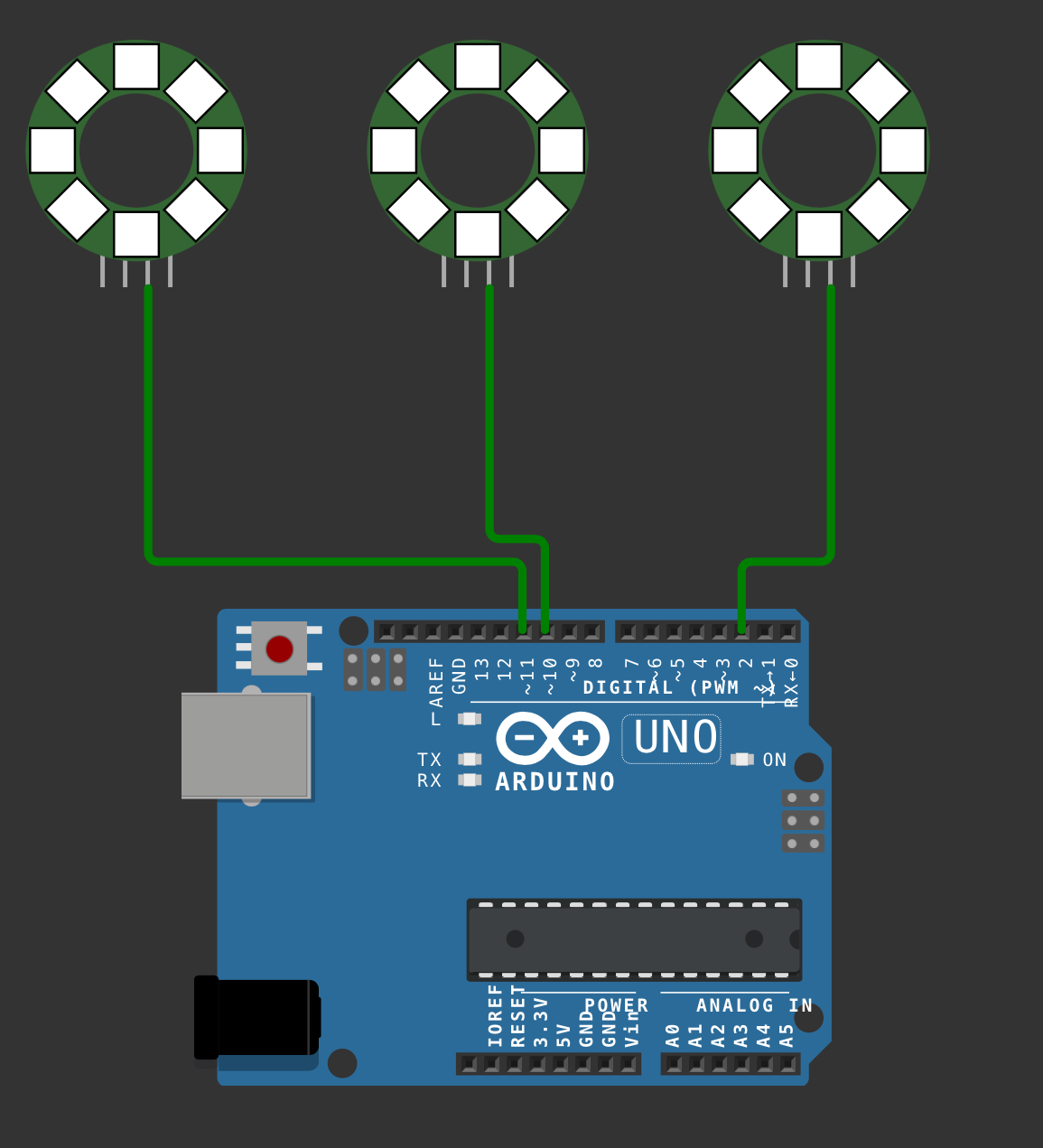
here is an example on how to use the controllers

you'll see the 3 rings get red first (fill_solid + show = all the strips are updated)
then I use the specific controllers for each ring to modify the content. First I use clearLeds to turn off each ring sequentially with a hard coded 2s pause in between and then I use fill_solid to modify the pixel buffer but I don't use show otherwise all the rings would update with that color. Instead I use the controller again and showLeds to just update the color of one of the strips, then I change the buffer again and update the other strip.

I think the code is pretty much self explanatory. Of course it would be better to have the pins and controllers in an array rather than in individual pointers. Left as an exercise for you :slight_smile:

click to see the code
/* ============================================
  code is placed under the MIT license
  Copyright (c) 2025 J-M-L
  For the Arduino Forum : https://forum.arduino.cc/u/j-m-l
  https://forum.arduino.cc/t/fastled-clear-clear-one-strip-only/1347711?u=j-m-l

  Permission is hereby granted, free of charge, to any person obtaining a copy
  of this software and associated documentation files (the "Software"), to deal
  in the Software without restriction, including without limitation the rights
  to use, copy, modify, merge, publish, distribute, sublicense, and/or sell
  copies of the Software, and to permit persons to whom the Software is
  furnished to do so, subject to the following conditions:

  The above copyright notice and this permission notice shall be included in
  all copies or substantial portions of the Software.

  THE SOFTWARE IS PROVIDED "AS IS", WITHOUT WARRANTY OF ANY KIND, EXPRESS OR
  IMPLIED, INCLUDING BUT NOT LIMITED TO THE WARRANTIES OF MERCHANTABILITY,
  FITNESS FOR A PARTICULAR PURPOSE AND NONINFRINGEMENT. IN NO EVENT SHALL THE
  AUTHORS OR COPYRIGHT HOLDERS BE LIABLE FOR ANY CLAIM, DAMAGES OR OTHER
  LIABILITY, WHETHER IN AN ACTION OF CONTRACT, TORT OR OTHERWISE, ARISING FROM,
  OUT OF OR IN CONNECTION WITH THE SOFTWARE OR THE USE OR OTHER DEALINGS IN
  THE SOFTWARE.
  ===============================================
*/

#include <FastLED.h>
const uint8_t numLeds = 8;
const uint8_t strip3Pin = 2;
const uint8_t strip2Pin = 10;
const uint8_t strip1Pin = 11;
const uint8_t gBrightness = 128;


CLEDController* controller1;
CLEDController* controller2;
CLEDController* controller3;

CRGB leds[numLeds];

void setup() {
  controller1 = &FastLED.addLeds<WS2812, strip1Pin, GRB>(leds, numLeds);
  controller2 = &FastLED.addLeds<WS2812, strip2Pin, GRB>(leds, numLeds);
  controller3 = &FastLED.addLeds<WS2812, strip3Pin, GRB>(leds, numLeds);

  fill_solid(leds, numLeds, CRGB::Red);
  FastLED.show(); // all red

  delay(2000);
  controller1->clearLeds(); // turn off strip 1

  delay(2000);
  controller2->clearLeds();

  delay(2000);
  controller3->clearLeds();

  fill_solid(leds, numLeds, CRGB::Green); // the array is now Green
  delay(2000);
  controller1->showLeds(gBrightness); // updte only strip 1

  fill_solid(leds, numLeds, CRGB::Orange); // the array is now Orange
  delay(2000);
  controller2->showLeds(gBrightness); // updte only strip 2

  fill_solid(leds, numLeds, CRGB::Blue); // the array is now Blue
  delay(2000);
  controller3->showLeds(gBrightness); // updte only strip 3


}

void loop() {}

There are two CRGB declarations as per my first posted code "leds" and "leds2"

TBH I am stretching my knowledge here of some of the more advanced skills of C++

The code below compiles and clears the one display "leds" wilst leaving "leds2" on.

Cheers

Rob

#include <FastLED.h>

// How many leds in your strip?
#define NUM_LEDS 48
#define NUM_LEDS2 60
#define BRIGHTNESS  15
const int WaterG[24] = {0,1,6,7,8,9,14,15,16,17,22,23,24,25,30,31,32,33,38,39,40,41,46,47};
const uint32_t WaterC[24] = {CRGB::Blue,CRGB::Blue,CRGB::Blue,CRGB::Blue,CRGB::Blue,CRGB::Blue,CRGB::Blue,CRGB::Blue,CRGB::Green,CRGB::Green,CRGB::Green,CRGB::Green,CRGB::Green,CRGB::Green,CRGB::Green,CRGB::Green,CRGB::Green,CRGB::Green,CRGB::Red,CRGB::Red,CRGB::Red,CRGB::Red,CRGB::Red,CRGB::Red};

const int FuelG[24] = {2,3,4,5,10,11,12,13,18,19,20,21,26,27,28,29,34,35,36,37,42,43,44,45};
const uint32_t FuelC[24] = {CRGB::Red,CRGB::Red,CRGB::Red,CRGB::Red,CRGB::Orange,CRGB::Orange,CRGB::Orange,CRGB::Orange,CRGB::Yellow,CRGB::Yellow,CRGB::Yellow,CRGB::Yellow,CRGB::Green,CRGB::Green,CRGB::Green,CRGB::Green,CRGB::Green,CRGB::Green,CRGB::Green,CRGB::Green,CRGB::Green,CRGB::Green,CRGB::White,CRGB::White};


// For led chips like WS2812, which have a data line, ground, and power, you just
// nCRGB::CRGB::Red to define DATA_PIN.  For led chipsets that are SPI based (four wires - data, clock,
// ground, and power), like the LPD8806 define both DATA_PIN and CLOCK_PIN
// Clock pin only nCRGB::CRGB::Reded for SPI based chipsets when not using hardware SPI
#define DATA_PIN 8
#define DATA_PIN2 4

//#define CLOCK_PIN 13

// Define the array of leds
CRGB leds[NUM_LEDS];
CRGB leds2[NUM_LEDS2];

void setup() { 
    FastLED.addLeds<WS2812B, DATA_PIN, GRB>(leds, NUM_LEDS);  // GRB ordering is typical
    FastLED.addLeds<WS2812B, DATA_PIN2, GRB>(leds2, NUM_LEDS2);  // GRB ordering is typical
    
    FastLED.clear();  // clear all pixel data
    FastLED.show();
    FastLED.setBrightness(BRIGHTNESS);
    Serial.begin(9600);
}

void loop() { 
  // Turn the LED on, then pause
  for ( int x = 0 ; x < 24 ; x = x + 2 ){
  Serial.println(x);
  int led1 = WaterG[x];
  int led2 = WaterG[x+1];
  leds[led1] = WaterC[x];
  leds[led2] = WaterC[x+1];
  int led3 = FuelG[x];
  Serial.print(" Fule G "); Serial.println(led3);
  int led4 = FuelG[x+1];
  Serial.print(" Fule G  "); Serial.println(led4);
  leds[led3] = FuelC[x];
  leds[led4] = FuelC[x+1];
  leds2[x] = CRGB::Red;
  FastLED.show();
  delay(100);
  leds2[x] = CRGB::Black;
  leds2[x+1] = CRGB::Blue;
  FastLED.show();
  delay(100);
  
  
  }
  // Now turn the LED off, then pause
  //leds[0] = CRGB::Black;
  FastLED[leds].clear();
 
  delay(500);
}

To summarize what you need to understand:

  • FastLED can manage multiple strips attached to different pins.
  • Strips can share or not share the buffer defining how the LEDs look like.
  • Modifying the buffer does not immediately show in the LED strip. The code needs to ask to transfer the buffer to the strip (the show or showLeds functions)
  • Each strip is managed by a controller.
  • If you call methods on FastLED (like show() or clear()), this message is forwarded to all the strips.
  • If you call methods on a controller, only the strip that it manages is impacted.
  • If strips share a buffer, clearing one strip using its controller (using clearLeds();) means you cleared the buffer, so the underlying buffer (since it's shared) of the other strip has been cleared too. But unless you call showLeds on that other strip, you won't see the change.

So if you have two strips and two buffers, then calling FastLED.show(); will transfer the specific buffer of a given strip to its strip. If you set all the LEDs to black in one buffer and let the other one remain unchanged, then calling FastLED.show(); will get one strip dark, while the other will be updated with the same pixels. So visually, you won't see any change (but it's slower since you updated something that did not need updating).

makes sense?

This topic was automatically closed 180 days after the last reply. New replies are no longer allowed.